

Gumroad is built for selling products, Patreon is built for recurring memberships, and Ko-fi sits between them with tips, a shop and optional memberships. If you sell digital downloads, start with Gumroad. If you have a fan base that wants to pay monthly for ongoing access, start with Patreon. If you mostly want low-friction one-off support, Ko-fi or a tipping link is the lighter choice. Below we compare all three on fees, setup, products and fan engagement, then show where instant tipping fits next to them.
TL;DR
- Gumroad suits one-time sales of digital products. U.S. creators pay 10% + $0.50 on direct sales and 30% on sales that come through its Discover marketplace.
- Patreon suits recurring memberships. It charged 10% plus card processing (2.9% + $0.30 in the U.S.) when we checked in October 2026.
- Ko-fi is the cheapest way to start: 0% on one-time tips and 5% on other income on the free plan, with Gold at $12 per month.
- None of the three lets a casual fan tip in two taps without a checkout flow. A no-account tipping link like ours covers that gap and works alongside any of them.
Table of Contents
- Gumroad vs Patreon vs Ko-fi at a glance
- Fees: what you actually keep
- Setup and payouts for U.S. creators
- Selling products, memberships and one-time support
- Fan engagement and community
- Which one should you pick?
- Where instant tipping fits
- Trade-offs to plan for
- FAQ
- Sources
Gumroad vs Patreon vs Ko-fi at a glance
The three platforms overlap, but each started from a different job. Gumroad began as a storefront, Patreon as a subscription layer for creators, and Ko-fi as a digital tip jar that grew a shop. That origin still shapes what each does best.
| Gumroad | Patreon | Ko-fi | |
|---|---|---|---|
| Best for | Selling downloads, courses, templates | Monthly memberships and tiers | One-off tips, small shop, light memberships |
| Platform fee (U.S.) | 10% + $0.50 direct; 30% via Discover | 10% | 0% on one-time tips, 5% otherwise (Free); Gold $12/month |
| Card processing | Added on direct sales; included in the 30% Discover fee | 2.9% + $0.30 added | Separate |
| Payouts | Directly to you after sales | Standard payout schedule | Straight to your PayPal or Stripe |
| Fan commitment | One purchase | Recurring pledge, account needed | Tip or purchase, optional membership |
The fee figures come from a 2026 comparison of what each platform keeps, checked on October 21, 2026. Platforms change pricing, so confirm on each official pricing page before you commit.
Fees: what you actually keep
The headline percentage is never the whole story. Processing, per-transaction charges and the type of sale all move your take-home.
Gumroad
Gumroad charges a platform fee of 10% plus $0.50 per direct transaction, and 30% on sales that start in Discover. Direct means the buyer arrived through your own link, profile or audience. On direct sales, card processing is added on top. On Discover sales, the 30% includes processing.
The flat $0.50 matters most on cheap items. On a $5 template, 10% is $0.50, so the platform fee alone is $1.00 before processing. On a $50 course the same $0.50 barely registers. If you sell lots of low-priced items, run the math at your real price points.
Gumroad has also acted as a merchant of record since January 1, 2025, which includes global sales tax handling for creators. For a solo seller that is a real time saver, because you are not registering for sales tax in every jurisdiction yourself.

Patreon
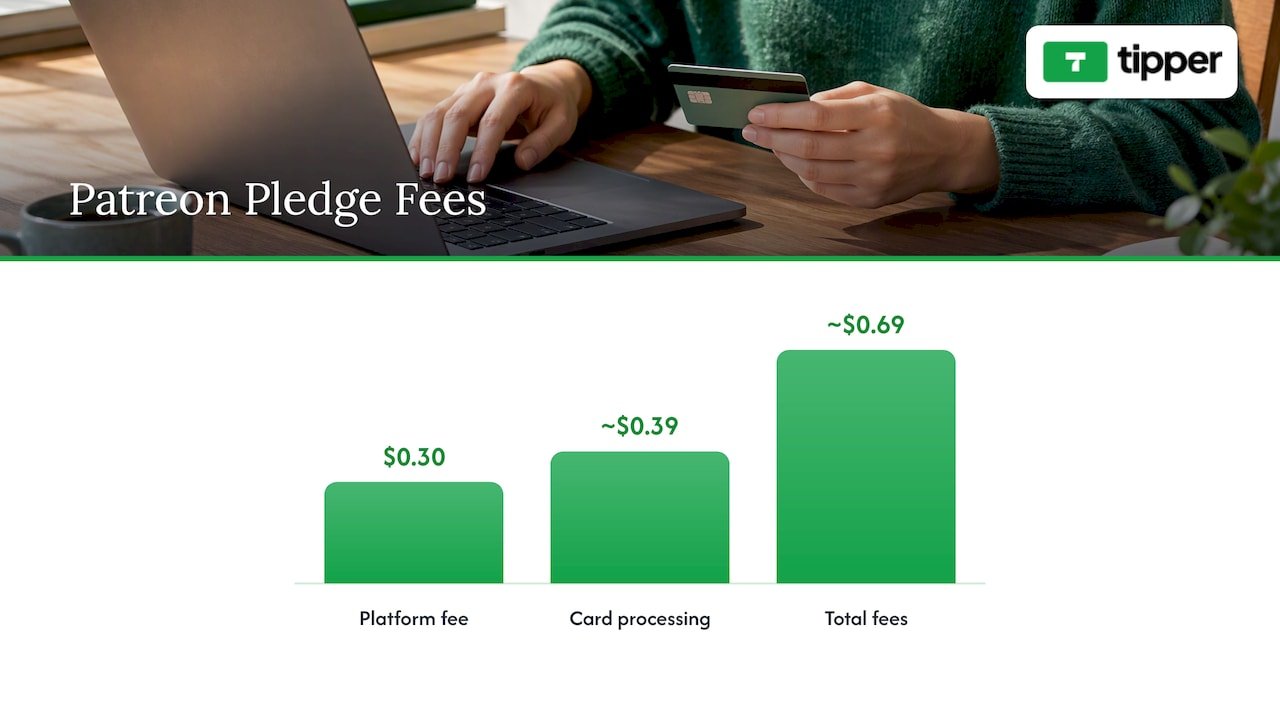
Patreon charged 10% plus U.S. card processing of 2.9% + $0.30 when checked in October 2026. The $0.30 fixed fee is the part that hurts on small pledges. A $3 monthly pledge loses 30 cents to the platform, about 9 cents plus 30 cents to processing, so roughly $0.69 in total, or about 23%.
Patreon also moved creators on older billing models onto subscription billing, with an automatic switch for those who did not migrate, according to the same comparison. If you have an older Patreon account, check your billing settings and your patrons’ next charge dates.
Ko-fi
Ko-fi’s free plan charged 0% on one-time tips and 5% on other income, with payment processing separate. Gold costs $12 per month. That structure makes Ko-fi attractive when most of your income is small one-off support, and it is why “Gumroad vs Ko-fi” comes up so often: both take payments from fans, but Ko-fi leans on tips and Gumroad on sales.
A worked example
Say you earn $500 a month and it comes from 50 fans paying $10 each.
- Patreon: 10% is $50, and processing at 2.9% + $0.30 on each of 50 charges is about $14.50 + $15 = $29.50. You keep roughly $420.50.
- Gumroad (direct): 10% + $0.50 per sale is $50 + $25 = $75, plus about $29.50 processing. You keep roughly $395.50.
- Ko-fi Free (all one-time tips): $0 platform fee, then processing of about $29.50. You keep roughly $470.50.
These are our own estimates from the published rates, rounded, and they ignore payout fees, currency conversion and refunds. The point is the shape: small, frequent payments favor platforms without a per-transaction fee, and larger one-off sales favor platforms that bundle tax handling.
Setup and payouts for U.S. creators
All three are quick to start. You create a profile, connect a payout method, and share a link.
Ko-fi is the simplest on payouts: payments go directly to your PayPal or Stripe account, so there is no balance sitting on the platform. Gumroad and Patreon both require you to connect a payout method and follow their payout schedules, so check the current schedule and any minimums on their official help pages before you plan around cash flow.
The bigger setup difference is the buyer side. Patreon asks every patron to create an account and enter a card, because it is built around ongoing pledges. Gumroad lets buyers check out with a card or PayPal without a long onboarding, which is why it works for impulse purchases. Ko-fi supports guest tips as well.
Selling products, memberships and one-time support
Digital products
Gumroad is the strongest here. You upload a file, set a price, and the buyer gets a download. You can sell ebooks, presets, templates, software keys, video courses and more, and add pay-what-you-want pricing. Ko-fi has a shop with a similar idea, but it is a secondary feature. Patreon is not a storefront: you can post downloads to members, but selling a single product to a stranger is awkward.
Memberships
Patreon is the strongest here. Tiers, member-only posts, benefits and recurring billing are the whole product. Gumroad offers memberships and subscriptions too, and Ko-fi has a membership option, but fans tend to expect Patreon when they hear “join my support page.” If your content is serial (a weekly comic, a podcast with bonus episodes, a build-in-public series), Patreon’s habit loop is hard to beat.
One-time support
This is where Ko-fi shines and where Gumroad’s pay-what-you-want pricing can stand in. Patreon is a poor fit for a fan who wants to give $5 once. A dedicated tipping link handles this case best, and we cover the options in our guide to types of digital tip jar tools.
Fan engagement and community
Patreon gives you the deepest relationship tools: member-only feeds, tier-based perks, messaging and community posts. Fans who pledge are already committed, so engagement tends to be steady.
Gumroad’s engagement is thinner. You can email customers who bought from you and build a following, but there is no feed or community built around purchases. Many Gumroad sellers pair it with an email platform, and a look at a Mailchimp vs Klaviyo comparison helps you pick the tool that will carry that list.
Ko-fi sits in the middle: supporters can leave a message with a tip, follow your page, and join memberships. The thank-you loop is light but friendly.
If you want that thank-you moment to feel personal, a short note or video reply after each tip does more for repeat support than any tier structure. Our piece on direct tipping engagement for influencers goes deeper.
Which one should you pick?
Choose by what your audience does, not by which logo is bigger.
- You sell finished products to people who found you once. Gumroad. Mind the $0.50 on low prices and keep your sales on direct links to avoid the 30% Discover fee.
- You publish on a schedule and fans want ongoing access. Patreon. Price tiers high enough that the $0.30 processing fee is a small share.
- You get small gestures of thanks from viewers, readers or followers. Ko-fi or a tipping link.
- You do all three. Run a split stack: Patreon for members, Gumroad for products, and a tip link in your bio and stream panels for everything else.
If you want more head-to-head detail, see our comparison of Patreon vs Ko-fi vs Buy Me a Coffee, our list of Gumroad alternatives for U.S. creators and our wider digital tipping platform comparison.
Our perspective
We build Tipper, so we see the same pattern from creators every week: the people who want to support you rarely want to create another account. A Patreon pledge asks for commitment, a Gumroad checkout asks for a purchase decision, and a viewer who just enjoyed a stream or a tutorial wants to say thanks in ten seconds.
That is why we designed Tipper around a personal link or QR code where supporters can pay with Apple Pay, Google Pay or a card, with no account. Our model is built so creators keep 100% of each tip, with a payment processing fee added at checkout rather than taken out of what you earn. Creating and keeping an account is free, with no subscription.
We do not think of this as a replacement for a membership or a store. We think of it as the missing layer: the place where spontaneous appreciation lands, along with a thank-you note, photo or video that keeps the relationship personal.
Tipper
Where instant tipping fits
Most creators who compare Gumroad and Patreon end up with a gap. Memberships capture your most committed fans. Products capture buyers. Neither captures the viewer who loved one video and wants to give $4 right now.
Tipper covers that gap. You get a personalized link or QR code, supporters tip with Apple Pay, Google Pay or a card without making an account, and you can reply with a text, photo or video thank-you. Because it is free to create an account and there is no subscription, it adds a revenue stream without adding a monthly bill. It works well for Twitch and YouTube creators, freelancers and in-person use such as events or small businesses.

If you want to try it, create your tip link on Tipper. Our guides on collecting tips with no signup required and Apple Pay tipping setup walk through the details, and why creators need tipping links explains the thinking behind them.
Trade-offs to plan for
- Fee stacking. Percentage fee, fixed fee and processing all apply on top of each other. Model your average transaction, not the headline rate.
- Discover vs direct on Gumroad. Marketplace traffic is discovery you did not have to build, but at 30% it costs three times the direct rate. Use it deliberately.
- Patron friction on Patreon. Asking fans to sign up filters for commitment, and it also filters out casual supporters.
- Ko-fi tier changes. The 5% on non-tip income can be reduced with Gold at $12 per month, which pays off only once your monthly income on those sales is large enough. Compare the cost to the savings on your own numbers.
- Taxes. Gumroad’s merchant-of-record role covers sales tax on product sales, but your own income tax obligations remain yours. Talk to a CPA about self-employment income.
- Platform dependence. Keep an email list and your own links so you can move if pricing changes.
FAQ
Is Gumroad cheaper than Patreon?
It depends on what you sell. On a direct sale, Gumroad takes 10% + $0.50 plus processing, while Patreon takes 10% plus processing of 2.9% + $0.30 on each pledge. For large one-time sales the two are close; for small recurring pledges Gumroad’s fixed $0.50 can cost more per charge, so run your own average price.
Is Gumroad or Ko-fi better for selling digital products?
Gumroad is built around selling products and includes sales tax handling as a merchant of record. Ko-fi has a shop and a lower entry cost, with 0% on one-time tips and 5% on other income on its free plan. Choose Gumroad for a serious catalog and Ko-fi for a small shop alongside tips.
Can I use Gumroad and Patreon together?
Yes. Many creators run Patreon for members, Gumroad for downloads and a tip link for casual support. Just keep each audience clear about what each link is for, so fans do not pay twice for the same thing.
What is comparable to Gumroad?
Ko-fi’s shop, Sellfy and similar storefronts compete for digital product sales. If your goal is simply accepting support rather than selling files, a tipping link such as ours is a lighter alternative. See our Ko-fi alternatives list for more options.
Sources
- Selling to fans in 2026: what each platform keeps
- Creator Fees Comparison of 9 Platforms Side by Side
- Mailchimp vs Klaviyo for ecommerce revenue




Leave A Comment