


A share tip link is a personalized payment link or QR code that lets supporters send instant fiat tips through Apple Pay, Google Pay, or a card without creating an account. It works as a direct route between a supporter’s wallet and a creator’s bank account, skipping the sign-up forms that slow down casual generosity. Creators control the page, the payout, and how they say thanks.
TL;DR:
- Supporters can tip instantly using Apple Pay, Google Pay, or a card without creating an account, increasing the likelihood of spontaneous generosity.
- Setting up a share tip link requires verifying payout details, customizing the page, enabling payment methods, and testing across devices before sharing.
- Apple Pay and Google Pay require merchant IDs, certificates, domain verification, and platform onboarding, with most creators relying on established platforms to handle technical setup.
- Platform and payment processing fees reduce the tip amount received, and creators must report all income to the IRS regardless of platform-issued forms, maintaining careful records.
- The most effective placement for tip links is highly visible, such as bios or live streams, paired with a clear, low-pressure ask to maximize conversion rates.
Table of Contents
- How share tip links move money from supporter to creator
- Setting up your share tip link and QR code
- What Apple Pay and Google Pay require behind the scenes
- Fees, payout timing, and tax reporting basics
- Sharing your link in ways that actually convert
- The real tradeoff behind instant, no-account tipping
- Getting started with Tipper
- Sources
- FAQ
How share tip links move money from supporter to creator
A supporter’s experience is simple by design. They click a link in a bio or scan a QR code on a flyer, pick a tip amount, and pay with Apple Pay, Google Pay, or a card, all without registering for anything. That last part matters: every extra field or login screen is a chance for someone to abandon the tip before it happens.
Behind the scenes, the platform acts as the intermediary. It processes the payment, then routes the funds toward the creator’s connected bank account as a payout, handling the technical handshake between the supporter’s payment method and the receiving account.
Many tipping pages also let creators add a personal layer on top of the transaction:
- A short thank-you note, photo, or video that plays after the tip lands
- Custom preset amounts that match the creator’s typical audience
- A page design that matches the creator’s brand or content style
That personalization is not just decoration. It is often what turns a one-time tipper into someone who comes back.
Setting up your share tip link and QR code
Getting a working tip link live usually takes less time than editing a single post. Here is the order that avoids the most common headaches.
- Gather your payout details first. Have your bank account information and any identity verification documents ready, since most platforms confirm identity before releasing funds.
- Build your tipping page. Add preset tip amounts, write a short bio or description, and decide whether you want to offer thank-you messages as text, photo, or video replies.
- Turn on your payment methods. Enable Apple Pay, Google Pay, and card payments through the platform’s settings, and expect a brief verification step for each method before it goes live.
- Generate your link and QR code. Most platforms create both automatically once your page is published.
- Test on multiple devices. Send yourself a small test tip from an iPhone, an Android phone, and a desktop browser to confirm each payment method actually completes.
- Watch for setup snags. Domain verification delays and payment provider onboarding are the two most common holdups, and both typically resolve within a short review window.
Pro Tip: Test your link the same week you plan to share it publicly, since payment method verification can take a day or two and you do not want a broken button during a livestream.
Once the link is live, treat it the way you would any other piece of content: check it periodically, especially after any platform update, to confirm Apple Pay and Google Pay buttons still display correctly on mobile.
What Apple Pay and Google Pay require behind the scenes
Accepting Apple Pay and Google Pay on a tipping page is not a single toggle. Apple’s own developer documentation requires a merchant identifier, a payment processing certificate, and domain verification before Apple Pay can appear as an option on a web page. Google Pay works differently but adds its own layer: production access typically requires onboarding through the Google Pay & Wallet Console, often alongside an approved payment service provider.
- A creator building a DIY payment page has to manage merchant IDs, certificates, and console approvals directly.
- A creator using an established tipping platform typically has these steps handled as part of account setup.
- Apple’s acceptable use guidelines also require that Apple Pay be presented on equal footing with other payment options, not buried behind extra clicks.
- Tokenization keeps raw card numbers out of the transaction, with the payment processor and platform sharing responsibility for encryption and compliance.
For most creators, the practical choice is whether to build this infrastructure themselves or use a platform where it already exists. Our guide to Apple Pay setup for creators walks through the difference in more detail.
Fees, payout timing, and tax reporting basics
Two separate costs show up on most tips: a platform fee for running the service, and a payment processing fee charged by the card network or wallet provider. What lands in a creator’s account is the tip amount minus both. Payout timing varies by platform, but delays usually trace back to unverified bank details or a pending identity check rather than the payment itself.
Tax reporting is where creators most often get caught off guard. The IRS has been clear that gig workers must report all tip income, regardless of whether they receive a 1099 for it, and recent changes to Form 1099-K add a specific box, 1c, for cash tips. The IRS guidance on managing gig work taxes also lists 1099-K and 1099-NEC as common forms creators may receive and recommends keeping copies of any forms sent by the businesses or platforms they work with.
A creator’s tip income is taxable whether or not a platform issues a 1099-K for it, according to IRS reporting guidance: the reporting threshold affects paperwork, not the underlying obligation.
Practical recordkeeping steps worth building into a routine:
- Export tip reports from your platform on a monthly or quarterly basis.
- Keep an independent log of date, amount, and payer name when available.
- Save copies of every 1099 you receive alongside your own records.
Sharing your link in ways that actually convert
Placement decides most of the outcome before the ask even happens. A link buried on page three of a website will not perform the way one pinned to the top of a profile does.
- Put your link or QR code somewhere visible by default: bio, pinned post, livestream overlay, printed receipts, or event signage.
- Keep the ask short and specific, something like “Enjoyed this? Tips welcome” reads better than a paragraph explaining why you need support.
- Time the ask to a moment of value, right after a free resource, at the end of a set, or following a helpful reply, rather than during something sensitive or unrelated.
- Reassure supporters that a tip does not require handing over an account or personal details, since that reassurance itself removes hesitation.
Pro Tip: Offer an anonymous tip option alongside your thank-you workflow. Some supporters want to give without being named, and forcing identification costs you the tip entirely.
The real tradeoff behind instant, no-account tipping
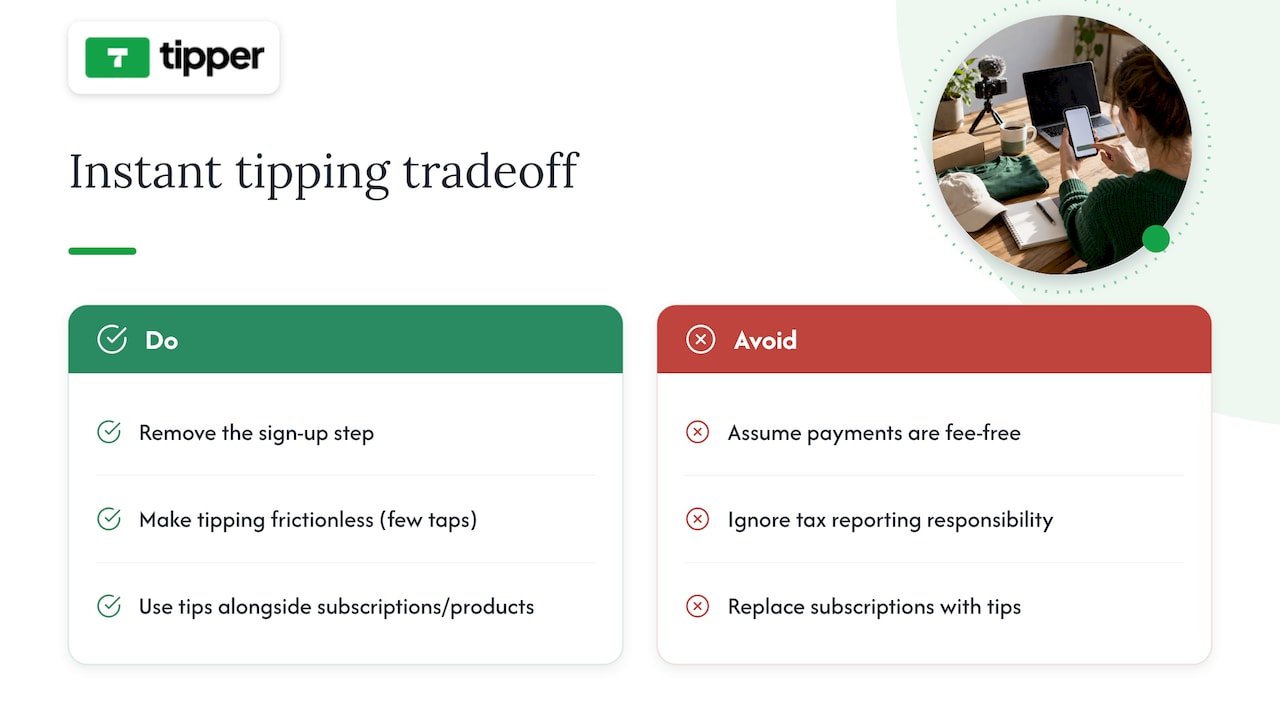
Removing the sign-up step does something subtle: it turns vague goodwill into an actual transaction, because the gap between “I should tip this person” and “I did” shrinks to a few taps. That is the whole case for frictionless tipping, and it is a real one.
It is not free of tradeoffs. Processing fees still apply, and the tax responsibility does not disappear just because the payment felt casual. Tips work best as a complement to subscriptions or product sales, not a replacement for them.
— Tipper
Getting started with Tipper
Tipper builds a share tip link around the exact model this article describes: supporters pay instantly through Apple Pay, Google Pay, or card, with no account required on their end, and creators keep 100% of what they earn. The page is customizable, allowing preset amounts and thank-you messages as text, photo, or video.

What that looks like in practice:
- No sign-up required for anyone sending a tip
- Apple Pay and Google Pay support alongside card payments
- Customizable tip pages with preset amounts and thank-you options
- Direct payouts to a connected bank account
Getting set up starts on the Tipper landing page, where you create your page and generate your link and QR code in one pass. Once tips start coming in, check your dashboard for payout timing and exportable reports helpful at tax season. For a deeper walkthrough of placement and setup choices, our tip link strategy guide covers presets, testing, and payout configuration in more detail.
This article is general information, not a substitute for advice from a qualified financial advisor. Consult a qualified financial professional about your own circumstances before acting on anything here.
Sources
- Configure Apple Pay on the web – Capabilities – Account – Help – Apple Developer
- Google Pay API & Google Pay & Wallet Console – Console
- Filing tips and updates for gig economy workers | Internal Revenue Service
FAQ
Do supporters need an account to send a tip?
No. A share tip link is built specifically so supporters can pay with Apple Pay, Google Pay, or a card without registering for anything. The creator receiving the tip is the one who needs a verified account and payout details.
Do I have to report tips I receive through a link?
Yes. The IRS requires gig workers to report all tip income, whether or not you receive a 1099-K, and recent form changes add a specific box for cash tips. Keeping your own log of tips received protects you if platform reporting thresholds mean no form arrives.
What do I need to accept Apple Pay on my tip page?
Apple’s developer documentation requires a merchant ID, a payment certificate, and domain verification before Apple Pay can appear as a payment option. Platforms built for creators typically handle these steps as part of setup rather than leaving them to the individual.
How much of a tip do I actually keep?
The amount depends on the platform’s fee structure and the payment processing fee attached to each transaction, with the remainder going to the creator’s payout.
Where should I place my tip link for the best results?
Visible, low-friction spots work best: a bio link, a pinned post, a livestream overlay, or a QR code on printed materials at events. Pairing the link with a specific, low-pressure ask tends to outperform a generic mention buried in a longer post.




Leave A Comment