
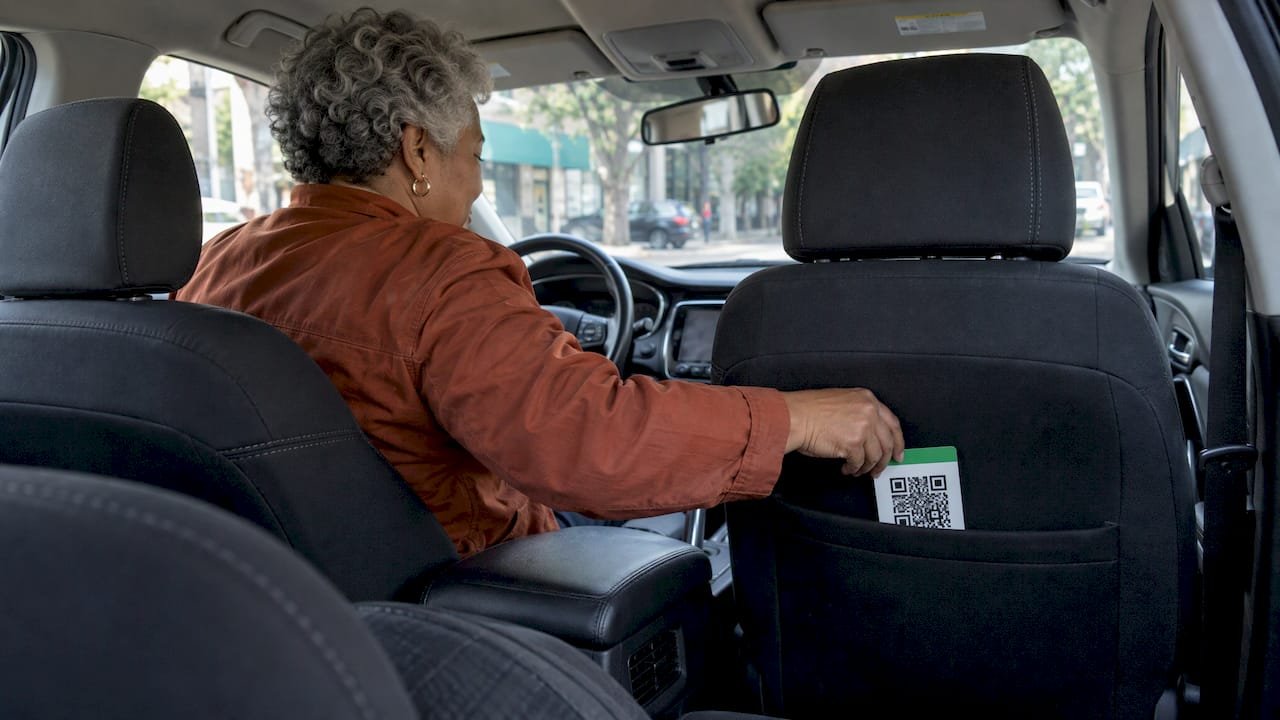
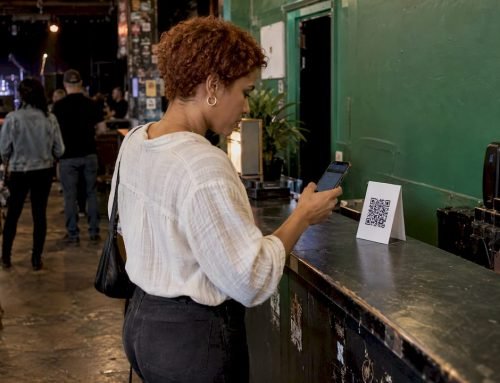
A tip QR code for rideshare drivers is a printed square that opens your personal tip page when a passenger scans it with their phone camera. With Tipper, the rider doesn’t need an account: they pick an amount, pay with Apple Pay, Google Pay or a card, and can see your thank-you note or video. You create the page for free, print the code, and put it where a rider can see it without being asked.
The in-app tip is still the main way riders tip on Uber and Lyft. A QR code covers the moments the app doesn’t: the rider who forgot, the one who closed the app, the one who would rather pay in person. This guide covers building the page, designing the sign, placing it safely and setting expectations for what it will earn.
TL;DR
- Create a free tip page on Tipper, download its QR code and print it. Riders scan it and pay with Apple Pay, Google Pay or a card, with no account.
- Treat the sign as a gentle reminder, never a request. Keep it small, readable at a glance and out of your line of sight.
- Tips are not guaranteed on any ride. Gridwise data puts the average rideshare tip at about $1.58 per trip, so a good sign works over hundreds of rides.
- Read the current Uber or Lyft driver terms for your market before you display anything, and keep the in-app tip as the first option you mention.
- Tipper says creators keep 100% of their tips. A platform fee and a small payment processing fee are added at checkout.
Table of Contents
- Why a QR code fits rideshare tipping
- What the data says about rideshare tips
- How to set up a rideshare driver tip QR code
- Payment methods, fees and payouts
- Where to put the sign
- Doing it without pressure
- Keep the code safe
- Beyond the car: one link for everything
- Promo: your tip page in a few minutes
- Perspective: why we built tipping around the tipper
- FAQ
- Sources
Why a QR code fits rideshare tipping
The in-app flow works, but it has windows. Uber says riders can add a tip after rating a trip, and drivers see new tips when they go online. Lyft’s rider help says in-app tips can be added up to 30 days after the ride, but adding one right after a ride only works within 2 hours if no rating or payment has been submitted. Many riders never open the app again once they step out.
That gap is the reason drivers put up tip signs. A QR code removes the usual friction of the alternatives:
- Cash: fewer riders carry it now.
- Venmo or Cash App handles: the rider has to type your name, find the right profile and hope it is you.
- A payment link you read aloud: hard to remember and awkward at 11 p.m.
A scan takes about five seconds, and Apple Pay or Google Pay means no card number to type. That speed matters because tipping decisions in a car are impulsive. If paying takes effort, the rider usually skips it.
What the data says about rideshare tips
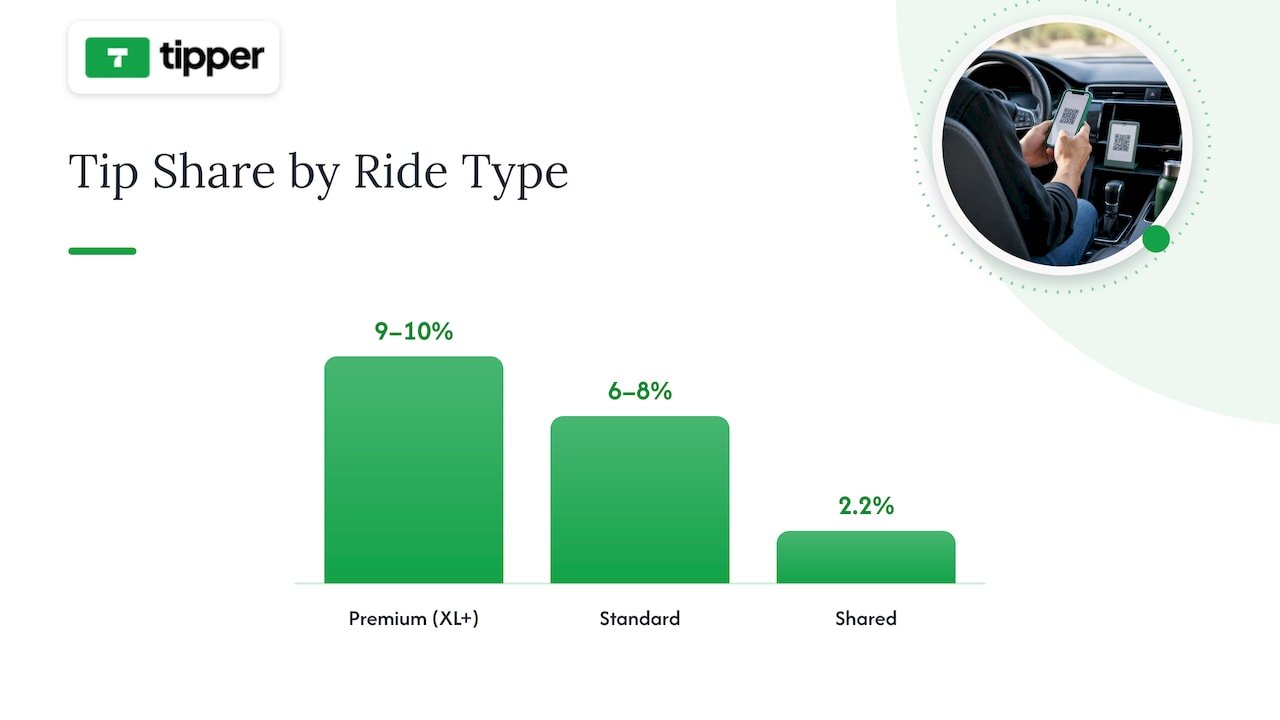
Set realistic expectations before you spend time on a sign. Gridwise’s 2026 Annual Gig Mobility Report found the average rideshare tip per trip reached about $1.58 in Q4 2025, up 6.8% from $1.48 a year earlier. The same report shows tip share varies by ride type: premium rides (XL and above) drew roughly 9 to 10% of the fare, standard rides 6 to 8%, and Shared rides only 2.2%.
That average hides a long tail. An analysis of Gridwise-based driver data suggests about 1 in 4 rides gets a tip, typically $3 to $5, while the rest close at zero. So your QR code is not trying to lift a flat average. It is trying to turn a few of those zero rides into tipped ones.
A small sample from one Uber driver, who tracked 151 rides, points to where that is most likely. In his write-up, every trip over 30 minutes was tipped, 75% of airport trips were tipped, and short trips under 5 minutes were tipped only 24% of the time. It is one driver’s data, not a study, but it matches what many drivers expect: long rides, airport runs and reservations are where a visible, easy option earns the most.
For context, 61% of Americans say they tip taxi or rideshare drivers often or always, and the customary range is quoted at 10 to 20%. Riders already intend to tip. The sign makes it easier to follow through.
How to set up a rideshare driver tip QR code
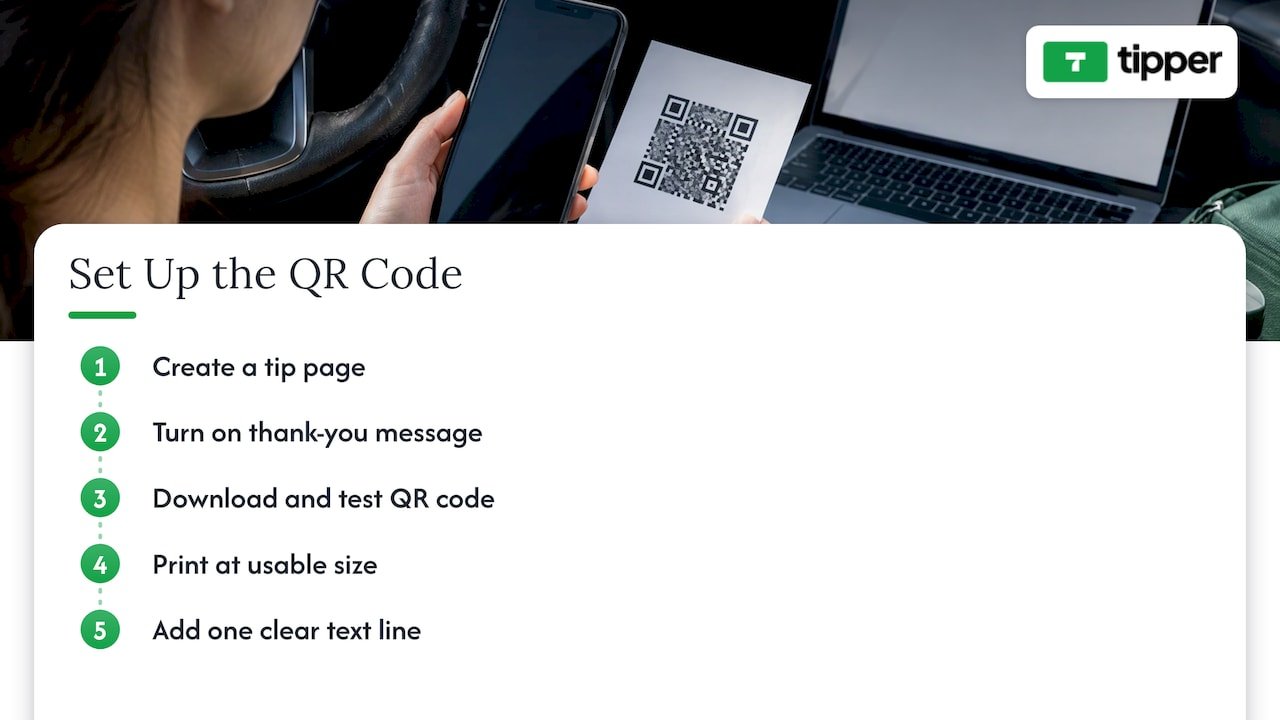
Step 1: Create your tip page
Sign up on Tipper as a creator. It is free to create and maintain an account, and there is no subscription. Your personalized link is the heart of the setup: it is what the QR code points to. Choose a short, clear page name, ideally your first name or a driving nickname riders can read, since that is what they see before paying.
The page is customizable, so add a short line such as “Thanks for riding with me today.” Keep it warm and brief. Riders see it on a phone screen for a few seconds.
Step 2: Turn on the thank-you message
Tipper lets you reply with a text note, a photo or a video. This is a real advantage in a car. A rider who tips from the curb in the dark gets a personal thank-you afterward, which is the kind of small interaction that makes a rider remember you. Write a stock message you can reuse, then personalize it when you have a moment, for example mentioning the airport run or the long ride home.
Step 3: Download your QR code and test it
Download the code from your page. Before printing, scan it with two phones, one iPhone and one Android, to confirm it opens the right page and shows Apple Pay and Google Pay. Our guide to running a $1 test for event QR tipping walks through the same check: send yourself a small tip, confirm it lands, and only then print.
Step 4: Print it at a usable size
A QR code needs contrast and room. Print it at least 2 by 2 inches with a white margin around it, on matte material so glare from streetlights does not break the scan. Sticker paper, laminated cardstock or a plastic card all work. A glossy finish looks neat but reflects headlights, so lean matte.
Step 5: Add one line of text
The code alone confuses people. Add a single line saying what it is: “Scan to tip your driver.” Skip anything pushy such as “Tips = 5 stars.” Don’t link tips to ratings. It reads as pressure and invites a worse rating.
If you want to learn why some signs get shared and photographed while others get ignored, the principles in creating shareable content that boosts engagement apply to a car sign too: one clear idea, a friendly tone, a visual people want to look at.
Payment methods, fees and payouts
Passengers can pay through your QR code with Apple Pay, Google Pay or a card, and they don’t need to create an account. That is the point of the tool for a driver: you don’t ask a rider to download anything, sign up or share contact details. The rider’s privacy is protected, which matters to people who are wary of handing over personal information to a stranger in a car.
On costs, Tipper’s model is a platform fee plus a small payment processing fee added on each tip at checkout. Creators keep 100% of their earnings, and there is no subscription. We don’t publish a fixed fee on this page; the current fee is shown on Tipper when you set up your page. Payouts go directly to you.
How does that compare with the in-app tip? Uber states that its in-app tips carry zero service fees, and Lyft says 100% of tips go to drivers. The in-app tip remains the simplest option for riders who are in the app. The QR code is the next step for the rider who is not. For a breakdown of how digital tips and cash differ on what you keep and what you may owe, read our guide on digital tips vs. cash.
Where to put the sign
The goal is a sign the rider notices without being told to look at it.
- Back of the front seats (headrest or seatback): the best spot. It is in the rider’s natural line of sight, and a phone camera can scan it from a normal seated position.
- Rear door panel or window corner: works for a side-facing code, but check that it doesn’t block your mirrors or the window view.
- Center console, facing back: reachable by a rear passenger, but only if it doesn’t interfere with the shifter or your controls.
In a front seat, a loose sign can slide into your driving. Fix it with adhesive or a clip and keep it clear of airbag zones. Never put anything on the windshield or in a position that blocks your view. If the sign is secure, readable and out of the way, you’ve done it right.
Two more placement habits help. First, keep it clean. A scuffed, sun-faded code fails to scan and looks neglected. Second, use one sign, not a collage. A single clear code is easier to trust than three competing ones.
Doing it without pressure
The best tip signs feel like a courtesy. Here is how to keep it that way.
- Never mention the sign while driving. The code works when the rider chooses to look at it. If they ask how to tip, point to the app first and the sign second.
- Don’t tie tips to ratings. Say nothing about stars.
- Keep the wording to one line. “Scan to tip your driver” is enough.
- Accept a no gracefully. A rider who doesn’t tip is the most common outcome, and a warm drop-off matters more than any scan.
- Mind the platform rules. Uber’s rider help says that payments, including tips, are made through the Uber app, while its driver help says that a cash gratuity offered by a rider is voluntary and may be accepted. The practical reading: never ask for payment of the fare outside the app, and only let a tip be something the rider offers. Check the current driver terms for Uber, Lyft or any other platform you drive on before you display a sign, because they are updated.
Tips are also separate from your minimum pay in some places. Uber’s Washington State notice, for example, says that drivers are entitled to 100% of their tips, which are in addition to and may not count toward minimum pay rates. Rules differ by state and city, so look up yours.
Keep the code safe
A QR code is only as trustworthy as the sticker it is printed on. Fraudsters sometimes stick their own code over a real one, so a rider could end up paying someone else. Protect yours:
- Print your name or page name beneath the code so riders can compare it to what opens on their phone.
- Use a laminated card or a sticker that tears if peeled, and check it at the start of every shift.
- Don’t leave the car unattended with the sign visible when you can avoid it.
Our guide to QR code tipping security covers the common threats and how to stop each one. Riders also appreciate seeing your name on the page after they scan, since it confirms they are tipping the right person.
Beyond the car: one link for everything
Because a Tipper page is a link as well as a code, you can use it outside the car. Put it in a social bio, a text reply to a regular rider or a business card. If you also stream, post videos or run a side hustle, the same page can collect tips there too. We explain how to share a no-account tip link across platforms. If you already use a link-in-bio page or another tip jar, you can add your Tipper link next to it and send riders to the page that needs no sign-up.
Promo: your tip page in a few minutes
Tipper is built for people who get tipped in person and online. You create a free account, get a personalized link and QR code, and riders pay with Apple Pay, Google Pay or a card without making an account. You send a thank-you as a note, photo or video, and your earnings go straight to you. Set up your page at Tipper and print your code today.
Fees are a platform fee plus a small processing fee added at checkout, with no subscription to pay for your account.
Perspective: why we built tipping around the tipper
Most tipping tools were designed for the person receiving the money. We think the person giving it matters just as much. A rider in the back seat has a few seconds and a phone. If we ask them to download an app, make an account and enter a card number, most of them will skip it, and the driver loses a tip that the rider wanted to give.
That is why a Tipper link works with no account, and why Apple Pay and Google Pay are right there. It is also why the thank-you matters. A short note or video turns a payment into a moment between two people, and that is what makes a rider remember a driver.
Drivers work hard for modest margins, so we built the page to be free to create and to let creators keep 100% of their earnings. A QR code in a car is a small thing. Done well, it makes a good ride easier to reward.
Tipper
FAQ
How do I get a QR code for tipping?
Create a free page on Tipper, then download the QR code that comes with your personalized link. Print it, scan it with two phones to confirm it works, and display it where riders can see it. Setup takes a few minutes.
Do riders need an account to tip through my QR code?
No. Riders scan the code and pay with Apple Pay, Google Pay or a card without signing up. This keeps the tip quick and keeps their personal details private.
How much should a rider tip on a $30 ride?
The commonly quoted range for rideshare is 15 to 20% of the fare, which works out to $4.50 to $6 on a $30 ride. Gridwise’s data shows real-world averages are lower, at about $1.58 per trip across all rides, so every extra tip counts.
Will I know when someone tips me through the QR code?
Yes. Tips arrive through your Tipper page and you can reply with a thank-you note, photo or video. In-app tips on Uber and Lyft are separate: Uber says drivers see new tips when they go online.
Can I put a tip sign in my Uber or Lyft?
Many drivers do, and Uber’s driver help says a rider’s voluntary cash gratuity may be accepted. Keep the sign non-pushy, never ask for fare payment outside the app, and check the current terms of the platform you drive on.
Sources
- How Tipping Works | Drive with Uber
- How to tip your driver | Lyft Help
- Annual Gig Mobility Report 2026 | Gridwise
- Rideshare Driver Tips: Uber and Lyft Earnings in 2026
- What 151 Uber Rides Taught Me About Tipping
- Tipping in 2026: What the Data Says
- Do You Tip Car Service? Rates for Uber, Mechanics and More
- Uber Help: My driver asked to be paid in cash
- Uber Help: How tips work
- Washington State TNC Notice of Rights | Uber
- How to Create Shareable Content That Boosts Engagement



Leave A Comment