


Tip link analytics means measuring clicks, visit-to-tip conversion rate, average tip size, and revenue by traffic source for your personalized tip link or QR code. The one thing to do today: attach UTM parameters to every link you share and start watching which source actually converts into paid tips, not just clicks.
TL;DR:
- Attaching UTM parameters to each tip link allows tracking of traffic sources and helps identify which platform and placement generate the most revenue.
- Conversion rates of 15 to 25 percent indicate strong performance, but issues like slow load times and in-app browser restrictions often cause drop-offs before payment.
- Fixing wallet support, simplifying payment flows, and avoiding in-app browser traps can significantly increase completed tips, often more than design or copy changes.
- Segmenting supporters by behavior, timing, device, and source helps optimize strategies for high-value tippers and improves overall revenue visibility.
- Using basic event tracking with tools like GA4 or spreadsheets, combined with regular analysis, ensures creators catch checkout issues early and maximize tip conversion.
Table of Contents
- What Tip Link Analytics Actually Measures
- How Do You Tag and Track Individual Tip Links?
- Why Are Visitors Clicking but Not Tipping?
- Building a Simple Analytics Setup That Actually Works
- Which Experiments Actually Move the Needle
- How Tipper’s Design Maps to These Fixes
- Finding Your Highest-Value Tippers
- Connecting Tip Link Data to Your Broader Revenue Picture
- What to Know About Privacy When Tracking Tip Data
- How We Prioritize Tip-Link Analytics
- Start Collecting Tips Without the Checkout Friction
- Sources
- FAQ
What Tip Link Analytics Actually Measures
Clicks tell you almost nothing on their own. A link with 500 clicks and a 2% conversion rate earns less than one with 80 clicks and a 20% conversion rate, so the real work starts with connecting traffic to revenue.
Here’s what actually deserves a spot on your dashboard:
- Clicks and unique visits by source — Instagram bio, TikTok caption, YouTube description, and in-person QR code all behave differently and need separate tracking.
- Visit-to-tip conversion rate — divide completed tips by unique visits to your tip page. This is the single number that tells you whether your page, not your audience, is the problem.
- Average tip amount and revenue per visitor (RPV) — multiply conversion rate by average tip to get a rough RPV, then compare it across sources to find your highest-value traffic.
- Payment-method conversion — Apple Pay and Google Pay typically close faster than manual card entry because they skip form fields entirely.
A rough benchmark worth knowing: dedicated tipping pages that convert 15 to 25% of visitors into tippers are considered strong performers among creator monetization platforms. It’s friction somewhere between the click and the payment button.
Check clicks and conversion rate weekly. Save average tip amount and revenue-by-source comparisons for a monthly review, since those numbers need more volume to mean anything.
How Do You Tag and Track Individual Tip Links?
Every tip link you share should carry a UTM tag that identifies where it came from. This is the difference between guessing which platform pays and knowing for certain.
The standard scheme uses three parameters, and you can set them up in a few minutes:
- utm_source identifies the platform:
instagram,tiktok,youtube,qr_flyer. - utm_medium identifies the placement:
bio,story,caption,email_signature. - utm_campaign identifies the specific push:
spring_merch,livestream_march,poster_v2.
A finished link might read tipper.app/yourname?utm_source=tiktok&utm_medium=bio&utm_campaign=march_launch. Standard UTM tagging like this lets you monitor unique clicks, click-through rate, and conversion by source in real time rather than relying on a single lump total, according to Ohio University’s marketing communications guidance.
If you run your link through a shortener or a link-in-bio tool, test it before publishing. Some shorteners strip query parameters or redirect through a webview that drops the tag entirely. Paste the shortened link into a private browser tab and confirm the full UTM string survives the redirect.
For QR codes, encode the complete UTM-tagged URL, not the bare link, then scan it yourself on both an iPhone and an Android phone before printing it anywhere.
Pro Tip: Print a small batch of QR codes first and scan-test them under real lighting conditions. A code that looks fine on screen can fail on a coffee shop poster if it’s too small or the contrast is off.
Why Are Visitors Clicking but Not Tipping?
A checkout funnel has three stages: page view, payment started, payment completed. Most creators lose people between the second and third step, and the reasons are almost always fixable.
The usual suspects, in order of impact:
- Missing one-tap wallet support. If someone has to manually type a card number on their phone, you’ve added ten seconds of friction that kills momentum.
- Form complexity. Every extra required field (name, email, a note) is a chance for someone to abandon before paying.
- Slow page loads. A tip page that takes more than two or three seconds to load on mobile data loses visitors before they see a payment button.
- In-app browser trapping. Links opened inside Instagram, TikTok, or Facebook’s built-in browser often can’t access saved wallet credentials the way Safari or Chrome can.
That last one deserves attention because it’s easy to miss. Forcing a link to open in the visitor’s native browser rather than an app’s webview can produce 2 to 4 times more completed tips, since most mobile users are already logged into Apple Pay or Google Pay in their default browser but not inside a third-party app’s embedded window, according to Inc.’s reporting on friction costs. This single fix often outperforms redesigning your entire page.
Segment your funnel data by device and payment method before you change anything. If Android users convert fine but iPhone users drop off at payment, that’s a wallet-support problem, not a design problem. Fixing the wrong thing wastes weeks.
Building a Simple Analytics Setup That Actually Works
You don’t need enterprise software to get this right. You need a short list of events captured consistently, every time, across every link you share.
Track these six events at minimum:
- Link click, with the full UTM payload attached
- Tip page view
- Payment started
- Payment completed, with the final amount recorded
- Payment method used (Apple Pay, Google Pay, or card)
- Referrer or source, pulled from the UTM tag
A minimal setup like this connects the entire path from arrival to revenue instead of leaving you guessing at the middle, a structure recommended in Scrile’s analytics guidance for creators. Build four dashboard panels around it: a conversion funnel showing drop-off at each stage, revenue broken out by source, average tip size over time, and payment-method success rate.
For tools, GA4 event tracking works if you’re comfortable setting up custom events, and a spreadsheet export from your tipping platform covers the basics if you’re not. Either way, check your numbers weekly. A sudden drop in payment-completed events, with clicks holding steady, almost always means something broke in your checkout flow.
Which Experiments Actually Move the Needle
Run one variable at a time, over a short window, so you know exactly what caused the change. Guessing at multiple fixes simultaneously just wastes traffic.
- Test your CTA copy first. “Buy me a coffee” and “Support my work” pull differently depending on your audience.
- Test preset tip amounts. Three to five suggested amounts tend to outperform a blank field, since donation page research shows structured choices raise both conversion and average gift size.
- Test one-step versus two-step payment forms. Fewer screens between intent and payment usually wins.
Wallet support and escape-flow fixes tend to deliver the largest single jump, often outperforming weeks of copy testing.
Pro Tip: Run each test for at least a full week to smooth out day-of-week traffic swings before you declare a winner.
How Tipper’s Design Maps to These Fixes
Tipper builds around the exact friction points that kill tip conversion. Senders pay through Apple Pay, Google Pay, or card without creating an account, which removes the biggest drop-off point in any checkout funnel.
- No-sender-account flows mean fewer form fields between click and payment.
- Creators keep all of what they earn, which simplifies revenue reconciliation for reporting purposes.
- Thank-you notes, photos, or videos give you a natural reason to track repeat tips from the same supporter over time.
For deeper setup walkthroughs, Tipper’s own blog covers how tipping links work for creators and practical tip link strategy for setup and payouts.
Finding Your Highest-Value Tippers
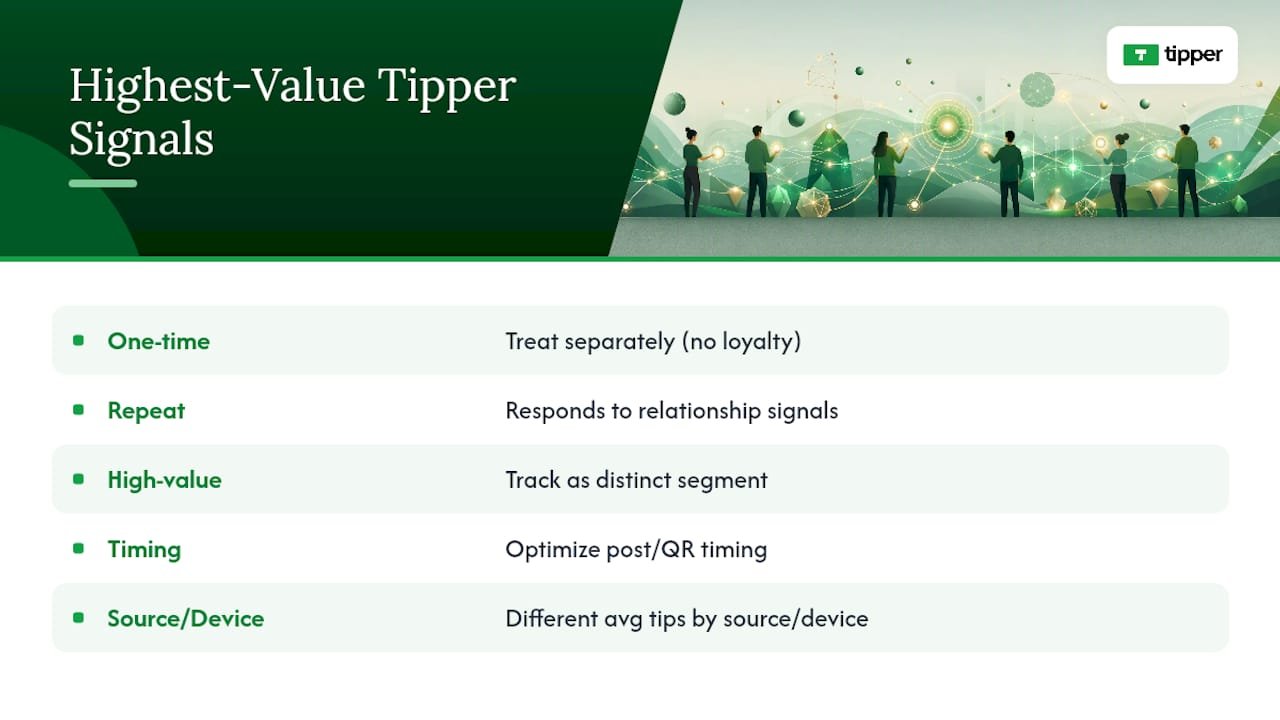
Not every visitor who tips is equally valuable, and lumping them together hides your best opportunities. Segment by behavior first: one-time tippers, repeat supporters, and high-value single tips each deserve a different read.
Repeat tippers are worth tracking separately because they usually respond to relationship signals, not discounts. If someone has tipped three times in two months, a personalized thank-you video costs you nothing and often earns a fourth tip faster than any promotional push would.
Time-of-day and day-of-week patterns matter too. If your audience skews toward evening tips on weekdays but weekend afternoons on Saturdays, that’s useful for timing your posts and QR placements, not just your content calendar. Platform source matters as much as timing. A supporter who arrives from a YouTube video description often behaves differently than one clicking a link in an Instagram story, even if both are the same demographic on paper. Video-sourced traffic tends to arrive with more context about who you are, which often shows up as a higher average tip.
Geographic and device data round this out. If most of your high-value tips come from desktop visitors during a livestream, but your QR code traffic skews mobile with smaller average amounts, you’re looking at two different audiences with two different jobs: one converts better with a live ask, the other with a fast, frictionless mobile checkout. Building separate tracking for each lets you tailor your CTA and preset amounts instead of running one generic setup for both.
None of this requires expensive software. A basic spreadsheet that logs source, device, amount, and timestamp for each tip gets you 90% of the way to spotting your best audience segment.
Connecting Tip Link Data to Your Broader Revenue Picture
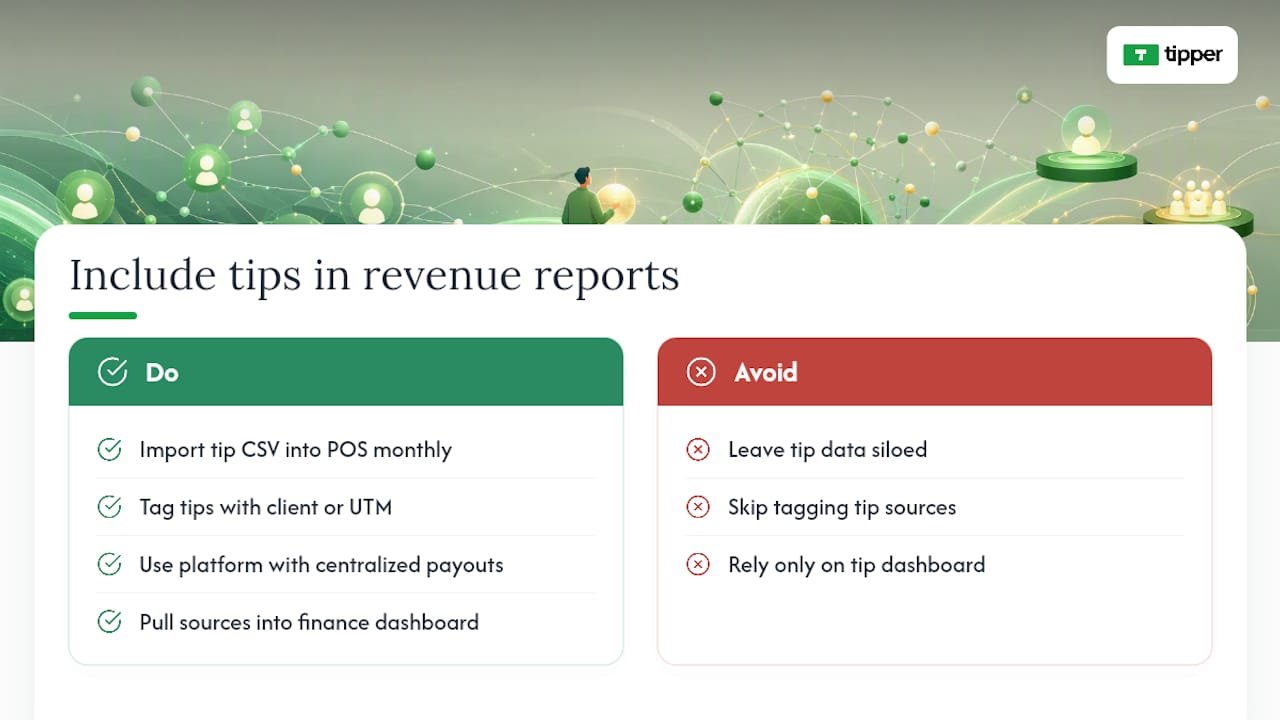
For small businesses and freelancers who also run point-of-sale systems or customer relationship management tools, tip link data sitting in isolation is a missed opportunity. A tip is still revenue, and it should show up next to your other income sources when you’re reviewing monthly totals.
Most POS systems allow manual entry or CSV import for outside revenue streams, which is the simplest way to fold tip data in without custom development. Export your tip link revenue by source and date, then import it alongside your regular sales data so your monthly reports reflect your full income, not just card-swipe transactions.
CRM integration matters more for freelancers and creators with repeat clients or patrons. If a client tips you after a project wraps, tagging that tip with their name or a client-specific UTM campaign lets you see lifetime value per client instead of treating tips as anonymous, one-off events. Platforms that centralize payouts and provide clean reporting reduce the reconciliation work this normally takes, a point Tipper’s own guide to personalized tip links addresses directly.
If you’re comparing traffic-analysis tools to go deeper on source performance, options like the alternatives covered in this roundup of traffic and source-analysis platforms can help creators understand referral patterns beyond what a basic tip link dashboard shows. For freelancers building out a fuller revenue picture, a dedicated personal finance dashboard can pull tips, invoices, and other income into one view rather than checking three separate tools.
The goal isn’t complexity. It’s making sure a tip doesn’t disappear into a separate silo where it never gets counted toward your actual earnings.
What to Know About Privacy When Tracking Tip Data
Tracking clicks and conversions means collecting data, and that comes with responsibilities you can’t skip, even as a small creator. UTM parameters and event data typically don’t include personally identifiable information on their own, but once you start tying tips to specific supporter names or email addresses for CRM purposes, you’ve entered territory that requires more care.
Keep collection minimal. You don’t need a supporter’s full browsing history to know their tip converted from a TikTok bio link. Stick to source, timestamp, amount, and payment method, and avoid storing anything more personal unless a supporter has explicitly given it to you, such as through a thank-you note reply or a client relationship.
If you’re using analytics platforms like GA4, review their data retention settings and make sure you’re not defaulting to indefinite storage of visitor-level data you don’t actually need. Most creators only need aggregate trends, not individual visitor profiles.
Be transparent about what you collect if you’re running a small business with recurring customers rather than anonymous one-time tippers. A simple line in your tip page footer noting that anonymized usage data helps you improve the page goes a long way toward building trust without requiring a full legal disclosure. When in doubt about specific regulatory requirements for your location or customer base, a quick consultation with someone who handles data compliance professionally beats guessing, especially if you’re storing any tipper contact information for CRM use.
How We Prioritize Tip-Link Analytics
Tipper checks conversion rate and payment-method split first every week, because those two numbers expose problems fastest. Clicks can look healthy while revenue quietly stalls.
The first experiments worth running are always wallet support, simplified CTA presets, and escape-flow fixes for in-app browsers, since they touch the widest share of traffic.
For creators with small but loyal audiences, chasing volume matters less than protecting conversion rate on the visitors already showing up.
— Tipper
Start Collecting Tips Without the Checkout Friction
Tipper removes the exact obstacles this guide just walked through. Senders pay through Apple Pay, Google Pay, or card with no account required, which means fewer abandoned checkouts and cleaner attribution when you tag each link with a UTM campaign.

Setup takes minutes: create your personalized tip link, add source and campaign tags before sharing it anywhere, and generate a QR code for in-person tipping. If you’re weighing no-fee tipping structures for a small business, this breakdown of no-fee tipping systems is worth a look alongside your setup.
Ready to see it in action? Create your tip link on Tipper and start tracking conversion from your very first share.
Sources
FAQ
What Are Tip Link Analytics?
Tip link analytics track clicks, visit-to-tip conversion rate, average tip amount, and revenue by traffic source for a personalized tipping link or QR code, so you know which channels actually drive revenue.
What’s a Good Conversion Rate for a Tip Page?
A conversion rate between 15 and 25% of visitors completing a tip is considered strong for dedicated tipping pages. Below that, check for payment friction or in-app browser issues first.
Why Do In-App Browsers Hurt Tip Conversion?
In-app webviews often can’t access saved wallet credentials, so visitors can’t complete Apple Pay or Google Pay payments as easily as they could in their default browser, cutting completed tips significantly compared to native-browser flows, per Inc.’s reporting.
How Do I Track Which Platform Sends the Most Tips?
Add UTM parameters to every link you share, using a consistent source, medium, and campaign naming scheme, then compare conversion rate and revenue across sources in your analytics dashboard.
Does Tipper Provide Analytics for Tip Links?
Tipper supports wallet-native, no-account payment flows and analytics-ready links that let creators tag sources with UTM parameters and track which platforms convert best.




[…] using Tip Link Analytics to optimize defaults and gratitude workflows have reported tip increases of 2 to 4 times, based on […]