


A YouTube tip link is a personalized tipping URL, that you drop as the primary call to action in the top two lines of your video description or a pinned comment, so viewers can send money instantly with Apple Pay, Google Pay, or a card. No sign-up required on their end. Create the link, paste the full https:// address where viewers see it before hitting “Show more,” and click-test it on desktop and mobile before you publish. YouTube’s own tipping tools exist too, but they run on separate eligibility rules.
TL;DR:
- Placing your tip link in the first two lines of the description ensures it remains visible before viewers click “Show more” on most devices.
- Testing your complete, full
https://URL on both desktop and mobile after publishing is crucial to confirm it remains clickable and functional.- Limiting your description to three to five links, with the tip link at the top, prevents triggering spam detection and maintains viewer focus on your primary call to action.
- Using UTM parameters on your tip URL helps track traffic sources and measure the effectiveness of each video or platform in driving tips.
- Running both native YouTube tipping tools and external links allows you to maximize revenue control, payout timing, and viewer options based on your channel’s eligibility.
Table of Contents
- Where Should You Put Your YouTube Tip Link?
- How Do You Build a Tip Link That Actually Works?
- Writing a Description That Doesn’t Bury Your Link
- Should You Use Native YouTube Tipping or Your Own Link?
- Fixing a Tip Link That Won’t Click
- When an External Tip Link Beats Native Tools
- Get Your Tip Link Live With Tipper
- Sources
- FAQ
Where Should You Put Your YouTube Tip Link?
Placement decides whether your tip link gets clicked or gets buried. YouTube truncates descriptions after roughly the first two lines on most devices, so anything below that point disappears behind the “Show more” button until a viewer taps it. If your tip link sits on line five, most people will never see it.
Put your tip link in the first two lines of the description, right after a short hook sentence that tells viewers why they’d want to tip. This above-the-fold placement is standard advice from creators who structure descriptions around one clear ask instead of burying it in a wall of text.
Pinned comments are your backup channel — a tactic often highlighted in Effective Blog Promotion: Strategies to Increase Your Reach for catching viewers who skip the description entirely. A pinned comment shows up immediately when someone opens the comment section, so restating your tip link there catches viewers who skip the description entirely.
A few other placement options worth knowing:
- Channel store and membership links work through
/storeor/joinURLs, but these require channel eligibility tied to monetization status. - Cards and end screens can point to a store or membership page, not typically external tip links, and only for eligible channels.
- New or under-review channels sometimes see description links render as plain, unlickable text, a known linkification limitation tied to account status or recent strikes.
How Do You Build a Tip Link That Actually Works?
A tip link that fails on half your viewers’ phones is worse than no link at all. Here’s how to build one that holds up.
- Create your tipping page. Sign up with a digital tipping platform, build your personalized page, and copy the complete URL, starting with
https://, not a shortened fragment or a bare domain. - Tag it with UTM parameters. Add source, medium, and campaign values to the URL so your analytics can tell you which video, or which platform, actually drove the tip. This is standard practice for tracing traffic sources back to specific content.
- Shorten it if it’s long. A managed slug keeps your description clean and lets you redirect the destination later without editing dozens of old videos.
- Run the test routine. Publish the video, expand the description, click the link on both desktop and mobile, and if possible, send yourself a small test tip to confirm the payment flow works end to end.
- Check your analytics after a few views. Confirm the UTM hits are showing up before you lean on that link for a big promotion push.
Pro Tip: Never paste a URL straight out of a word processor. Smart quotes and invisible formatting characters can quietly break YouTube’s link detection, even when the URL looks perfectly normal on screen.
Skip line breaks inside the URL itself, and always keep the https:// prefix. Drop it, and YouTube may not recognize the text as a clickable link at all.
Writing a Description That Doesn’t Bury Your Link
More links do not mean more tips. A description packed with ten different URLs actually works against you, both with viewers and with YouTube’s own systems.
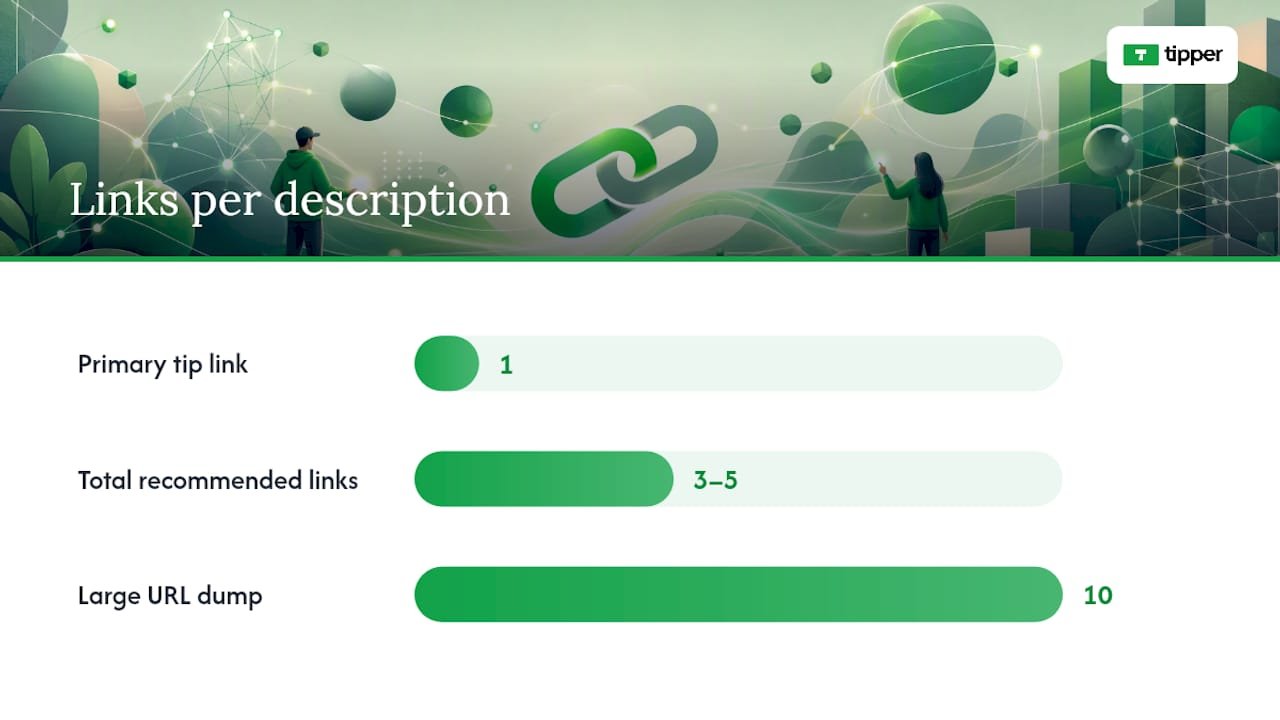
Cap your total description links at 3 to 5 and give your tip link the top spot. Research into platform spam detection has found that an opening cluster of multiple URLs can read as a low-quality signal to automated moderation systems, which sometimes suppresses reach on the video. One clean, obvious CTA outperforms a link dump every time.
A quick structural template that works:
- Line 1: A short hook. (“Enjoyed this? You can support the channel directly.”)
- Line 2: Your tip link, full
https://URL, nothing else on that line. - Blank line.
- Secondary links: social handles, merch, affiliate links, capped at 3 to 5 total.
If you run affiliate or sponsored links, place any required disclosure near those links, not buried at the bottom of the description. This matters for both platform policy and, depending on where you’re based, advertising law.
Save this structure as your default upload description. YouTube lets you set a template that autopopulates on every new video, which means you never have to remember to paste your tip link again. Consistency here compounds. A viewer who sees the same trustworthy layout on video after video is more likely to click without hesitating.
Should You Use Native YouTube Tipping or Your Own Link?
YouTube’s built-in tipping tools, Super Thanks, Super Chat, and channel memberships, sit in a different category from an external tip link. They appear directly inside the player or live chat, but they require eligibility enrollment through YouTube’s Commerce Product Module, and YouTube takes a revenue share.
An external tip link fills the gap when you don’t qualify yet, or when you want full control over payout timing and viewer privacy.
For live streams specifically:
- Pin your tip link in the live chat at the start of the stream, not just once.
- Mention it out loud every 15 to 20 minutes. Viewers scroll fast and miss pinned text constantly.
- Overlay the URL on your stream graphics so it’s visible even to viewers with chat collapsed.
- Label the link clearly. If your external tip link works differently from Super Chat, fees or payout timing, say so in one sentence, so viewers aren’t confused about what they’re using.
Fixing a Tip Link That Won’t Click
A broken link costs you tips silently. Nobody messages a creator to say “hey, your link didn’t work.” They just leave.
- Confirm the URL starts with
https://and contains no line breaks or smart quotes copied from a document. - Test the link on both a desktop browser and a mobile device, since rendering issues sometimes show up on only one.
- If the link still shows as plain text, check whether your channel has a pending strike, a recent policy review, or incomplete verification. These are common causes.
- If the description link stays broken, move your tip link to a pinned comment or your channel banner as a temporary workaround while you resolve the account issue.
Be upfront in your description or a linked FAQ about how tips are used, what fees apply, and your refund policy. Viewers tip more when they trust exactly where the money goes.
When an External Tip Link Beats Native Tools
External tip links give you something YouTube’s native tools don’t: full control over payout timing, higher retained revenue share, and ownership of your own supporter data instead of it living inside YouTube’s analytics dashboard. Native features like Super Thanks win on convenience. They appear right in the player, with zero friction for eligible viewers.
The smartest approach isn’t picking one and abandoning the other. Run both where you qualify, tag your external link with UTM parameters, and let a few weeks of data tell you which one your audience actually responds to. Keep your description hygiene consistent across every upload, because a tip link that shows up in a different spot every video trains viewers to stop looking for it.
— Tipper
Get Your Tip Link Live With Tipper
Every step in this guide, the https:// link, the clean UTM structure, the short slug, the above-the-fold placement, can be provided by digital tipping platforms without the setup headache.

Setup takes minutes. Create your account, build your personalized tip page, and copy the full link straight into the top two lines of your description or your pinned comment. You can also read Tipper’s creator tip link strategy guide for payout presets, or check how Tipper handles YouTube-specific setup if you want the platform-specific walkthrough. Supporters can also leave a thank-you note, photo, or short video with their tip, which turns a one-time payment into an actual moment between you and the person watching. Head to Tipper and get your link live before your next upload.
Sources
- Make YouTube Description Links Clickable
- Lnk
- Turn on and manage Super Thanks
- SJSU thesis on YouTube spam detection and link density
FAQ
What Is a YouTube Tip Link Exactly?
A YouTube tip link is a personalized payment URL you place in your video description or pinned comment so viewers can send you money directly, without creating an account. Some platforms generate this link and support Apple Pay, Google Pay, and card payments at checkout.
Where Do I Find My Tip Link Once I Create It?
You’ll find it on your tipping platform’s dashboard right after setup, ready to copy as a full https:// URL. Paste that exact URL into the top two lines of your description, since links placed above the fold get seen before viewers have to click “Show more.”
Why Isn’t My Tip Link Clickable on YouTube?
The most common cause is a missing https:// prefix, a smart quote or line break copied from a word processor, or a channel currently under policy review. YouTube’s linkifier fails silently on malformed URLs, so always test on both desktop and mobile after publishing.
Should I Use Super Thanks Instead of an External Tip Link?
Use both if you’re eligible. Super Thanks requires enrollment in YouTube’s Commerce Product Module and takes a revenue cut, while an external tip link like Tipper gives you direct payouts and keeps more of what viewers send.
How Many Links Should I Put in My Description?
Keep it to 3 to 5 total links, with your tip link as the single primary CTA at the top. Piling on more links dilutes clicks and can read as low-quality to YouTube’s own spam signals.



[…] step-by-step guide to YouTube tip link placement walks through description formatting and pinned comment setup in more […]