


The fastest way to collect tips as a creator is a tipping link or QR code platform that supports one-click Apple Pay, Google Pay, and card payments without forcing your supporter to create an account. We built Tipper around exactly that gap: supporters tip in seconds with no sign-up, and you keep 100% of what they send.
TL;DR:
- Most tipping platforms support Apple Pay, Google Pay, and card payments without requiring supporters to create accounts, ensuring quick and frictionless support.
- Fixed per-transaction fees can significantly reduce small tips’ value, making fee structures more critical if your audience mainly sends small, frequent tips.
- Payment method support varies by country and configuration, so testing the checkout process is essential before sharing your link widely.
- Payout speed and method, as well as the platform’s support responsiveness, are key factors for reliable income management and troubleshooting.
- One-time tips are generally more effective for impulse support moments, while recurring tips suit creators with steady content schedules and ongoing supporter relationships.
Table of Contents
- How tipping-link platforms work and what features to expect
- What to compare when choosing a tipping platform
- How fees and taxes affect your take-home from tips
- Quick start: set up and test a tipping link in hours
- Does platform popularity actually matter for your reach?
- How well does a tipping link fit into your existing toolkit?
- What to expect from customer support when something breaks
- Recurring tips versus one-time tips: which should you offer?
- Why tipping links complement subscriptions, not replace them
- Tipper: get started with instant tipping links
- FAQ
- Sources
How tipping-link platforms work and what features to expect
A tipping link works in three steps: your supporter opens your link or scans your QR code, picks or types an amount, and pays with Apple Pay, Google Pay, or a card. No app download, no account creation on their end, and no redirect maze. That simplicity is the entire point of this product category: it removes every piece of friction between “I want to support this person” and the money actually moving.
Underneath that simple flow, most tipping platforms in this category offer a similar feature set:
- Preset tip amounts alongside a custom entry field
- A personalized page with your name, photo, and bio
- A generated QR code for in-person or on-screen use
- Donor notes or thank-you message options
- Configurable payout frequency
- Transaction exports for bookkeeping
The trade-off worth understanding early is simplicity versus customization. A stripped-down tipping link converts better because there is less to think about, but it also offers fewer branding controls than a full website. The other trade-off is cost structure: fixed per-transaction fees barely register on a $50 tip but eat a meaningful share of a $2 tip, which matters if your audience tends to send small, frequent amounts rather than occasional large ones.
What to compare when choosing a tipping platform
Picking a platform is less about brand recognition and more about matching a short list of mechanics to how your audience actually behaves. Work through these in order:
- Payment-method support: confirm the platform enables Apple Pay, Google Pay, and the card networks your supporters already use, since Stripe’s own guidance notes that available payment methods depend on country, currency, and account configuration, so test before you assume.
- Fee structure: look past the headline rate to per-transaction fixed fees and processor surcharges, since those compound differently depending on your typical tip size.
- Payout speed and method: check whether payouts run on a fixed schedule or on demand, what minimum threshold applies, and whether ACH or instant payout is available.
- Sender friction: test whether your supporter needs an account, how the mobile checkout feels, and whether the QR code opens cleanly on both iOS and Android.
- Privacy and messaging: confirm you can send and receive thank-you notes or short videos, and that transaction records export cleanly for tax season.
Pro Tip: Send yourself a real test tip from your own phone before sharing a link publicly. It’s the fastest way to catch a broken payment method or a confusing checkout step.
Checkout design itself changes outcomes. PayPal’s own business materials point out that offering familiar payment options at checkout tends to raise conversion, and that managed checkout versus a more customizable integration carries different fee and fraud-handling trade-offs. For creators living on impulse micro-tips, that distinction is worth understanding before you commit to a platform.
How fees and taxes affect your take-home from tips
Every tipping platform layers costs in roughly the same way: a platform fee (if any), a payment-processing fee, and sometimes a small fixed charge per transaction. That fixed charge is the one that quietly hurts: a flat fee of a few cents takes a much bigger bite out of a $1 tip than a $20 one, so if your community tends to send small amounts often, the fee structure matters more than the headline percentage.
On the tax side, the IRS is direct: payments received for goods, services, or property count as income and must be reported even if you never receive a Form 1099-K. That guidance specifically calls out gig workers, freelancers, and other independent contractors, and points sole proprietors toward Schedule C. Calling a payment a “tip” does not make it automatically tax-free; what matters is what the payment represents.
Practical habits that keep you covered:
- Keep a running ledger of gross tips, processing fees, and refunds, since 1099-K reporting generally reflects gross amounts before fees are deducted
- Route tip income through a dedicated business bank account
- Export CSVs regularly rather than reconstructing a year’s history in April
- Talk to a tax professional about your specific reporting thresholds
Our own guide to creator tax reporting walks through recordkeeping in more detail, and freelancers juggling several income streams may also find value in a dedicated expense tracking system built for tax-ready bookkeeping.
Quick start: set up and test a tipping link in hours
You can go from zero to a working tip link before the end of your afternoon. Here is the order that avoids rework:
- Sign up and verify payout details so your bank account or card is connected before you need the money to move.
- Set up tip amounts and page branding, including your photo, a short bio, and a couple of preset amounts that match what your community typically sends.
- Enable Apple Pay, Google Pay, and card payments, then generate your link and QR code.
- Run test payments from both a mobile browser and a desktop browser to confirm the checkout feels smooth on each.
- Confirm payout arrival and pull a transaction export so you know what your bookkeeping will look like going forward.
Pro Tip: Open your tip link in a private or incognito browser window and have a friend send a real small test tip. That catches issues your own logged-in session will never show you.
Before sharing your link anywhere public, double-check the receipt your supporter gets and the payout timing your platform promises, since those two details shape trust more than almost anything else. Our walkthrough on accepting tips without invoicing covers the operational side of this in more depth if you want a second pass before launch.
Does platform popularity actually matter for your reach?
A bigger user base on a tipping platform does not directly put more money in your pocket, because tipping links rely on your own audience, not platform discovery. Unlike a marketplace where strangers browse and find you, a tipping link only works once you share it, in your bio, your video description, your livestream chat, or a printed QR code at a live event.
Where popularity does help is trust and familiarity. A supporter is more likely to complete a payment quickly on a checkout flow that looks and feels like something they have used before, which is part of why one-click Apple Pay and Google Pay matter so much: your supporter is reacting to a payment experience they already trust, not evaluating an unfamiliar brand. Platform scale can also mean more reliable uptime and faster feature iteration, but it is not a substitute for actually sharing your link where your audience already spends time.
The practical takeaway is to judge a platform less by how many other creators use it and more by how fast and familiar the actual checkout feels to the people you already have.
How well does a tipping link fit into your existing toolkit?
A tipping link earns its place in your workflow when it slots cleanly next to the tools you already use rather than asking you to rebuild anything. Most creators place their tip link in a social media bio, a YouTube description, a livestream overlay, or a printed QR code at an in-person event, and the link itself doesn’t require any technical integration to use that way.
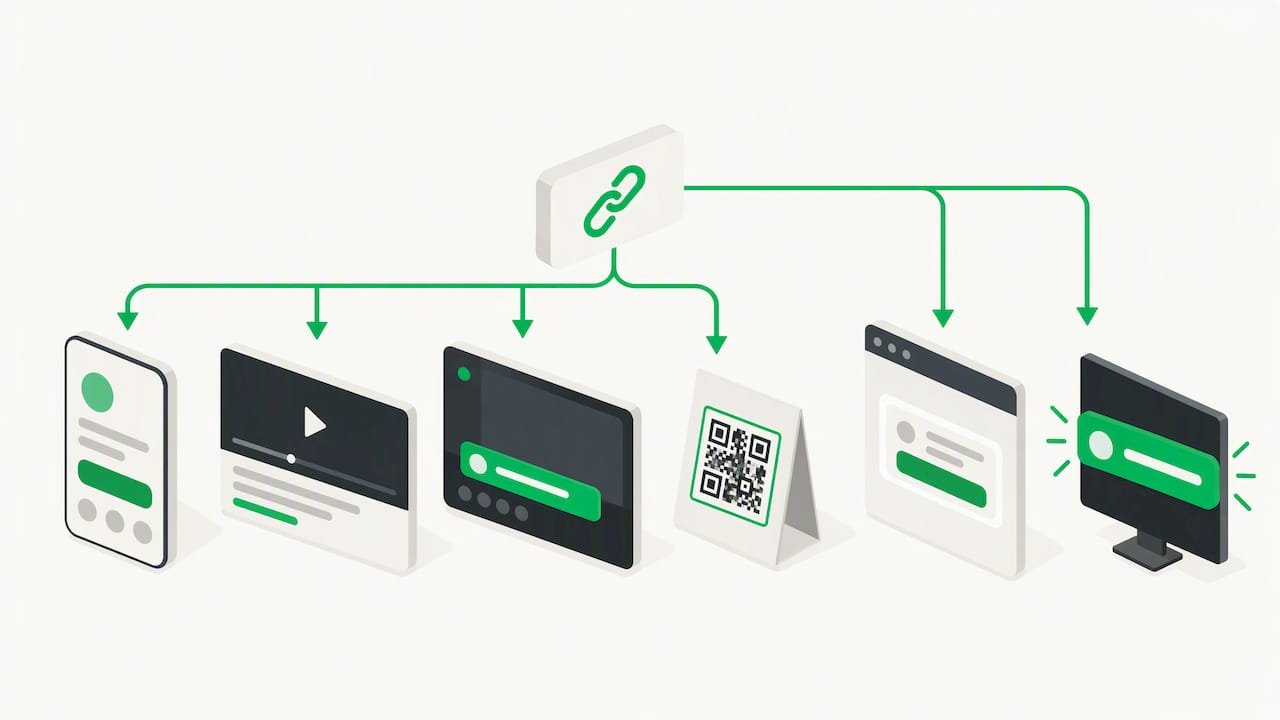
Beyond the basic link, some creators layer their tip page into a broader stack: a newsletter sign-up, a Linktree-style hub, or a stream overlay during a live broadcast. The important distinction is between a tipping link (a standalone page you share), a tipping widget (embedded directly into a site or stream), and a live-stream microtip tool (built for real-time, on-screen alerts). Our breakdown of real-time supporter contribution tools walks through how these differ if you are trying to decide which fits your format.
What to expect from customer support when something breaks
Payment issues are rarely dramatic, but they are urgent: a supporter’s card gets declined, a payout doesn’t land when expected, or a QR code stops scanning right before a live event. The practical test of any platform’s support isn’t the marketing page, it’s how fast you can reach a real answer when one of those moments hits.
Before you lean on a platform for income, check two things: whether support responds through a channel you’d actually use (email, chat, or a help center with real troubleshooting steps), and whether common issues, declined payments, delayed payouts, or QR code problems, have clear documentation you can self-serve. A platform that only offers a contact form with no stated response window leaves you guessing exactly when you can least afford to.
Recurring tips versus one-time tips: which should you offer?
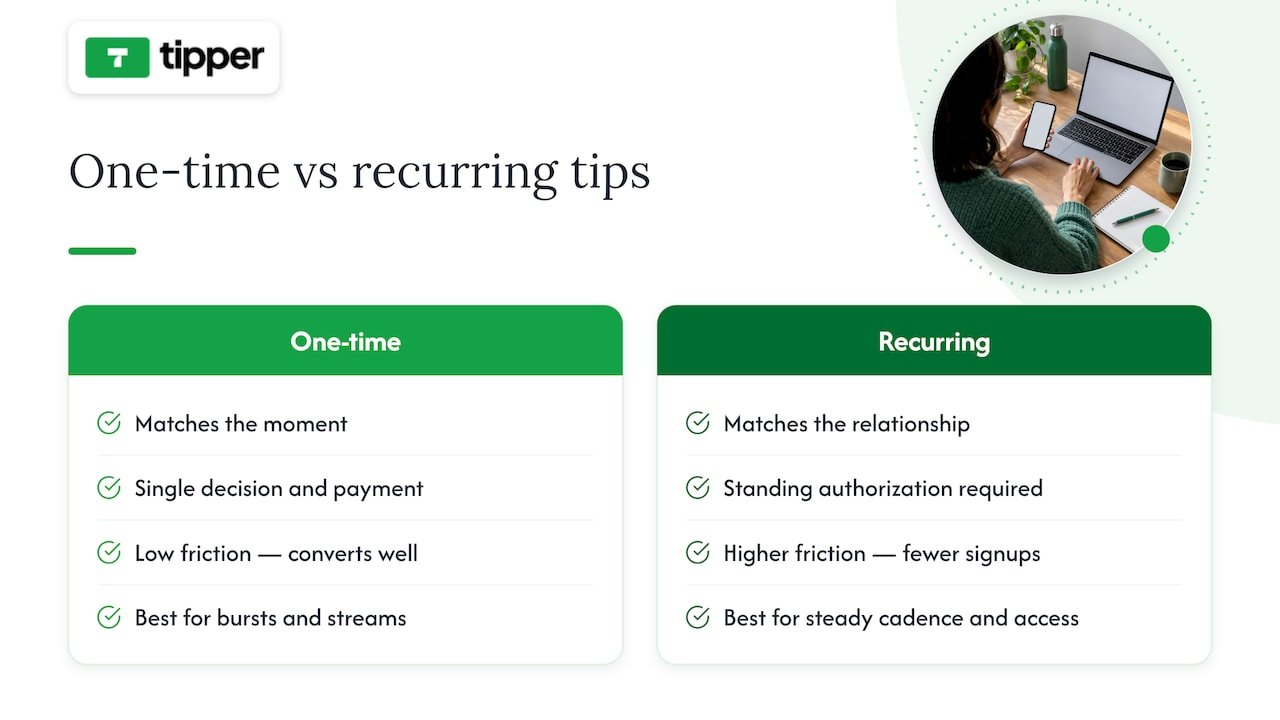
One-time tips match the moment: a great stream, a helpful post, a single piece of work someone wants to reward right now. Recurring tips match a relationship: a supporter who wants to back you on an ongoing basis without re-deciding every month. Most creators are better served by offering one-time tipping as the default and treating recurring support as a separate, optional layer rather than the main event.
The reason is friction. A one-time tip asks for a single decision and a single payment, which is why it converts so well for impulse appreciation moments, right after a livestream clip, in response to a post, or at an in-person event. A recurring commitment asks someone to trust you with a standing authorization, which is a bigger ask and a smaller pool of people will say yes to it. If your content comes in bursts, livestream reactions, seasonal content, one-off collaborations, a one-time tipping link captures far more of the moments that actually prompt someone to pay. Recurring support tends to work better for creators with a steady publishing cadence where fans want predictable, ongoing access or recognition.
Why tipping links complement subscriptions, not replace them
Tipping and subscriptions solve different problems, and treating them as competitors misses the point. Tipping shines in impulse moments: a supporter watching a livestream, meeting you at an event, or reading a post that hit them in a particular way. There is no commitment, no recurring charge to remember, just a quick thank-you in the moment it happens.
That low commitment is also tipping’s advantage over subscriptions when it comes to churn. A subscriber who cancels feels like a loss. A one-time tipper who doesn’t tip again next month was never locked into anything, so there’s no churn to manage, just an open door for the next moment they feel like showing up.
Where subscriptions and merchandise still win is predictable, larger recurring revenue; building a monthly budget around tips alone is unrealistic for most creators. The two aren’t in competition. Tipping captures the casual supporter and the spontaneous moment; subscriptions capture the committed fan who wants an ongoing relationship. Our piece on why creators need tipping links goes deeper into how the two fit together.
— Tipper
Tipper: get started with instant tipping links

If you have read this far, you already know what matters: no account required for your supporter, real payment methods they already trust, and a payout structure that doesn’t quietly erode small tips. That is the exact design behind Tipper.
Getting started takes a few minutes:
- Sign up and verify your payout details
- Customize your page with preset amounts and branding
- Copy your link or generate your QR code
- Share it anywhere your audience already shows up
Full fee details live on our pricing and product page, and our longer platform comparison guide is there if you want to see how the mechanics stack up before you commit. Set up your link today and see your first tip land.
FAQ
What is the best platform for collecting creator tips?
The best fit for most creators is a tipping-link platform that supports one-click Apple Pay, Google Pay, and card payments with no account required for the sender. Tipper is built around that exact model, and creators keep 100% of what they receive.
Do I have to pay taxes on tips I receive as a creator?
Generally, yes. The IRS treats payments received for goods, services, or property as income that must be reported even if you never receive a Form 1099-K, and that guidance applies to freelancers and independent contractors.
What payment methods should a tipping link support?
At minimum, a tipping link should support Apple Pay, Google Pay, and major card networks, since available payment methods vary by country and account configuration and testing your own checkout is the only way to confirm it works for your audience.
How do fees affect small tips differently than large ones?
Fixed per-transaction fees take a much larger percentage out of a small tip than a large one, since the flat portion of the cost doesn’t scale with the amount sent. That is why checking the full fee breakdown, not just the headline rate, matters more for creators who receive frequent small tips.
Should I offer recurring tips or one-time tips?
One-time tips generally convert better for impulse appreciation moments like livestreams or single posts, while recurring tips suit creators with a steady publishing schedule and an audience that wants ongoing involvement. Most creators are better served offering one-time tipping as the default and adding recurring support as an optional extra.
Sources
- What to do with Form 1099-K | Internal Revenue Service
- Migrate to the Payment Element with the Payment Intents API | Stripe
- PayPal Business Pricing | Transaction & Processing Fees | PayPal US



Leave A Comment