


Apple Pay is defined as a device-based payment system that lets creators accept tips instantly using Face ID or Touch ID authentication, with no manual card entry required. The role of Apple Pay in creator tipping goes far beyond convenience. It removes the single biggest barrier to getting paid: friction. Creators see tip conversion rates drop 30–50% when Apple Pay is unavailable on their tip page. That number alone explains why Apple Pay implementation is now a core part of any serious creator monetization strategy. Platforms like Tipper are built around this reality, letting supporters pay in seconds without creating an account.
How does Apple Pay work for creators receiving tips?
Apple Pay’s web payments run on the Payment Request API in Safari, which connects directly to the iPhone’s Secure Element chip. That chip stores encrypted card data and handles biometric authentication locally on the device. No card number ever touches the creator’s server.
When a supporter taps the Apple Pay button on a tip page, the flow works like this:
- Safari detects the Payment Request API call and displays the Apple Pay sheet.
- The supporter authenticates with Face ID or Touch ID.
- Apple’s servers generate a one-time payment token and pass it to the payment processor.
- The processor charges the card and confirms the transaction.
- The creator receives the tip, typically within seconds.
Tokenization replaces card details with a unique transaction code each time. This means even if a payment processor is breached, no real card data is exposed. For creators, this security model also builds audience trust, which directly affects whether a supporter completes a tip or abandons the page.
Safari vs. in-app browsers: a critical difference

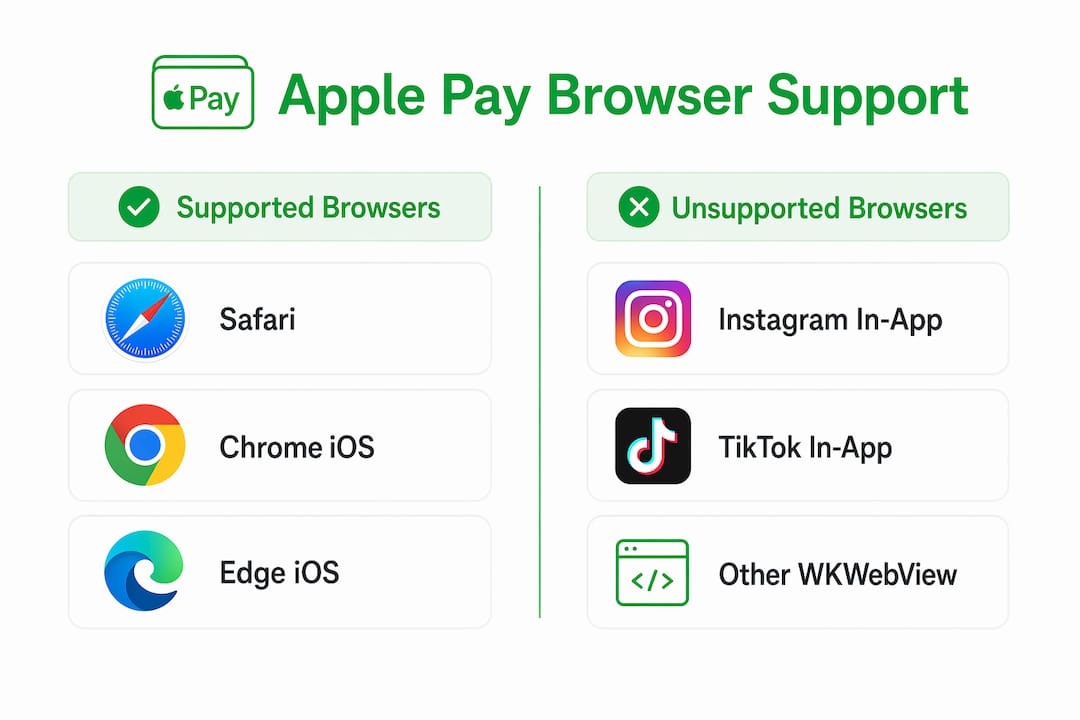
Not all browsers support Apple Pay equally. The table below shows where Apple Pay works and where it does not.
| Browser context | Apple Pay support | Why |
|---|---|---|
| Safari on iPhone | Full support | Native Payment Request API access |
| Safari on Mac | Full support | Same API, desktop authentication |
| Chrome on iPhone | Full support | Uses Safari’s WebKit engine |
| Instagram in-app browser | No support | WKWebView blocks Payment Request API |
| TikTok in-app browser | No support | WKWebView blocks Payment Request API |
In-app browsers use WKWebView, which does not support the Payment Request API. The Apple Pay button simply does not appear. Supporters fall back to manual card entry, and most do not complete the payment.
What credentials does a creator need?
To activate Apple Pay on a tip page, creators or their developers must complete three steps in the Apple Developer portal:
- Create an Apple Merchant ID tied to the creator’s domain.
- Generate and upload an Apple Merchant Identity Certificate to authenticate server-to-Apple communication.
- Verify domain ownership by hosting the
apple-developer-merchantid-domain-associationfile at the exact pathhttps://yourdomain.com/.well-known/apple-developer-merchantid-domain-association.
An Apple Merchant ID and Merchant Identity Certificate are mandatory before any Apple Pay transaction can process. Skipping either step produces a silent failure: the button may render but payments will not go through.
What are common challenges when integrating Apple Pay for creator tips?
The most common mistake creators make is assuming that adding an Apple Pay button is enough. If the audience arrives via Instagram, TikTok, or any other social platform, the in-app browser blocks Apple Pay entirely. The button disappears, supporters see a generic card form, and most leave without tipping.
The in-app browser problem and how to fix it
The fix is a smart redirect link. Instead of linking directly to the tip page, the creator links to a redirect URL that forces the page to open in Safari. On iPhone, this restores the full Apple Pay experience. Redirecting social traffic to Safari restores native payment UI and brings tip conversion rates back to normal levels.
Here is the correct approach for sharing tip links on social media:
- Create a redirect link that opens your tip page in Safari instead of the in-app browser.
- Use this redirect link in every Instagram bio, TikTok link-in-bio, and story swipe-up.
- Test the link from inside each app to confirm Apple Pay appears.
- Update the link whenever you change your tip page URL.
- Add a short note in your post copy: “Tap the link to tip with Apple Pay.”
Apple’s digital perks rule
Tips that unlock digital perks require Apple’s StoreKit in-app purchase system, which charges a 30% commission (or 15% for qualifying small businesses). This is not optional. Apple treats any digital unlock tied to a payment as an in-app purchase, regardless of what the creator calls it. A creator who routes digital perk payments through a web Apple Pay flow risks app rejection and account suspension.
The practical rule: if the tip gives the supporter something digital (a PDF, exclusive video, Discord role), use StoreKit. If the tip is a pure expression of gratitude with no digital return, web Apple Pay is permitted.
Tip jar design mistakes that kill conversions
Common tip jar design errors include making tipping feel mandatory, setting preset amounts too high, and skipping a thank-you message. Each of these reduces completion rates. The best tip jars share four traits: they feel optional, use warm language, offer reasonable preset amounts (think $3, $5, $10), and confirm the tip with a genuine thank-you.
Pro Tip: Free UI kits like VP0’s mobile tip jar templates give creators a compliant, warm starting point without building from scratch. They include preset amount buttons, optional note fields, and confirmation screens that match Apple’s Human Interface Guidelines.
How to set up and verify Apple Pay merchant credentials
Setup starts with an Apple Developer Program subscription, which costs $99 per year. Without it, the Apple Developer portal is read-only and merchant features are locked.
The full setup sequence looks like this:
- Log into the Apple Developer portal and navigate to Certificates, Identifiers & Profiles.
- Create a new Merchant ID under the Identifiers section.
- Generate a Merchant Identity Certificate and download it to your server.
- Download the
apple-developer-merchantid-domain-associationfile from the portal. - Upload the file to
https://yourdomain.com/.well-known/apple-developer-merchantid-domain-associationwith public read permissions. - Register the domain in the Apple Developer portal and trigger verification.
Domain verification fails with 404 or 403 errors when the file is missing or has incorrect permissions. A 404 means the file is not at the right path. A 403 means the server is blocking public access to the .well-known directory. Both are fixable with a file path check and a server configuration update.
| Error type | Cause | Fix |
|---|---|---|
| 404 Not Found | File not uploaded or wrong path | Upload to exact /.well-known/ path |
| 403 Forbidden | Server blocks directory access | Set file permissions to public read |
| Verification timeout | HTTPS not configured | Ensure valid SSL certificate on domain |
Pro Tip: During development, use a tunneling tool like ngrok to expose your local server over HTTPS. Apple’s domain verification requires a live, publicly accessible HTTPS URL. A local localhost address will always fail verification.
What tips can creators use to increase tips with Apple Pay?
The highest-impact change any creator can make is fixing the in-app browser problem first. Every other optimization is secondary if Apple Pay does not appear for the majority of your mobile audience.
Beyond the redirect fix, these practices consistently improve tip rates:
- Place tip links in high-visibility spots. Instagram bio, YouTube description, and email signature all outperform buried links in post captions.
- Use preset tip amounts. Supporters tip more often when they do not have to decide on an amount. Three presets ($3, $5, $10) cover most audiences.
- Keep the tip page focused. One call to action, one payment method front and center, and no distracting navigation.
- Send a thank-you after every tip. Platforms that support video or note responses see higher repeat tip rates. A personal message turns a one-time supporter into a regular one.
- Track which links convert. Use UTM parameters on your tip links to identify which platform or post drives the most completed tips. Double down on what works.
Pro Tip: Match your tip page branding to your content style. A tip page that looks like your YouTube channel or newsletter builds trust faster than a generic payment form. Supporters are more likely to complete a tip when the experience feels personal.
For creators exploring no-fee tipping systems, the combination of Apple Pay and a zero-commission platform produces the highest net earnings per tip.
Key takeaways
Apple Pay increases creator tip completion rates by removing manual card entry, but only when the payment page loads in Safari rather than an in-app browser.
| Point | Details |
|---|---|
| In-app browsers block Apple Pay | Use smart redirect links to force tip pages open in Safari for all social traffic. |
| Merchant credentials are mandatory | Create an Apple Merchant ID, certificate, and verify your domain before going live. |
| Digital perks require StoreKit | Tips that unlock digital content must use Apple’s in-app purchase system to avoid rejection. |
| Tip jar design affects conversion | Use optional tone, reasonable presets, and a thank-you message to maximize completed tips. |
| Domain file placement is critical | A 404 or 403 error on the domain-association file silently breaks Apple Pay for all visitors. |
What I’ve learned after watching creators lose tips to in-app browsers
Most creators I talk to have no idea their Apple Pay button is invisible to half their audience. They set it up correctly in Safari, test it on their own phone, and assume it works everywhere. It does not. The moment a supporter taps a link inside Instagram or TikTok, they land in a WKWebView browser that strips Apple Pay out entirely.
The redirect link fix is not complicated, but it requires knowing the problem exists. That is the gap. Creators spend hours on tip jar copy and preset amounts while their biggest conversion killer sits unaddressed in their link-in-bio.
Apple’s StoreKit rule trips up a different group. Creators who add small digital bonuses to tips (a wallpaper, a shoutout, a PDF) often do not realize they have crossed into in-app purchase territory. Apple does not warn you at setup. The rejection comes later, and it can take weeks to resolve.
My honest advice: treat Apple’s commerce rules as product requirements from day one. Decide whether your tips are pure gratitude payments or digital transactions, and build accordingly. The technical setup is straightforward once you know which path you are on. The frictionless tipping practices that actually move the needle are almost always about removing obstacles, not adding features.
— Steve
Tipper makes Apple Pay tipping simple for creators
Tipper is built for creators who want to collect tips through Apple Pay without managing merchant certificates, domain verification files, or redirect logic themselves.
Supporters can tip through Tipper using Apple Pay or Google Pay with no account required. The platform handles the technical infrastructure so creators focus on their content. Tipper also keeps 100% of earnings with the creator, meaning no platform commission eats into every tip. Smart redirect links are built into every Tipper tip page, so Apple Pay works whether a supporter arrives from Safari or a social media app. Creators who want a fast, low-friction tip setup can be live in minutes.
FAQ
Why does Apple Pay not show on my tip page?
Apple Pay only appears in Safari and supported browsers. If your supporters arrive through Instagram or TikTok, in-app browsers block Apple Pay via WKWebView. Use a smart redirect link to open your tip page in Safari instead.
What is the apple-developer-merchantid-domain-association file?
It is a verification file Apple requires you to host at https://yourdomain.com/.well-known/apple-developer-merchantid-domain-association. Domain verification fails with a 404 or 403 error if the file is missing or the directory is not publicly accessible.
Do I need an Apple Developer account to accept tips via Apple Pay?
Yes. An Apple Developer Program subscription is required to create a Merchant ID and generate the Merchant Identity Certificate needed to process Apple Pay payments on your domain.
Can I offer digital rewards when accepting tips through Apple Pay?
Only if you use Apple’s StoreKit in-app purchase system. Tips that unlock digital perks must route through StoreKit, which charges a 30% commission (or 15% for qualifying small businesses). Pure gratitude tips with no digital return can use web Apple Pay.
How do I increase my tip conversion rate with Apple Pay?
Fix the in-app browser problem first with redirect links, then use three preset tip amounts, keep the page focused on one action, and send a personal thank-you after every tip. These four changes address the most common reasons supporters abandon a tip page before completing payment.




[…] dedicated link service like Tipper consolidates Apple Pay, Google Pay, and card payments into a single one-click page instead of […]
[…] is whether to build this infrastructure themselves or use a platform where it already exists. Our guide to Apple Pay setup for creators walks through the difference in more […]