

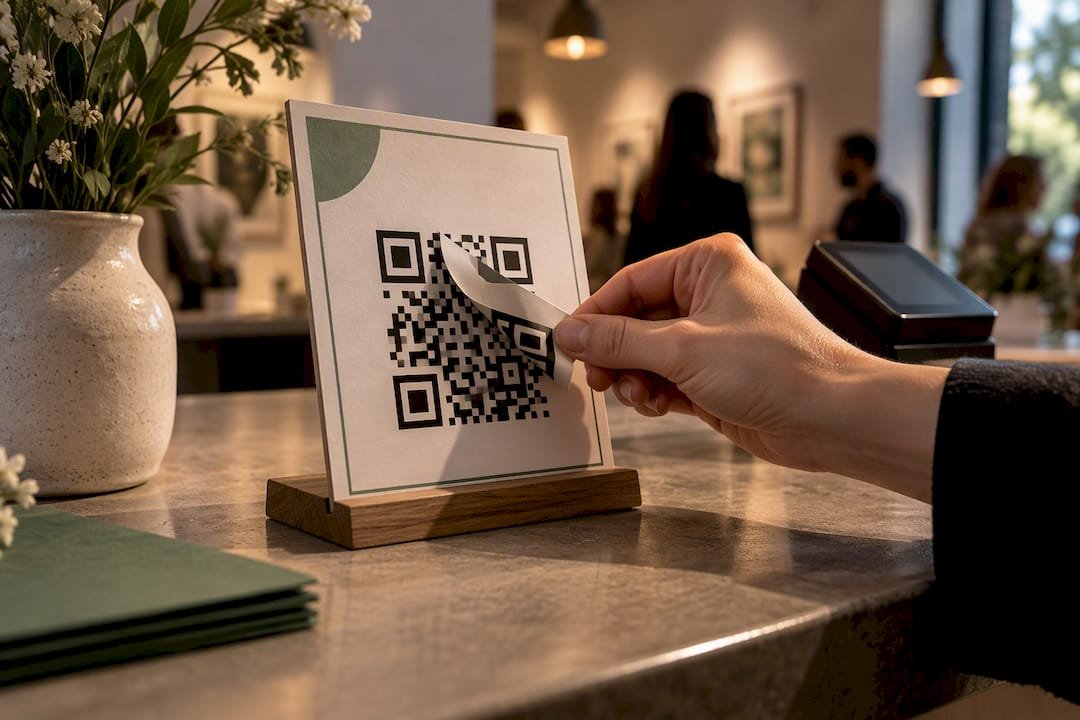
A QR code is just a picture of a link. It proves nothing about who controls the page behind it, so tipping security depends entirely on verifying the destination and locking down your accounts before money moves. Do that with a URL preview, a confirmed recipient identity, and multi-factor authentication turned on, and QR tipping is one of the safer ways to collect money from a crowd. Skip the checks, and you’re trusting a sticker.
TL;DR:
- Most QR tipping scams involve physical tampering or overlay substitution rather than technological flaws, emphasizing the need for physical and operational checks.
- Verifying the URL preview, confirming the domain matches the brand, and manually entering the link are crucial habits to prevent scams during QR code use.
- Keeping accounts secure with unique passwords, multi-factor authentication, and frequent transaction monitoring reduces the risk of unauthorized access to tip funds.
- Using a controlled, changeable QR code platform enables quick redirection or deactivation if a code is compromised, preventing prolonged scams.
- Educating supporters to recognize legitimate codes and encouraging them to ask for confirmation helps create community vigilance against fake or tampered QR codes.
Table of Contents
- What Are the Main QR Tipping Threats?
- How Do You Verify a QR Code Before Paying?
- Protecting the Accounts and Devices Behind Your Tips
- Operational Habits That Keep QR Tipping Safe
- What to Do if a Tip or Tip Page Gets Compromised
- A 10-Step Checklist Before You Publish a QR Tip Code
- Teaching Your Supporters to Spot a Fake Code
- Technical Ways to Lock Down a QR Code
- What Legal Protections and Liabilities Apply to QR Tipping?
- Author Perspective: Treat QR Tipping Like Any Other Payment Channel
- How Tipper Helps Creators Cut QR Tipping Risk
- Sources
- FAQ
What Are the Main QR Tipping Threats?
The biggest risk isn’t the technology. It’s what someone can do to the physical or digital layer around it before you or your supporter ever scans.
The FTC has flagged quishing (phishing delivered through a QR code) and physical sticker-overlay substitution as the two threats that show up most often in the real world, especially anywhere a code sits unattended in public, like a tip jar on a merch table or a printed sign at a pop-up event. A scammer can print a near-identical code and paste it over yours, and nobody notices until the tips stop arriving.
Here’s what to watch for:
- Quishing links that route to a spoofed payment page built to look exactly like your real one.
- Sticker overlays placed directly on top of legitimate printed codes at events or storefronts.
- Redirected destinations, where a link that once worked gets quietly repointed after the fact.
- Smishing prompts, text messages pushing urgent action that pressure someone to scan without checking anything first.
A convincing confirmation screen after payment doesn’t prove the money reached you. It only proves the page was designed to look convincing.
How Do You Verify a QR Code Before Paying?
Verification takes fifteen seconds and it’s the single habit that kills most QR scams before they start.
- Check the printed code for tampering. Look for a raised edge, a slightly different paper stock, or a sticker sitting on top of another sticker.
- Preview the URL before opening it. Most phone cameras show the destination link before you tap through. Read the domain carefully.
- Confirm the domain matches the brand. A misspelled word, an extra character, or an unfamiliar top-level domain is a red flag.
- Look for HTTPS and a recognizable structure, not just a lock icon, which scammers can fake too.
- When in doubt, type it manually. Navigate to the known tipping page yourself instead of trusting the scan, or scan with a separate device you control.
It helps to understand why this matters technically. EMVCo’s QR-payment specifications draw a real line between merchant-presented payment QR payloads, which carry structured, cryptographically checkable transaction data, and generic URL QR codes, which just point a browser somewhere. Most creator tipping links fall into that second category. That means the security question isn’t about the QR format at all. It’s about authenticating the destination, full stop.
Pro Tip: Bookmark your own tipping page on your phone. If a QR code ever takes you somewhere that doesn’t match the bookmarked version, stop before you pay.
Protecting the Accounts and Devices Behind Your Tips
The QR code is only half the security picture. The account that actually receives the money is the other half, and it’s the part attackers go after once the code itself is locked down.
- Use a unique, strong password for your payment and platform accounts, generated and stored with a password manager instead of reused across sites.
- Turn on multi-factor authentication, and choose app-based or phishing-resistant MFA over plain SMS codes where the option exists.
- Require phone or app-based confirmation for payments, and keep your operating system and payment apps updated so known exploits get patched automatically.
- Check transactions on a regular schedule rather than only when something feels off, since frequent monitoring is what actually catches unauthorized activity early.
- Know your payment provider’s dispute and error-resolution process before you need it, not after.
Account hygiene habits like password rotation and layered authentication aren’t unique to tipping. Security practices built for high-stakes digital transactions apply just as well to a creator’s payout account as they do to a trading account. The principle carries over: whoever controls the login controls the money, regardless of how the payment got initiated.
Operational Habits That Keep QR Tipping Safe
Most of the risk in QR tipping comes down to sloppy operations, not sophisticated hacking. Tighten these five habits and you close off the paths scammers actually use.
- Use a short, branded domain or a personalized landing page instead of a generic link string. A recognizable domain is harder to convincingly fake.
- Keep a written inventory of every QR code you’ve generated, where it’s posted, and when it was last checked.
- Restrict edit permissions on your landing page to yourself or one trusted collaborator, never a shared login passed around a team.
- Test every code after printing, and run a small live transaction, a $1 test, before any event where the code will see real traffic.
- Retire old codes once a sign, table tent, or merch item is out of rotation instead of leaving them live indefinitely.
For placement, design matters as much as the code itself. Signage that sits flush against a hard surface with visible edges makes tampering obvious at a glance, while a code taped loosely over a poster invites exactly the kind of overlay substitution the FTC warns about. Some practical sign layouts already built around this idea include a short verification line that supporters can check, like the domain name printed in text next to the code itself.
Documented inventories and restricted permissions aren’t just tidiness. They’re the difference between catching a forgotten code before someone else finds it and never knowing it existed at all.
What to Do if a Tip or Tip Page Gets Compromised
Speed matters here more than anything else. The first hour after you discover a problem determines how much of it you can undo.
- Screenshot everything immediately: the QR image, the final URL it resolved to, timestamps, and any transaction IDs involved.
- Disable or redirect the compromised link the moment you confirm it’s bad, even before you’ve finished gathering evidence.
- Contact your payment provider or bank right away. Reporting quickly is what actually enables a recovery or reversal, not reporting eventually.
- Notify affected supporters through a channel you already control, like a pinned post or your own verified bio link, so they don’t keep sending money to a bad address.
- Keep a written log of every call, email, and reference number from your dispute process. You may need it more than once.
Pro Tip: Save transaction IDs the moment they arrive, not after something goes wrong. A dispute filed with proof takes days. One filed on memory alone can take weeks.
A 10-Step Checklist Before You Publish a QR Tip Code
Run through this before any QR code goes into a bio link, a merch drop, or event signage.
- Set up a branded or personalized tipping link rather than a raw generic URL.
- Run a real test payment, ideally a $1 event test, before trusting the code with a crowd.
- Confirm the money actually settled by matching the transaction ID on your end, not just the confirmation screen the payer saw.
- Enable MFA on every account tied to the payout.
- Lock your phone and laptop with biometric or PIN protection.
- Print signage on tamper-evident material where an overlay would be visible.
- Place the code somewhere overlay stickers would obviously stand out.
- Restrict who can edit your landing page.
- Recheck the code after any event where the sign was left unattended.
- Retire the code once its purpose (a specific show, drop, or pop-up) is over.
Creators running recurring events have found that borrowing sign templates built for this exact workflow saves the guesswork of designing anti-tamper signage from scratch.
Teaching Your Supporters to Spot a Fake Code
Your own security habits only cover half the risk. The other half depends on whether the person scanning your code knows what a legitimate one looks like.
Most fans have never been told what to check before scanning, so a few words on your signage or in your caption go a long way. Tell them explicitly what the correct domain should read before they tap through, and encourage them to preview the link rather than scan and pay in one motion. A short line like “our tip page always starts with [yourdomain]” gives supporters a concrete detail to check against, rather than a vague instinct to trust.
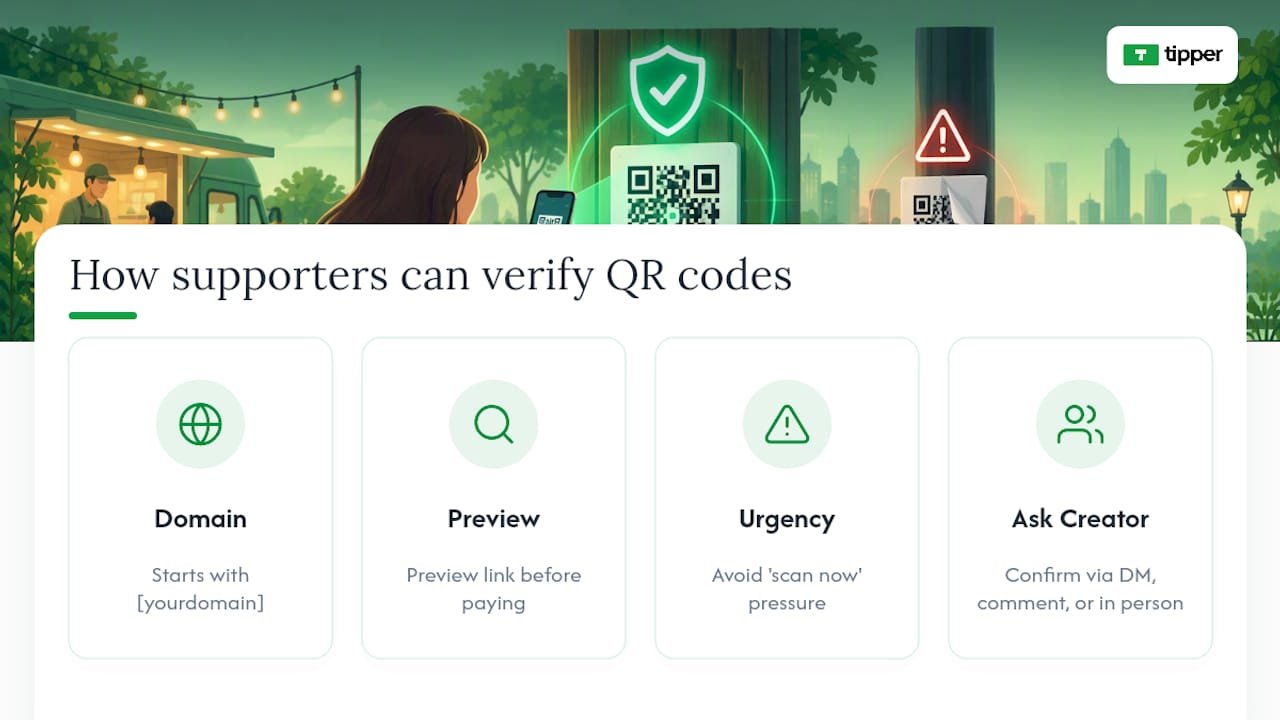
Urgency is the tell to teach people to notice. Scammers lean on pressure, a “scan now before this offer ends” line, or a QR code taped over a real one with no explanation. Legitimate requests rarely demand instant action, so any code paired with urgent language deserves a second look before anyone scans it.
It also helps to normalize asking. Tell your audience directly that they can always ask you to confirm a link is real, in a comment, a DM, or in person at an event. Creators who build this expectation into their community find supporters flag suspicious codes on their own, often before the creator even notices something’s off. That habit turns your audience into an early-warning system instead of a target list.
Technical Ways to Lock Down a QR Code
Not every QR code needs the same level of protection, but a few technical choices meaningfully lower the risk of a code being copied, redirected, or spoofed.
Dynamic QR codes let you change the destination URL after the code is printed, without reprinting anything. That sounds like a convenience feature, but it’s also a security tool: if a code is ever compromised or a landing page needs to move, you can redirect traffic instantly instead of leaving a broken or hijacked link live on a wall or table tent for weeks.
Encrypted or signed payloads, the kind EMVCo’s merchant-presented QR specification is built around, let a receiving system cryptographically confirm the payload hasn’t been altered. Most individual creator tipping links don’t use this level of encoding, since they route through a standard browser link rather than a payment-network payload. That’s exactly why destination verification matters more for creators than encryption specs do.
A few practical technical habits close most of the remaining gap:
- Generate codes through a platform that lets you audit and update the destination link at will.
- Avoid third-party “free QR generator” tools that route through their own shortened domain, since you lose visibility into whether that domain gets flagged or reused later.
- Keep one authoritative source for your current, active code and treat any other version you find in the wild as suspect until verified.
None of this requires a technical background. It requires picking tools that give you control over the link after it’s printed, not just at the moment you created it.
What Legal Protections and Liabilities Apply to QR Tipping?
Legal clarity around QR tipping is still catching up to how fast creators have adopted it, and that gap matters for anyone treating tips as real income.
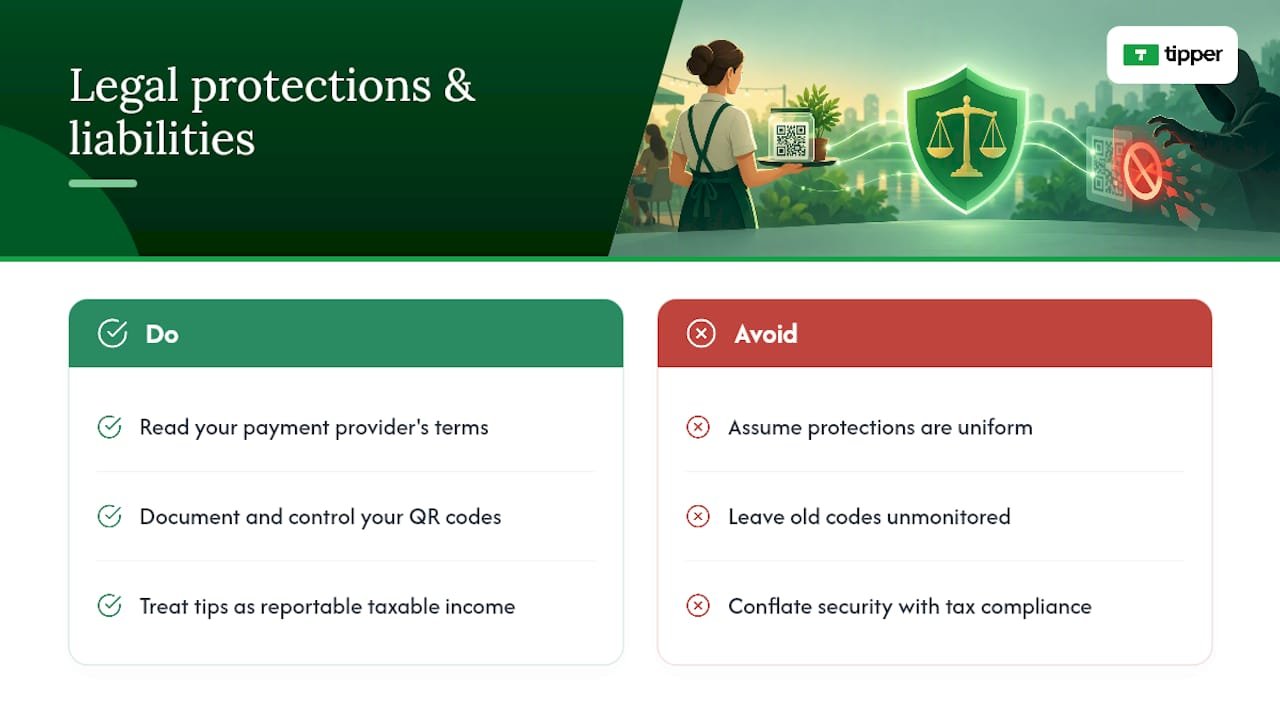
Mobile-payment protections aren’t uniform. The CFPB notes that consumer protections differ significantly across payment services, meaning the dispute rights you get on one platform may not carry over to another. As a creator, that means reading your specific payment provider’s terms rather than assuming blanket protection.
Liability for a spoofed or redirected tip generally lands on whoever controlled the compromised link or code, which is one more reason to keep tight, documented control over your QR inventory rather than letting old codes drift around unmonitored. If a supporter’s payment gets misdirected through a code you posted, you may be the first point of contact for that dispute even if you weren’t the one who tampered with it.
Tip income also carries ordinary tax and reporting obligations, separate from the security question entirely. That’s worth flagging here only because creators sometimes conflate “is this safe” with “is this compliant.” They’re different questions, and a secure QR setup doesn’t substitute for treating tip income as reportable earnings under your own tax obligations.
Author Perspective: Treat QR Tipping Like Any Other Payment Channel
Creators tend to treat QR tipping as a casual add-on, something closer to a tip jar than a payment system. That framing is the actual risk. The moment a QR code touches real money, it deserves the same scrutiny you’d give a checkout page, not the trust you’d give a poster on a wall.
What consistently reduces friction and confusion in the field isn’t more warnings. It’s clearer verification: a branded link supporters recognize, a visible recipient identity, and a transaction record both sides can point to if something goes wrong. Dispute resolution only works when there’s a paper trail. A screenshot and a real name beat a vague memory of scanning a code at a show three weeks ago.
— Tipper
How Tipper Helps Creators Cut QR Tipping Risk
Tipper is built around one advantage that matters most for the risks covered above: a personalized link tied to a specific creator, so supporters see exactly who they’re paying instead of a generic redirect they have to take on faith.

Some platforms do not require an account for the person sending a tip, and payments can run through Apple Pay, Google Pay, or card, which cuts down on the kind of confusing multi-step redirects that make spoofed pages easier to disguise. If you want to see how other creators have set this up in practice, the examples of contactless tip collection walk through real setups event by event. When you’re ready to put a verified, branded tipping link in your own bio or on your own signage, you can set one up on Tipper in a few minutes.
Sources
- See a QR code parked somewhere? Don’t scan it…yet! | Consumer Advice
- EMV® QR Codes | EMVCo
- Watch accounts closely when card data is hacked | Consumer Financial Protection Bureau
FAQ
Is QR Code Tipping Actually Safe?
QR tipping is safe when the destination is verified and the receiving account is protected with strong authentication. The risk lives in unverified links and weak account security, not in the QR format itself, according to FTC guidance on QR code scams.
How Can I Tell if a Tipping QR Code Has Been Tampered With?
Look for a sticker sitting on top of another sticker, a different paper texture, or a raised edge on printed signage. If the code sits somewhere unattended and easy to reach, treat it with extra suspicion before scanning.
What Should I Do if a Supporter Says They Tipped but I Never Received It?
Ask for a screenshot with the transaction ID and timestamp, then check that record against your own payment dashboard. If nothing matches, contact your payment provider immediately and follow their dispute and error-resolution process.
Does Tipper Require Supporters to Create an Account to Send a Tip?
No. Tipper lets supporters send a tip through a personalized link using Apple Pay, Google Pay, or a card, with no account required on their end. Current pricing and fee details are available directly on the Tipper site.
Are Dynamic QR Codes More Secure Than Static Ones for Tipping?
Dynamic QR codes let you update the destination link without reprinting the code, which makes it faster to shut down or redirect a compromised link. That flexibility helps operational security, though the bigger factor for creators remains verifying the destination URL every time.



Leave A Comment