


You can accept one-off tips on your blog, and you don’t need a fundraising campaign or a Patreon-style membership to do it. The fastest path is a short tip link or embedded button that takes card payments plus Apple Pay and Google Pay, placed right where readers finish reading. Tools like Tipper build this exact function into a single personalized link. Set it up once, drop it into your post footer, and you’re collecting tips within the hour.
TL;DR:
- Using a personalized tip link supported by Apple Pay, Google Pay, and card payments ensures the highest convenience for mobile users, increasing tips.
- Placing the tip button immediately after the content or on confirmation pages yields better conversion rates than mid-article or top-of-page placements.
- Limiting preset tip amounts to four between $3 and $10, along with an optional custom field, appeals to most readers without overwhelming choices.
- Keep the tipping process simple by skipping account requirements and additional fields, reducing friction and encouraging spontaneous tips.
- Testing a $1 tip beforehand and adding a genuine thank-you message significantly boosts repeat tipping and overall success.
Table of Contents
- How Do You Add a Tip Button or Tip Link to a Blog?
- Where Should You Place a Tip Link for the Best Conversions?
- Which Payment Methods Should You Offer, and What Do They Cost?
- How Do You Promote a Tip Link Without Sounding Pushy?
- What Should You Know About Privacy, Payouts, and Taxes?
- What Actually Works Once You’ve Set Up Tipping
- Start Collecting Tips With a tipping platform
- Sources
- FAQ
How Do You Add a Tip Button or Tip Link to a Blog?
Every platform handles the technical part a little differently, but the sequence is the same everywhere.
- Build the tip page or personalized link. Set two to four preset amounts, write one line of microcopy explaining what the money supports, and skip anything that looks like a fundraising goal, since tip jars work better as a no-strings gesture than a campaign with a target.
- Embed the button inline or use a short redirect URL. Something like yoursite.com/tip is easier to say out loud in a podcast or read aloud in a video than a long checkout link.
- Test the full flow on both desktop and mobile, confirm the payout destination, and check that a receipt actually gets sent.
For WordPress specifically, you have three real options: a dedicated tip jar plugin, a WooCommerce product priced at $0 with a “name your price” field, or a simple shortcode that embeds a hosted tip button. Shopify creators can do something similar with a product page and a Buy Button widget, while Substack writers typically just link a tip URL from their bio or use an embedded footer button. A step-by-step blog tip button walkthrough covers the screenshots platform by platform if you want the exact clicks.
Keep the whole thing simple. A tip jar is not a donor management system. It’s meant for individuals and small creators, so skip the account requirements and campaign tracking that bigger fundraising tools push on you.
Pro Tip: Run one test tip yourself for $1 before you announce the button publicly. It’s the only way to catch a broken redirect or a payout account that’s still pointed at the wrong email.
Where Should You Place a Tip Link for the Best Conversions?
Placement matters more than most bloggers assume, and the data on this is consistent: tip requests convert best when they show up right after a reader has already gotten something valuable, not before.
- End-of-post, immediately after the content, is the single strongest spot because readers who finish an article have already decided it was worth their time.
- Confirmation pages (after a download or newsletter signup) work well because the reader just completed an action, which puts them in a “yes” mindset.
- Avoid placing tip requests above the fold or mid-article, where they compete with the content itself.
Best-practice research on tip jars for blogs and online platforms backs this up directly: jars placed alongside free content, with clear customization and multiple payment options, outperform generic sidebar widgets.
Amounts matter almost as much as placement. Four preset tiers plus one open “enter your own amount” field covers the widest range of readers without overwhelming anyone with choices. Lower numbers work better than you’d think. Guidance on tip jar amounts suggests $3 to $10 as the range that gets clicked most, because it feels closer to a coffee than a donation.
Most of the specific tip jar recommendations in the best-practice checklist come down to reducing friction: fewer fields, familiar payment logos, and no forced account creation. Name is optional. Email is optional. Every extra field you require is a reason for someone to close the tab instead of tapping “send.”
Language changes behavior too. “Buy me a coffee” reads as casual and low-stakes. “Donate” reads as formal, sometimes even like you’re running a nonprofit, which can make a reader hesitate if they’re not sure their $5 belongs in that category.
Pro Tip: Pair each preset amount with a one-line impact statement, like “$5 covers my coffee while I edit next week’s post.” Creators who explain what a tip actually funds report higher willingness to give, even at the same dollar amount.
Which Payment Methods Should You Offer, and What Do They Cost?
Card payments combined with Apple Pay and Google Pay give you the lowest friction on mobile, where most blog traffic actually lands. A reader who has to type in a 16-digit card number is far less likely to finish than one who taps their phone once.
- Card + Apple Pay/Google Pay: fastest checkout, best for impulse tips under $20.
- PayPal: less slick on mobile, but it’s the processor readers already trust, and broad coverage advice still recommends including it for readers who don’t want to enter card details anywhere new.
- Crypto tip jars: efficient for audiences that already hold crypto, and non-custodial gateways settle tips directly to a creator-controlled wallet without holding funds in between.
Two separate fees usually apply on any tip: a platform fee for the tipping tool itself, and a payment processor fee for moving the money. Before you go live, confirm exactly when payouts hit your bank, whether that’s instant, daily, or weekly, and double check where the money actually lands.
How Do You Promote a Tip Link Without Sounding Pushy?
The tone that works is closer to a friend mentioning something in passing than a sponsor read. Nobody wants a hard pitch after a helpful tutorial.
- Add a casual line at the end of high-performing posts: “If this saved you time, tips are always appreciated” reads very differently than “Please donate now.”
- Put a version of the same line in your email newsletter footer and your social bio, so the ask shows up in three places without ever feeling repetitive.
- Show what a specific amount does. Impact-focused language increases perceived value far more than a bare “tip me” button ever does.
- Test the phrasing and placement on your two or three best-performing posts first, then roll out whatever gets the higher click rate everywhere else.
Timing beats volume. Placing the ask right after a direct value moment, like the end of a tutorial or right after you’ve answered someone’s comment, consistently outperforms a permanent sidebar widget that readers learn to tune out.
Pro Tip: Screenshot a thank-you note from a supporter (with their permission) and use it sparingly as social proof near your tip link. Seeing that someone else already tipped lowers the psychological barrier for the next reader.
What Should You Know About Privacy, Payouts, and Taxes?
Keep the data you collect to the bare minimum. Name and email should be optional fields, never required, since every unnecessary field reduces completion on a small transaction.
- Tips are generally taxable income in the United States, so keep a simple record of every payout for your own bookkeeping.
- Talk to a tax professional about how to categorize tip income for your specific situation. This article isn’t tax advice.
- Before launch, confirm whether your tipping tool holds funds temporarily or forwards them immediately, and note the payout schedule so you’re not caught guessing where your money is.
What Actually Works Once You’ve Set Up Tipping
Most advice about blog tipping focuses on the button. That’s the easy part. What actually determines whether tipping generates real income is whether creators treat it as a persistent, low-key feature rather than a one-time announcement.
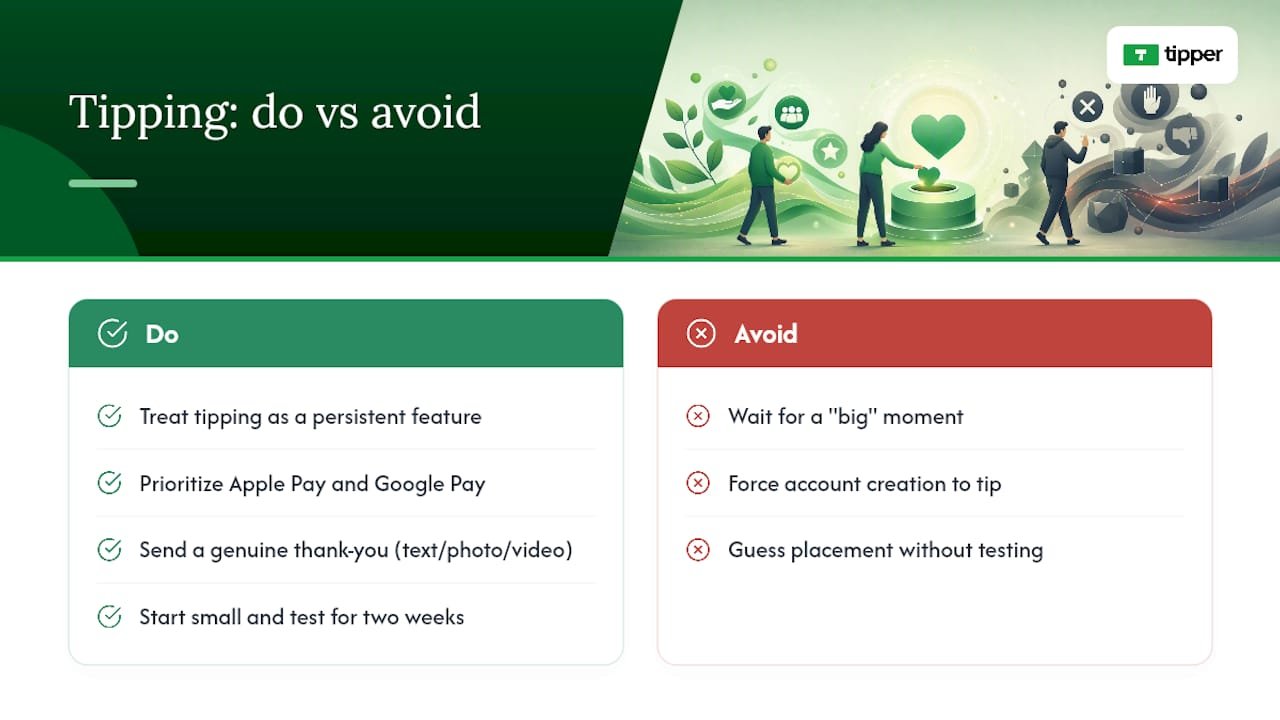
Personalized links and in-page buttons prioritize Apple Pay and Google Pay specifically because that’s where mobile friction dies fastest. A sender doesn’t need an account, which removes the single biggest drop-off point in any tipping flow. Thank-you notes, whether that’s a short text, a photo, or a video, help with retention. A reader who gets a genuine thank-you is far more likely to tip again next month.
The honest takeaway: don’t wait for a “big” moment to add a tip link. Start small, put it in one spot, watch what happens for two weeks, then adjust placement or wording based on what you actually see. Guessing wastes more time than testing.
— Tipper
Start Collecting Tips With a tipping platform
Some platforms provide a personalized tip link and an embeddable button that accept Apple Pay, Google Pay, and card payments, with no account required on the sender’s side.

Getting started takes less time than writing your next post. Sign up, build your tip link or button, add it to your post footer or social bio, and send yourself a $1 test tip to confirm the whole flow works before your readers see it. If you’re weighing rails and tools first, this rundown of digital tip jar tool types is worth a quick read. Once tipping is live, you’ll have a clearer sense of whether it can eventually reduce your dependence on ad revenue altogether.
Sources
- How to Add a Tip Jar to Your WordPress Site – FundCollector
- How to Set Up a Crypto Tip Jar on Your Website (WordPress & Shopify)
- 5 Best Tip Jar Practices For Blogging and Online Platforms – Attention Insight
FAQ
Is Blog Tipping Legal in the United States?
Yes. Accepting one-off tips through a payment processor is legal, but tip income is generally taxable, so keep records and consult a tax professional for your specific situation.
What’s the Best Payment Method for a Blog Tip Button?
Card payments paired with Apple Pay and Google Pay give the lowest friction on mobile, though including PayPal helps cover readers who prefer a processor they already trust.
How Much Should I Set as Preset Tip Amounts?
Four preset tiers between roughly $3 and $10, plus an open custom-amount field, tend to convert best because they feel closer to a small everyday purchase than a formal donation.
Do I Need a Recipient Account to Use Tipper?
No. Tipper lets senders tip through a personalized link using Apple Pay, Google Pay, or a card, with no account required on their end.
Where Should I Put My Tip Link for the Best Results?
End of post is the strongest spot, since readers who just finished your content are already in a positive mindset, right before they’d otherwise navigate away.




Leave A Comment