


If you take tips online, PCI compliance applies to you, even when a payment provider handles every card. The PCI Security Standards Council says PCI DSS covers any entity that stores, processes or transmits cardholder data, whether it does so directly or through a third-party service provider. The good news: if you never touch card numbers, your share of the work is small. It is mostly choosing the right provider, keeping paperwork, and not breaking the setup with your own website.
This guide is for streamers, YouTubers, freelancers, and small business owners who collect tips through a link, a QR code, or a page on their own site. It explains what PCI DSS is, what “outsourcing” does and doesn’t remove, and a practical checklist you can finish in an afternoon.
TL;DR
- PCI DSS applies to anyone who accepts card payments. Outsourcing to a compliant provider shrinks your scope, but it does not remove your responsibility.
- The smartest move for tips is to never collect card data yourself. Let a hosted tip link take the payment, so supporters pay on the provider’s page, not yours.
- Most fully outsourced merchants validate with a short self-assessment, usually SAQ A. Your bank or payment partner decides what you must file and how often.
- Keep a written list of the payment providers you use and check their compliance status every year.
- If you embed a payment form on your own site, the 2025 rules on script attacks apply to you.
Table of Contents
- What PCI DSS is, in plain terms
- Does a tip jar count as card acceptance?
- Shrink your scope first: the “scale down” rule
- What outsourcing does and doesn’t do
- SAQ A in 2025 and 2026: what changed
- A practical checklist for creators and small businesses
- Common mistakes to avoid
- Our perspective
- Taking tips with Tipper
- FAQ
- Sources
What PCI DSS is, in plain terms
The Payment Card Industry Data Security Standard is a set of security rules for protecting card data. It is built around 12 main requirements: secure networks, protecting stored data, managing vulnerabilities, controlling access, monitoring networks, and maintaining security policies.
Two points trip people up.
The council writes the standard, but your bank enforces it. The PCI Security Standards Council sets the rules. Which validation level you fall into, how often you report, and what happens if you don’t are set by your acquirer or the card brands. The council’s own guide tells merchants to confirm the specifics with their bank or payment partner. If you use a payment platform, that partner is your first call.
It is not a one-time certificate. Validation is generally annual, and some programs add quarterly network scans. Treat it like renewing a license, not passing a test once.
Does a tip jar count as card acceptance?
Yes. A tip is a card payment like any other. The fact that the amount is $3 or the money is a thank-you rather than a sale changes nothing about how card data must be protected. If a supporter pays with a card, Apple Pay or Google Pay through your link, a payment is being processed, and PCI DSS is part of the picture.
What does change is how much of the standard you personally carry. That depends on one question: where does the card number go?
| How you take tips | Where card data goes | Your PCI burden |
|---|---|---|
| Hosted tip link or QR code that opens the provider’s own page | Straight to the provider, never through your site | Lightest. Usually a short self-assessment |
| Provider’s payment form embedded in your site (iframe) | Entered on your page but sent to the provider | Light, but you must confirm your page can’t be tampered with by scripts |
| Your own form that posts card details to your server | Through your systems | Heavy. Avoid this for tips |
| Writing card numbers in DMs, emails or spreadsheets | Stored in places never meant for it | Serious risk. Never do this |
The first row is the reason hosted tip links exist. The less card data you see, the less there is to secure.
Shrink your scope first: the “scale down” rule
The FTC’s guide for businesses puts it simply: keep only the personal information you truly need, and if you don’t need it, don’t collect it. For a creator, that translates into a rule you can apply today: you do not need a supporter’s card number, ever. You need to know that money arrived.
In practice:
- Don’t ask supporters to send card details by message or email, even “just this once.”
- Don’t build your own checkout for a donation button.
- Don’t export payment details into spreadsheets or fan databases.
- Keep supporter notes (a name, a message) separate from anything payment-related.
Privacy and compliance point the same way here. Our piece on privacy-first payment collection for creators and sellers covers the setup in more detail, and why payment privacy matters for U.S. freelancers explains the stakes for people who work under their own name.
What outsourcing does and doesn’t do
Many creators assume that a compliant processor means they are compliant. That is half true. A compliant provider lowers your scope considerably, but the council states plainly that no outsourcing option completely removes a merchant’s PCI DSS responsibilities.
What stays with you:
- Validating your own status. Even a fully outsourced merchant validates annually, typically with a Self-Assessment Questionnaire. SAQ A is the one commonly used by merchants who completely outsource card functions.
- Checking your provider. You remain responsible for making sure the provider you chose is compliant, and for having written agreements in place.
- Keeping a provider list. Maintain a written list of every third-party service provider that touches payments (gateways, processors, tip platforms) and review their compliance status each year. Skipping this documentation is a common pitfall in audits.
- Not undermining the setup. A validated tool is one part of the equation. The council notes that it still has to be used inside an environment that doesn’t break its protections, and you stay responsible for how you configure and use it.
SAQ A in 2025 and 2026: what changed
SAQ A is the shortest self-assessment, built for card-not-present merchants who hand all payment handling to a third party. PCI DSS v4.0.1 became the active version, and the council released updated SAQs for v4.0.1 that clarified eligibility in SAQ A and added and removed some requirements.
The change that matters for creators is an eligibility criterion in SAQ A: the merchant must have confirmed that their site is not susceptible to attacks from scripts that could affect the payment functions. The council later published FAQ guidance on how to confirm that. You can do it by getting confirmation from your compliant payment provider that its solution includes script protection, or by using a protected implementation, as explained in the council’s clarification on SAQ A eligibility.
Who does this hit?
- Embedded forms (iframes). If a payment form sits inside your own page, this criterion applies to you.
- Full redirects. If supporters leave your site and pay entirely on the provider’s page, the criterion does not apply to you in the same way, which is another point in favor of a plain link or QR code.
If you’re unsure which describes your setup, open your tip page in a private browser window and click the tip button. Does the address bar change to the provider’s domain? Then it’s a redirect. Does the card field appear inside your own page? That is an embed.
A practical checklist for creators and small businesses
You can work through this in an afternoon. None of it requires a security team.
1. Choose a provider that puts compliance in writing
The PCI Security Standards Council’s e-commerce guidance recommends clear written agreements that spell out the provider’s PCI status and who is responsible for what. Look for security delivered as a basic service rather than something you must configure, and ask for references from financial institutions where relevant. Questions to send before you sign up:
- Are you PCI DSS compliant, and can you show me your status?
- Where does the supporter enter payment details: on your page or mine?
- If I embed your form, how do you protect against script attacks?
- Which parts of PCI DSS are mine, and which are yours?
A good provider answers these without a sales pitch.
2. Use hosted links and QR codes
A personal link in your bio, a panel under your stream, or a QR code on a table or a business card keeps card entry off your property. For in-person work such as hair stylists, tour guides, buskers, and delivery drivers, a printed QR code is the lowest-scope option there is. See our guides on frictionless client tipping and point-of-sale tipping alternatives for setups by type of business.
3. Prefer wallets for the actual payment
Apple Pay and Google Pay let a supporter pay without typing a card number at all, which means fewer fields to protect and less friction. We cover the practical side in Apple Pay and Google Pay tips: benefits for small businesses and the setup in Apple Pay tipping setup for your business.
4. Write down your providers
Open a document titled “Payment providers.” List each service that touches money: the tip platform, your payout bank, any storefront checkout. Next to each, note what it does, the date you last checked its compliance status, and where the proof lives. Set a yearly calendar reminder.
5. Complete the right questionnaire
Ask your acquirer or payment partner which SAQ applies to you. Fully outsourced merchants typically use SAQ A, and the questionnaire itself lists its eligibility criteria on its first pages, so read them before signing. If you also embed a form or run a terminal with a dial-up or standalone setup, you may land on a different form, such as SAQ B, which has its own criteria.
6. Keep your own site and accounts clean
Even with a hosted checkout, your site can be the weak point if it’s compromised. Keep your website platform and plugins updated, use unique passwords and two-step verification on your email, hosting, and payment accounts, and remove scripts you don’t recognize. This matters most if you embed any payment element.
7. Know what to do with disputes
Compliance covers data security, not chargebacks, but they show up in the same bank conversations. If you tip-collect at a restaurant or service business, our piece on chargebacks on tips and POS fixes explains the common failure points.
Common mistakes to avoid
“My processor is compliant, so I’m done.” You still validate, keep your provider list, and protect your own site.
Collecting cards “manually” for a supporter who can’t use the link. Taking numbers over DMs creates stored card data on platforms never designed for it. Send them the link instead.
Assuming a validated app equals a compliant merchant. The council’s position is that the application is just one part, and your configuration matters.
Ignoring the acquirer. Because validation levels and frequency come from your bank or payment partner, a generic checklist can’t replace their answer.
Mixing supporter data and payment data. Thank-you notes, names, and shout-out lists are fine. Anything resembling card details does not belong in them.
Our perspective
We built Tipper around a simple idea: the less payment data a creator has to handle, the better for everyone. A supporter taps your link or scans your QR code, pays with Apple Pay, Google Pay or a card, and doesn’t need an account. You never ask for a card number, never see one in a DM, and never build a checkout. That is the single biggest thing you can do to keep your compliance load light.
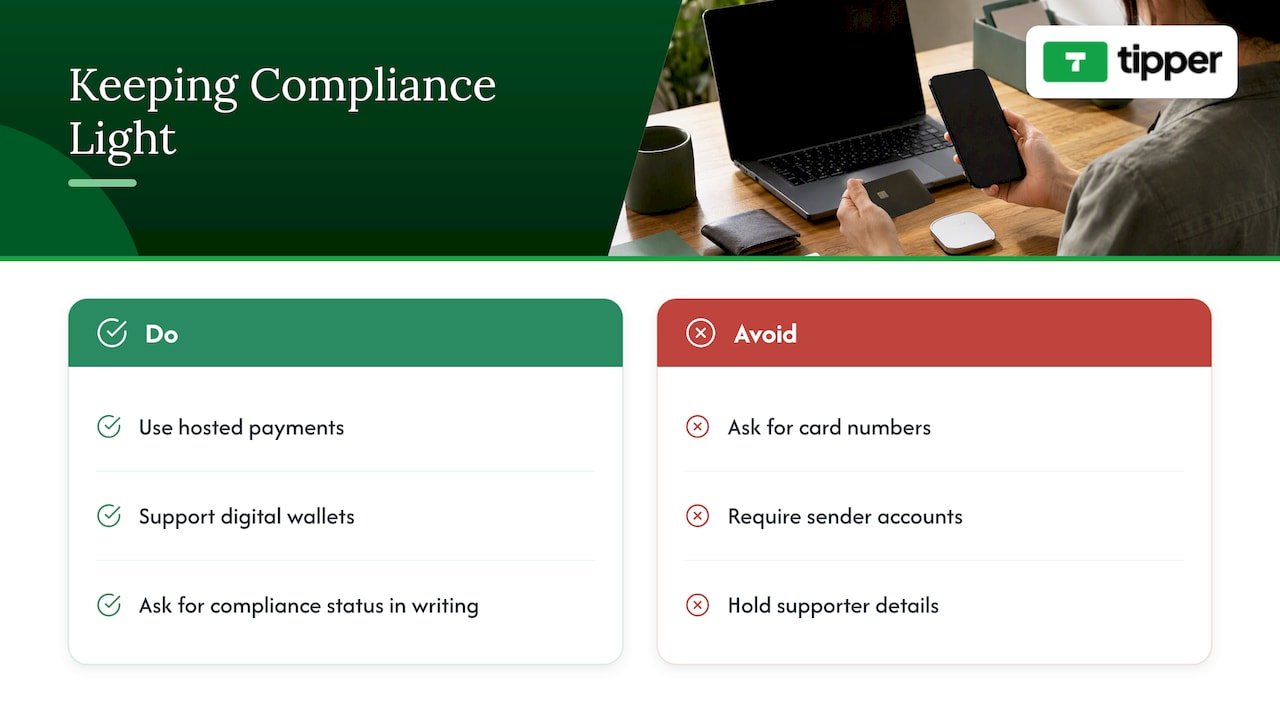
We also think creators deserve straight answers. No tool, ours included, makes responsibility disappear, and you should ask any provider for its compliance status in writing. What a good tip platform can do is make the right path the easy one: hosted payment, wallet support, no accounts for senders, and payouts that go straight to you. Creators keep 100% of their earnings on Tipper; a platform fee and a small payment processing fee are added at checkout on each tip, so you aren’t paying a subscription to get paid.
Privacy is the other half. Supporters shouldn’t have to hand over personal details to say thanks, and you shouldn’t have to hold them. Thank-you notes, photos or videos carry the personal connection; card data never needs to.
— Tipper
Taking tips with Tipper
If you want a tip link or QR code that keeps card entry off your own site, Tipper is free to create and maintain for creators, with no subscription. Supporters can tip with Apple Pay, Google Pay or a card without making an account, and you can send back a thank-you as text, a photo or a video. The processing fee is shown at checkout. Set it up, add the link to your bio, and you have a tip page without building anything.
If you’re comparing options first, our overview of no-fee customer tipping systems and the guide to payment links and engagement are good starting points.
FAQ
Do I need PCI compliance if I only accept a few tips a month?
Yes, in principle. PCI DSS isn’t tied to volume as a matter of whether it applies, though your bank or payment partner sets the validation level and what you must file. For most small creators using a hosted link, that means a short self-assessment, not a full audit. Ask your provider which one applies.
What is SAQ A?
It is the Self-Assessment Questionnaire for merchants who fully outsource card payment handling and never store, process or transmit cardholder data on their own systems. Under PCI DSS v4.0.1, it also asks you to confirm that your site is not susceptible to script attacks when you embed a payment form.
How often do I have to validate?
Generally once a year, and some programs require quarterly network scans on top. The exact schedule is set by your acquirer or payment partner, so confirm it with them rather than relying on a general rule.
Is a PCI-compliant tip platform enough on its own?
No. It lowers your scope a great deal, but you still need to verify the provider’s status each year, keep a written list of providers, and make sure your own site doesn’t bypass or weaken the payment flow.
Who should I ask about my specific situation?
Start with your acquirer or payment provider, since they decide your validation requirements. For a hosted tip page, a written answer from your tip platform about its PCI status and your responsibilities is the right first document to collect.
Sources
- PCI SSC FAQ: Does PCI DSS apply to merchants who outsource all payment processing?
- PCI DSS E-commerce Guidelines
- PCI Quick Reference Guide
- FTC: Protecting Personal Information, A Guide for Business
- Important Updates Announced for Merchants Validating to SAQ A
- FAQ Clarifies New SAQ A Eligibility Criteria for E-Commerce Merchants
- SAQs for PCI DSS v4.0.1 Now Available
- PCI DSS SAQ B




Leave A Comment