


Tiplor is a digital tip jar built for live music: one QR code, one link, and fans tip with Apple Pay, Google Pay or a card. If you are not a busker or a gigging musician, or you want something that fits streams, videos and client work as well as a stage, you have good alternatives. The best fit for most creators is a tip page that needs no fan account, takes wallet payments and lets you keep what fans send. That is what we built Tipper to do. Below we compare it with Ko-fi, Buy Me a Coffee, Tip Stack, Patreon, Tip Top Jar and the payment apps many performers still use.
TL;DR
- Tiplor is purpose-built for live music. If you tip-collect outside that world (streaming, YouTube, freelance work, small business), a general tip page often fits better.
- Tipper has no fan account requirement, supports Apple Pay, Google Pay and cards, and creators keep 100% of their tips. A small processing fee is added at checkout.
- Ko-fi can be 0% on tips if you opt out of its extra features, Buy Me a Coffee charges 5%, and a new Patreon creator pays 10%, all before card processing.
- Check fee settings the day you sign up. Some defaults quietly take a cut.
- Match the tool to your volume: simple jars for small audiences, membership suites only when recurring revenue justifies them.
Table of Contents
- What Tiplor does well, and where people look elsewhere
- How to compare tip jar platforms
- Seven Tiplor alternatives at a glance
- 1. Tipper: tips without fan accounts
- 2. Ko-fi: cheap tips with optional extras
- 3. Tip Stack: a 1% option
- 4. Buy Me a Coffee: familiar, but 5%
- 5. Patreon: for memberships, not casual tips
- 6. Tip Top Jar: tiers and activation fees
- 7. Venmo, PayPal and Cash App
- Perspective: why we think fee and friction matter most
- What fragmentation costs you
- Which one should you pick?
- Set up a tip page in a few minutes
- FAQ
- Sources
What Tiplor does well, and where people look elsewhere
Tiplor describes itself as a digital tipping platform for live music, serving artists, venues, hosts and festivals. Its pitch is simple: put a QR code on a stand, a sign or a screen, and the audience taps to tip without hunting for your Venmo handle. For a street performer or a coffee-house singer, that is a sensible design.
People start searching for alternatives for a few predictable reasons:
- They are not live musicians. A Twitch streamer, a TikTok creator or a freelance designer has no stage and no crowd standing in front of a QR code. They need a link that lives in a bio and works from a phone.
- They want thank-you messages. Many creators want to reply to a tip with a note or a short video, not just receive a number in a dashboard.
- They want to compare fees. Every platform takes something, whether a platform fee, payment processing or both. Seeing them side by side matters.
- They want one link across platforms. Creators who already use Linktree, Throne or Buy Me a Coffee want a tip option that slots into that set-up.
None of that is a knock on Tiplor. It is a focused product. The point is to pick the tool that matches how you actually get tipped.
How to compare tip jar platforms
Before looking at names, decide what you are comparing. Five criteria cover nearly every decision.
- Platform fee on tips. The percentage the platform keeps from each tip.
- Payment processing. Card transactions in the US typically cost about 2.9% + $0.30, according to Pick the Platform’s tip jar guide. That is a payment-network cost, not a platform fee, but it hits small tips hardest. A $3 tip loses about 39 cents to a flat 30-cent charge plus the percentage, roughly 13%.
- Friction for the supporter. Does the fan need an account? Can they pay with Apple Pay or Google Pay in two taps?
- Fit for your audience. Live crowd, stream chat, video comments, client invoices.
- Extras you actually use. Memberships, shops, request queues, and thank-you messages. Extras that you do not use are costs in disguise.
Seven Tiplor alternatives at a glance
| Option | Best for | Platform fee on tips | Supporter needs an account? |
|---|---|---|---|
| Tipper | Creators, freelancers, small businesses | Creators keep 100%; small processing fee added at checkout | No |
| Ko-fi | Simple tips plus an optional shop | 0% on tips if you opt out of expanded modes | Check current checkout flow |
| Tip Stack | Pure one-time tipping | 1% | Check current checkout flow |
| Buy Me a Coffee | Creators wanting a familiar brand | 5% | Check current checkout flow |
| Patreon | Recurring memberships | 10% for new creators | Yes, for memberships |
| Tip Top Jar | Event and fundraiser tip pages | Tiered plans | Check on its site |
| Venmo, PayPal, Cash App | Quick, informal tips | Varies by app | Usually yes |
Processing fees apply on top of the platform fee for the card-based options. Fees change, so confirm them on each platform before you commit.
1. Tipper: tips without fan accounts
Tipper gives you a personalized link and a QR code. A supporter opens it, picks an amount and pays with Apple Pay, Google Pay or a card. They never create an account, which removes the step where most casual supporters drop off.
What creators get:
- 100% of the tip. We do not take a cut of what supporters send you. A small payment processing fee is added at checkout.
- Free to start. Creating and maintaining an account costs nothing and there is no subscription.
- A customizable tip page. Make it look like you, not like a template.
- Thank-you messages in text, photo or video. This is the personal touch that turns a one-off tip into a relationship.
- Direct payouts.
- Privacy focus. Supporters do not hand over an account to tip you.
It works for a Twitch or Kick streamer dropping a link in chat, a YouTube creator pinning one under a video, a freelancer adding it to an invoice, or a barista or musician showing a QR code in person. That last case overlaps with Tiplor, but Tipper is not tied to live music.
The trade-off is honest: Tipper is a tip tool, not a membership suite. If you want tiered monthly subscriptions and gated posts, read the Patreon section below.
2. Ko-fi: cheap tips with optional extras
Ko-fi is the best-known low-cost option. According to Pick the Platform, it can charge 0% on tips for creators who opt out of its expanded feature modes. A SirenCY fee comparison reaches a similar conclusion for one-off tips: Ko-fi’s free mode charges no service fee on them.
The catch is in the settings. Pick the Platform notes that some platforms, Ko-fi among them, apply a fee by default unless you turn it off. Open the fee and payout settings right after you register. We also keep a longer list in our guide to Ko-fi alternatives with no-account tips.
3. Tip Stack: a 1% option
Tip Stack is a pure tipping product. Pick the Platform lists its platform fee at 1%, plus standard processing. If you only want a jar and nothing else, it is a lean choice. Compare how supporters pay and what messaging you get with your own needs.
4. Buy Me a Coffee: familiar, but 5%
Buy Me a Coffee is recognizable to fans, which helps conversion for some creators. It takes 5% on payments according to the same guide. On a $5 tip, that is 25 cents before processing. Over a year with a modest audience, the difference between 0% and 5% is real money, though not life-changing at tiny volume. If you are already on it and want to see what else is out there, see our comparison of micro-donation platforms and a wider digital tipping platform comparison.
5. Patreon: for memberships, not casual tips
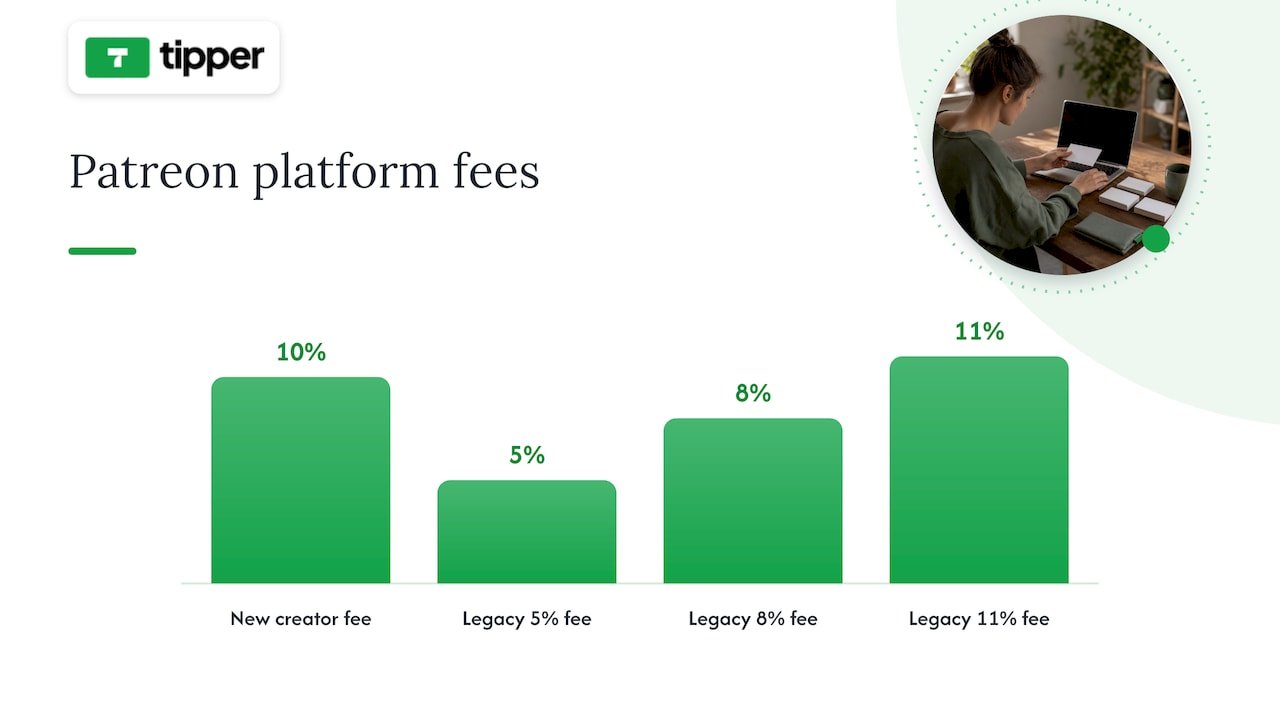
Patreon raised fees for new creators from August 4, 2025: a 10% platform fee plus processing, while legacy accounts may keep 5%, 8% or 11% depending on when they joined. For a creator with a paying monthly base and gated content, that fee buys discovery and retention tools. For low-volume creators who mostly want tips, it is an unnecessary cost, which is the view Pick the Platform’s analysts take when weighing simple jars against membership platforms.
If you are weighing a higher-fee platform that bundles engagement and publishing tools, it helps to know what the bundle includes. Tools like automated SEO and content publishing platforms show the kind of extras that can justify a bigger cut, as long as you will really use them. We cover the switch in when tipping beats subscriptions.
6. Tip Top Jar: tiers and activation fees
Tip Top Jar targets events, fundraisers and creators with free and paid tiers. Its plans differ by payout speed, number of tip pages and analytics. It can suit someone who wants dashboards and several pages. If you just want one link that works, paid tiers may be more than you need. Our own breakdown is in Tip Top Jar alternatives for creators.
7. Venmo, PayPal and Cash App
Many performers still point people to a payment app. One Reddit thread on virtual tip jars among music makers shows Venmo and PayPal as common choices, with a QR code making them easier. The weakness is that supporters usually need the same app and an account, and your personal handle may be exposed. A dedicated tip page avoids both.
Perspective: why we think fee and friction matter most
We build for the moment a supporter feels like saying thanks. That feeling lasts a few seconds. If the next screen asks for an email, a password and a saved card, most people close it. That is why we designed Tipper so supporters can pay with Apple Pay or Google Pay without an account.
We also think creators should keep what supporters send. Small tips are the backbone of creator income, and fixed processing costs already bite into them. Adding a large platform percentage on top makes a $3 tip feel pointless to the creator. Our model is that creators keep 100% of their tips, and processing is a small fee added at checkout.
Last, we believe a tip should lead to a human moment. A short thank-you note or video costs you a minute and builds loyalty that no dashboard can.
— Tipper
What fragmentation costs you
Many creators run a link-in-bio tool, a membership platform and a separate tip jar. Industry observers describe this as platform fragmentation, a hidden cost in time and attention, and newer all-in-one platforms are trying to consolidate it. Consolidation has a price too: higher fees are often how bigger suites justify extra features, as a niche-platform co-founder told Pick the Platform when discussing platforms that charge 15% or 20% on tips. Ask whether you are paying for a simple jar or an engagement suite.
A practical rule: keep tipping separate and light, so you can change it without rebuilding your whole presence.
Which one should you pick?
- You perform live and only live: Tiplor stays a reasonable fit, and its focus on venues and festivals is a strength.
- You stream, make videos or freelance: pick a tip page with a shareable link, wallet payments and thank-you messages. Tipper is built for that.
- You want a shop or membership alongside tips: Ko-fi or Patreon, depending on whether recurring revenue is real.
- You tip in small amounts: compare total cost per $3 or $5 tip, not just headline percentages.
- You already use a link hub: add a tip link there instead of replacing it. Our Throne alternatives guide covers privacy-first gifting if that is your setup.
Set up a tip page in a few minutes
If you want to try the no-account route, create your Tipper page and add the link to your bio, stream panels or video descriptions. Print the QR code for in-person use. Payments by Apple Pay and Google Pay are supported, and there is no subscription. If you run a business and want to accept wallet payments from clients, our guide to Apple Pay tipping setup for your business walks through it.
FAQ
Is Tiplor only for musicians?
Tiplor positions itself as a digital tipping platform for live music, serving artists, venues, hosts and festivals. Other creators can read that as a signal to look at general-purpose tip pages. Check its current terms before deciding.
What is the cheapest Tiplor alternative?
On published fees for tips, Ko-fi can be 0% if you opt out of its expanded modes, and Tip Stack lists 1%. Card processing of roughly 2.9% + $0.30 applies on top in the US. Tipper lets creators keep 100% of their tips, with a small processing fee added at checkout.
Do my supporters need an account to tip me?
That depends on the platform. With Tipper, supporters do not create an account and can pay with Apple Pay, Google Pay or a card. Payment apps like Venmo typically require the app.
Should I use Patreon instead of a tip jar?
Only if you have or expect recurring members and gated content. New Patreon creators pay a 10% platform fee plus processing, which is hard to justify for occasional tips.
Sources
- Ko-fi vs Buy Me a Coffee vs VojVoj: the cheapest tip-jar platforms in 2026, Pick the Platform
- Patreon vs Buy Me a Coffee vs Ko-fi in 2026, UniLink Blog
- Ko-fi vs Patreon vs Buy Me a Coffee: Fee Math, SirenCY
- Club Wants Creators To Build Their Entire Business On One Platform, NetInfluencer
- Is anyone using virtual tip jars? r/WeAreTheMusicMakers



Leave A Comment