


The fastest way to run designer tipping online is a personalized tip link or QR code that takes Apple Pay, Google Pay, and cards without asking supporters to create an account. Set one up, put it on your bio, invoice, or checkout page, and you’re collecting instant appreciation payments the same day.
TL;DR:
- Preset tip amounts, especially the middle value, significantly increase the average donation compared to freeform input, with recommended ranges depending on your audience.
- Loading speed and minimal, focused design are crucial for high conversion, particularly on mobile data connections at in-person events or in busy environments.
- Fees vary considerably, with native platform commissions reaching up to 30 percent, so using an external tip link can help maximize earnings.
- Payouts typically arrive in your account within one to three business days, with standard processing fees applied per transaction.
- Displaying trust signals such as a clear purpose statement, privacy reassurance, and optional receipts encourage support by establishing legitimacy and security.
Table of Contents
- How Does an Online Tipping Link Actually Work?
- How Do You Set Up a Tipping Page or QR Code?
- What Makes Tipping Pages Convert Better?
- What Fees Should You Expect, and When Do You Get Paid?
- What Trust Signals Should Your Tip Page Show?
- Who Actually Uses a Tipping Link Like This?
- Tip Links Versus Memberships: When Does Each Make Sense?
- Start Collecting Tips With a Link That Keeps What You Earn
- Sources
- FAQ
How Does an Online Tipping Link Actually Work?
A tip link works in four steps: someone taps your link or scans your QR code, pays in seconds using a saved card or mobile wallet, optionally leaves a note, and the money lands in your account. No app download, no sign-up screen, no typed-in card number if the payer has Apple Pay or Google Pay already saved on their phone.
That no-account flow matters more than it sounds. Every extra field or login screen between a supporter’s impulse and their payment kills conversions. Dedicated tipping pages with tap-to-pay access capture that split-second decision before it fades.
Creators and small businesses typically place these links in:
- Social media bios and creator profile links
- Personal websites or portfolio contact pages
- PDF invoices and email footers
- Printed QR codes at a register, on a table tent, or on a delivery receipt
Adding a tip option to an existing site is common enough now that platforms like WooCommerce treat tips as standard order line items for bookkeeping purposes.
How Do You Set Up a Tipping Page or QR Code?
Getting a working tip page live takes less time than most people expect. Here’s the sequence:
- Create your tip page. Sign up, name your page, and add a profile photo or logo so supporters recognize you instantly.
- Connect payment methods. Turn on Apple Pay, Google Pay, and card processing so anyone can pay however they normally pay for things.
- Set your payout destination. Link a bank account or debit card, then send yourself a small test tip to confirm money actually moves through.
- Pick preset tip amounts. Choose two or three suggested values instead of leaving a blank field.
- Add a thank-you option. Decide whether you’ll respond with a text note, a photo, or a quick video message.
- Generate your URL and QR code. Drop the link into your bio and site, print the QR code if you work in person, and test the whole flow on your own phone before sharing it.
Pro Tip: Test your tip link on a phone that has never visited your page before, on both Wi-Fi and cellular data. First-time load speed is where most tip pages quietly lose money.
This entire setup rarely takes longer than the time it takes to order coffee. Tipper’s landing page walks through the same sequence, and most creators have a live link before they’ve finished their first cup.
What Makes Tipping Pages Convert Better?
The single biggest lever is preset amounts. Prompting a supporter with suggested values instead of a blank box increases the average tip. Research on anchoring found that prompted amounts lifted average tips by a significant margin compared to letting people type in whatever number they thought of.
A well-built tip page usually includes:
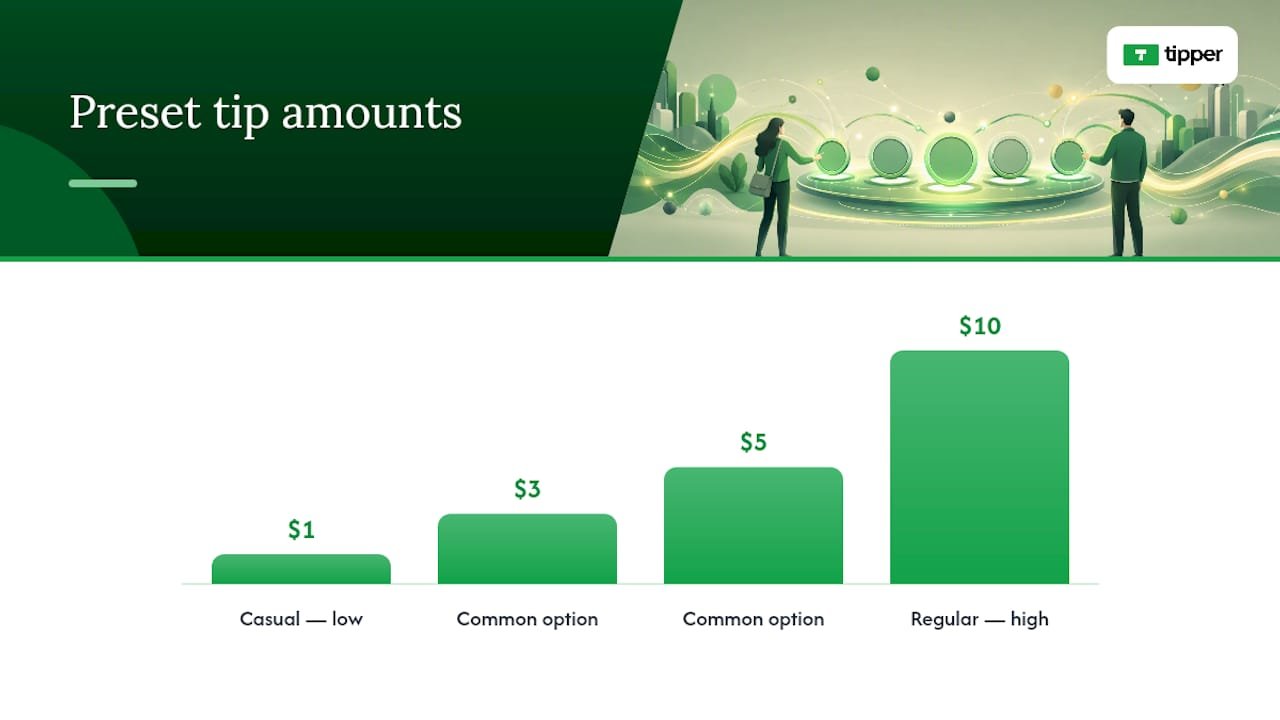
- Three preset amounts with a sensible middle option, scaled to your audience (something like $1/$3/$5 for casual followers, $3/$5/$10 for regular supporters)
- A clear, single call to action instead of competing buttons or offers
- A visible profile photo so the person paying recognizes who they’re supporting
- A short thank-you note or video option to close the loop
- Minimal text and fast load time, especially on mobile data
That last point deserves attention. A tip page loaded on a shaky connection at a farmers market table has maybe three seconds to load before someone gives up. Mobile-first, one-tap experiences tend to convert better than anything requiring an app install or new account, and every extra image or widget adds load time you don’t need.
One detail people skip: limit the choices on the page. A tip page crowded with merchandise links, membership tiers, and social buttons splits attention away from the one action you actually want, which is the tip itself. Keep the page narrow in purpose. If you want to promote your merch store too, do that somewhere else.
Placement changes results as much as design does. A link buried in a bio performs differently than a QR code sitting on a counter or printed at the bottom of an invoice, so it’s worth testing more than one spot rather than assuming your first placement is the right one.
What Fees Should You Expect, and When Do You Get Paid?
Card and mobile wallet payments carry standard processing costs, which is normal across the payments industry and not unique to any one platform. What varies a lot more is the platform fee layered on top, and that’s where the math changes fast.
Here’s why that distinction matters: native tipping tools on major social platforms have been reported charging commissions up to roughly 30% on top of standard processing. On a $20 tip, that’s $6 gone before you see a dime.
- Processing fees apply per transaction, the same as any card payment
- Payouts typically land in your account within one to three business days
- Most platforms give you a running log or export for tracking income
What Trust Signals Should Your Tip Page Show?
A page that looks legitimate gets tipped more. State plainly what the tip supports, mention that receipts are available, and reassure people their payment information stays private. None of this needs a paragraph. A single line under your headline does the job.
- A one-sentence purpose statement (“Tips help fund new tutorial videos”)
- A note that receipts are available on request
- Privacy reassurance that payment details aren’t shared or displayed publicly
- A private inbox for thank-you replies rather than exposing personal phone numbers or emails
Keep your own records separate from the platform, too. Export your tip history periodically so you have it for tax season, since tip income is generally reportable earnings, not a gift.
Pro Tip: If a tip arrives with a suspicious note, an unusually large amount from a new visitor, or a payment that gets reversed shortly after, treat it like any other flagged transaction. Contact your payment processor’s support line rather than refunding it yourself outside the platform.
Who Actually Uses a Tipping Link Like This?
The same basic tip page adapts to wildly different jobs. A freelance designer might drop the link on an invoice footer right under the total due. A streamer puts it in a bio and mentions it during a live broadcast. A coffee shop owner tapes a QR code by the register for people who want to tip but never carry cash.
- Portfolio designers and consultants: add the link to your contact page and every invoice you send
- Freelancers with in-person work: print a QR code on delivered work, business cards, or in a meeting room
- Streamers and short-form creators: put the link in your bio and mention it during live sessions
- Small service businesses: place a QR code at the counter and on printed receipts
Each of these placements gets a different kind of supporter, at a different moment of intent, which is exactly why testing more than one spot pays off.
Tip Links Versus Memberships: When Does Each Make Sense?
Tipping links win for spontaneous, low-friction appreciation. Someone loved a specific post, invoice, or interaction and wants to say so right then. Memberships are a different tool entirely. They work once you’ve already proven recurring demand and want predictable monthly revenue instead of one-off gestures.
Most creators eventually run both. Combining a platform’s native features with an external tip link you control means you own the supporter relationship even if the platform changes its rules tomorrow. Instant, no-account tipping and keeping every dollar of the tip itself is what makes the external link worth having in the first place.
— Tipper
Start Collecting Tips With a Link That Keeps What You Earn
Some tipping platforms take a significant commission on every gift your supporters send you. Supporters tip through your personalized link or QR code without creating an account, paying with Apple Pay, Google Pay, or a card in a few taps.

Setting one up follows the same short sequence covered above: build your page, turn on your payment methods, and share your link or QR code wherever supporters already find you, from a bio to an invoice to a printed sign at your counter. If you’re weighing this against a card-reader tip jar at checkout, point-of-sale alternatives worth knowing are worth a look too. When you’re ready, create your tip page and get a working link live before your next post goes out.
Sources
A few sources back the specific claims made throughout this guide, worth a look if you want the fuller picture.
- Axios — tipping creators coverage
- University of Michigan (UMSI) — prompting increases tipping
- WPSlash — accept tips and donations guide
- TIPMO — The ultimate guide to a cashless tipping page in 2026
FAQ
What Is Designer Tipping Online?
It refers to collecting tips or appreciation payments through a personalized link or QR code instead of a platform’s built-in tipping feature. Senders pay with Apple Pay, Google Pay, or a card, often without creating an account, and the money goes directly to the creator or business.
Do Supporters Need an Account to Send a Tip?
No. A well-built tip link lets anyone pay in a few taps using a saved mobile wallet or card, with no sign-up screen in the way. That no-account flow is a big part of why tap-to-pay tip pages convert better than tools requiring an app download.
How Much Does Tipper Charge to Use?
Tipper’s platform fee structure and current processing rates are listed on the Tipper website. Creators keep the tip itself with only standard processing applied. Check the site for the exact current numbers before you launch.
How Fast Do Tip Payouts Arrive?
Most tip page payouts land in a connected bank account within one to three business days after the transaction clears. Timing can vary slightly depending on your bank and the payment method the supporter used.
Should I Use a Tip Link Instead of Platform-Native Tipping?
Use both if your platform allows it, but keep an external tip link for ownership over the relationship and to avoid high native tipping commissions. Owning the tip page directly also means your setup survives even if a platform changes its monetization rules.




Leave A Comment