


A TikTok tip link is a personalized page or QR code that lets your followers send you money instantly through Apple Pay, Google Pay, or a card, with no account or sign-up required on their end. The move that actually works: build the tip page, connect a live payment processor, set three preset amounts, then drop the link in your TikTok bio and pinned comments and test it with a real payment before you promote it.
TL;DR:
- Setting up a tip link requires verifying live mode status for your payment processor and ensuring your payout currency matches your intended receiving currency.
- Placing the tip link on your TikTok profile, pinning it on high-engagement videos, or overlaying it in videos boosts click-through and tip collections.
- Testing with a real payment before promotion uncovers most checkout issues, preventing lost tips and follower frustration.
- Most creators overlook the importance of strategic placement, personalized messaging, and timing, which significantly increases tip revenue.
- Using a flexible, account-free system like Tipper supports easy setup, multiple payment options, and keeps 100% of earnings without sign-up barriers.
Table of Contents
- What You Need Before Creating a Tip Link
- Step-by-Step: Build Your Tip Page and Connect Payments
- How to Add the Tip Link to TikTok for the Best Results
- Why Did My Tip Link Payment Fail?
- Tipper’s Take on Account-Free Tipping and Audience Support
- The Part Most Creators Get Wrong About Tip Links
- Ready to Start Collecting Tips With Tipper?
- Setup Guides Worth Bookmarking
- Sources
- FAQ
What You Need Before Creating a Tip Link
Get these pieces lined up first, or you’ll be troubleshooting mid-launch instead of collecting tips.
- An email address and login for your tip page account
- A payout destination: a bank account or connected payout method where the money actually lands
- A connected payment processor, either Stripe, PayPal, or an all-in-one built-in processor
- Basic brand assets: a clear profile photo, a short display name, and a one-line description of what you do
Before you go live, confirm your processor account is switched to live mode, not test mode. This trips up more first-time creators than anything else. Also check that the currency on your payout settings matches the currency you expect to receive. A mismatch here means tips can process but land somewhere you didn’t intend, or fail outright. If you get stuck, Tipper’s internal setup walkthrough covers account creation and payout timing in more detail.
Step-by-Step: Build Your Tip Page and Connect Payments
Once your prerequisites are sorted, the actual build takes less time than editing a TikTok video.
- Create your tip page. Choose a short, memorable URL, upload a photo that matches your TikTok profile, and write one sentence explaining why someone might want to tip you. Specificity beats vagueness here. “Tips help me buy props for next week’s videos” outperforms “Support me.”
- Connect a payment processor. You can wire up Stripe payment links by selecting the “Donation” type and setting suggested amounts, connect PayPal directly, or use Tipper’s built-in processor flow, which skips the manual setup entirely. Whichever route you take, double-check the account is in live mode.
- Set your preset amounts. Three buttons is the standard: one impulse-tip amount, one default, and one for your biggest fans. Presets with a highlighted middle option tend to become the default choice for most tippers, so don’t bury your target amount at the end of the row. Decide whether you’ll allow custom amounts too, and write a genuine thank-you message that will show up after someone tips.
- Publish and test. Copy the public URL or generate a QR code, then send yourself a small, real payment. Not a test transaction. A live one. Confirm the thank-you screen displays correctly and that the receipt shows up where you expect it.
Pro Tip: Write your thank-you message like you’re texting a friend, not issuing a receipt. “Got your tip, means a lot, more content coming Friday” reads a hundred times warmer than “Thank you for your donation.”
A single payment link that accepts card, Apple Pay, Google Pay, and PayPal gives you flexibility if you plan to share the same link across platforms beyond TikTok, not just in your bio.
How to Add the Tip Link to TikTok for the Best Results
Placement determines whether your tip link gets clicked or ignored, and TikTok gives you exactly four real spots to use it.
- Profile bio link. This is your baseline. Every visitor to your profile sees it.
- Pinned comment on your best-performing posts. Pin it to videos that already have engagement, not your newest upload. People tip after they’ve already decided they like you.
- Link-in-bio aggregator. If you’re juggling multiple links, put your tip link near the top, not buried under five other options.
- QR code or short link overlay in the video itself. This works especially well on tutorial or behind-the-scenes content where the ask feels earned.
Keep your on-screen copy short: “Tip jar in bio if this helped” beats a paragraph explaining your monetization philosophy. Tell people specifically what tipping supports, whether that’s new equipment, more frequent uploads, or a personal thank-you video reply, because vague asks get vague results.
Tips tend to spike around these high-engagement moments rather than in response to constant, blanket requests, so save your asks for when they’ll actually land.
Pro Tip: Test your tip link on your own phone using both Apple Pay and Google Pay before you promote it. Mobile wallet behavior can differ from desktop, and you want to catch a broken checkout before a fan does.
Placing your tip option where people already have context, right after a helpful video or inside a pinned comment on proven content, converts noticeably better than sending cold traffic to a generic external page.
Why Did My Tip Link Payment Fail?
Test with real money before you tell a single follower the link exists. A $1 or $2 live payment to yourself will surface almost every problem a test-mode transaction hides.
If a payment doesn’t go through, work down this list:
- Confirm your processor is actually in live mode. Test mode transactions look identical to real ones until the money never arrives.
- Check for a currency mismatch between your tip page settings and your payout account.
- Verify mobile wallet settings. Apple Pay and Google Pay sometimes need to be re-enabled after a processor update.
- Double-check your payout account details are current, especially if you recently switched banks.
Once a test payment clears, confirm the funds actually reach your payout account and note the timing, since most processors settle within a few business days rather than instantly. If something still looks wrong, contact your platform or processor’s support team with the transaction ID, the exact time of the attempt, your device type, and a screenshot of the error. That level of detail gets a resolution faster than “my tip link isn’t working.”
Tipper’s Take on Account-Free Tipping and Audience Support
Tipper was built specifically to remove the account requirement on the tipper’s side.
Picture a creator who just posted a tutorial that took hours to film and edit. A fan sends a tip through the pinned comment link. Instead of a generic auto-reply, the creator records a fifteen-second thank-you video and sends it back. That small exchange, tip and personal response, is the entire mechanism that turns a one-time tipper into a repeat supporter. It’s not complicated. It’s just consistently rare, because most creators never build the reply into their routine.
For the technical side of connecting TikTok specifically, including how fees and backup links work, Tipper’s tipping breakdown for TikTok creators walks through the details step by step.
The Part Most Creators Get Wrong About Tip Links
Most advice on this topic treats the tip link like a formality, something you slap in your bio once and forget. That’s backwards. The setup takes twenty minutes. The placement, timing, and follow-through are where almost everyone leaves money on the table.
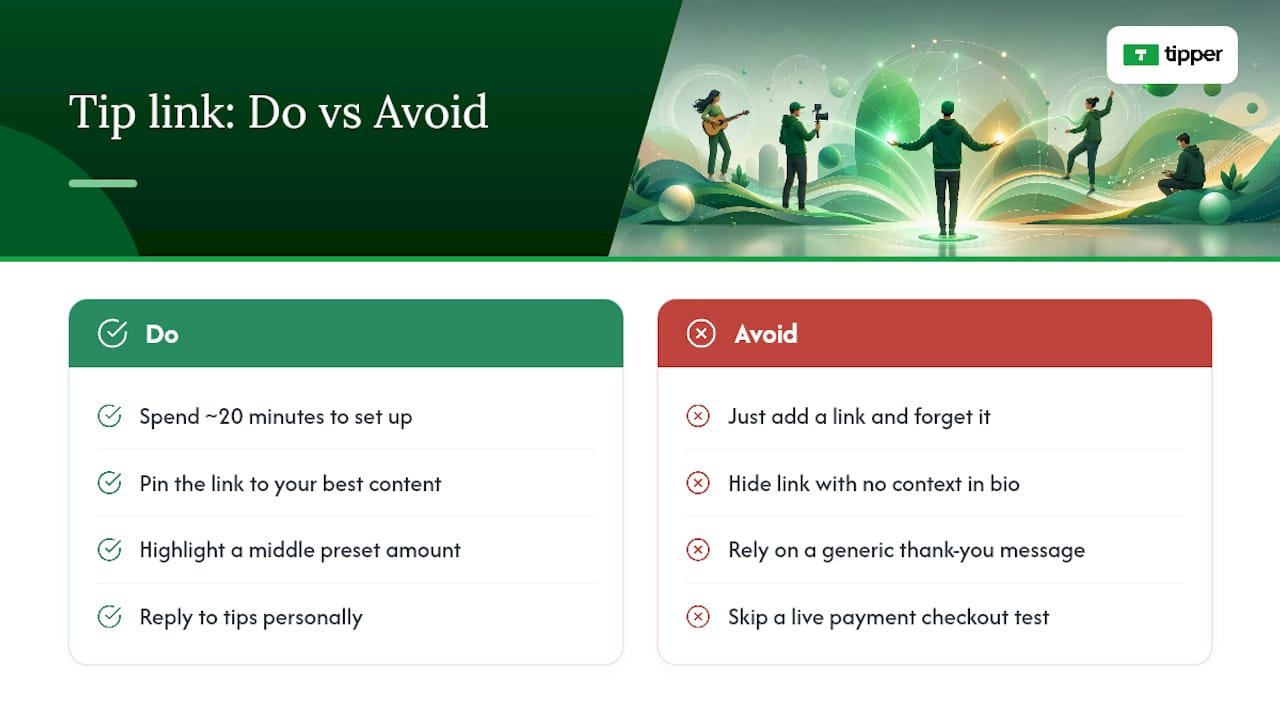
The conventional wisdom says “just add a link and ask for support.” But a link with no context, sitting in a bio nobody reads past the first line, converts at nearly nothing. The creators who actually collect meaningful tips are the ones who pin the link to their best content, highlight a middle preset amount so it becomes the default click, and reply to tips personally instead of letting a generic thank-you do the work.
If you’re setting this up for the first time, prioritize the live payment test over everything else. A broken checkout that nobody reports because nobody bothered trying is far more common, and far more costly, than a poorly worded bio line.
— Tipper
Ready to Start Collecting Tips With Tipper?
A direct route to an account-free tip link is built for exactly what this article covers: fast setup, no sign-up friction for the person sending the tip, and full ownership of your earnings.

Here’s what that looks like in practice:
- Fast setup. A tip page you can build and publish in minutes, not hours.
- Privacy-first design. Supporters tip through mobile wallets or card without creating a login or handing over an account.
- Direct payouts. Creators keep 100% of what they earn, with thank-you messages sent back as text, photo, or video for a personal touch.
If you run a physical business collecting in-person tips too, Tipper’s guide to point-of-sale tipping alternatives is worth a look. For creators ready to move now, set up your tip page on Tipper and have a working link before your next upload goes out.
Setup Guides Worth Bookmarking
For deeper technical steps matched to your specific payment processor, these resources cover the ground this article touched on:
- Creator Tips Playbook, for placement and preset-amount strategy
- Tips Block setup walkthrough, for connecting a processor and testing live payments
- Best creator tip link strategy, for payout expectations and placement details
Sources
- Creator Tips Playbook — How to Earn From Your Audience With
- How to Use the Tips Block in UniLink (Accept Tips and Micro-Payments on Your Page)
- Accept Tips & Donations From Fans via PayPal or Crypto | PayRequest
FAQ
Do I Need a TikTok Business Account to Use a Tip Link?
No. A personalized tip link works independently of TikTok’s account type since it lives outside the app entirely. You just need a place to paste the URL, whether that’s your bio, a pinned comment, or a video overlay.
Can Followers Tip Me Without Creating an Account?
Yes, that’s the entire point of an account-free tip link. Platforms like Tipper let supporters pay through Apple Pay, Google Pay, or a card in a few taps, with no login or sign-up step on their end.
What Payment Processors Work for a Tip Link?
Stripe and PayPal are the two most common choices, and both support payment links built specifically for tipping. Tipper also offers a built-in payment flow that skips the manual processor setup.
How Do I Know If My Tip Link Is Actually Working?
Send yourself a small, real payment rather than relying on test mode. Confirm the thank-you message displays, check that the receipt arrives, and verify the funds show up in your payout account within the processor’s normal settlement window.
Does Tipper Take a Cut of My Tips?
Current pricing details are listed on the Tipper website.



Leave A Comment