

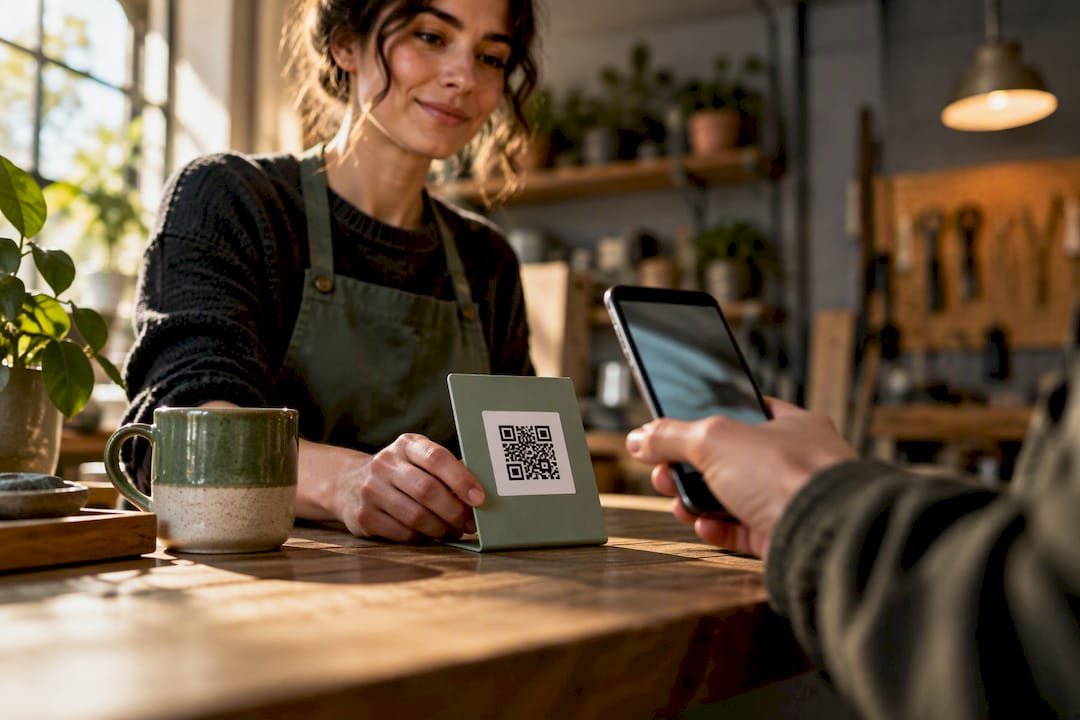
The fastest way to collect an instant tip is a hosted tipping link or QR code that supports one-tap wallets like Apple Pay and Google Pay. Skip anything that forces a supporter to create an account first. Some tipping platforms work this way out of the box, so create a link and send yourself a $1 test tip right now to confirm the payout path before you share it anywhere.
TL;DR:
- Using a hosted payment link or QR code with wallet support ensures tips are collected quickly and without forcing supporters to create accounts.
- Setting up a tipping link involves verifying identity, creating the link, generating a QR code, and testing with a small payment before sharing live.
- Minimizing data collection and offering Apple Pay or Google Pay options significantly increases the likelihood of tipping.
- Tips usually update instantly in your platform balance, but bank transfer to your account can take one to three business days, with standard processing fees applying.
- One-tap, no-account tips are most effective because each additional step can reduce support, making simple, privacy-focused options the best choice for most creators.
Table of Contents
- How Instant Tipping Links Actually Work
- How Do You Set Up a Tipping Link Step by Step?
- What Increases Tips Without Asking for Too Much Data
- How Fast Do You Actually Get Paid, and What Do Fees Look Like?
- Why We Think One-Tap, No-Account Tipping Wins
- Get Your Instant Tipping Link Live With Tipper
- Sources
- FAQ
How Instant Tipping Links Actually Work
An instant tipping link is just a hosted checkout page with a single job: take a tip and get out of the way. No product catalog, no cart, no login wall. The sender taps a link or scans a QR code, picks or types an amount, pays with a card or a mobile wallet, and the transaction is done in under 30 seconds. That’s the whole model, and the fact that it works so well is exactly why it’s spreading from bartenders’ tip jars to newsletter footers.
But “tipping link” covers a few genuinely different setups, and picking the wrong one costs you either money, privacy, or speed.
Hosted payment links. Services built specifically for this, including Tipper, generate one URL that opens a checkout supporting cards plus Apple Pay and Google Pay. General-purpose tools work similarly: Stripe Payment Links let a seller accept payment without building a website at all, and the same link converts into a scannable QR code automatically. PayPal’s Payment Links do the same thing through a hosted checkout that skips coding entirely. The appeal is speed. The sender never leaves the page, and most wallet-based flows close in one tap.
- Best for: creators, freelancers, and service workers who want one link they can drop anywhere.
- Trade-off: you’re relying on the provider’s checkout design, so features like suggested amounts or thank-you notes vary by platform.
Tip pages with QR codes. This is the physical-world version, a printed or displayed code at a register, a tip jar, or a table tent. It works because it removes the last bit of friction for in-person tipping: no typing a URL, no searching an app store. A good tip page adds a photo, a short bio, suggested dollar amounts, and a thank-you message field. This format shines at events and counters where someone’s hands are full and their patience is short.
- Best for: bartenders, delivery drivers, food trucks, and small venues.
- Trade-off: print quality and placement matter more than people expect. A blurry or tiny QR code kills conversions before the payment screen ever loads.
Crypto tip jars. A small niche of tools, like Shieldz’s free tip jar generator, create a pay-what-you-want page that sends funds straight to a wallet address with no platform holding the money in between. There’s no custodial delay and no platform fee cut, but the sender needs a crypto wallet, network fees fluctuate, and volatility means the dollar value of a tip can shift before it’s even converted.
- Best for: creators with an audience that’s already comfortable with crypto.
- Trade-off: technical enough to shrink your potential tipper pool significantly.
BLE and proximity discovery. This is the newest and least proven method: Bluetooth-based discovery that lets a nearby phone detect a tipping option without scanning anything. It’s promising for venue staff who move around a room, but battery drain, inconsistent device support, and immature standards keep it more experimental than practical for 2026.
The real trade-off across all four methods comes down to four variables: friction, privacy, payout speed, and fees. Hosted links and QR pages win on friction and speed. Crypto wins on privacy and avoids platform fees but loses on accessibility. BLE promises the lowest friction of all, someday, but isn’t there yet. For most service workers and creators, a hosted link with wallet support is the practical middle ground, which is exactly why it dominates the market.
How Do You Set Up a Tipping Link Step by Step?
Getting a working tipping link live takes less time than making a pot of coffee. Here’s the real sequence, not the marketing version.
- Sign up and verify your identity. Expect to enter your name, email, and bank account details, either through an instant verification service like Plaid or a manual micro-deposit process for ACH. This step exists because payment processors are legally required to confirm who’s receiving money, not because the platform wants your data.
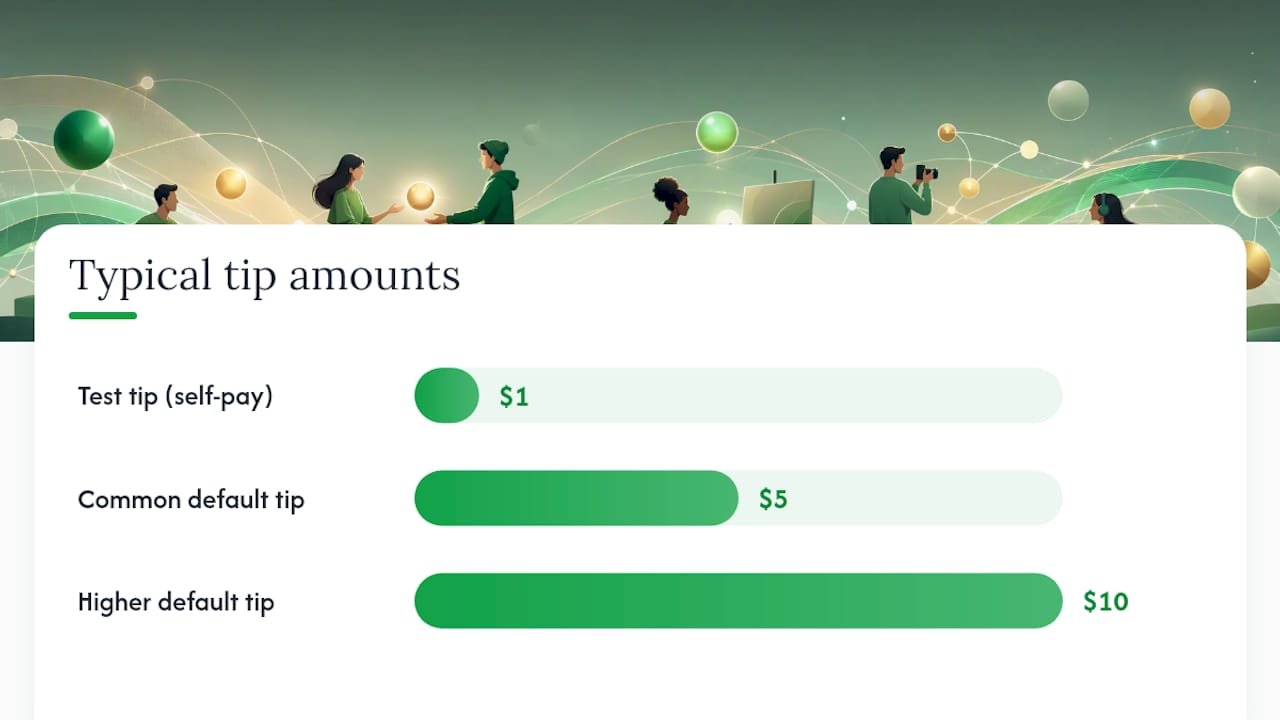
- Build your link. Set one or two suggested tip amounts (most creators land on something like $5 and $10 as defaults), upload a photo, and write a short line explaining what the tip supports. Choose your default currency and any branding options the platform offers.
- Generate your QR code. Many tipping platforms turn your link into a QR code automatically. Save it as an image you can print for a counter or table tent, or paste the raw link directly into a social bio, an invoice, or a text message.
- Send yourself a $1 test tip. This is the step people skip and regret. Pay your own link with a card or wallet, then check three things: did the notification arrive, does the amount match what you expected after fees, and how long did it take to hit your available balance? Event-based tipping setups benefit especially from this dry run since there’s no time to troubleshoot mid-shift.
- Set your payout cadence and confirm bank verification. Decide whether you want payouts daily, weekly, or on demand, and double check that your bank account passed verification. An unverified account is the single most common reason a payout gets held instead of delivered.
Pro Tip: Run your test tip using the same payment method your typical supporter would use, if you expect most tips through Apple Pay, test with Apple Pay, not a manually entered card number. Wallet checkouts and card checkouts sometimes route through slightly different verification paths.
Once that $1 test clears and lands in your balance on schedule, you’re not testing anymore. You’re live.
What Increases Tips Without Asking for Too Much Data
Every extra field you ask a supporter to fill out is a chance for them to close the tab instead. Research on tipping behavior backs this up directly: privacy-preserving, low-friction tipping flows increase the likelihood someone actually tips, while being observed or asked for unnecessary personal details reduces it. That’s not a marketing claim, it’s a documented behavioral pattern, and it should shape how you build your tip page.
- Put Apple Pay and Google Pay front and center, not buried under a “more options” toggle. One-tap wallet completion consistently beats manual card entry for speed.
- Offer two or three suggested amounts with one marked as the default. Too many choices slows people down; no suggestions at all leaves them guessing.
- Only collect what you need to pay out: name, email, and bank details. Skip asking supporters for their own accounts or extra personal information, that friction has nothing to do with getting your money and everything to do with losing the tip.
- Confirm every tip with a clear message, and if the platform allows it, add a short 5 to 10 second thank-you video or a personal note. That small gesture is what turns a one-time tipper into a repeat one.
- If you’re using a printed QR code, make it large, well-lit, and paired with a short URL as backup text for anyone whose camera struggles to focus.
Statistic Callout: According to the same tipping privacy research, the feeling of being watched or asked for unneeded information measurably reduces whether someone tips at all, not just how much. Privacy isn’t a nice add on feature here, it’s a direct lever on your conversion rate.
How Fast Do You Actually Get Paid, and What Do Fees Look Like?
There’s a difference between your tip balance updating and the cash actually landing in your bank account, and mixing those two up is where most new users get confused. A tip usually shows up in your platform balance within seconds or minutes. Getting that balance into your checking account is a separate step, and it typically takes anywhere from same-day to one to three business days, depending on your bank and the payout method you’ve selected. Some platforms offer instant crediting to an internal balance, similar to what services like SnapTip describe, while the transfer to your actual bank account still runs on standard settlement timing.
Fees generally stack in two layers:
- Payment processing fee — a percentage charged by the card network or wallet provider on every transaction, standard across virtually every payment link tool on the market.
- Platform fee — what the tipping service itself charges to run the link, host the page, and manage payouts. Tipper’s own processing fee structure is disclosed at checkout so senders and recipients both see it clearly.
Tips are taxable income, full stop. Keep a simple record of transaction dates and amounts as they come in, don’t wait until tax season to reconstruct it from memory. The IRS newsroom publishes updated guidance on taxable income and deductions relevant to working Americans, and if your tip income becomes a meaningful part of your earnings, a conversation with an accountant is worth the hour it takes.
Why We Think One-Tap, No-Account Tipping Wins
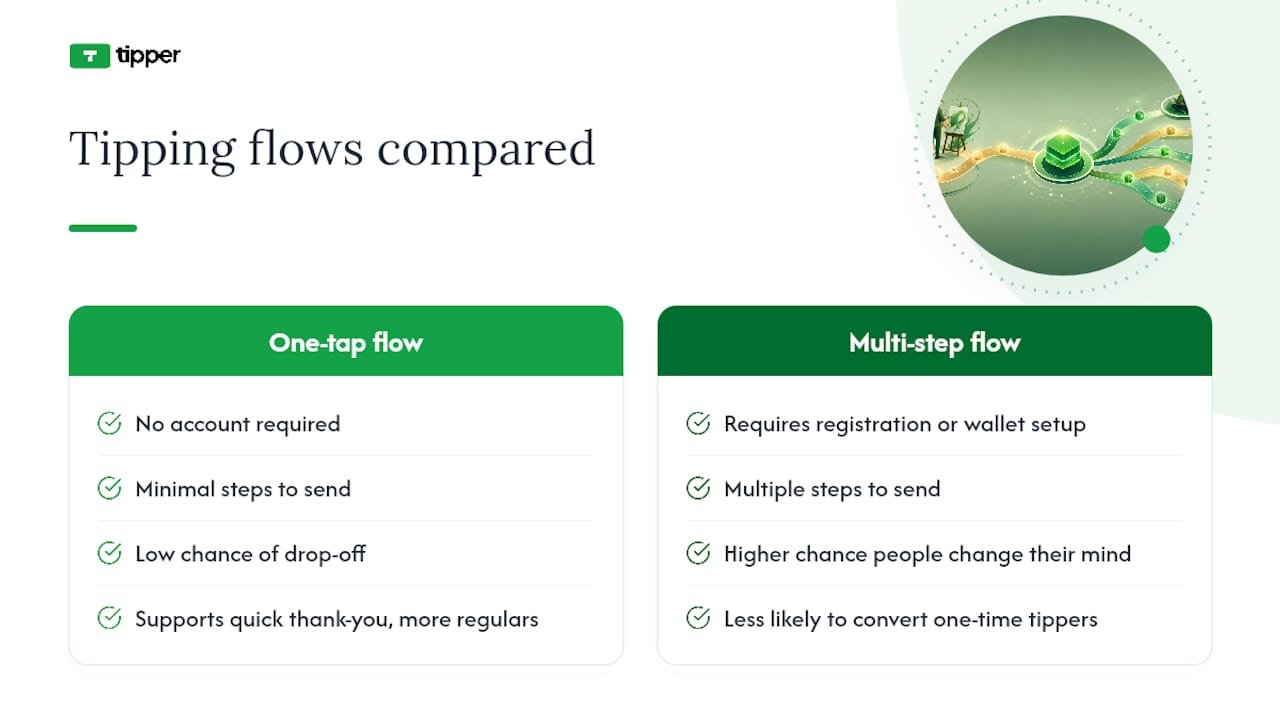
Every extra step between “someone wants to tip you” and “the tip is sent” is a step where they change their mind. That’s not a theory, it shows up in the research on tipping behavior, and it’s the entire reason Tipper builds around a no-account, wallet-first flow instead of asking senders to register anywhere.
The part people underestimate is the personal touch. A tip is rarely just a transaction, it’s a small “I see you” moment, and creators who send back a quick thank-you note or short video turn one-time tippers into regulars. Simplicity and connection aren’t opposite goals here. They reinforce each other.
— Tipper
Get Your Instant Tipping Link Live With Tipper
Some platforms provide a personalized link and QR code that lets anyone tip you instantly with Apple Pay, Google Pay, or a card, no sender account, no app download, no friction.

Getting started takes about five minutes. Sign up, build your link with a photo and a couple of suggested amounts, and run a $1 test tip to confirm your payout path works before you share it anywhere. Then drop the link in your social bio, print the QR code for your counter or invoice, or paste it straight into a text message. If you want a walkthrough of how other creators are placing these links in real setups, the contactless tip collection examples page is a good place to see it in practice. Head to Tipper to create your link and start collecting tips today.
Sources
For the technical side of hosted payment links, Stripe’s payment links documentation and PayPal’s payment links page both cover supported payment methods and checkout security in detail. For the tax side, the IRS newsroom is the authoritative source on how tip income is taxed. And for the behavioral research behind why privacy-first tipping flows convert better, the study on tipping privacy is worth reading in full.
- Tipping privacy: The detrimental impact of observation on non-tip responses
- Stripe Payment Links | Simple links to accept payments
- PayPal: Payment Links
- IRS newsroom
FAQ
What Is an Instant Tipping Link?
An instant tipping link is a hosted checkout page, usually paired with a QR code, that lets someone send you money in a few taps without creating an account. Tipper builds this specifically around one-tap wallet payments like Apple Pay and Google Pay so the sender never has to fill out a form.
How Long Does It Take to Get Paid After a Tip?
Your balance typically updates within seconds or minutes of the tip being sent. The transfer to your actual bank account depends on your payout settings and bank, generally landing same-day to within one to three business days.
Do I Need a Business Account to Accept Tips?
No. Most tipping link platforms only require you to verify your identity and bank details, not a registered business. Senders never need any account at all to send you a tip.
Are Tips Received Through a Link Taxable?
Yes. Tips are taxable income regardless of how they’re received, and the IRS treats digital tips the same as cash tips. Keep records of every transaction so reporting them at tax time is straightforward.
What Fees Should I Expect on an Instant Tipping Link?
Expect a payment processing fee charged by the card or wallet network on each transaction, which is standard across nearly every payment link service. Some platforms add a separate platform fee for hosting and managing the tip page, and Tipper discloses its fee structure directly at checkout.



[…] Collect Tips in 5 Minutes With Tipper: Tipping Link for Creators […]