


Yes, you can start collecting tips today. Create a personalized tip link and QR code that accepts Apple Pay, Google Pay, and cards, and students can send you a tip in under ten seconds without downloading an app or making an account. One option built specifically for this is available. Set it up, test it once on your own phone, then share it at your next class.
TL;DR:
- Wallet payments like Apple Pay and Google Pay significantly increase the likelihood of students completing tips by reducing payment friction.
- Setting up a personalized tip link and QR code typically takes less than ten minutes once its initial configuration is complete.
- Display the tip QR code in accessible places such as studio entrances, class slides, or post-class communications to maximize visibility at the right moment.
- Always verify QR codes visually and via URL preview to avoid scam links or tampered signs, especially in public spaces.
- Tips received through digital links are taxable income and should be tracked consistently for accurate tax reporting.
Table of Contents
- Setting Up Your Yoga Teacher Tip Link and QR Code
- Which Payment Methods and Tip Amounts Work Best?
- Where Should You Share Your Tip Link in Class?
- How Do You Spot a Fake QR Code or Tip Link?
- Do You Have to Report Tips on Your Taxes?
- What Teachers Are Actually Doing With Tip Links
- Get Your Tip Link Running With Tipper
- Sources
- FAQ
Setting Up Your Yoga Teacher Tip Link and QR Code
Getting a working tip link takes less time than rolling out your mat. Most of the setup happens once, and after that you’re just sharing the same link or code every week.
Start with the basics before you touch any payment settings:
- Prepare your profile. Choose a display name students will recognize (your teaching name, not just a username), add the payout email you check regularly, and write a short thank-you message. A line like “Thanks for practicing with me” goes a long way.
- Enable wallet payments. Turn on Apple Pay and Google Pay support alongside card payments, and add your payout details. Some platforms verify your identity at this stage. It’s routine and usually takes a few minutes.
- Build your tip presets. Set a few suggested amounts instead of leaving every tip to guesswork.
- Generate and export your QR code. Save a high-resolution version for printing and a smaller one for screens or slides.
- Test before you share. Send yourself a small test tip, like $1, from your own phone. Then try scanning the code from a second device to confirm it opens the right page.
Pro Tip: Keep the original QR image file somewhere safe, like a cloud folder you control. If a printed sign gets damaged or a scam version turns up somewhere, you’ll want to reprint from the real source instantly.
Run through this once, and every future class just means printing the same code or pasting the same link, whether you’re teaching a drop-in class or working with private clients. A primer on how digital tipping works is worth a skim if any step feels unfamiliar.
Which Payment Methods and Tip Amounts Work Best?
Wallet payments remove almost every point of friction. When a student can tap Apple Pay or Google Pay instead of typing in a card number, they’re far more likely to actually finish the payment instead of abandoning it halfway through. Cards should stay available too, since not every phone has a wallet set up.
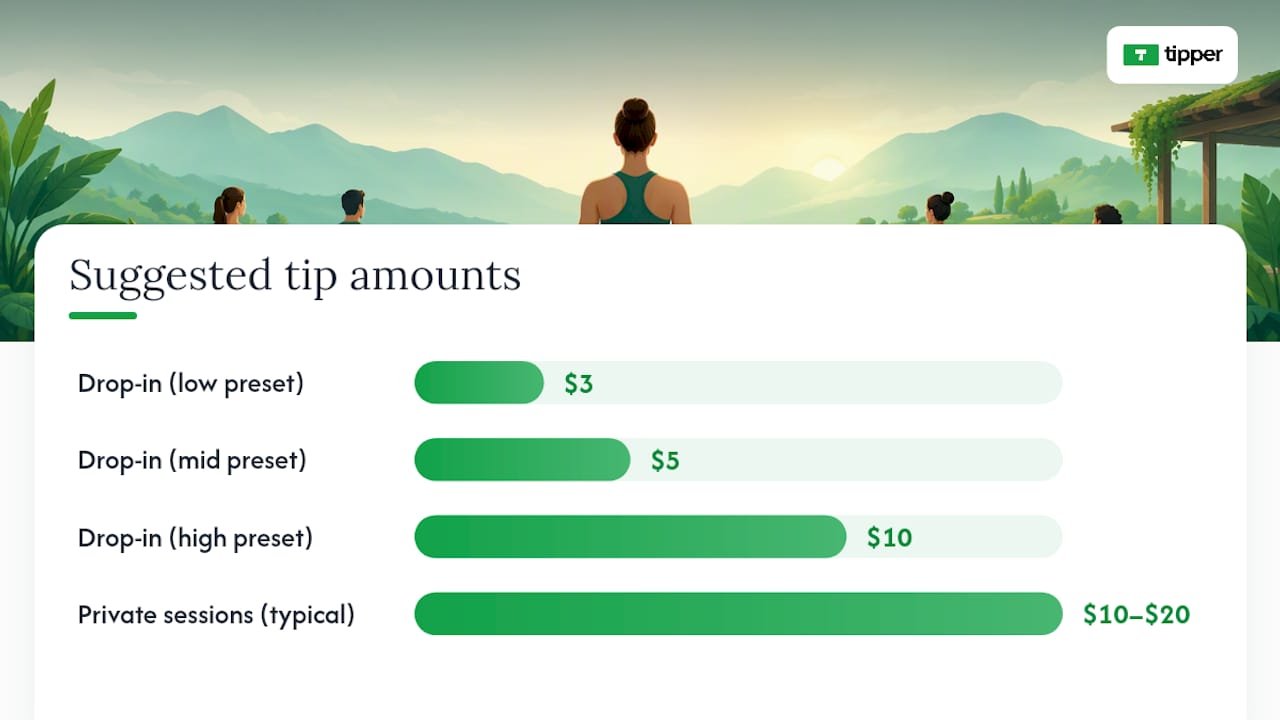
Preset amounts matter more than most teachers assume. A reasonable spread looks like:
- $3, $5, and $10 for a typical drop-in class
- $10 to $20 for private sessions or workshops
- A visible “custom amount” option every single time
Research on tipping behavior found that preselected prompts can shift what people actually give, and self-checkout style prompts in particular tend to depress giving rather than encourage it. The fix isn’t fewer presets, it’s better ones. Anchor with a fair middle option and never bury the custom-amount field.
If a processing fee applies, say so plainly on the tip page itself, not in fine print. Students respond better to a clear “a small processing fee applies” than to a number that feels hidden until after they’ve paid. A quick read on Apple Pay and Google Pay setup covers the wallet side in more detail.
Where Should You Share Your Tip Link in Class?
The link only works if students actually see it at the right moment, not buried three scrolls deep in your bio.
- In the studio: a small printed QR sign near the door, or a slide projected before class starts and again as everyone’s rolling up mats.
- At the front desk: a laminated card with the code, especially for studios that run a lot of drop-ins.
- Post-class follow-up: drop the link into your class confirmation email or group chat, ideally once, not every message.
- Your social profiles and class listings: add it once to your bio and any class-booking page so it’s always findable without you repeating yourself.
Timing beats repetition. One instructor insight worth borrowing: mentioning the link once at the end of class, then reinforcing it in a single follow-up message, tends to get better results than asking mid-class or nagging students across multiple channels. A simple script works fine: “If today’s class was helpful and you’d like to leave a tip, my link is on the sign by the door, no pressure.” That phrasing does the work without turning tipping into an ask.
How Do You Spot a Fake QR Code or Tip Link?
QR codes are convenient, and that’s exactly why scammers like them too. The FTC has warned that criminals hide harmful links inside QR codes, and one increasingly common tactic is pasting a fake sticker directly over a legitimate code in a public space like a printed sign or a parking meter. Unsolicited codes sent by text or email carry the same risk.
Follow these steps to keep your sign safe and your students protected:
- Check your printed sign regularly. A code that’s been tampered with often looks slightly off, like a sticker layered over the original.
- Preview the URL before scanning. Most phone cameras show a link preview; check for misspellings or an unfamiliar domain before tapping through.
- Never enter a password to tip someone. A legitimate tip page never asks for banking logins or personal identification.
- Report anything suspicious. If a code or link looks wrong, stop the interaction, check your recent transactions, and report it to the FTC or the FBI’s IC3 division.
Print your own code from a source only you control, and reprint it the moment a sign looks disturbed.
Do You Have to Report Tips on Your Taxes?
Yes. Tips received through a digital link count as taxable income, and depending on volume they may show up on a Form 1099-K issued by the payment processor. The IRS gig-economy guidance makes clear that tip income needs to be tracked and reported regardless of whether a 1099-K arrives, since the threshold for issuing one doesn’t change your underlying obligation to report.
Good record-keeping doesn’t need to be complicated:
- Log totals weekly, not just at tax time, so nothing gets lost between January and April.
- Reconcile your payout reports against your own running total every month.
- Keep a simple spreadsheet or note tracking date, amount, and source (class tip, private session, workshop).
- Talk to a tax professional if you’re mixing tip income with studio pay or freelance teaching income elsewhere.
A quick look at gig economy tipping and what it means for taxes can help clarify how this fits alongside other freelance income if you teach at multiple studios.
What Teachers Are Actually Doing With Tip Links
Placement changes by context. Drop-in classes do best with a sign by the door and a mention at the very end. Private clients respond better to a link included once in a booking confirmation, since asking in person can feel awkward in a one-on-one setting. Workshops sit somewhere in between: a slide during the closing minutes works, paired with a follow-up email.
Keep tipping optional every time you mention it. The phrase “no pressure” isn’t filler, it’s what keeps a tip link from turning into an obligation. Some teachers only bring it up once a year, around the holidays or at the end of a multi-week series, when a tip equal to roughly one session’s cost is a common informal guideline for private students. Thank-you notes matter more than people expect. A short text or a quick video reply to a tip builds the kind of connection that a generic receipt never will.
— Tipper
Get Your Tip Link Running With Tipper
You can get a personalized tip link and QR code from a platform that does not require students to create an account first. They can use Apple Pay, Google Pay, or card payments, and the payment goes directly to you.

Getting started takes three steps: sign up, build your personalized link, then generate and download your QR code. Test it with a small tip on your own phone before you print anything or share it in class, just to confirm the wallet options display correctly. If you’re comparing setup workflows across tools, this rundown on frictionless tipping practices is a useful companion. When you’re ready, create your tip link on Tipper and have it live before your next class.
FAQ
Do I Need a Business Account to Receive Tips?
No. Most platforms, including Tipper, let students send a tip without creating an account themselves, and you can set up your own tip link as an individual teacher without registering a formal business.
How Much Should I Suggest as a Preset Tip Amount?
$3 to $10 works well for drop-in classes, while $10 to $20 fits private sessions better. Always include a custom-amount option, since preselected prompts alone can quietly shift what people actually give.
Are Digital Tips Taxable Income?
Yes. Tips you receive through a digital link are taxable, and they may appear on a Form 1099-K depending on how much you process through that platform in a year.
How Do I Know a QR Code Isn’t a Scam?
Preview the landing URL before you tap through, and look closely for misspellings or an unfamiliar domain. The FTC warns that fake stickers are sometimes pasted directly over legitimate printed codes in public spaces.
Does Tipper Charge a Fee?
Full pricing details are available on Tipper’s site.



Leave A Comment