


For solo creators who want revenue fast, the strongest combination is a tipping-first tool like Tipper, paired with a membership platform like Patreon for recurring income and a course or community tool for structured content. Each fills a different job: instant appreciation payments, predictable monthly support, and long-term content delivery. You rarely need all three at once, but knowing which to launch first saves months of setup.
TL;DR:
- Tipping tools like Tipper process payments instantly without requiring an account, making them ideal for quick, real-time appreciation payments, especially for small tips under $5 that are heavily affected by fixed fees.
- Subscription platforms such as Patreon charge around 10% of platform fees plus processing costs, which can significantly reduce the value of micro-pledges, especially below $5.
- Course platforms like Zenler, Teachable, or Thinkific involve upfront setup with lesson modules and are best suited for structured content, while community tools like Discord and Circle focus on real-time interaction and discussion.
- The speed of payout varies, with instant tipping tools settling faster than subscription services that batch payouts weekly or monthly, influencing cash flow timing for creators.
- Before choosing a platform, creators should evaluate payout speed, fee structure for small transactions, content ownership, and integration options to prevent wasting time and ensure it aligns with their current audience and monetization goals.
Table of Contents
- Shortlist: What Each Platform Is and Who It Suits
- Pricing, Payouts, and the Features That Actually Matter
- How to Choose a Platform Without Wasting a Weekend
- Examples of Top Creators Using Each Platform
- Where Each Platform Draws the Line
- How These Platforms Handle Security and Privacy
- Who Owns Your Content on Each Platform
- When Tipping-First Beats Launching a Membership or Course
- Get Started With Tipper in Three Steps
- FAQ
- Sources
Shortlist: What Each Platform Is and Who It Suits
Here’s a quick rundown of where each platform fits, so you can match it to what you’re actually trying to do this month.
- Tipper: an instant tipping link that accepts Apple Pay and Google Pay with no account required from the sender; best for creators who want micro-donations and real-time appreciation without building a membership funnel; creators keep their earnings minus payment processing fees.
- Patreon: a membership platform built around recurring patron tiers; best for creators who already have an audience willing to pay monthly; charges a platform fee plus processing on every pledge.
- Zenler: a course-focused platform with a built-in site builder and branded mobile app options; best for creators selling structured courses who want one tool for delivery and marketing.
- Kajabi: a premium all-in-one platform aimed at creators scaling courses into full businesses; best for established creators ready for funnels and marketing automation, at a higher price point.
- Teachable: a course hosting and sales platform with a simple setup; best for creators who want to publish a course without wrestling with a page builder.
- Thinkific: a course platform with strong curriculum tools and learner analytics; best for creators who care about structured lesson design and tracking student progress.
- Kartra: a marketing-first platform with membership and course features bundled in; best for creators who want funnels, email automation, and commerce in one place.
- LearnWorlds: an interactive course platform with built-in assessments; best for creators who want quizzes and engagement tools baked into lessons.
- Circle: a community platform that plugs into existing creator sites; best for creators who want members-only spaces and segmented discussions.
- Discord: a free chat platform with live voice and text channels; best for creators who want informal, real-time community connection without building a storefront.
- fr3n: an all-in-one community and monetization platform combining link-in-bio, community spaces, and a shop.
- Whop: a platform for selling digital products and gated memberships, built around a marketplace model.
- Behind The Scenes: a platform built for tight control over membership access and who can see your content.
Pricing, Payouts, and the Features That Actually Matter
Most of the decision comes down to three things: how much a platform takes, how fast you get paid, and whether it supports the kind of content you make.
- Fee shape: platforms typically charge a percentage platform fee plus a separate payment processing cut, and the two compound on every transaction.
- Payout speed: tipping tools built around Apple Pay and Google Pay tend to settle faster than subscription platforms that batch payouts weekly or monthly.
- Monetization type: tips and one-off payments suit creators testing demand; subscriptions suit creators with a steady content calendar; courses suit creators packaging expertise into a product.
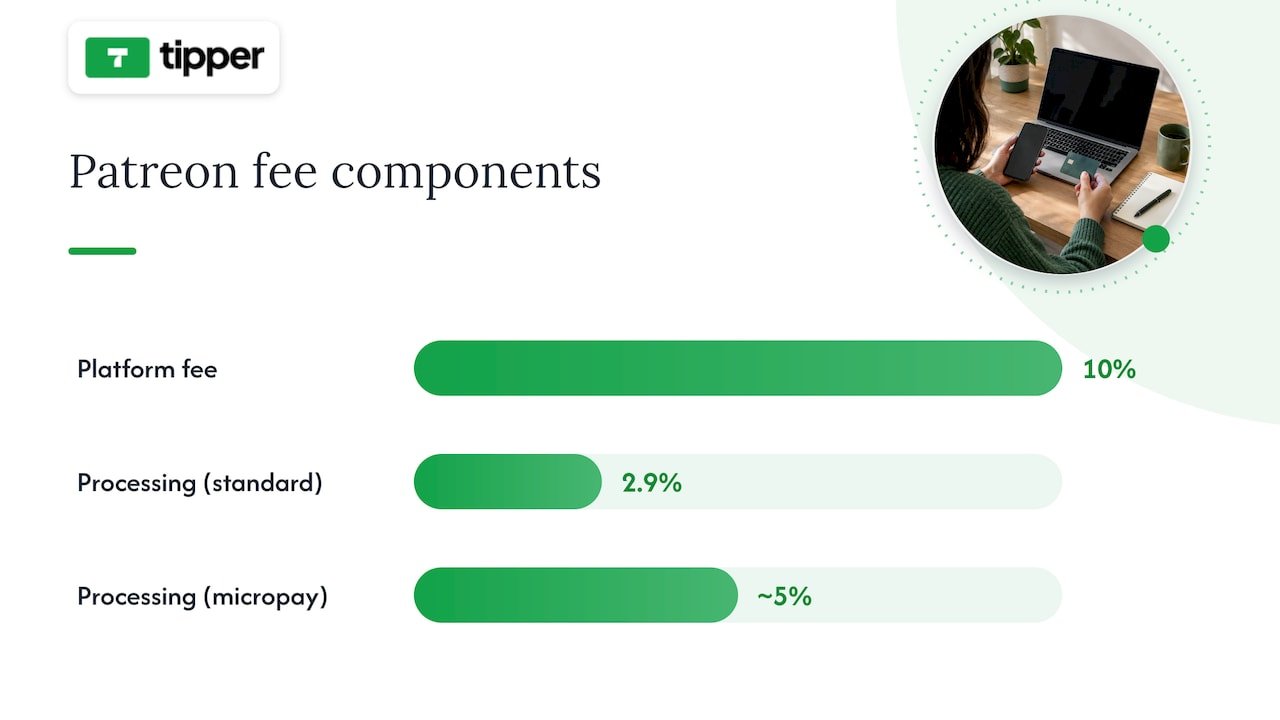
Patreon illustrates the fee math well. New creators on Patreon pay a flat 10% platform fee plus payment processing, which runs around 2.9% plus $0.30 for standard pledges but jumps to roughly 5% plus $0.10 for micropayments of $3 or less. That second rate structure quietly punishes small pledges: a $3 tier loses a much larger share of its value to fixed fees than a $10 tier does.
Pro Tip: If you’re testing a membership tier below $5, run the math on both platform fee and processing before you commit, because fixed per-transaction costs eat a bigger percentage of small payments.
Setup effort varies widely. A tipping link takes minutes to create and share, while a course site on Zenler, Kajabi, or Thinkific involves building lesson modules, pricing structures, and sometimes a custom domain before you ever collect a payment. Community features split a similar way: platforms like Circle and Discord add real-time chat and forums, while course platforms mostly bolt on basic commenting. Many creators pair a course platform with Discord or Circle for community and use Zapier or website embeds to connect email lists and analytics.
Support quality matters more than people expect. G2 reviews of Podia consistently favor simpler, all-in-one tools, with Podia holding a 4.6-out-of-5 rating and reviewers citing fast setup and straightforward support as the reason they stick with it over more complex alternatives.
How to Choose a Platform Without Wasting a Weekend
Before committing to any platform, run through a short checklist: How big is your audience right now? How fast do you need to launch? Is your revenue model tips, subscriptions, or product sales? How sensitive are you to fees? Do you need community features, and do you want to own your audience data outside the platform?
When you demo a platform, ask these questions directly:
- How fast can I actually get paid after a supporter sends money?
- What are the total fees on a $5 tip or a $5 monthly tier, platform fee plus processing combined?
- Can I embed this on my own website instead of only linking out?
- What integrations exist for email marketing and analytics?
Pro Tip: Run a tiny live test before committing: create a tip link or a $5 tier, share it with your 50 most engaged fans, then track conversion rate and the time it takes to receive your first payout.
Fixed per-transaction fees hit small tiers hardest, which is why annual billing or $5-plus minimum tiers tend to preserve more of your revenue than monthly micro-pledges.
Examples of Top Creators Using Each Platform
Different creator types gravitate toward different platforms based on their content format and audience relationship. Course creators teaching structured skills, cooking, business strategy, software tutorials, tend to land on Zenler, Teachable, or Thinkific because those platforms are built around modules and completion tracking. Creators with a loyal fan base who want ongoing support, writers, podcasters, illustrators, often build recurring income through Patreon’s tier system.
Creators focused on community and live interaction, gaming commentators, niche hobbyists, educators running cohorts, frequently rely on Discord or Circle to host discussions between content drops. Creators selling digital products, templates, presets, guides, gravitate toward Whop or fr3n because those platforms combine a storefront with audience tools in one place. Creators who want tight control over who sees their content and when often choose Behind The Scenes for that gating flexibility.
For creators who simply want fast appreciation payments without building any of the above, infrequent supporters sending a one-time thank-you, live-stream viewers tipping mid-broadcast, newsletter readers showing gratitude, a tipping link fits because it skips the setup entirely and lets a supporter pay in seconds using Apple Pay or Google Pay.
Where Each Platform Draws the Line
Every platform has boundaries worth knowing before you build around it. Course platforms like Kajabi, Teachable, and Thinkific are built for structured lessons, so they’re a poor fit if your content is mostly short-form or spontaneous. Marketing-heavy tools like Kartra assume you want funnels and email sequences, which adds complexity you may not need if you only sell one product.
Community platforms carry their own trade-offs. Discord servers can get difficult to monetize directly without a separate payment layer, and Circle communities work best when paired with an existing website or audience rather than as a standalone discovery channel. Behind The Scenes and Whop both focus on gated access, which suits paid communities but offers less for creators who want open, discoverable content.
Membership platforms like Patreon work best for ongoing content relationships and struggle with one-off purchases or impulse support. Geography and payment method support also vary: some platforms limit payout options or currencies by region, so it’s worth confirming your country and preferred payment method are supported before building your monetization plan around any single tool. Tipping tools built for instant payments, by contrast, tend to have fewer content-format restrictions since they’re not tied to delivering structured lessons or gated feeds, but they’re not built to replace a full course or membership system either.
How These Platforms Handle Security and Privacy
Payment security is table stakes across legitimate creator platforms: card data and payment credentials are processed through established payment networks rather than stored directly by most platforms, and reputable tools rely on encryption standards used across the payments industry. Where platforms differ is in what additional data they collect and how transparent they are about it.
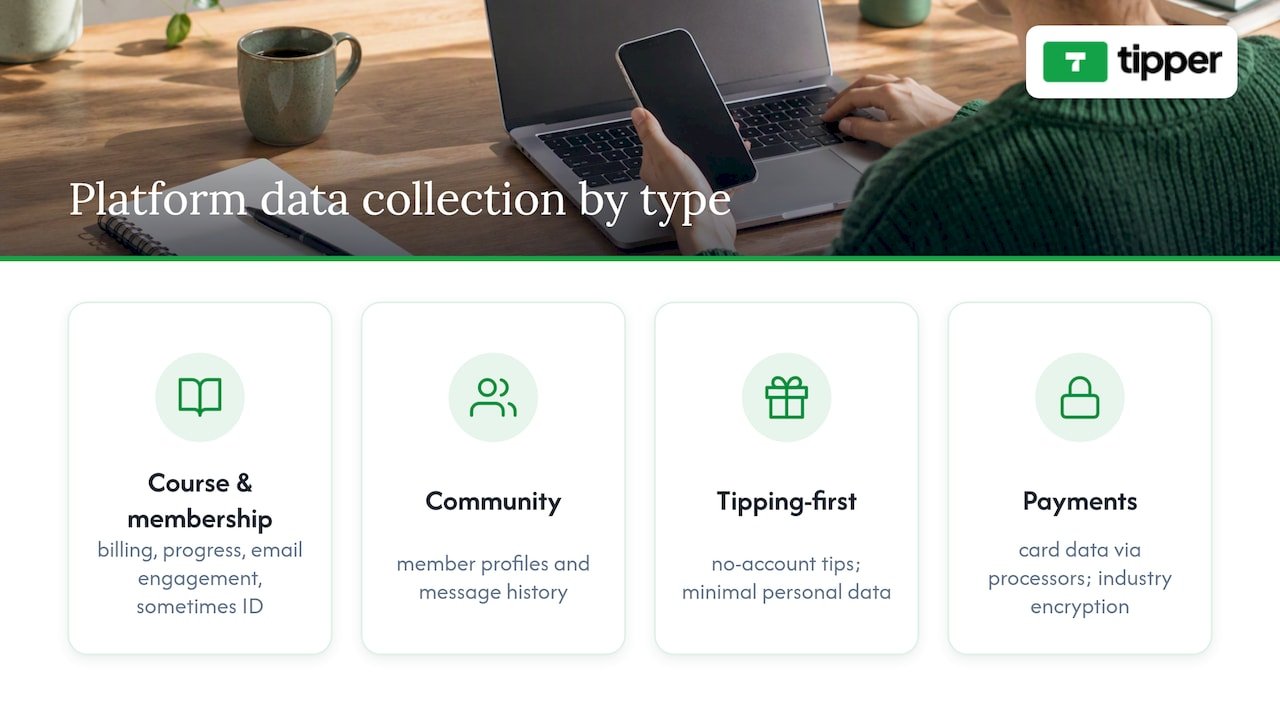
Membership and course platforms often collect more personal data by necessity: billing addresses, course progress, email engagement, and sometimes identity verification for payouts. Community platforms like Discord and Circle store message history and member profiles, which raises its own questions about moderation and data retention.
Tipping-first tools built around one-time payments, like Tipper, tend to minimize data collection by design since supporters don’t need to create an account to send a tip. That no-account flow means less personal information passes through the platform in the first place, a structural privacy advantage rather than a policy promise. Whatever platform you choose, it’s worth checking whether payouts run through a recognized processor and whether the platform publishes a clear privacy policy before you connect your bank details.
Who Owns Your Content on Each Platform
Content ownership terms vary more than most creators realize until they try to leave a platform. Course platforms like Teachable, Thinkific, and Zenler generally let you export your course materials, but your audience data, email lists, student records, often stays harder to move if you decide to switch providers. Reading the export and data-portability sections of a platform’s terms before you upload months of content is worth the ten minutes it takes.
Membership platforms like Patreon give you ownership of the content you post, but your patron relationships live inside their ecosystem, meaning you depend on the platform for continued access to those supporters. Community platforms like Discord and Circle generally leave content ownership with the creator but differ in how easily you can export conversation history or member lists.
Tipping tools sidestep much of this because there’s no content library to own in the first place: the transaction is the product. For creators, the practical takeaway is to check two things before committing to any platform, whether you can export your core assets (course files, email lists, community posts) and whether the platform claims any rights to monetize your content independently of your account.
When Tipping-First Beats Launching a Membership or Course
The instinct for a new creator is often to build a membership tier or a course before anyone has sent a single dollar. We think that’s backward. A tip link lets a supporter pay through Apple Pay or Google Pay in seconds, with no account to create, and creators keep their earnings rather than splitting them across platform cuts. That speed matters most in the first weeks, when you’re still proving anyone will pay you at all.
We built this type of tipping platform around that moment: the instant between someone enjoying your work and wanting to say thanks with money, not a recurring commitment. A thank-you note or short video closes the loop and turns a one-time tip into a relationship worth nurturing toward a membership later.
For readers who want a deeper walkthrough, our guide on why creators need tipping links covers the conversion logic in more detail, and our digital tipping platforms comparison breaks down how tipping fits alongside memberships and courses.
— Tipper
Get Started With Tipper in Three Steps
If you want supporters to pay you today rather than after weeks of setup, an instant tipping link is the fastest route: create one, share it, and accept a payment within minutes, no account needed on the sender’s side and no cut taken beyond payment processing.

Getting started takes three steps. First, create your personalized tipping link or QR code. Second, share it in your bio, stream overlay, or newsletter wherever supporters already are. Third, accept your first tip through Apple Pay, Google Pay, or card, and send a thank-you note or video back.
If you’re also exploring a dedicated website to anchor your tip link alongside your content, our partner resource on websites that sell while you sleep covers the setup side. When you’re ready, start with Tipper and get your link live today.
FAQ
What are the best platforms for creators?
The best choice depends on your goal: Tipper works well for instant tips and appreciation payments, Patreon suits recurring memberships, and platforms like Zenler, Kajabi, or Teachable fit creators selling structured courses. Most solo creators start with the lowest-friction option that matches their current content format, then add others as their audience grows.
Which platform pays the most for 1,000 views?
View-based payouts depend on the specific platform’s ad-revenue or payout program, and figures vary widely by niche, audience location, and content type, so there’s no single reliable figure to cite. Tipping and membership platforms don’t pay per view at all; they pay based on direct supporter contributions, which is a different revenue model entirely.
What platform pays the most for content?
There’s no universal answer, because payout depends on your monetization type: tipping tools let you keep your full earnings minus payment processing, while subscription platforms like Patreon take a platform fee on top of processing, typically a flat 10% plus standard or micropayment processing rates. The better question is which fee structure fits your typical transaction size.
What is the best video platform for creators?
This depends on whether you want to host course videos, run a membership, or build community around live content. Course-focused platforms like Zenler, Thinkific, or LearnWorlds handle structured video lessons, while community tools like Discord and Circle suit live or ongoing video interaction rather than packaged courses.
Sources
- Podia reviews | G2
- Patreon fee calculator (creator payout) – TransferFees
- Zenler features — online course platform




[…] entry point, tends to capture the widest range of listener intent. For a deeper look at how support platforms fit into a podcast’s broader revenue mix, layering tends to outperform relying on a single […]