

Apple Pay and Google Pay do the same core job: they let you pay with a card stored on your phone, in stores, online, and in apps. The better one is mostly decided by the phone in your pocket. iPhone owners use Apple Pay, Android owners use Google Pay, and both are free for shoppers in the US. The gap that matters more is for creators: neither wallet is a way to receive tips on its own, so you need a tip page that accepts both.
Below, we compare the two wallets on devices, security, fees and limits, then explain what each means if you want fans to tip you with a tap.
TL;DR
- Devices decide it. Apple Pay works on Apple hardware, while Google Pay is built around Android, Chrome and your Google Account.
- Cost to the shopper is zero on both. Apple says it charges no fee for Apple Pay in the US, and Google’s U.S. pages publish no user fee. Your card issuer may still charge its normal fees.
- Security is close to a tie. Both replace your real card number with a token or virtual number and require biometrics or a passcode.
- Neither wallet collects tips for you. A creator needs a link or QR code that supports both wallets. Tipper lets supporters tip with Apple Pay or Google Pay without creating an account.
Table of Contents
- Apple Pay vs Google Pay at a glance
- Devices and where you can use each
- Security and privacy compared
- Fees and limits
- What the wallets mean for creators and tips
- Which wallet should you use?
- How Tipper handles both wallets
- Our perspective
- Start accepting Apple Pay and Google Pay tips
- FAQ
- Sources
Apple Pay vs Google Pay at a glance
| Apple Pay | Google Pay | |
|---|---|---|
| Works on | iPhone, Apple Watch, Mac, iPad, Apple Vision Pro | Android phones, plus Chrome and Google Account saved payment details |
| In-store payment | Contactless terminals, after biometric or passcode check | Contactless terminals, after unlocking an Android phone |
| Online checkout | Websites and apps that accept it | Buy with Google Pay button, Chrome and Android autofill |
| Card number shared with merchant | No, device-specific token | No, virtual card for eligible cards and partners |
| Cost to the user in the US | No Apple fee | No user fee published on Google’s U.S. pages |
| Lost device tool | Find My | Find My Device |
Sources for each row appear in the sections below.
Devices and where you can use each
Apple describes Apple Pay as a way to pay with debit or credit cards added to Apple Wallet in stores, on websites, and in apps. It runs on iPhone, Apple Watch, Mac, iPad and Apple Vision Pro, and acceptance depends on participating cards and merchants.
Google’s U.S. pages describe Google Pay as a service for online checkout, in-store tap-to-pay, and saved payment details used across Google Account, Google Wallet, Chrome and Android. In a store, you unlock your Android phone, hold it near a contactless reader, and wait for the check mark.
In practice, at a US retail terminal the two behave the same way. Both work wherever the contactless wave symbol is shown, so a barista or cashier rarely cares which one you hold up.
The online side differs a little. Google lists a Buy with Google Pay button, Chrome and Android autofill, virtual cards where eligible, and buy-now-pay-later options such as Affirm, Klarna, or Zip, with eligibility requirements. Apple Pay shows up as a button at checkout in Safari and in apps, with the same Face ID, Touch ID or passcode confirmation.
The NFC difference nobody mentions
One structural difference is worth knowing. The Consumer Financial Protection Bureau found in 2023 that Apple restricts third-party payment apps from using NFC for tap-to-pay on its devices, while Android did not restrict NFC access for payment apps. For you as a shopper, this means that on an iPhone the in-store tap is Apple’s wallet, and on Android you have more room for other apps. It does not change what you pay.

Security and privacy compared
Both wallets keep your real card number away from the merchant.
- Apple Pay uses device-specific tokenization and biometric authentication (Face ID, Touch ID, or passcode). Actual card numbers are not stored on Apple servers or shared with merchants. If a device is lost, you can suspend or erase cards remotely with Find My.
- Google Pay lists encrypted saved payment details, built-in authentication, fraud alerts, and virtual card numbers for eligible cards and partners. If a phone is lost or stolen, Find My Device helps you protect your data.
If you want a wider view of why these protections matter when a card is lost or misused, this overview of credit card fraud protection covers the basics.
Where privacy differs
The difference is less about the payment and more about the company behind the wallet. Google says it will not sell personal information or transaction history, but it may use Google Pay data to run transactions, show your history, resolve problems and offer other features. You can opt out of Google telling merchants whether Google Pay is set up on your device.
The CFPB’s report adds context: it says Google collects consumer data that it appears to use to develop services and in advertising, while Apple collects app-use data to develop products or improve marketing of existing ones. Apple also says Apple Pay does not store transaction information that can be linked back to you. Neither company is invisible, so the practical step is to open the privacy settings in whichever wallet you use and set them deliberately.
Fees and limits
Is there a monthly fee for Google Pay? Google’s official U.S. pages publish no user transaction fee or subscription price. Issuers, merchants, financing providers or other parties may still apply charges, so read the agreement tied to your card or financing option.
Is there a fee for Apple Pay? Apple states it charges no fee for using Apple Pay in stores, online or in apps in the US. Your card issuer may still apply its normal charges.
Limits and fees show up when money moves between people rather than at checkout:
- Apple Cash lets you send or receive up to $10,000 per message and per 7-day period, and after identity verification the maximum balance is $20,000. An Instant Transfer to an eligible debit card costs 1.7%, with a minimum of $0.25 and a maximum of $25, according to Apple Support.
- Google Pay balance: if you set one up earlier, you can still use it to pay businesses online, in apps or contactless where accepted in the US, but new balance cards can’t be set up.
So the wallets themselves are free to the person tapping. The money that gets deducted in a tip or sale usually comes from whoever processes the payment behind the wallet.
What the wallets mean for creators and tips
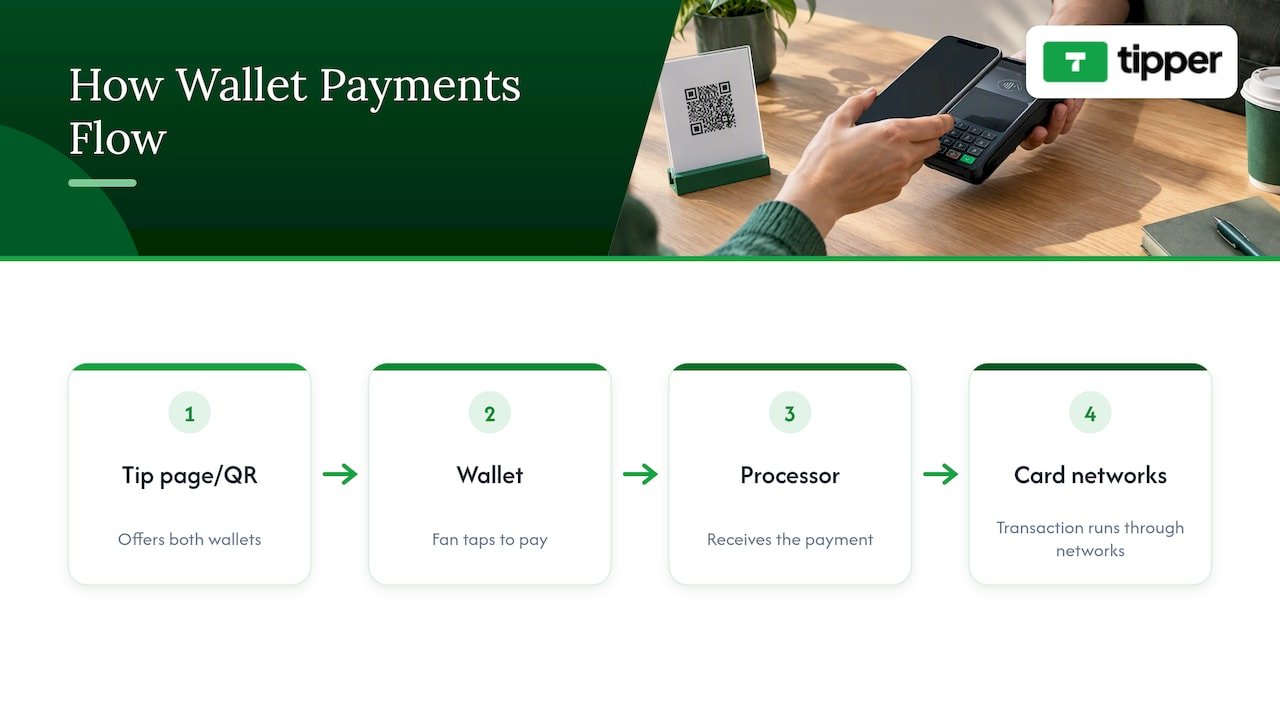
Here is the part most comparisons skip. Apple Pay and Google Pay are payment methods. They do not give you a page, a link, or a payout. When a fan taps Apple Pay on a website, the wallet passes the payment to a processor, and the transaction runs through that processor and the card networks. The distinction between using a wallet through a processor and billing directly is explained in this guide to building a payment processing app.
For a creator, that leads to a simple setup: you need a tip page or QR code that offers both wallets, so iPhone and Android fans each get their one-tap option. Peer-to-peer features like Apple Cash or an old Google Pay balance are the wrong tool for a public audience. They require the sender to be in the same ecosystem and are built for personal transfers, not for a link you drop in a bio.
Checklist before you offer wallet tips
The question every creator should answer first is what happens between the tap and the payout. Before you pick a tool, check:
- Wallet coverage. Does the page show both Apple Pay and Google Pay, plus a card option for everyone else?
- Account requirement for senders. Every sign-up screen costs you tips. A sender who has to create an account often leaves.
- Fee structure. Find out the platform fee, the processing fee, and who pays each. Add them up on a $5 tip, because fixed per-transaction charges bite hardest on small amounts.
- Payout path and timing. Where does the money land, and how fast?
- Privacy. What does the sender see, and what do you see about them?
- Where the link works. Bio links, stream panels, QR codes on printed material.
The fee point deserves a number. As one example from the market, a payment-link product from another company charges 4.99% + $0.30 per sale, which on a $5 tip is about $0.55, or roughly 11%. That is why we tell creators to compare the full per-tip cost, not just the headline percentage. For more on what you keep, see our breakdown of digital tips vs cash.
If you want a setup walkthrough, our guide to Apple Pay tipping setup covers it step by step, and our piece on Apple Pay and Google Pay tips for small businesses covers the business side.
Which wallet should you use?
- You own an iPhone: use Apple Pay. It is built in, it is free from Apple, and it works with Find My if you lose the device.
- You own an Android phone: use Google Pay or Google Wallet. Google Wallet replaces card details with a virtual card and requires biometric authentication.
- You switch between ecosystems: you can keep both, since the same card can sit in either wallet.
- You are a creator: offer both. Your audience will split between iPhone and Android, and a page that supports only one loses the other half.
How Tipper handles both wallets
Supporters on your Tipper link can pay with Apple Pay, Google Pay or a card, and they do not need an account to do it. You set up a personalized page or QR code, share it, and receive tips directly. Tipping is free to set up, with no subscription; a small processing fee is added at checkout on each tip.
If you want to see how the sharing side works, read about our no-account share tip link. For creators who care about keeping personal details out of the transaction, our privacy-first payment collection setup explains the approach.
Our perspective
We built Tipper around one observation: the tap is the easy part. Apple Pay and Google Pay already made paying fast. What most creators lack is a place to send people that doesn’t ask a fan to register, verify an email, or pick a username before they can say thanks.
That is why a supporter can tip through a Tipper link with Apple Pay or Google Pay without creating an account. Every extra step between “I love this” and “sent” costs a tip, and we designed the flow to remove those steps.
We also think a tip is more than a transaction. Creators can answer with a thank-you note, a photo or a video, which keeps the personal feel that makes people tip again. Our model is designed so creators keep 100% of their earnings, with a small processing fee added at checkout rather than taken out of the tip.
Our advice: pick the wallet your phone supports, and pick a tip page that supports both.
Tipper
Start accepting Apple Pay and Google Pay tips
If you stream, make videos, freelance, or run a small business, you can create your Tipper link in a few minutes and put it in your bio, your panels or a printed QR code. Fans tip with the wallet they already use, and you get a personal way to thank them.
Want to compare options first? Our guide to Apple Pay donation platforms for creators walks through what to look for.
FAQ
Is Google Pay as good as Apple Pay?
For everyday payments, yes. Both pay at any contactless terminal that shows the wave symbol, both use tokenized or virtual card numbers, and both need biometrics or a passcode. The better choice is whichever one your phone supports.
Is there a downside to paying with Apple Pay?
Apple Pay only works on Apple devices, and acceptance depends on participating cards and merchants. Apple charges no fee for it in the US, but your card issuer may apply its usual charges. Apple Cash Instant Transfers to a debit card carry a 1.7% fee.
Is there a monthly fee for Google Pay?
Google’s official U.S. pages publish no subscription price or user transaction fee for Google Pay. Charges from your card issuer, a merchant or a financing provider can still apply, so check those agreements.
Can fans tip me with Apple Pay or Google Pay?
Yes, if your tip page supports them. The wallets are payment methods, so you need a link or QR code that accepts both. With Tipper, supporters can pay with either wallet or a card without creating an account.
Do I need Apple Cash or a Google Pay balance to receive tips?
No. Those are person-to-person tools with their own limits, and Google no longer sets up new balance cards. A tip page connected to a payment processor is the better fit for a public audience.
Sources
- Apple Pay, Apple
- Google Pay: pay online, in stores or send money
- Secure, fast and convenient online payment, Google Pay
- Keep your payment info safe, Google Pay Help
- Use your Google Pay balance to pay businesses, Google Pay Help
- Apple Cash transfer limits, Apple Support
- Big Tech’s Role in Contactless Payments, CFPB
- Apple Pay vs Google Pay 2026, Fintech Essential
- Google Wallet vs Apple Wallet, Android Police
- Why credit card fraud protection matters
- Building a payment processing app


[…] The same logic applies to Apple Pay. Both wallets are just a faster way for a fan to confirm a card payment with a fingerprint, face scan or PIN. If you want the head-to-head view, we compare them in Google Pay vs Apple Pay in the US. […]