
You can monetize open source without closing your code. Maintainers earn through hosted services, paid support, open core, sponsorships, and direct tips from people who already use their work. Which one fits depends on who uses your project: companies tend to pay for reliability, and individuals tend to pay to say thanks.
This guide covers each model with real examples, what open-source licenses let you charge for, how to earn from free downloads, and how to set up a tip link so supporters can pay in seconds.
TL;DR
- Open source projects typically earn through donations, hosted services, paid support and courses, open core, dual licensing and complementary products.
- Under the GPL you can charge for copies of the software, but you must provide the source code or a written offer for it.
- Companies pay for time saved and risk removed. Individual users pay out of gratitude, and that is where tips fit.
- A personal tip link or QR code in your README, docs and release notes lets any user pay in seconds, with no account.
- Start with one low-effort channel (sponsors plus a tip link), then add a paid layer once you see what users ask for.
Table of Contents
- The main ways open source projects make money
- What open source licenses let you charge for
- Earning from free downloads
- Sponsorships and tips: how supporters contribute
- Perspective: why a tip link belongs in every open source project
- Where to put your tip link so people use it
- Stacking channels: a practical plan
- Choosing between platforms for tips and memberships
- Common mistakes when you monetize open source
- Set up your tip link with Tipper
- FAQ
- Sources
The main ways open source projects make money
Most successful projects combine two or three channels rather than relying on one. Here is the landscape, from least to most effort.
| Model | How it works | Best for | Effort |
|---|---|---|---|
| Tips and one-off thanks | Users send a small payment when your project helps them | Libraries, tools, plugins, themes, scripts | Very low |
| Recurring sponsorship | Monthly backing, often with perks | Maintainers with an engaged audience | Low to medium |
| Paid support and consulting | Customers pay for answers, SLAs, integration help | Infrastructure and developer tools | Medium |
| Courses and screencasts | Teach people to use your project | Frameworks and libraries with a learning curve | Medium |
| Hosted or managed version | You run it, customers pay for convenience | Server software, databases, analytics | High |
| Open core | Free community edition, paid edition with extra features | Projects with business users | High |
| Dual licensing | Same code under an open license and a commercial one | Libraries embedded in commercial products | Medium to high |
The PostHog team describes several of these: a hosted or managed version, paid support, open core with a free community edition plus a paid edition, and donations. Wingback lists open core, professional services, premium support, paid training and education, and GitHub Sponsors plus donations as proven strategies, and points to Red Hat and GitLab as open core successes.
Why companies pay
John Mark Walker, writing on Opensource.com, argues that people often mistake source code for the product. In his view, customers pay for solutions that save them time, whatever the technology’s origins. That matches how the money flows in practice: a team will pay for a hosted version because it removes operations work, or for support because it removes risk.
The same article tracks Glyptodon, whose revenue in 2017 came overwhelmingly from support and services. By the end of 2019 more than 70% came from license subscriptions, and the company grew at over 30% on average during the change. Revenue mixes shift as a project matures.
Examples worth studying
- Tailwind UI. Adam Wathan started Tailwind as an open source CSS library in 2017. According to Karl Hughes’ write-up, he went full-time after two years and has made $2 million in revenue by charging for premade UI components. The free library built the audience, and the paid components monetized it.
- A solo indie project. An Indie Hackers post describes Manuel Astudillo building an open source project to scratch his own itch, then slowly building a business around it that now brings in $18k in monthly recurring revenue.
- A sponsor-funded maintainer. Caleb Porzio, creator of Livewire, reported growing his annual GitHub Sponsors revenue to $112,680. We come back to his approach below.
What open source licenses let you charge for
Open source does not mean you cannot earn from it. Software labeled open source can still be monetized, but the license sets the rules, so read yours before choosing a model. This is general information, not legal advice. For a commercial arrangement, talk to a lawyer who works with software licensing.
Selling copies
The GNU project encourages people who redistribute free software to charge as much as they wish. Quoted by TechRepublic, it says you can charge nothing, a penny, a dollar, or a billion dollars. The catch is that this applies to the executable form, and distributors must supply the complete source code or a qualifying written offer for it.
The Libre Software Licensing Guide breaks down GPLv2 further. Section 1 lets you charge a fee for the physical act of transferring a copy. Section 2(b) means you cannot charge for the copy being under GPLv2, so you cannot say someone may have it under the GPL only if they pay.
What this means for a maintainer
- You can offer a paid convenience: a signed installer, a packaged build, a hosted instance.
- You can sell things that sit next to the code: documentation, training, support, templates, themes.
- You cannot make the license itself conditional on payment.
- Different licenses (MIT, Apache, GPL, AGPL) allow different commercial setups, so check yours before you plan an open core or dual license split.
Earning from free downloads
If your project is free to download, the download is the top of your funnel, not the end of it. Think about what a person does after the download works.
- They succeed. The best moment to ask for support is right after the tool solved their problem.
- They look for the next step. A paid course, template pack or support plan can meet them there.
- They want to say thanks. A visible tip link turns goodwill into income.
A Gumroad creator described in Letters by Burk earned around $150 directly from free products in the first year. The larger payoff was the customer list, which later drove sales of paid products. Treat free downloads as a way to build a relationship, and the money follows from several places.
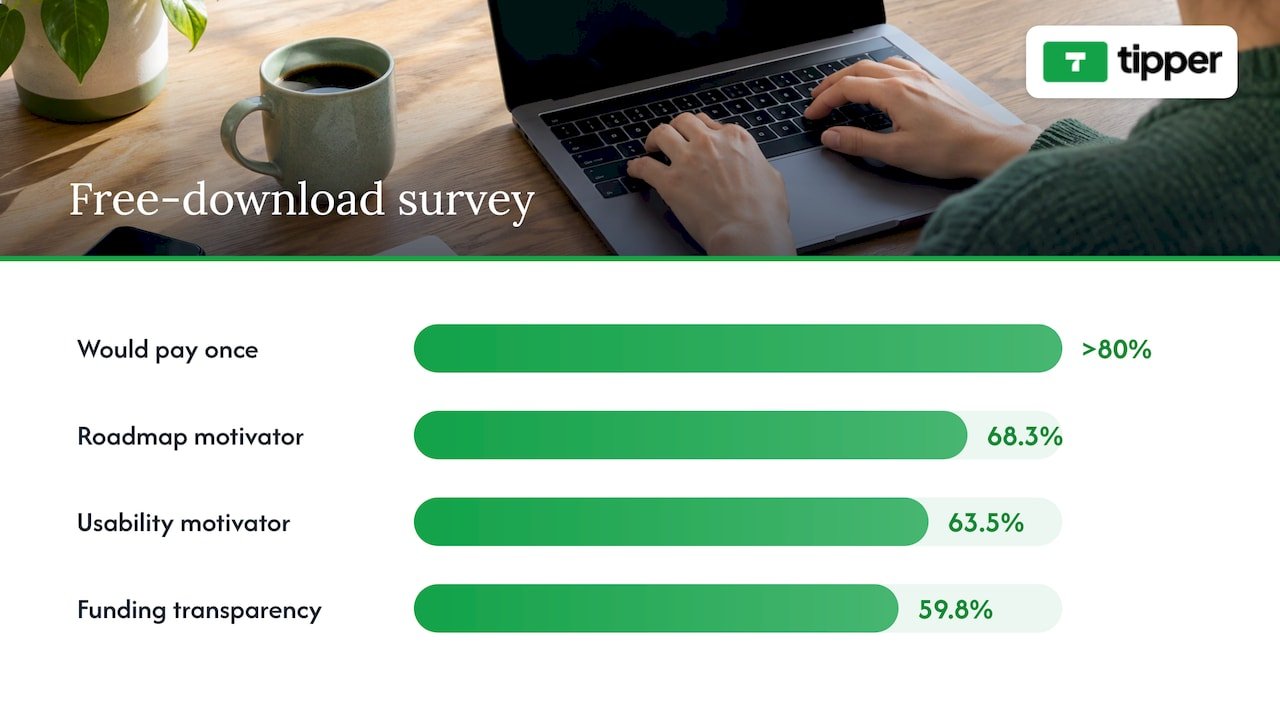
The Futo.tech survey is useful here. More than 80% of customers surveyed said they would pay once, as pay-what-you-want or a one-time purchase, for open source software. A clear project roadmap was the top motivator at 68.3%, followed by usability at 63.5% and funding transparency at 59.8%. In practice: publish a roadmap, keep the project easy to use, and say where the money goes.
Sponsorships and tips: how supporters contribute
There are two kinds of supporter, and they behave differently.
Organizations sponsor through platforms they can expense. Dimitris Platis notes that in many large projects, such as Linux and curl, most sponsors are companies or organizations. Reo.dev reports that OpenCollective, used by Babel, has raised over $1.4M, and that GitHub Sponsors lets developers accept donations through GitHub.
Individuals are the people who star your repo, read your docs at midnight and fix their own bug with your code. They rarely want a monthly commitment or a new account. They want a quick way to send $3 or $10 and move on. That is the gap a tip link fills.
Lessons from a GitHub Sponsors success
Caleb Porzio’s write-up offers concrete numbers. He was accepted into GitHub Sponsors in December 2019, and GitHub matched the first $5k and took no cut. He offered sponsor-only screencasts at $14 per month. His main lesson: the biggest mistake is making the first tier too small, because given the choice of $1 to $5 a month or $14, people pick the lesser amount. He raised his tier from $9 to $14.
The takeaway is to design tiers on purpose. A recurring tier should carry a real perk. A tip should stay simple and open to any amount, so that nobody who wants to say thanks is turned away.
Choosing what goes in a paid tier
Evil Martians suggests thinking about the customers who would get so much value they would be willing to pay, then building features for them. These are often performance optimizations, scaling, clustering, enhanced monitoring and special integrations. Keep the core useful for everyone and put the business-grade extras in the paid layer.
If you go open core, PostHog notes the trade-off plainly: you maintain two editions, and you may need venture capital to fund the operation. On the plus side, you don’t need to process user data through third parties, which helps adoption in larger companies that treat data privacy as core to their ethos.
Perspective: why a tip link belongs in every open source project
We built Tipper around a simple observation: the people who benefit most from a free project are usually the least likely to fill out a sign-up form to say thanks.
That is why a Tipper link works without an account on the supporter’s side. A user who finds your tool useful can pay with Apple Pay, Google Pay or a card, then optionally leave a note. You can answer with a thank-you message as text, a photo or a video, which keeps the human connection that open source runs on.
Creators keep 100% of their earnings on Tipper. A small payment processing fee is added at checkout on each tip, and creating and maintaining an account is free, with no subscription.
Our view is that sponsorships, support contracts and paid tiers are all worth building, and a tip link sits comfortably next to them. It captures the spontaneous moments of gratitude the other channels miss: the late-night fix, the saved afternoon, the script that just worked.
Tipper
Where to put your tip link so people use it
The link only earns when people see it at the moment of value. These are the places that work for open source projects.
- The README, near the install instructions. Users who got the tool running are at their happiest here.
- Your documentation footer. Every docs page is a chance for a supporter to appear.
- Release notes and changelogs. People read these when they care about the project’s future.
- The CLI or app itself. A short “support this project” line after a successful run, with a short link or QR code, can be unobtrusive and effective.
- Video descriptions and stream panels. If you teach with your project on YouTube or Twitch, put the link where viewers already look.
- Conference slides and talks. A QR code on the last slide lets people tip from their phone while you are still on stage.
- Your profile pages. GitHub, social bios and personal sites should all carry the same link.
A QR code is especially handy for meetups, hackathons and in-person events. Our guide on one-click tip solutions for creators shows what frictionless tipping looks like, and our overview of real-time supporter contribution tools compares the options.
Write the ask like a maintainer, not a marketer
Keep the message short, honest and specific. “This project is maintained in my spare time. If it saved you an hour, a tip helps me keep fixing bugs” works better than a generic plea. Say what the money supports: bug fixes, docs, hosting for a demo, test infrastructure. The Futo.tech survey above shows funding transparency matters to paying users, so a short note about where tips go builds trust.
Stacking channels: a practical plan
You do not need to launch everything at once. This order suits most solo maintainers and small teams.

Stage 1: collect goodwill
Add a tip link and a sponsorship button. Publish a roadmap. Thank every supporter personally, since a short reply costs you a minute and makes the next tip more likely.
Stage 2: sell the adjacent things
Write a course, a template pack or a set of screencasts. Keep a mailing list so the people who downloaded your project can hear about it. If you already teach on video, our piece on freelance extra income strategies has ideas that carry over to maintainers who take on paid work.
Stage 3: offer reliability
When companies begin asking for help, package it: paid support, priority issue handling, consulting hours, or a hosted version. This is where the larger sums usually come from, as the Glyptodon and Tailwind examples show.
Stage 4: consider open core or dual licensing
Only once you understand what business users value. Check your license first, and keep the community edition genuinely useful.
Whichever stage you are in, people have to find the project first. Understanding SaaS SEO and sustainable growth can help when your project grows into a product with its own site and docs that need to attract steady organic traffic.
Choosing between platforms for tips and memberships
Creators have many options, and the right one depends on how you want to be paid. A few comparisons from our blog can help you weigh them:
- If you are deciding between membership platforms, see Patreon vs Ko-fi vs Buy Me a Coffee.
- If you plan to sell digital downloads and want to understand platform costs, read Gumroad vs Patreon.
- If small payments matter to you and you want to keep more of each one, see our guide to micro donation platforms for creators.
- If you want a quick setup with tax-ready records, read about setting up creator donation platforms in hours.
A useful rule: memberships suit people who want ongoing perks, and tips suit people who want to give once without commitment. Many maintainers use both.
Common mistakes when you monetize open source
- Waiting for the project to be big. Supporters appear early. A tip link costs nothing to add.
- Hiding the ask. If users cannot find your support options in two clicks, they will not use them.
- Setting only small recurring tiers. As Porzio’s experience shows, a low first tier pulls everyone toward the lowest amount. Give recurring tiers a real perk and price them deliberately.
- Ignoring the license. Before you sell a build or plan a commercial edition, confirm what your license permits.
- Charging for what companies actually want. Business users pay for reliability, speed and support. Build your paid layer around those needs.
- Forgetting to say thanks. A personal reply is the cheapest retention tool you have.
Set up your tip link with Tipper
If you want a fast way to let users of your project say thanks, Tipper gives you a personalized tip link and QR code. Supporters pay with Apple Pay, Google Pay or a card, and they do not need an account. You keep 100% of your earnings, with a small payment processing fee added at checkout, and your account is free to create and maintain.
You can customize your tip page, then reply to supporters with a text, photo or video thank-you. For a walkthrough of how instant payments work, see our explainer on instant tip payments for creators. If you also help clients or take on contract work around your project, our guide to tipping for freelancers covers links, QR codes and invoices in six steps.
FAQ
Can I charge money for open source software?
Yes, in most cases. Under the GPL you can charge for copies, but you must provide the complete source code or a qualifying written offer, and you cannot charge for the license itself. Other licenses have their own terms, so read yours or ask a software licensing lawyer before selling.
What is the easiest way to start earning from an open source project?
Add a way for users to support you directly: a sponsorship button plus a tip link in your README and docs. It takes minutes and captures gratitude right after your project solves a problem. Paid support, courses and hosted versions can follow as demand grows.
How do I monetize free downloads?
Treat each download as the start of a relationship. Ask for a tip when the tool works, collect emails for updates, and offer paid extras such as templates, courses or support. A Gumroad creator in one account earned about $150 from free products in year one and gained a customer list that powered later paid sales.
Do open source tips need the supporter to have an account?
Not with Tipper. Supporters open your link, pay with Apple Pay, Google Pay or a card, and they are done. You receive the tip, and you can reply with a thank-you note, photo or video.
Should I choose open core or sponsorships?
They solve different problems. Sponsorships and tips need little work and suit projects of any size. Open core takes more effort because you maintain two editions, and it suits projects with business users who need extra features. Many maintainers start with the first and add the second later.
Sources
- How Do Open Source Companies Make Money? 6 Business Models
- How to sell open source software, Opensource.com
- How Do Open Source Companies Make Money? Karl Hughes
- Monetizing an open-source project ($18k MRR), Indie Hackers
- How we monetized our open source devtool, PostHog
- 5 Proven Strategies for Monetizing Open Source Software, Wingback
- Is it legal to sell GPL software? TechRepublic
- Libre Software Licensing Guide, GPLv2 section by section
- How to Earn Money With Free Products, Letters by Burk
- Shifting Perspectives on Purchasing Open Source Software, Futo.tech
- How to Monetize Open Source Software: 7 Proven Strategies, Reo.dev
- How to make money with Open Source, Dimitris Platis
- I Just Hit $100k/yr On GitHub Sponsors, Caleb Porzio
- How to turn an open source project into a profitable business, Evil Martians




Leave A Comment