


Truly fee-free tipping is realistic for creators, but only on the platform side: a payment processor almost always takes a small cut no matter which service you use. Tipper is built around this distinction, letting creators keep 100% of their tip earnings while supporters pay with Apple Pay, Google Pay, or a card, no account required. The details that matter most, payout timing, taxes, and disclosure rules, are covered below.
TL;DR:
- Processing fees from payment processors are nearly unavoidable, so truly free tips only waive platform fees, not transaction costs.
- Payouts typically take one to two business days, with instant options available at extra cost; consider your need for quick access.
- Tips are taxable income regardless of receiving a tax form, and keeping a detailed record simplifies tax reporting and deductions.
- No-account tipping supports fast, impulse donations but may limit features like recurring payments or saved payment methods.
- Most platforms set transaction and withdrawal limits to prevent fraud, which rarely impact small, regular supporters but matter for large one-time tips.
Table of Contents
- How no-account tipping links and QR codes work
- Fees and payout timing: what you actually pay and when you get paid
- Taxes and recordkeeping for tip income
- Set up a tipping link or QR code in minutes
- Why Tipper meets the no-fee tipping brief
- Privacy and supporter friction: no signup vs required accounts
- Comparing popular no-fee tipping platforms
- Security and fraud protection on tipping platforms
- Integrating tip links with your website and social profiles
- Limits and caps on tip amounts
- Support and customer service for tipping platforms
- Legal considerations for tipping platform compliance
- A creator’s perspective: trade-offs and when no-fee is the right call
- Start collecting tips with Tipper
- FAQ
- Sources
How no-account tipping links and QR codes work
A tipping link or QR code is designed to remove every obstacle between a supporter wanting to say thanks and that thanks actually landing in your account. The flow is simple, by design:
- A supporter taps your link or scans your QR code, no login or app download required.
- They pick a payment method: Apple Pay, Google Pay, or a debit or credit card.
- They can add a short note, photo, or sometimes a video with the tip.
- The payment processes and the platform routes the funds toward payout.
The phrase “no fee” gets used loosely across the industry, and it matters which fee a platform is actually waiving. Some platforms waive their own service fee but still pass along the payment processor’s cut, since card networks and processors always charge something to move money. Others build a markup into the transaction instead of showing a line-item fee. Reading the fine print on payment processing for tips shows how the gross amount a supporter pays differs from the net amount that lands in your account, and that gap is where processing costs usually live.
Fees and payout timing: what you actually pay and when you get paid
Even on a platform that charges creators nothing to use it, a payment processor is still doing the work of moving money from a card network to a bank account, and that service is rarely free. The processor’s fee is typically a small percentage of the transaction plus a flat amount, deducted before the money reaches you.
Payout speed is the other variable creators tend to underestimate. Standard payouts through most payment processors take about 1 to 2 business days to settle, according to Stripe’s payout documentation. Faster options exist: instant payout features can move funds in minutes rather than days, but they usually carry an added fee on top of standard processing costs. A platform advertising “instant tips” is often describing how quickly the supporter’s payment is captured, not how quickly you can spend it.
Before settling on any platform, confirm these items in its terms:
- What percentage (and flat amount, if any) the payment processor charges per transaction.
- Whether standard payouts take 1 to 2 business days, and what the accelerated option costs.
- Whether the platform has a minimum payout threshold or a maximum per-transaction tip amount.
- Whether fees are deducted automatically or billed separately.
- Whether refunds or chargebacks pull money back out of your account after payout.
Running these questions against any platform you’re considering, including comparisons on digital tipping platforms, gives you a clearer picture than a homepage claim of “zero fees” ever will.
Taxes and recordkeeping for tip income
Tip income is taxable whether or not you receive a tax form for it. The IRS confirms that gig workers and creators owe tax on tip income even without a 1099-K, and separate IRS guidance on tip recordkeeping recommends tracking every tip as you receive it rather than reconstructing totals at tax time.
A few practical facts shape how you should plan:
- The 1099-K threshold for third-party settlement organizations is $20,000 in gross payments and 200 transactions in a calendar year, per IRS Publication 1099; below that, you likely won’t receive a form, but the income is still reportable.
- A new federal tip deduction runs from 2025 through 2028 and lets eligible tipped workers deduct up to $25,000 in qualified tips per return, but eligibility is tied to having the income reported on an information return like a 1099-K or 1099-NEC, per the IRS’s gig economy filing guidance.
- If your platform never crosses the reporting threshold, you may not get a 1099-K, which can make it harder to document eligibility for that deduction even though the tips themselves remain taxable.
- Keep a running log, ideally a spreadsheet or dedicated app, noting the date, amount, platform, and any fee deducted for each tip received.
A separate bank account for tip income makes quarterly tax estimates and year-end filing far less stressful, and tracking creator tips for taxes walks through a simple system for doing it.
Pro Tip: Save payout confirmation emails and fee receipts in one folder as they arrive instead of trying to reconstruct them in April.
Set up a tipping link or QR code in minutes
Getting a tipping link live takes less setup than most creators expect, and the order of operations matters for avoiding rework later.
- Create your account and connect a payout method (bank account or supported digital wallet).
- Enable Apple Pay and Google Pay so supporters can tip without typing card details.
- Set two or three preset tip amounts that match what your audience typically gives.
- Generate your personalized link and matching QR code.
- Add the link to your bio, and place the QR code where supporters will actually see it: a livestream overlay, event signage, or a printed card at a market stall.
Copy matters as much as placement. “Tip me” works, but “Send a quick thank-you, no account needed” tells a hesitant supporter exactly why the friction they expect won’t be there. If any of your content is sponsored or includes paid promotion alongside your tipping link, disclosure language needs to sit where it’s genuinely hard to miss, not buried in a caption’s final line, per FTC guidance for influencers.
Before sharing your link widely, review what payment permissions you’re granting the platform and whether supporter payment details are ever stored or shared. A tip link strategy guide covers preset amount testing and placement in more depth.
Pro Tip: Test your own link on your phone before posting it publicly, paying with Apple Pay or Google Pay end to end, so you catch friction before a supporter does.
Why Tipper meets the no-fee tipping brief
The features that matter for a genuinely low-friction tip link map directly onto the checklist above:
- No account required for senders: supporters tip in seconds without creating a login.
- Apple Pay and Google Pay support: removes the need to type card numbers on a phone.
- Creators keep 100% of their earnings: no platform-side service fee is deducted from your tip.
- Customizable tip pages: presets and branding match your own audience and content.
- Thank-you notes, photos, or videos: a personal reply to a supporter closes the loop.
- Privacy-first design: supporters aren’t asked to hand over more information than a payment requires.
Setting up takes roughly as long as the five steps above: connect a payout method, enable your preferred wallets, set presets, and generate a link or QR code. From there, Tipper handles routing the payment while you focus on the thank-you message.
Privacy and supporter friction: no signup vs required accounts
Every account creation screen is a point where a supporter can simply give up and close the tab. Platforms that require supporters to register before tipping are optimizing for their own data collection, not for the supporter’s experience, and the cost shows up as abandoned tips you never see.
No-signup tipping flips that trade-off. A supporter clicks, pays with a wallet they already have set up on their phone, and leaves. The entire interaction can take under thirty seconds, which matters most for impulse tips: someone enjoying a livestream moment or walking past an in-person tip jar QR code isn’t going to fill out a registration form first.
The privacy angle cuts the other way too. Supporters are often more willing to tip when they know they aren’t creating a permanent account tied to their email or payment history, and creators benefit from not having to manage or secure a database of supporter accounts they didn’t ask for. The trade-off is real: platforms that require accounts can offer features like saved payment methods or recurring tip subscriptions that a one-time, no-signup flow doesn’t support as naturally. Which friction a creator should accept depends on whether their audience tips once in a while or supports them every week.
Comparing popular no-fee tipping platforms
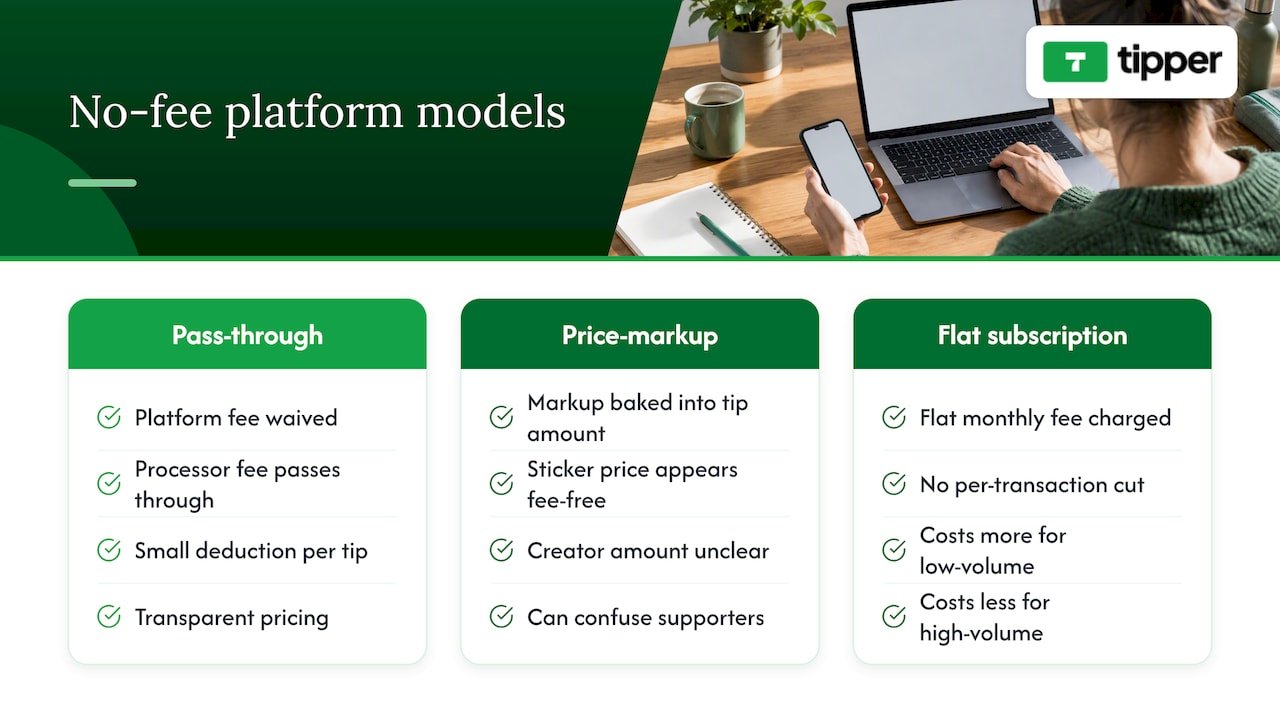
Platforms marketed around “no fee” tipping generally fall into a few patterns worth recognizing before you commit to one.
Some waive their own platform fee entirely and let the payment processor’s standard cost pass through unchanged, which keeps pricing transparent but means the creator still sees a small deduction on every tip. Others bundle a markup into the displayed tip amount so the sticker price looks fee-free, which can confuse supporters who expect the full amount to arrive with the creator. A third group charges creators a flat monthly fee instead of a per-transaction cut, which can cost more for low-volume creators and less for high-volume ones.
The practical differences that matter most are whether supporters need an account to send a tip, whether Apple Pay and Google Pay are supported out of the box, how fast payouts settle, and whether the platform supports thank-you messages or media replies. A platform that scores well on no-signup tipping and wallet support but settles payouts slowly may suit a creator who tips rarely needs instant cash, while a business juggling daily transactions will weigh payout speed more heavily. Reviewing a digital tipping platform comparison against your own tipping frequency and audience habits is more useful than chasing the lowest advertised fee alone.
Security and fraud protection on tipping platforms
Tipping platforms handle real money moving between strangers, so the security questions worth asking are concrete. Does the platform use a PCI-compliant payment processor rather than storing card numbers itself? Is every transaction encrypted in transit? Does the platform monitor for suspicious patterns, like repeated failed charges or unusually large tips from new payment methods?
For creators, the bigger practical risk is usually chargebacks and refund fraud rather than account takeover, since no-signup flows mean there’s no supporter account to compromise in the first place. A supporter disputing a legitimate tip with their card issuer can pull funds back out of your payout after the fact, so it’s worth understanding how quickly a platform notifies you of disputes and what documentation it keeps on its end.
Two-factor authentication on your own creator account, strong unique passwords, and reviewing payout notifications regularly for anything unfamiliar cover most of the risk on your side. The platform’s job is securing the payment rail itself; yours is noticing when something about your account activity looks wrong.
Integrating tip links with your website and social profiles
A tipping link earns the most when it shows up everywhere a supporter already is, rather than living on a page they have to go looking for. Most platforms generate a standard URL that works as a bio link on Instagram, TikTok, X, or YouTube, and the same link typically embeds as a button on a personal website or Linktree-style page.
QR codes extend that reach offline: printed on a table tent at a craft fair, displayed as a livestream overlay during a stream, or included on a business card. Some creators embed a tip button directly into blog posts or newsletter footers, turning any piece of content into a potential tipping moment without asking the reader to leave the page.
The setup for most of these integrations is copy-and-paste rather than custom development, since the link or embed code doesn’t change based on where it’s placed. A personalized tip link works identically whether it’s shared in a text message or embedded on a storefront website, which is part of why creators tend to post it in more places than they initially plan.
Limits and caps on tip amounts
Most tipping platforms set a maximum per-transaction amount, often in the low thousands of dollars, as a fraud-prevention measure rather than a policy against generosity. Minimum tip amounts, when they exist, are usually small, often under a dollar, to keep the barrier to entry low.
Some platforms also apply daily or monthly caps on how much a single sender can tip, or how much a creator can receive, before additional verification is required. These limits rarely affect typical supporter behavior, since most tips are modest, but they matter for a creator running a high-profile fundraiser or receiving an unusually large one-time gift. Checking a platform’s stated transaction limits before promoting a major campaign avoids a failed payment at the worst possible moment.
Support and customer service for tipping platforms
When a payout doesn’t arrive on schedule or a supporter’s payment fails, the quality of a platform’s support becomes the thing that actually matters, not the fee structure on the homepage. Response time and the channels available, email, in-app chat, or a help center, vary widely across tipping platforms and are worth testing before you rely on a service for real income.
A platform with clear documentation on common issues, like why a payout is delayed or how a disputed charge is handled, tends to resolve problems faster than one that requires a support ticket for every question. Checking whether help resources are self-serve or require waiting on a response is a reasonable thing to test with a small test tip before promoting a link widely.
Legal considerations for tipping platform compliance
Tipping platforms that move money on behalf of creators generally operate as payment facilitators or work with regulated payment processors, which means the processor underneath the platform carries its own compliance obligations around fraud monitoring and anti-money-laundering rules. As a creator, you’re not typically required to hold any special license to receive tips, but you are responsible for reporting the income accurately.
If any of your tipping activity overlaps with sponsored content or a material relationship with a brand, FTC endorsement rules apply regardless of which payment platform you use, and disclosures need to be clear and conspicuous rather than buried in fine print, per the FTC’s influencer disclosure guidance. A practical checklist for affiliate and influencer disclosures can help you audit your own posts against current FTC expectations.
A creator’s perspective: trade-offs and when no-fee is the right call
Low-friction, privacy-first tipping earns its keep during small, frequent moments: a live stream chat, an in-person market table, a reader who wants to say thanks without committing to anything bigger. That’s where asking for an account kills the impulse entirely.
Accelerated payouts or recurring subscription features can justify a small fee once your volume grows past occasional tips. Either way, if any tip ties to sponsored content, disclose the relationship clearly, not as an afterthought.
— Tipper
Start collecting tips with Tipper
We built Tipper around the parts of tipping that cause creators the most friction: asking supporters to make an account, wondering how much of a tip actually lands in your pocket, and never knowing when the money will show up.

Getting started takes a few minutes:
- Create your free account and connect a payout method.
- Enable Apple Pay and Google Pay so supporters can pay in one tap.
- Set your preset tip amounts and personalize your tip page.
- Share your link or QR code on your profiles, stream overlay, or signage.
Sign up at Tipper and generate your first tipping link today.
FAQ
Do no-fee tipping platforms really charge nothing?
A platform can waive its own service fee, but the payment processor moving the money almost always charges something, usually a small percentage plus a flat amount per transaction. “No fee” typically means no platform cut, not zero cost anywhere in the chain.
Do I owe taxes on tips if I never get a 1099-K?
Yes. The IRS confirms that all tip income is taxable even when you don’t receive a 1099-K, and the reporting threshold for that form is $20,000 in gross payments and 200 transactions per the IRS’s official guidance.
How fast do tip payouts usually arrive?
Standard payouts through most payment processors settle in about 1 to 2 business days, according to Stripe’s payout documentation. Some platforms offer instant payout options that deliver funds in minutes for an added fee.
Do supporters need an account to send a tip?
No. Tipping through a personalized link works without the supporter creating an account, and payment is made directly through Apple Pay, Google Pay, or a card.
Do I need to disclose tips from sponsored content?
Yes, if the tip relates to a paid or sponsored relationship, FTC rules require a clear and conspicuous disclosure placed where it’s hard to miss, according to FTC guidance for influencers.
Sources
- IRS Publication 1099
- Filing tips and updates for gig economy workers | Internal Revenue Service
- Tip recordkeeping and reporting | Internal Revenue Service
- FTC: Disclosures 101 for social media influencers
- Stripe payouts documentation



Leave A Comment