


Facebook tipping, in the sense that matters for creators, means adding a personalized tip link to your profile or Page so supporters can send instant, account-free tips through Apple Pay, Google Pay, or a card. You can set one up and test a tip quickly. Before you promote it, know two things: the IRS treats voluntary post-access payments differently from required ones, and the FTC has disclosure rules if tips show up alongside paid endorsements.
TL;DR:
- Under IRS guidance, voluntary payments after content access can qualify as tips, but required access payments count as compensation; reconcile gross receipts against fees monthly.
- For tip requests alongside paid endorsements, disclose near the caption’s top, on screen, or early in video; comments and expanded captions do not qualify.
- Before sharing, test checkout on iOS, Android, and desktop; digital wallets are not available to everyone, while card payment covers other visitors.
- Put the link in the Page action button or profile Links section, then use UTM tags to compare which posts or Stories drive taps.
Table of Contents
- How tipping links behave on Facebook and where to place them
- Payment methods and the account-free sender experience
- Tax and recordkeeping under current IRS guidance (2026)
- FTC disclosure rules when tips appear with endorsements
- Step-by-step: create a tip link, add it to Facebook, test one tip, and track results
- Best practices to increase tips while protecting privacy and trust
- Author perspective: why instant tip links matter now
- Tipper: how it supports Facebook tipping and how to get started
- FAQ
- Sources
How tipping links behave on Facebook and where to place them
A tipping link works the same way wherever you put it: tap, choose an amount, pay, done. The placement decision is really about visibility and tracking, not functionality.
On a personal profile, the natural spot is the About section under Links. On a business Page, you have more real estate: the action button at the top of the Page and a dedicated Links section in About. A single action button works well when tipping is your one call to action; a link-in-bio style landing page makes more sense when you’re also pointing people to merchandise, a newsletter, or a scheduling link.
What a visitor sees after tapping is simple:
- A page with preset tip amounts and a custom option
- A choice between Apple Pay, Google Pay, or card entry
- An optional field to leave a note, and in some setups a short video message back to them
Add UTM parameters and a short branded link so you can see which placement, post, or Story actually drives taps, as outlined in this guide to Facebook link-in-bio setups.
Payment methods and the account-free sender experience
“Account-free” refers to the sender, not you. Supporters never create a login or profile to tip you. They open your link, and the payment runs through whatever method they already have on their device or card.
Apple Pay and Google Pay handle most mobile traffic with a single tap, since the payment detail is already stored on the device. Card checkout covers everyone else, including desktop visitors and anyone on a device without a digital wallet configured. Because the experience differs slightly by platform, test your link on iOS, Android, and desktop before you share it widely. A tip that fails silently on one device type costs you money you never see.
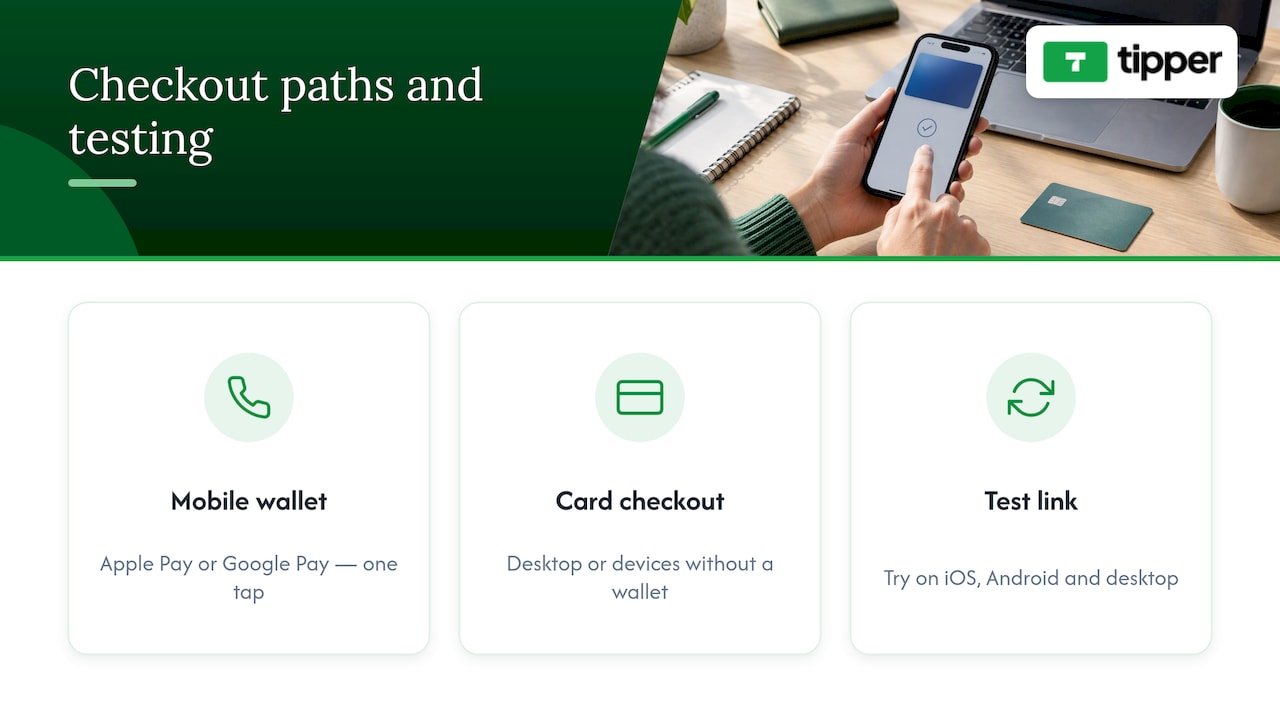
Processors issue receipts automatically, and payouts to you typically follow a set cadence set by the platform you use. Processing fees are usually a small percentage added at checkout rather than deducted from your payout, but the exact structure varies by provider, so check the specifics on your payment processing setup before you publish a link.
Tax and recordkeeping under current IRS guidance (2026)
The 2026-18 Internal Revenue Bulletin clarifies a distinction that matters for anyone collecting tips through a link: a voluntary payment made after a supporter already has access to your content can qualify as a tip, while a payment required to get access is compensation, not a tip. Calling a paywall charge a “tip” doesn’t change its tax treatment.
That distinction has a practical consequence for reporting. Payment processors often report gross amounts on Form 1099-K without subtracting fees, according to the IRS’s guidance on Form 1099-K, so you need your own records to reconcile what you actually kept.
Keep a simple ledger with these columns:
- Date and platform or post the tip came from
- Gross tip amount
- Processor or platform fee
- Net payout received
- Refunds or chargebacks
- Purpose or campaign tag
Reconciling this monthly, rather than scrambling in January, avoids surprises when a 1099-K shows a bigger number than what hit your bank account. If you’re self-employed, a tool like Mali Money’s breakdown of self-employment tax can help you figure out how much to set aside from tip income. None of this replaces advice specific to your situation, so loop in a tax professional for your actual filing.
FTC disclosure rules when tips appear with endorsements
If a tip request shows up in the same post as a paid partnership or any material connection to a brand, the FTC’s endorsement guidance requires a clear and conspicuous disclosure placed with that content, not buried in comments or tucked into your About section.
On Facebook, that means putting the disclosure where a viewer can’t miss it: in the caption itself near the top, in the on-screen text of a Story, or spoken out loud early in a livestream or video. A disclosure that requires tapping “see more” doesn’t meet the bar.
Examples that work:
- A post caption starting with “Paid partnership with [Brand]” before any tip mention
- On-screen text reading “Ad” or “Sponsored” visible for the full Story duration
- A spoken disclosure in the first 15 seconds of a live tipping stream
When you’re unsure whether a relationship counts as material, disclose anyway and save a screenshot of what you posted and when.
Step-by-step: create a tip link, add it to Facebook, test one tip, and track results
- Create and customize your tip page with preset amounts and a thank-you message or short video for supporters. Setup for this generally takes about five minutes.
- Add the link to your Page’s action button or your profile’s Links section, then check that it displays correctly on both mobile and desktop.
- Send yourself a small test tip on an iOS device and again on Android, confirming the payment completes and the receipt arrives.
- Record the test tip in your ledger, then add UTM parameters and a short branded link so future clicks are trackable.
Quick checklist before you share the link publicly:
- Preset amounts make sense for your audience
- Thank-you message or video is recorded and attached
- Link tested on both major mobile platforms
- Ledger entry created for the test transaction
Pro Tip: Share your tip link in a Story first, since Stories get a concentrated burst of views that make it easy to spot broken links fast.
For a full walkthrough, see this guide to getting paid in minutes with a personalized tip link.
Best practices to increase tips while protecting privacy and trust
Wording matters more than most creators expect. Phrases like “if you’d like to” or “totally optional, but appreciated” signal voluntariness, which matters both for conversion and for the IRS distinction covered earlier. Avoid language that implies tipping unlocks something, since that reframes it as a required payment.
- Keep your action button as the primary, always-visible tip destination
- Mention the link in Stories and regular posts occasionally, not every post
- Reassure senders that no account or signup is needed before they tap
- Show brief confirmation text after a successful tip so senders know it worked
Small tests move the needle here. Try two different preset amount sets or two CTA phrasings for a few weeks and compare clicks using your UTMs, an approach covered in more depth in this tip link strategy guide.
Pro Tip: If you post video content to promote your link, a tool like Kudoflix’s slideshow editor can turn a batch of photos into a quick promo clip without a download.
Author perspective: why instant tip links matter now
Instant tip links give creators something algorithmic reach never guarantees: immediate, direct feedback that a piece of content landed. That micro-revenue signal is worth more than its dollar amount suggests. Removing the account requirement for senders is the real unlock here, since every extra step between “I want to tip you” and “I tipped you” loses people. Tipping shouldn’t be your whole monetization plan, as outlined in this overview of why creators need tipping links, but as one piece alongside sponsorships, products, or memberships, it’s one of the lowest-friction pieces to add.
— Tipper
Tipper: how it supports Facebook tipping and how to get started
We built Tipper around the gap this guide keeps pointing at: supporters shouldn’t need an account to show appreciation, and creators shouldn’t lose a cut of every tip to platform overhead.

- Create a personalized tip link accepting Apple Pay, Google Pay, and card payments
- Let supporters tip without creating an account on our end
- Attach a thank-you note, photo, or video back to each supporter
- Keep 100% of every tip you receive
Once your link is live, add it to your Facebook action button, send yourself a test tip, and check your payout terms before sharing it with your audience. Get started at Tipper.
FAQ
Do I need a Facebook account to receive tips?
You need a Facebook presence to share your link there, but the tip itself runs through your tipping platform, not through Facebook. Supporters sending you a tip never need a Facebook or platform account of their own.
Are tips I receive through a link taxable income?
Generally yes. Under IRS guidance from 2026, voluntary payments made after someone already has access to your content can qualify as tips, and tip income is reportable even without a 1099-K, according to the IRS’s Form 1099-K guidance.
Do I need to disclose tipping if I also do sponsored posts?
If a tip request appears in the same post or video as a paid partnership, the FTC requires a clear, visible disclosure placed with that content, not hidden in comments. When in doubt, disclose and document it.
How much does it cost to set up a tip link with Tipper?
A small payment processing fee applies at checkout, with current details available on our pricing page.
Can supporters tip me without using Apple Pay or Google Pay?
Yes. Card checkout is available for supporters on desktop or devices without a digital wallet set up, so you’re not limited to mobile wallet users.


[…] quick payment or deposit rather than a consultation, a simple tipping-style link, such as the kind Tipper’s creator payment tools use for instant, no-account transactions, shows how a thank-you screen can carry a direct action […]