


Turn on Tips inside Edit Profile, connect at least one payment method, then put the link where people actually see it, your bio or a pinned post, instead of burying it in every tweet. That’s the whole job. The setup itself takes about five minutes; getting people to actually use it depends far more on what you post than on which payment app you pick.
TL;DR:
- Connecting your payment accounts correctly and testing the tip link beforehand ensures supporters can send money without errors or delays.
- Placing your tip link in your bio or a pinned post, rather than in every tweet, significantly increases the chances of receiving spontaneous tips.
- Offering multiple payment options and using a link service like Tipper reduces friction, encouraging more supporters to tip with a single tap.
- Verifying that your profile displays the money icon and testing each payment method helps prevent missed tips and builds trust with supporters.
- The cost of tips depends on the payment provider’s fees, especially if supporters use credit cards, which can add around 3% to the tip amount.
Table of Contents
- How Do I Set Up a Twitter Tip Link?
- Which Payment Methods Actually Get You Tipped?
- Where Should You Put Your Tip Link, and How Often Should You Mention It?
- How Do You Verify Your Tip Link Is Actually Working?
- Why a Frictionless Link Changes the Outcome
- What Should You Know About Privacy When Turning on Tips?
- What Happens After Someone Sends You a Tip?
- Who Can Turn on Twitter Tips?
- What Does It Cost to Receive Tips?
- The Setup Advice Nobody Emphasizes Enough
- Get Your Tip Link Running Without the App-Juggling
- Sources
- FAQ
How Do I Set Up a Twitter Tip Link?
The native Tips feature sits inside your profile settings on both mobile and web, and the path is nearly identical either way. Twitter (now X) built this as a direct pipeline to third-party payment services rather than its own processor, so setup is really about connecting accounts you may already have.
Here’s the sequence:
- Open the X app or go to x.com and tap your profile icon, then Edit profile.
- Scroll to Tips and open it. You’ll be shown the General Tipping Policy, which covers acceptable use and payment provider terms. Read it before you accept, since violating it can get the feature disabled.
- Toggle Allow tips on.
- Enter your payment usernames or links in the fields provided. Formatting matters here. A Cash App tag needs the “$” prefix, a Venmo handle needs to match exactly what’s on your Venmo profile, and a PayPal.me link needs the full URL. A typo in any of these sends someone’s money to the wrong place or nowhere at all.
- Save your profile.
- Confirm the small money icon now appears next to your profile, near the message and follow buttons.
Mobile and web walk-throughs show the exact same flow, just with slightly different menu depths, so don’t expect the Android version to differ meaningfully from iOS. One common snag: the icon doesn’t always appear instantly. If it’s missing after a minute, back out of Edit Profile completely and reopen it rather than refreshing the page, which sometimes fails to pull the update.
Which Payment Methods Actually Get You Tipped?
X’s Tips menu typically surfaces a handful of familiar names, Cash App, Venmo, PayPal, and in some regions Patreon or a personal Chime handle. Which ones show up depends on your account region and app version, so check your own Edit Profile screen rather than assuming a list applies to you.
The method you pick matters more than most people think. A supporter who has to download a new app or create an account just to send $5 will abandon the process more often than one who can tap Apple Pay and confirm with Face ID in three seconds. That gap between “willing to tip” and “actually tipped” is almost entirely about friction, not generosity.
A few practical notes on formatting and choice:
- Double-check your Venmo and Cash App usernames match your public profile exactly, including capitalization.
- If you have a PayPal.me link, use the full URL, not just your username.
- Consider listing two options instead of one. Some supporters have Apple Pay set up but not Venmo, and vice versa.
- A dedicated link service like Tipper consolidates Apple Pay, Google Pay, and card payments into a single one-click page instead of routing to separate apps.
Pro Tip: Test every payment link yourself from a phone that isn’t logged into your own accounts. It’s the only way to catch a broken username before a supporter does.
Where Should You Put Your Tip Link, and How Often Should You Mention It?
Your bio and your pinned post are the two spots that actually convert, and for a specific reason: they’re visible without requiring the visitor to scroll through your timeline or catch a tweet at the right moment, as suggested by practical guidance on using profile bios and pinned posts from Link in Bio Hub.
The mistake most new creators make is leading with the ask. A tweet that opens with “Tip me here” and a link tends to underperform posts that lead with value, because the link itself eats into the punch of the first sentence and reads as a pitch before it reads as content. Twitter’s own character economics reward front-loading your hook and pushing links toward the end of a post, not the start.
A better structure looks like this:
- Pin a post that teaches something useful or shares a genuinely interesting take, then mention the tip link as a secondary line, not the headline.
- Use your bio for the permanent, always-visible link, since that’s where curious new followers look first.
- Reply to your own threads with something like “If this helped, the tip jar’s in my bio” rather than repeating the ask in every original post.
- Space out direct mentions. A tip request in every third or fourth post reads as promotional; one every couple of weeks paired with strong content reads as an update.
Sprout Social’s research on tipping etiquette backs this up directly: framing a tip as appreciation for value already delivered, rather than a request made before you’ve built any goodwill, measurably increases follow-through. That’s a sequencing problem, not a persuasion problem. Earn the relationship first through replies and useful posts, then let the tip option sit quietly where people can find it.
How Do You Verify Your Tip Link Is Actually Working?
Don’t assume the toggle worked just because the app didn’t show an error. Check it the way a stranger would encounter it.
- Open your profile from a browser you’re not logged into, or ask a friend to pull it up on their phone, and confirm the money icon appears next to your name.
- Tap the icon yourself and walk through what a supporter sees. Does it list the payment options you expect, and do the links land on the right accounts?
- Send yourself or ask a friend to send a small test tip, a dollar or two, through each connected method to confirm the money actually arrives.
- If a tip fails or the icon is missing, go back to Edit Profile, re-check your username formatting for typos, and re-save. A mismatched username is the single most common cause of a failed payment.
- If the icon still won’t appear after re-saving, log out and back into the app entirely. Cached profile data sometimes prevents the icon from updating on the first try.
Testing before you promote the link matters more than testing after. A broken tip flow discovered by a supporter, rather than by you, usually means that supporter doesn’t try again.
Why a Frictionless Link Changes the Outcome
That matters for the small, spontaneous tips that make up most creator income, the $3 and $5 gestures sent in the moment right after someone reads something useful. Anything that adds a signup screen kills a chunk of those.
A supporter who has to leave the app, install something new, and create a login before paying you $5 is a supporter who, more often than not, just closes the tab instead.
Creators who pair a pinned, value-first post with a one-tap link tend to see steadier tip flow than those who post the link cold. Add a short thank-you note or video reply through Tipper after a tip lands, and the relationship compounds. Supporters who feel personally acknowledged tip again.
What Should You Know About Privacy When Turning on Tips?
Enabling Tips means putting a payment identifier, a Cash App tag, a Venmo handle, a PayPal.me link, in front of anyone who visits your profile, including people who don’t follow you. That’s a different exposure level than posting content, so it’s worth thinking through before you flip the toggle.
Your payment username is not the same as your bank details, but it does let a stranger find your public payment profile, which on some apps shows a transaction history or friend list unless you’ve locked that down separately. Check your Venmo and Cash App privacy settings independently of your Twitter settings; making a payment string public on Twitter does nothing to protect what’s visible once someone clicks through.
Avoid connecting a payment account that’s tied to your real name if you post under a pseudonym, since some services display your registered name at checkout regardless of your display name on Twitter. A few practical habits reduce risk here: use a payment handle you don’t rely on for private transactions with friends and family, review each connected app’s own privacy settings before saving your profile, and periodically confirm nothing has changed after an app update. A link service that doesn’t require the sender to create an account, like Tipper, also reduces the amount of your payment history a stranger can browse, since the transaction happens on a page you control rather than inside someone else’s app.
What Happens After Someone Sends You a Tip?
Once your Tips setup is live, the actual receiving process happens almost entirely inside whichever payment app you connected, not inside Twitter itself. Twitter doesn’t hold or move the money; it’s purely a signpost pointing to your Cash App, Venmo, or PayPal account.
That means your notifications come from the payment app, not from Twitter. If someone sends $5 through Venmo, you’ll get a Venmo notification, and it may not mention Twitter at all unless the sender leaves a note referencing your post. This disconnect trips people up early on. Check your connected apps directly rather than expecting Twitter to alert you when a tip lands.
Payout timing follows each individual service’s own schedule, not a unified Twitter payout system. Cash App and Venmo balances are typically available instantly or within one to three business days for a bank transfer, depending on which transfer speed you choose, while PayPal balances can be withdrawn on your own schedule. A platform like Tipper, by contrast, handles the tip and the notification (including any thank-you note or video the sender attaches) in one place, so you’re not piecing together where a payment came from across three different apps.
It’s worth checking each connected service weekly at minimum, especially early on, so a tip doesn’t sit unnoticed for weeks because you weren’t watching the right app.
Who Can Turn on Twitter Tips?
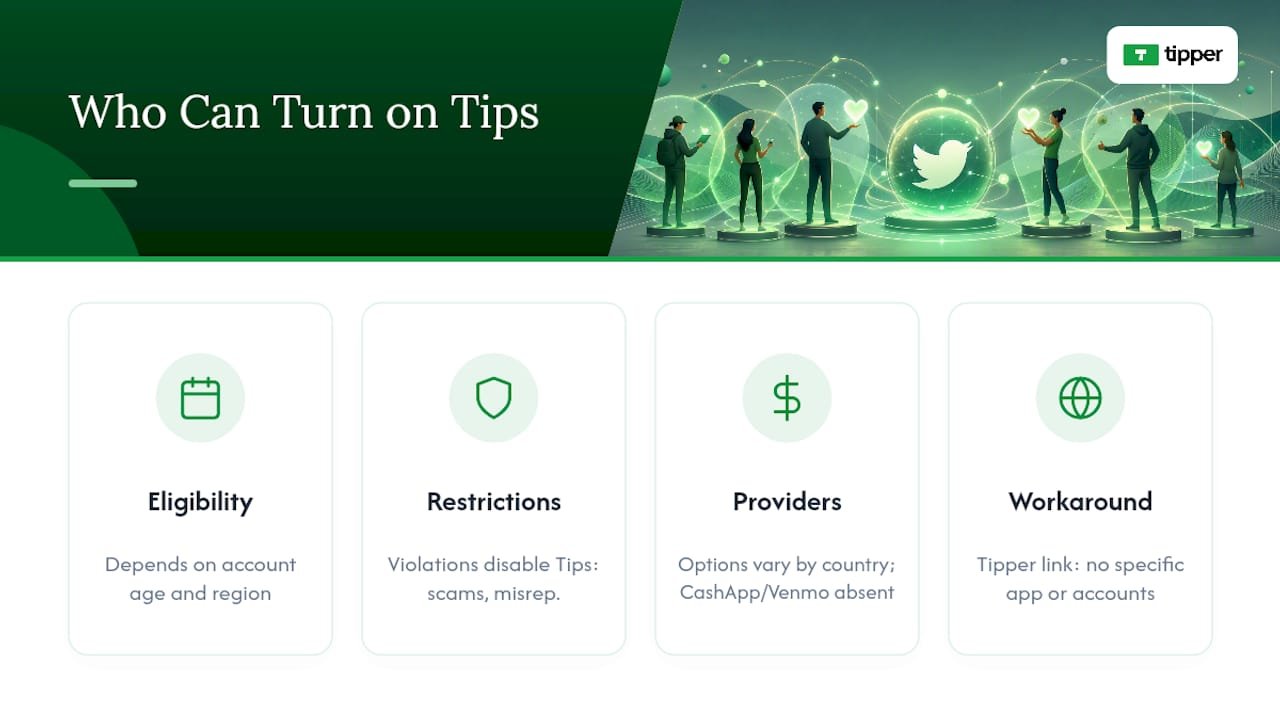
Twitter’s Tips feature isn’t universally available the moment you create an account. It rolled out gradually after its 2021 launch, and access has historically depended on account age, region, and whether Twitter has flagged the account for policy violations. A brand-new account created yesterday may not see the Tips option at all yet.
Beyond eligibility timing, the feature itself carries restrictions worth knowing before you build a promotion plan around it. Accounts that violate the General Tipping Policy, soliciting tips in exchange for prohibited content, misrepresenting what a tip funds, or using the feature for scams, risk having it disabled. Twitter also doesn’t guarantee every payment provider is available in every country, so a creator outside the US or a handful of other markets may find Cash App or Venmo simply absent from their options, leaving PayPal or a third-party link as the practical fallback.
There’s also a subtler limitation: Tips is a pass-through to external services, so if you’re not eligible for a Cash App or Venmo account for any reason, age, region, banking access, you won’t be able to use that particular option regardless of whether Twitter’s own feature is enabled. This is where a service like Tipper offers a workaround, since its personalized link doesn’t require the supporter to have any specific app installed and doesn’t require the creator to hold accounts with multiple regional payment providers.
What Does It Cost to Receive Tips?
Twitter itself doesn’t charge a platform fee for using the native Tips feature, but that doesn’t mean tipping is free. Every payment still routes through a third-party processor, and each one has its own cost structure that applies whether the tip comes through Twitter, a QR code, or a direct request.
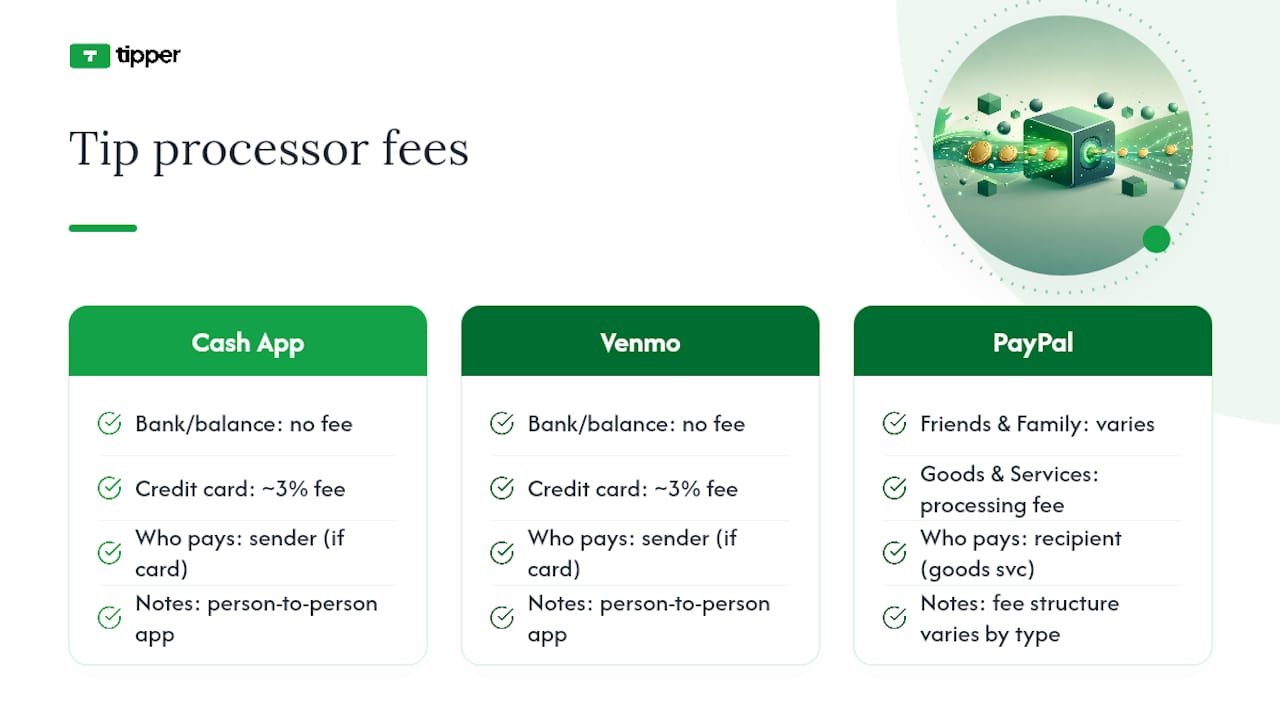
Cash App and Venmo generally process person-to-person payments funded by a bank account or balance without a fee, but a fee typically applies when the sender pays with a credit card, often in the range of 3%, charged to whoever initiates the payment depending on the app’s current terms. PayPal’s fee structure varies by transaction type and whether the payment is sent as “friends and family” or “goods and services,” with the latter carrying a processing fee absorbed by the recipient in most cases.
This is where the math shifts depending on your setup. Compare that against a native Tips setup where you might unknowingly lose a percentage to card processing fees you never explicitly agreed to, buried in the payment app’s own terms rather than Twitter’s.
The Setup Advice Nobody Emphasizes Enough
Most tutorials treat enabling Tips as the finish line. It’s the easy part. The actual leverage sits almost entirely in what you post around the link, not in which toggle you flip.
The conventional wisdom, “add the link, mention it often,” gets the sequencing backward. Buffer’s own guidance on link-first posts confirms what most creators discover the hard way: a tweet that opens with an ask reads as a pitch, and pitches get scrolled past. The creators who build steady tip income are the ones who treat the link as something supporters discover after they’ve already gotten value, not something they’re pitched before they know you.
If you take one thing from this guide, prioritize the five minutes of setup, then spend real time on the pinned post and bio placement rather than treating those as afterthoughts. A perfectly configured Tips toggle attached to a spammy timeline still won’t convert. A modest setup paired with genuinely useful, consistent posting will outperform it every time.
— Tipper
Get Your Tip Link Running Without the App-Juggling
Tipper skips the part where a supporter has to hunt down your Venmo, install Cash App, or create an account just to send you $5.

That matters most for the creators this guide is written for: people collecting small, frequent tips rather than occasional large ones, where every extra step between “I want to tip you” and “payment sent” costs you money. Tipper also lets you send a thank-you note, photo, or video back to each supporter, which the native Twitter flow simply doesn’t offer. If you’ve already built the habit of pointing followers to a tip link, set up a Tipper page and swap it into your bio in place of a scattered list of payment handles.
Sources
- How to Use Twitter (X): Complete Beginner’s Guide for 2026 – Buffer
- Introducing Tips – Blog – Twitter
- How to Enable Twitter Tip Jar – TryPostBase
- Twitter tips best practices – Sprout Social
FAQ
How do I add a tip link on Twitter?
Go to Edit Profile, open Tips, accept the tipping policy, toggle Allow tips on, and enter your payment usernames or links, then save and confirm the money icon appears on your profile.
What is the 4-1-1 rule on Twitter?
It’s a content-mix guideline suggesting that for every four value-driven or entertaining posts you share, post one soft promotional message and one direct ask, keeping self-promotion, including tip requests, a small minority of your overall posting.
How do I get a link to a specific Twitter post?
Tap the share icon on the tweet and select “Copy link to Tweet,” or click the timestamp on the post to open it individually, then copy the URL from your browser’s address bar.
How do I get more tips on Twitter?
Lead with genuinely useful or entertaining content, place your tip link in your bio or a pinned post rather than in every tweet, and use a frictionless payment option like Tipper so supporters can tip in one tap without creating an account.




[…] start on wording, Tipper’s guide to why payment links boost engagement and its walkthrough on building a working tip link fast both give templates you can adapt directly into your signature. Set up your link now and add it to […]