


Yes, you can accept tips by credit card and mobile wallet today, and you don’t need a merchant account to do it. The three practical routes are a shareable payment link, an embedded tips block on your own page, or a QR code that points to a hosted checkout. Each one, once connected to a processor, takes cards, Apple Pay, and Google Pay, lets you set preset or custom amounts, and sends payouts straight to your bank.
TL;DR:
- Using a hosted payment link, embedded tips block, or QR code allows quick acceptance of credit card and mobile wallet tips without a merchant account.
- Setting up involves linking a processor like Stripe or PayPal, configuring preset amounts, enabling wallets, and testing with a small tip before sharing publicly.
- In-person tips benefit more from QR codes for instant mobile payments, while online or remote tips favor links or embedded options for broader reach.
- Tips are taxable income, and you should keep records and consult a tax professional to ensure proper reporting and reconciliation.
Table of Contents
- Quick options: the real ways to accept card tips
- How do you set up card and wallet tipping?
- What fees come out of a credit card tip?
- How can you get more people to actually tip?
- Is it safe to collect card tips, and what about taxes?
- Where should you actually share your tipping link or QR code?
- Why Tipper bets on frictionless, account-free tipping
- Start Accepting Card and Wallet Tips With Tipper
- Sources
- FAQ
Quick options: the real ways to accept card tips
Every card tipping setup boils down to three shapes, and picking the right one depends on where your audience already is.
- Payment links. A hosted checkout page you can drop into a bio, email, or text. Stripe’s Payment Links let you build one without writing a line of code, and it works for a one-time tip or a recurring pledge. PayPal’s Payment Links do the same, accepting cards, Apple Pay, and Google Pay where enabled.
- QR codes. Same hosted link, different delivery. Print it on a table tent, a merch tag, or a slide at a live show, and anyone can scan and pay in seconds.
Links win on reach and simplicity. In-page blocks win on conversion, since the visitor never leaves your content. QR codes win when you’re standing in front of someone and a link would be clumsy.
How do you set up card and wallet tipping?
Getting a working tip flow live doesn’t take a developer. It takes about twenty minutes if you already have a bank account ready to link.
- Pick a processor and finish onboarding. Stripe or PayPal both work well; you’ll verify your identity and connect a bank account before you can accept live payments.
- Create your link or activate a tips block. Set your preset amounts (commonly three or four choices) and decide whether to allow a custom amount field.
- Turn on mobile wallets. Most processors enable Apple Pay and Google Pay automatically once your account is verified, but check your settings, and confirm domain verification if you’re embedding a block on your own site.
- Generate a QR code for the same link. Add your branding, write a short thank-you note that will trigger after payment, and run one real test transaction before you share it publicly.
- Check your payout settings. Confirm your bank routing details are correct and note how often payouts land in your account.
Pro Tip: Send yourself a $1 test tip before you share the link anywhere. It’s the fastest way to catch a broken wallet setting or a typo in your payout details before a real supporter hits the same wall.
Once wallets are confirmed live, Apple Pay and Google Pay tend to convert better on mobile than typing in a full card number, since the phone autofills everything.
What fees come out of a credit card tip?
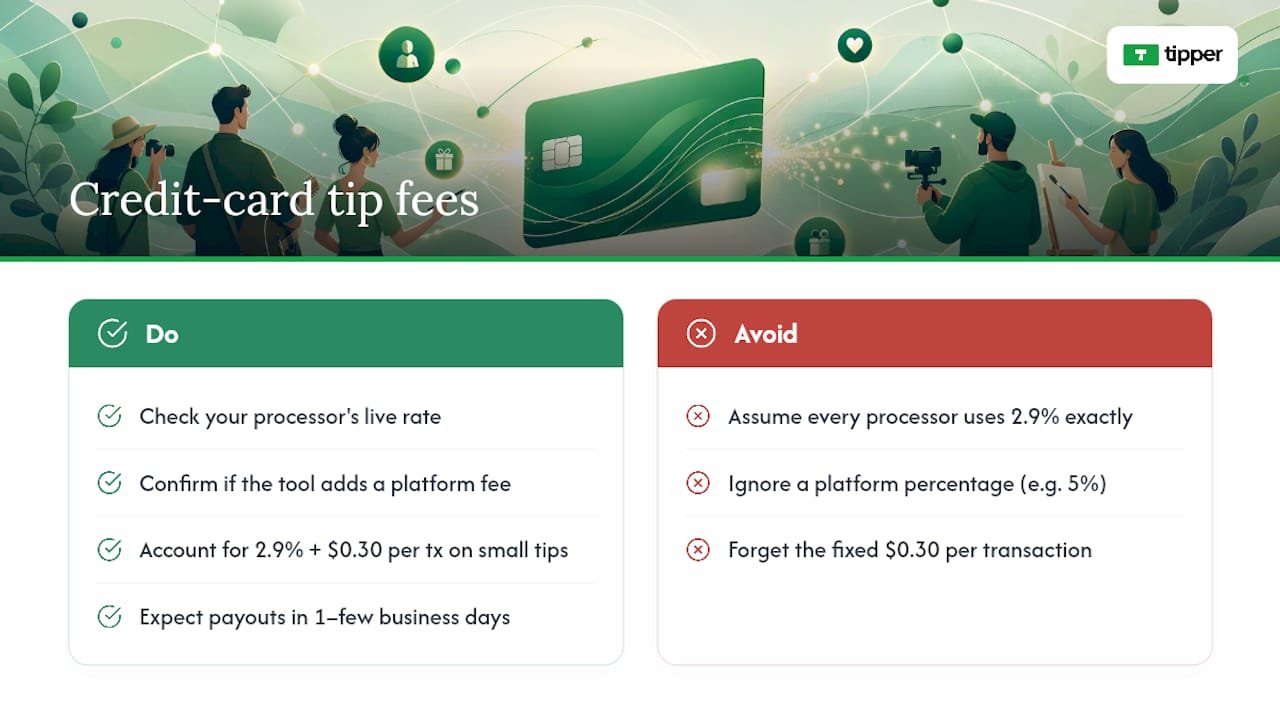
Card processing isn’t free, and knowing the math up front keeps you from being surprised at payout time. A typical US processor fee runs around 2.9% plus $0.30 per transaction, though you should always check your processor’s live rate, since these shift.
Card processing fees reduce a $5 tip by about the processor’s percentage plus a fixed fee, leaving most of the tip amount in your account. Similarly, larger tips have a slightly larger total fee but still leave the majority of the amount to you.
The bigger question is whether your tipping tool only passes along that processor fee, or adds its own percentage on top. Some platforms take a cut of every tip beyond what the card network charges; others don’t touch it at all. That distinction is worth confirming before you commit to a tool, since a 5% platform fee on top of standard processing meaningfully changes what you keep. Payouts themselves usually land in your bank within one to a few business days, depending on the processor and your account history.
How can you get more people to actually tip?
Getting the payment flow working is the easy part. Getting people to tap the button is where most creators leave money on the table.
- Put the option where attention already is. End of a video, your bio link, the footer of a newsletter, a QR code on a receipt or merch tag. Don’t bury it on a page nobody visits.
- Offer three preset amounts with an obvious middle choice, plus an optional custom field for the person who wants to go bigger. Most tips blocks default to this structure for a reason: choice paralysis kills conversions.
- Write one line of context above the button. “Buy me a coffee” or “Support this week’s episode” does more work than a bare “Tip” label, because it gives permission and sets expectations in the same breath.
- Send a thank-you the moment the tip lands. A short text note, a photo, or a quick video reply reinforces the gesture and makes the next tip more likely.
- Change one variable at a time. Swap the preset amounts, then measure. Swap the copy, then measure. Stacking changes makes it impossible to know what actually moved the needle.
Pro Tip: If you only test one thing this month, test your preset amounts. A middle option that’s slightly higher than you’d guess often lifts average tip size without hurting conversion at all.
Keeping the flow embedded rather than sending people to an external page tends to help here too, since every extra click or redirect is a chance for someone to lose momentum and change their mind.
Is it safe to collect card tips, and what about taxes?
A hosted checkout page does more than look clean. It also keeps most of the compliance burden off your plate.
- PCI scope stays small. When Stripe or PayPal hosts the actual checkout, you’re not storing card numbers on your own server, which limits your PCI compliance obligations considerably compared with building your own payment form.
- Collect only what you need. Ask for a name or note if you want it, but don’t require personal details that aren’t necessary for the transaction, and be upfront about what appears on a receipt.
- Tips are income. Keep records of what comes in, reconcile it against your payouts periodically, and talk to a tax professional about how to report it. Occasional gifts from friends are different from a steady tipping stream tied to your work, and that distinction matters for how you categorize it.
Where should you actually share your tipping link or QR code?
The best tip flow in the world does nothing if nobody sees it. A few channels consistently outperform the rest for creators and small businesses.
- Social bios and link pages. Tools like Linktree’s Commerce Links let you accept cards and wallets right from your bio without sending anyone off-platform.
- Email footers and newsletter CTAs. A direct payment link at the bottom of every send costs nothing and reaches people already invested enough to open your email.
- QR codes at live shows and events. Print one on signage, merch, or a tip jar sign, and let people scan and pay in a few seconds.
- An embedded tips block on your own site or storefront, similar to how businesses use customizable payment request pages to make paying (and tipping) feel like a natural part of checkout rather than an afterthought.
Why Tipper bets on frictionless, account-free tipping
We built Tipper around one observation: every extra step between “I want to tip you” and “the money moved” costs you supporters. Requiring an account, a login, or a redirect to some unfamiliar checkout page kills impulse generosity, and impulse is most of what tipping actually is.
Keeping the flow on the creator’s own page, backed by Apple Pay and Google Pay, mirrors what helps creators build sustainable tipping revenue instead of one-off donations that never repeat. The tools that win here aren’t the ones with the most features. They’re the ones that get out of the way fastest.
— Tipper
Start Accepting Card and Wallet Tips With Tipper
If you’ve been weighing a payment link against an embedded block against a QR code, here’s the shortcut: Tipper gives you all three from a single personalized link, no account required for the person sending the tip. You get card payments, Apple Pay, and Google Pay support out of the box, a customizable tip page that matches your brand, and thank-you messages you can send back as text, a photo, or video.

Setup takes a few minutes: connect your payout details, set your amounts, and you’re live. Before you share it anywhere, send yourself a real $1 tip to confirm the whole flow works end to end. Then head to Tipper and build your link.
Sources
For the setup details covered here, the official documentation is worth bookmarking: Stripe Payment Links, PayPal Payment Links, and UniLink’s Tips block guide. For platform-specific comparisons, see Tipper’s guide to digital tipping platforms.
FAQ
Can I accept credit card tips without a merchant account?
Yes. A processor like Stripe or PayPal handles the merchant relationship for you, and a hosted payment link or a personalized page from a platform like Tipper lets you accept cards without ever setting up your own merchant account.
Does Apple Pay or Google Pay cost more to accept than a regular card?
No, mobile wallets typically run through the same processor fee as a standard card transaction. The benefit is speed and conversion on mobile, not a different price.
How much of a $5 tip do I actually keep?
After a typical processing fee of around 2.9% plus $0.30, a $5 tip nets most of its amount, though your exact rate depends on your processor and whether your tipping tool adds its own platform fee on top.
Is a QR code or a payment link better for in-person tipping?
A QR code is usually better in person since it turns a physical sign or receipt into an instant scan-and-pay moment, while both options point to the same hosted checkout page behind the scenes.
Do I have to report credit card tips as income?
Yes, tips are income and should be tracked and reconciled against your payouts; consult a tax professional for how to report them based on your specific situation.



Leave A Comment