


The fastest way to collect one-off tips as a freelancer is a dedicated tipping link or QR code, paired with a tip line added directly to your invoices. We built our platform around exactly this setup, supporting popular payment methods so supporters can send a tip in seconds without creating an account. Tax and reporting rules still apply to that income, so it pays to get the basics right from the start.
TL;DR:
- Put one tipping link on invoices, email signatures, and social profiles, then turn it into a QR code for in person handoffs.
- Supporters can pay by Apple Pay, Google Pay, or card without creating an account, but processing fees apply and payouts follow the processor’s standard schedule.
- Report all tip income as taxable; a deduction applies for tax years 2025 through 2028, and multiple platforms may report tips on different forms.
- Place the request after completed work, offer preset amounts plus a custom option, and send a personal thank you promptly to encourage repeat support.
Table of Contents
- Quick methods to accept tips: link, QR, invoice add-on, embedded button
- Set up a fast tipping workflow with Tipper (link, QR, invoice)
- Fees, payouts, and supported payment types
- Tax and reporting essentials for tip income
- How to increase tip conversion: placement, wording, amounts, and thank-you
- The psychological upside of getting tipped as a freelancer
- How to tell clients tipping is welcome without sounding awkward
- Tipping versus traditional freelance payment models
- A note from the Tipper team
- Tipper: get started
- FAQ
- Sources
Quick methods to accept tips: link, QR, invoice add-on, embedded button
Each tipping method fits a different moment in your work, and matching the method to the moment matters more than picking a single favorite.
- Tipping link: a shareable URL you drop into an email signature, social bio, or text message, best for remote clients and online audiences who tip after seeing your work.
- QR code: a scannable version of the same link, ideal for in-person handoffs, event booths, or a printed card left with a finished project.
- Invoice add-on: a tip line built into the payment request itself, best when a client is already reviewing an invoice and deciding how much to pay.
- Embedded button: a tipping widget placed on a portfolio site or landing page, useful for creators who want passive, always-on access to tips.
The biggest difference between these methods is not the technology but the friction involved. A link or QR code lets a supporter pay instantly without signing up for anything, while some traditional donation platforms still require the sender to register, log in, or create a profile before completing a payment. For freelancers, account-free sending tends to convert better because it removes the one step most likely to cause someone to abandon the tip. Setup complexity is low across all four options: a link takes minutes to generate, a QR code is just that link rendered as an image, and an invoice add-on usually means pasting the same link into a line item or note field.
Set up a fast tipping workflow with Tipper (link, QR, invoice)
Getting a tipping system running takes less time than drafting a single client email. Here is a practical sequence:
- Create your personalized Tipper page and set a default suggested amount that matches the size of your typical project.
- Generate your tipping link and QR code from that page.
- Add the link to your invoice template as a line item or note, following a tip option on your service invoice.
- Paste the same link into your email signature and social media bios so it travels with every message you send.
- Print or display the QR code at in-person handoffs, pop-up events, or client meetings.
- Record a short thank-you note, photo, or video to send automatically or manually once a tip comes in.
Supporters never need an account to send a payment: they tap the link, choose a convenient payment method, and the tip lands in your account. You can set custom tip amounts for different clients or projects, and the thank-you message feature lets you close the loop with something more personal than a generic receipt. For a deeper walkthrough, our guide on building an instant tipping link covers the setup screen by screen, and our freelancer tipping workflow guide has templates for different project types.
Pro Tip: Keep one link for everything, your invoices, your bio, and your in-person QR code, so supporters only ever need to remember one destination.
Fees, payouts, and supported payment types
A payment processing fee is still applied at checkout, since moving money through Apple Pay, Google Pay, or a card network always involves a processing cost, and that distinction between platform cut and processing fee is worth understanding before you set expectations with supporters.
- Apple Pay and Google Pay: fastest for the sender, typically settling on the same processing timeline as a standard card transaction.
- Card payments: the most universal option, usable by anyone regardless of phone or wallet setup.
- Payout timing: expect funds to follow your payment processor’s standard settlement schedule rather than an instant transfer.
If you want a deeper look at how processing fees affect what you actually receive on tips, this breakdown of tip processing costs walks through the mechanics and a few tactics for minimizing the impact. For reconciliation, treat tips the same way you treat invoice payments: log each one with the date and client name so your records match your bank deposits at tax time.
Tax and reporting essentials for tip income
Tip income is taxable income, and the IRS has recently updated both the deduction rules and the reporting forms that apply to freelancers and gig workers. The agency’s filing tips and updates for gig economy workers page confirms a new tip deduction is available for tax years 2025 through 2028, while also making clear that tips must still be included in your total reported income on the appropriate form, whether that is a W-2, 1099-MISC, 1099-NEC, 1099-K, or Form 4137.
A new deduction for tips is available for several upcoming tax years, and tip income must still be reported on applicable tax forms.
The IRS also updated Form 1099-K instructions to add a dedicated box for cash tips and a Treasury Tipped Occupation Code field, which makes it easier for third-party platforms to report tip totals separately from other payments. Third-party settlement organizations report your tips on a 1099-K once your payments cross their reporting threshold, so freelancers using multiple tipping and payment tools may see tip income show up across more than one form.
Good record-keeping is the simplest way to stay ahead of all this. Track every tip as you receive it, set aside a portion for estimated taxes if tipping becomes a steady part of your income, and use the IRS’s own guidance on managing taxes for gig work for tools like Free File or authorized e-file providers. When your situation involves multiple income streams or you are unsure which form applies, a tax professional can confirm the right approach for your specific filing status.

How to increase tip conversion: placement, wording, amounts, and thank-you
Where and how you ask for a tip changes how often people actually send one.
- Place your tip link where the client’s attention already is: at the bottom of an invoice, in the email that delivers finished work, or on a QR card handed over in person.
- Offer preset tip amounts alongside a custom field rather than a single blank box, since a menu of options tends to convert better than an open-ended ask.
- Use direct, warm wording instead of a generic request, something like “If you loved this, a tip helps keep projects like this coming” rather than just “Tip here.”
- Send a short thank-you, a text note, a quick photo, or a 5 to 10 second video, as soon as a tip arrives, since that personal touch encourages repeat support.
- Test one variable at a time: swap the wording on your invoice line, try a different preset amount set, or move the link from the footer to the top of your delivery email.
Pro Tip: A quick video thank-you costs you almost nothing to record but does more to build goodwill than any amount of polished copy.
Placement matters because a tip request buried in a long document gets skipped, while one sitting next to the moment of delivery, when the client is happiest with your work, gets noticed.
The psychological upside of getting tipped as a freelancer
A tip changes the emotional tone of a transaction. Where an invoice payment just closes out an obligation, a tip is voluntary, which makes it read as direct recognition of the work itself rather than a contractual formality. That shift matters for freelancers who often work alone, without a manager or coworker offering feedback in real time.
Receiving even a small tip after a project can reinforce that a client valued the extra effort you put in, which tends to boost motivation on the next project more than a flat fee alone would. It also changes the relationship dynamic: a client who tips is signaling they see you as more than a vendor, which often leads to more open communication and repeat work down the line. For freelancers managing the isolation that can come with solo work, a thank-you note attached to a tip, the kind Tipper supports through text, photo, or short video, adds a layer of human connection that a bank transfer alone never provides.
None of this replaces fair base pricing. But treating tips as a signal of appreciation, not just extra income, helps explain why many freelancers report that tipped projects feel different, even when the dollar amount is modest.
How to tell clients tipping is welcome without sounding awkward
Most clients do not tip freelancers simply because the option never occurs to them, not because they are unwilling. The fix is making the option visible and easy, without turning every invoice into a pitch.
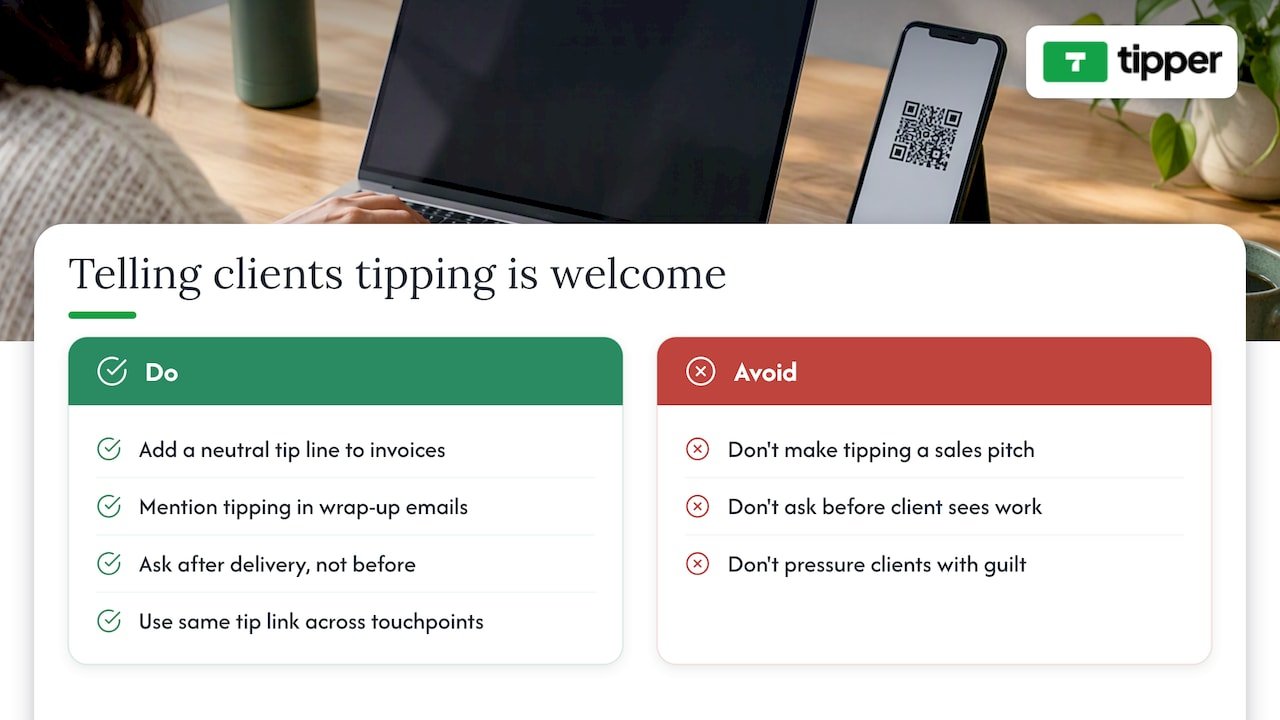
The simplest approach is to treat your tip link like a normal part of your delivery process rather than a special request. A line on your invoice that reads “Tips are always appreciated but never expected” removes the pressure while still opening the door. The same wording works in a project wrap-up email, right where you share the final files or deliverables.
Timing also shapes how a request lands. Mentioning tipping before the work is done can feel presumptuous, but raising it after the client has seen the finished result, when satisfaction is highest, feels natural. A quick note like “If this saved you time or hit the mark, a tip helps support more work like this” explains the value without overselling it.
Consistency helps too. Clients who see the same tip link across your invoices, emails, and social profiles start to recognize it as a normal part of how you work, rather than a one-time ask. Over multiple projects, that familiarity tends to do more for conversion than any single clever sentence ever could.
Tipping versus traditional freelance payment models
A flat project fee or hourly rate sets the floor for what you earn, but it rarely captures how much a client actually valued the outcome. Tipping sits on top of that baseline, functioning less like a payment method and more like an additional revenue stream that scales with client satisfaction rather than hours logged.
Traditional models, fixed bids, hourly billing, retainers, are predictable but rigid: the number is set before the work is judged. Tips flip that order, arriving after the client has seen the result, which means they reflect perceived value rather than estimated effort. This makes tipping a useful complement for freelancers in creative or service-based fields, where the gap between “adequate” and “exceptional” work is often invisible in a standard invoice.
Compared to other supplemental income ideas, like raising your base rate or adding paid add-on services, a tipping link costs nothing to set up and does not require renegotiating your pricing structure with every client. It also does not compete with other revenue streams; a tip link on an invoice sits comfortably alongside a retainer agreement or an hourly bill, adding upside without changing the underlying contract. For freelancers looking to diversify income without restructuring how they price their core work, tipping offers a low-friction starting point.
A note from the Tipper team
We built our platform because we kept hearing the same thing from freelancers: clients wanted to show appreciation but had no simple way to do it. One creator told us a short thank-you video turned a one-time tipper into someone who tips on every project since. That kind of personal exchange, paired with the privacy of not forcing supporters to create an account, is what we think makes tipping feel less like a transaction and more like a connection.
— Tipper
Tipper: get started
Setting up a tipping system should not take longer than sending the invoice itself.

Getting started takes three steps:
- Create your personalized tip page in a few minutes.
- Generate your link and QR code and add them to your invoices, email signature, and social bios.
- Start collecting tips and send a personal thank-you, note, photo, or video, for every one you receive.
Set up your Tipper page and start turning client appreciation into actual income.
This article is general information, not a substitute for advice from a qualified financial advisor. Consult a qualified financial professional about your own circumstances before acting on anything here.
FAQ
How much should freelancers suggest as a tip amount?
There is no fixed industry standard, but offering a few preset amounts alongside a custom field tends to perform better than a single blank box, since it gives supporters a quick reference point. Matching your presets to the typical size of your projects, smaller suggestions for quick tasks, larger ones for bigger deliverables, keeps the ask realistic.
Do freelancers have to report tip income on taxes?
Yes, tip income counts as taxable income and must be reported on the applicable form, whether that is a W-2, 1099-NEC, 1099-K, or Form 4137, according to the IRS’s gig economy filing guidance. A deduction for tips is available for tax years 2025 through 2028, but the income itself still needs to be included in your total earnings.
Do supporters need an account to send a tip?
No, the point of a dedicated tipping link or QR code is that supporters can pay instantly using Apple Pay, Google Pay, or a card without signing up for anything. Removing that step is one of the main reasons link and QR-based tipping tends to convert better than platforms requiring an account.
What is the easiest way to add tipping to an existing invoice?
The simplest approach is pasting your tipping link into a line item or note field on your current invoice template, which takes only a few minutes to set up. Our guide on adding a tip option to a service invoice walks through the exact placement that tends to get noticed.
Are payment processing fees charged on every tip?
Yes, moving money through Apple Pay, Google Pay, or a card network involves a processing cost, which is separate from any platform cut on the tip itself.




Leave A Comment