


The fastest, highest-converting way to accept tips is a mobile-first tip link or hosted tip page that triggers the Apple Pay sheet the moment someone taps it. We built Tipper around exactly that flow: personalized links with no sender account required, so you keep 100% of what supporters send. Expect instant tip acceptance, not a project that requires domain verification or custom development work.
TL;DR:
- Hosted pages can handle domain verification; custom checkouts require setup, and desktop tests may miss failures that appear in Safari on an actual iPhone.
- Processing fees combine a percentage and fixed charge, but platform disclosure varies; report every tip as income, even if no Form 1099-K arrives.
- Apple Pay replaces card numbers with device tokens and dynamic security codes, while merchant tokens can keep recurring payments active after card or device changes.
- Preset amounts, a default tip, and an early Apple Pay button reduce friction; track page visits against completed payments to find where supporters drop off.
Table of Contents
- What Apple Pay tipping flows actually look like
- How Apple Pay works behind the scenes, and what to check
- Fees and tax reporting basics for creators accepting tips
- Setting up Apple Pay tipping: a practical checklist
- Best practices that maximize Apple Pay tip conversion
- How Tipper removes the friction from Apple Pay tipping
- What creators should prioritize when picking a tipping flow
- Start accepting Apple Pay tips today
- FAQ
- Sources
What Apple Pay tipping flows actually look like
Supporters do not want to type card numbers on a phone, so the flow you choose matters more than almost any other decision you make. A payment link or hosted tip page is the simplest version: someone taps your link, lands on a mobile-optimized page, and the Apple Pay sheet appears almost immediately if their device supports it.
QR codes extend that same page into physical spaces: a sticker on a merch table, a slide at the end of a talk, a table tent at a pop-up event. The supporter scans, lands on the identical hosted page, and pays the same way.
In-app or embedded checkout flows give you more control over branding and placement, but they typically require domain verification and SDK or JavaScript integration work before Apple Pay shows up at all.
- Payment links and hosted tip pages: fastest to launch, no code required
- QR codes: best for in-person events, merch tables, and venues
- Embedded or in-app checkout: more design control, more setup overhead
Mobile-first design and placing the Apple Pay button early in the flow both push conversion higher, because every extra tap or scroll is a chance for someone to abandon the payment before it starts.
How Apple Pay works behind the scenes, and what to check
Apple Pay’s security model is part of why it converts so well: supporters trust it instinctively, even on a page they have never visited before. When a supporter pays, their device generates a device-specific token (a DPAN) along with a dynamic security code, so the platform processing the payment never sees the actual card number, according to Apple’s security documentation.
Merchant tokens, known as MPANs, matter for a different reason: they help preserve payment continuity when a supporter replaces a card or switches devices, which reduces the chance a recurring supporter’s payment silently fails.
Web-based Apple Pay also requires domain verification, a step Apple’s own merchant integration guide documents in detail. Hosted platforms can absorb that requirement on your behalf, which is one reason a hosted tip page launches faster than a custom build.
- Device tokenization replaces your card number with a one-time, device-specific token
- Merchant tokens keep payments working across device and card changes
- Domain verification is required for Apple Pay on the web, with or without a hosted provider
According to Stripe’s documentation on Apple Pay, Payment Links and hosted Checkout pages generally support Apple Pay with minimal configuration, while deeper integrations like Elements require you to register your own domain.
Pro Tip: Test your tip page in Safari on an actual iPhone before sharing it publicly. Desktop browser tests miss the mobile-only failures that block the Apple Pay sheet from appearing.
Fees and tax reporting basics for creators accepting tips
Processing fees on Apple Pay tips work the same way they do for any card payment: a percentage of the transaction plus a small fixed fee, according to Stripe’s in-depth guide to Apple Pay. There is no extra Apple Pay surcharge layered on top of standard card processing.
What varies a lot between platforms is disclosure. Some platforms bundle the platform fee and processing fee into one number, while others break each one out so you can estimate your net payout before a tip even arrives. The second approach is worth prioritizing, since it lets you calculate take-home pay accurately instead of guessing.
- Processing fees are typically a percentage plus a small fixed fee per transaction
- Look for a clear breakdown between platform fees and processor fees
- Reconcile payouts against gross tips regularly so nothing is a surprise at tax time
Tips and appreciation payments count as income, and reporting obligations have changed. The IRS guidance for gig economy workers confirms that taxpayers must report all income they receive, including tips, even when they never receive a Form 1099-K for it. Reporting thresholds for Form 1099-K have shifted in recent years, so a creator who processes a meaningful volume of tips through a given platform in a calendar year may receive that form directly from the processor. The responsibility to report income does not wait for the form to arrive.
Setting up Apple Pay tipping: a practical checklist
Getting a tip page live does not require a developer, provided you choose the right starting point.
- Decide between a hosted tip page, which is live in minutes, and a custom integration on your own site, which takes longer but offers more design control.
- Confirm who handles domain verification: a hosted provider typically manages this for you, while a self-built page puts it on your plate.
- Build your tip page with preset amounts and the Apple Pay button placed early, before any secondary form fields.
- Add a personalized thank-you message, text, photo, or short video, so supporters get something back immediately.
- Set your payout destination and confirm your tax contact details are current before you share the link publicly.
Our guide to Apple Pay tipping setup walks through each of these steps in more detail if you want a longer reference.
Pro Tip: Share your tip link in the first comment or caption of a post, not buried at the end of a thread. The sooner supporters see it, the higher your conversion.
Best practices that maximize Apple Pay tip conversion
Small design choices make a disproportionate difference once Apple Pay is live. The goal is removing every point of friction between someone deciding to tip and the moment they actually pay.
- Keep the tip option visible and one-tap on mobile, and verify it in Safari specifically, since that is where most Apple Pay failures surface
- Use clear calls to action and preset amounts, with a sensible default tip pre-selected for impulse support
- Send a personalized thank-you, text, photo, or short video, right after payment to build a relationship instead of a transaction
- Track how many people reach your tip page versus how many actually complete payment, then adjust placement or copy based on where drop-off happens
Our complete 2026 guide to Apple Pay creator tips covers additional UX patterns worth testing, and the same frictionless principles apply whether you are running a solo channel or a small business collecting tips alongside sales.
For in-person events, a well-placed QR code works the same way a tip link does online. If you are weighing contactless hardware for a table or counter setup, this overview of contactless and NFC payment processing covers how those systems handle the tap-to-pay side of the experience.
How Tipper removes the friction from Apple Pay tipping
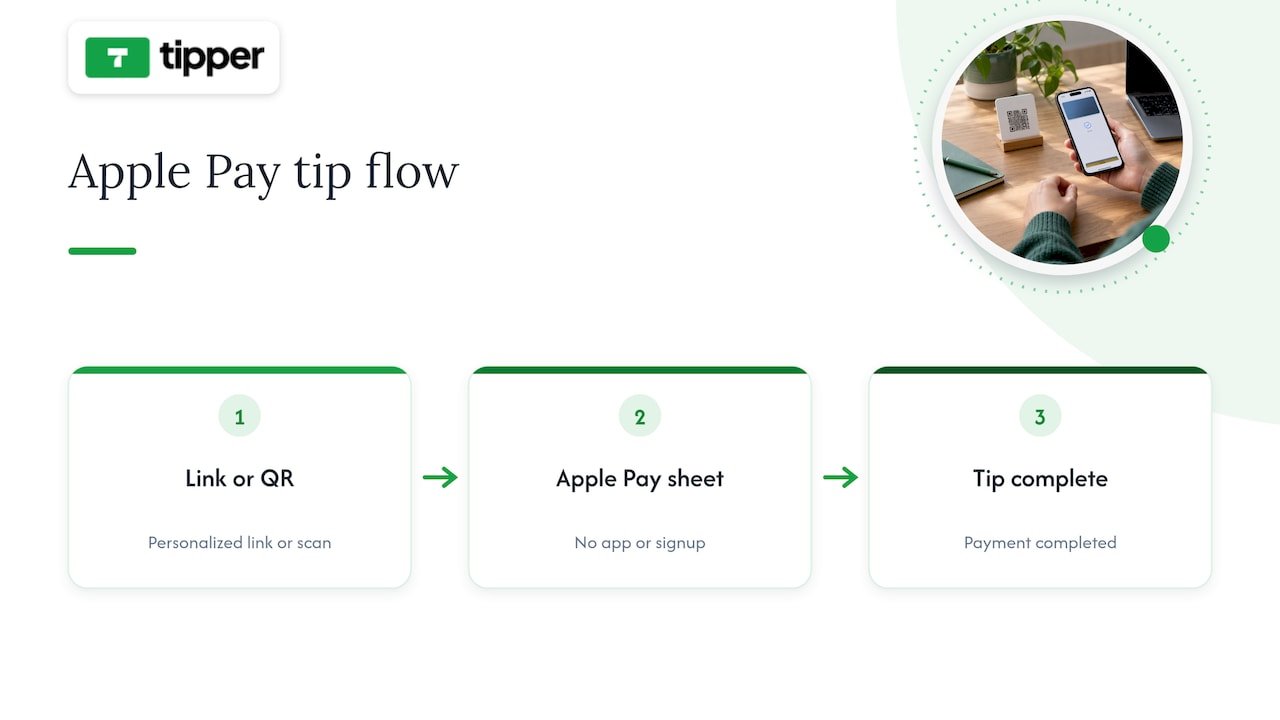
We built Tipper so creators can accept Apple Pay tips without asking supporters to create an account first: someone taps your personalized link or scans your QR code, and the Apple Pay sheet appears right there. No app download, no signup form standing between appreciation and payment.
Creators keep 100% of their earnings on Tipper, with a processing fee applied only at the point of payment, detailed on our tip link page. Because Apple Pay configuration is managed on the provider’s end, you skip domain verification and SDK work entirely.
Every tip page also supports a personalized thank-you response, a note, a photo, or a short video, so the interaction feels like an exchange rather than a transaction. That combination of speed for the supporter and warmth for the creator is the whole point of the design.
What creators should prioritize when picking a tipping flow
If I had to boil this down to one rule, it would be: remove every step between intent and payment. A frictionless, mobile-first flow with clearly disclosed fees will outperform a feature-rich platform that makes someone think twice before tapping pay.
Hosted tip links win on speed because they sidestep the domain verification and integration work that slows down a custom build. Test your flow on your own phone before trusting it with your audience, and ask a few supporters for honest feedback on where they hesitated.
— Tipper
Start accepting Apple Pay tips today
If you want supporters tipping within seconds instead of navigating a signup flow, a personalized tip link gets you there without touching a line of code.

Create your personalized tip page at Tipper and start sharing a link that turns appreciation into instant, one-tap support.
FAQ
What is the fastest way to accept Apple Pay tips?
A hosted tip link or tip page is the fastest option, since it triggers the Apple Pay sheet without requiring you to build or verify anything yourself. Platforms like Tipper generate this kind of link in minutes, with no sender account needed from supporters.
Do I need a website to accept Apple Pay donations?
No, a hosted tip page or QR code works without a personal website, since the page itself handles Apple Pay eligibility and domain verification on your behalf. You only need your own site if you want a fully custom, embedded checkout experience.
How much do payment processing fees cost on Apple Pay tips?
Processing fees typically combine a percentage of the transaction with a small fixed fee, the same structure used for any card payment, according to Stripe’s Apple Pay guide. Look for a platform that discloses this breakdown clearly so you can estimate your net payout before funds arrive.
Do I have to report tips I receive through Apple Pay?
Yes, all tips and appreciation payments count as income and must be reported, regardless of whether you receive a Form 1099-K, per IRS guidance for gig economy workers. You may receive a 1099-K directly from a payment processor once your transaction volume crosses the applicable threshold for the year.
Is Apple Pay safe for collecting tips from strangers?
Yes, Apple Pay uses device-specific tokens and dynamic security codes instead of sharing your supporter’s actual card number with the platform, as described in Apple’s security overview. That tokenization is part of why supporters trust it on a tip page they are visiting for the first time.
Sources
- Apple Pay Merchant Integration Guide — Apple Developer
- Apple Pay | Stripe Documentation
- Apple Pay: an in-depth guide — Stripe
- Filing tips and updates for gig economy workers — IRS




Leave A Comment