


The best Donorbox alternative depends on who is collecting the money. If you run a registered nonprofit and need receipts, donor records and events, look at Givebutter, Zeffy, Bloomerang or DonorPerfect. If you are a creator, streamer or freelancer who just wants fans to send support from a link, a tipping tool like Tipper fits the job better, because supporters can pay with Apple Pay, Google Pay or a card without creating an account.
This guide compares both groups honestly, so you can tell which kind of tool you actually need before you sign up for anything.
TL;DR
- Donorbox is fundraising software built around nonprofits: donation forms, recurring gifts, events and tax receipts. Creators often find it more than they need.
- Nonprofits comparing options should weigh platform fees, optional donor tips, CRM pricing and whether the tool fits their size.
- Creators who want fan support through a link-in-bio, stream panel or QR code are better served by a tipping page than by a donation system.
- Tipper lets supporters tip with no account, and creators keep 100% of their earnings, with a small payment processing fee added at checkout.
- Before choosing, check who pays the fees, how fast money reaches you, and whether supporters must sign up.
Table of Contents
- What Donorbox does well, and where people look elsewhere
- Quick comparison of Donorbox alternatives
- Nonprofit platforms worth a look
- When you are a creator, not a charity
- How to choose: six things to verify
- Our perspective: tipping is not fundraising
- Try a no-signup tip page
- Which option fits which person
- FAQ
- Sources
What Donorbox does well, and where people look elsewhere
Donorbox is fundraising software for donations, recurring gifts and events, and it serves nonprofits first. That focus is its strength. BetterWorld notes that it supports repeat donations and generates tax-deductible receipts, which matter if you are a 501©(3) answering to donors and auditors.
The same sources point to the reasons people shop around: nonprofit-centric features that individuals never use, tiered pricing with percentage-based platform fees, limited branding customization, and an interface some users find hard to navigate.
Those complaints split into two different problems:
- A nonprofit wants a cheaper or broader fundraising stack. It needs forms, a donor CRM, events and receipts, just at a better price.
- A creator wants something lighter. There is no board, no donor database and no annual appeal. There is an audience that wants to say thanks.
Most lists of Donorbox alternatives only answer the first problem. We cover both, starting with the nonprofit side because that is where most searchers land.
Quick comparison of Donorbox alternatives
The table summarizes what each option’s own pages say. Pricing changes often, so confirm it on the provider’s site before you commit.
| Option | Best for | Pricing signal | Supporter account needed? |
|---|---|---|---|
| Tipper | Creators, freelancers, small businesses collecting tips | Free to create an account, no subscription, small processing fee added at checkout | No |
| Givebutter | Nonprofits wanting an all-in-one tool | $0 platform fees with optional donor tips; 3% platform fee if tips are off, plus processing | Not required for a basic gift |
| Zeffy | Nonprofits wanting zero platform cost | No transaction or platform fees, funded by optional donor tips | Not required for a basic gift |
| Bloomerang | Nonprofits that want donor management first | Fundraising from $40/month billed annually, sold with CRM from $125/month billed annually | Varies by form |
| DonorPerfect | Nonprofits that need deeper donor management | Plans from $119 per month | Varies by form |
| Bonterra Network for Good | Small to medium nonprofits and public organizations | No public price; processing may run through Stripe or PayPal | Varies by form |
| PayPal | Quick, low-friction direct support | Standard PayPal fees | Card checkout often possible |
| JustGiving | Cause fundraising pages | Check current terms | Guest checkout, email needed |
Nonprofit platforms worth a look
Givebutter
Givebutter bundles donation forms, events, auctions, fundraising pages, a donor CRM and email, text and direct-mail engagement. It advertises 0% fees. The detail to read is on its pricing page: the $0 platform fee depends on supporters leaving an optional tip. If you turn tips off, a 3% platform fee plus payment-processing fees applies.
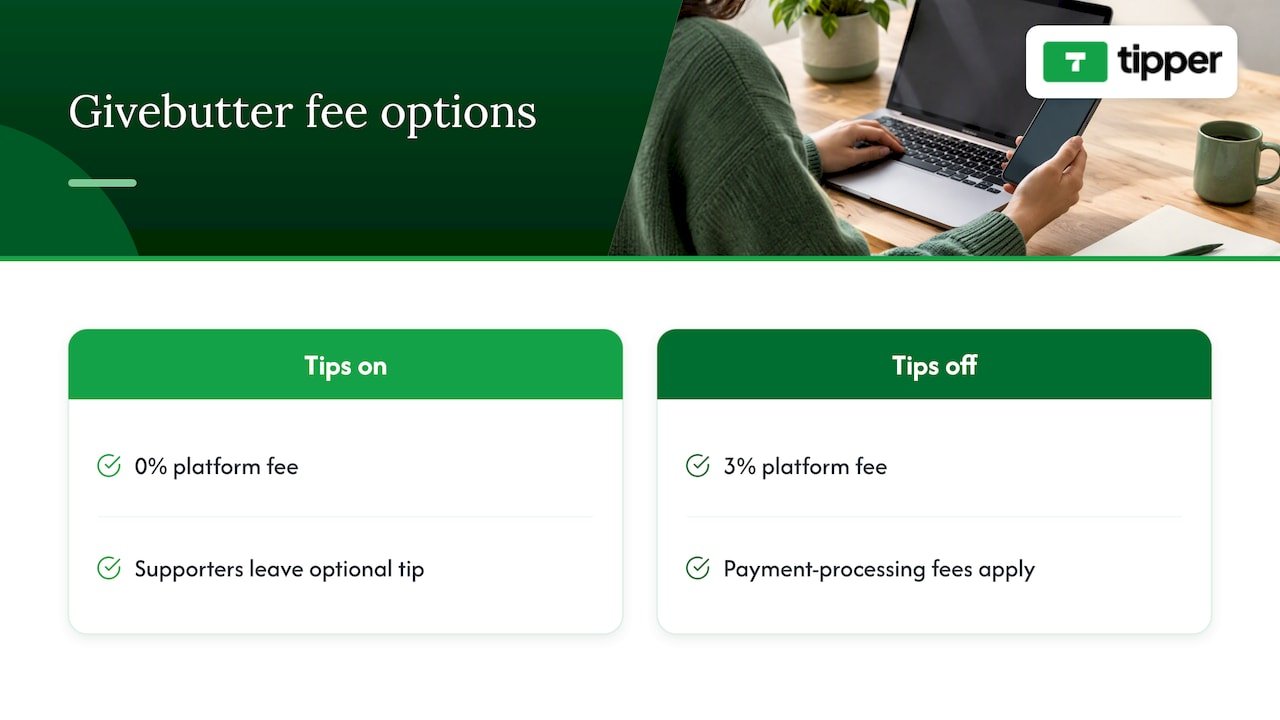
That is a fair model, but it means your effective cost depends on donor behavior and how your forms present the tip prompt.
Zeffy
Zeffy covers donations, recurring giving, ticketing, raffles, auctions, memberships, peer-to-peer campaigns, an online store and a CRM. It charges no transaction or platform fees and says it earns only from optional donor tips. For a small nonprofit with a modest budget, that is an easy model to understand. It is built for registered organizations, so it is not meant for an individual creator collecting appreciation.
Bloomerang
Bloomerang starts its fundraising product at $40/month billed annually, and you must buy it with Bloomerang CRM, which starts at $125/month billed annually. The pricing page lists features but no processing-fee schedule, so ask for that number in writing. It suits organizations that care most about retention and donor relationships.
DonorPerfect
DonorPerfect sells fundraising software packages starting at $119 per month, with pricing tied to the features you need. It sits at the heavier end: more donor management, more setup, more cost.
Bonterra Network for Good
Bonterra Network for Good serves small to medium nonprofits and public organizations with fundraising, donor engagement, volunteer and event tools. It publishes no public price, but Bonterra’s own guide says processing fees may include Stripe at 2.2% plus $0.30 per transaction or PayPal at 1.99% plus $0.49 per transaction. Treat those as examples of the processing layer, not a quote.
If your next step is donor outreach beyond the giving form, a guide to email marketing platforms for nonprofits can help you plan what to add after the donation tool is settled.
When you are a creator, not a charity
Here is where most Donorbox comparisons stop being useful. A streamer on Twitch or Kick, a YouTube creator, a TikTok or Instagram account, a freelancer or a musician does not need tax receipts, grant reporting or a donor CRM. They need three things:
- A link or QR code that works in a bio, a panel or on a printed card.
- A checkout so quick that a fan tips on impulse.
- A way to say thanks that feels personal.
Donation software asks supporters to fill out a form, sometimes create a profile, and often treat the gift as a charitable transaction. That friction costs tips. Creators who put a Donorbox URL in a channel panel can do it, since Twitch streamers can add a PayPal.me, Streamlabs Tips or Donorbox URL to a channel panel, but the experience is built for a different purpose.
Tipper
Tipper is a digital tipping platform for creators, freelancers, influencers and small businesses. You get a personalized link or QR code and a customizable tip page. Supporters pay with Apple Pay, Google Pay or a card, and they never create an account. You can reply with a thank-you message as text, a photo or a video, and payouts go directly to you.
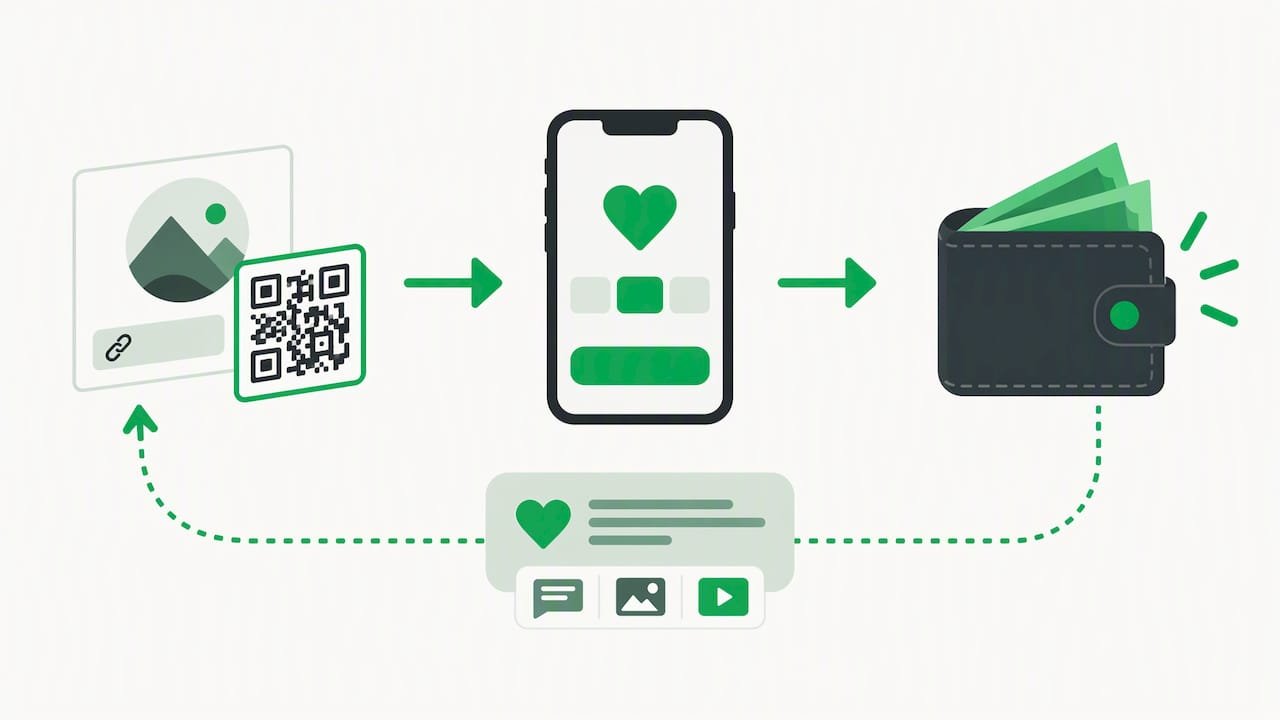
The business model is simple. Creating and maintaining an account is free, with no subscription. Creators keep 100% of their earnings, and a small payment processing fee is added at checkout on each tip. We do not publish a flat price for that fee, so check the checkout and the Tipper site for the current figure.
What Tipper does not do is just as clear. It has no donor CRM, no receipting for charitable deductions and no auction module. If you need those, use one of the nonprofit platforms above.
PayPal as a bare-bones option
PayPal works as a low-friction rail rather than a full creator platform. Its US help page says donors without PayPal accounts can generally donate by credit or debit card on most PayPal online products. It is familiar and trusted, but you get no tip page design, no thank-you video flow and little audience engagement.
JustGiving for cause fundraising
JustGiving suits a personal cause campaign more than ongoing creator support. Registration is optional through guest checkout, but donors must give an email address for a receipt, and guest donations do not appear in their account history. That is reasonable for a charity drive and a bit heavy for a two-dollar thank-you.
Crypto payment links
Some creators with international or crypto-native audiences also want a way to get paid without sending an invoice. Reusable crypto payment links are one approach to that. They suit a niche audience; most US fans expect to pay with Apple Pay, Google Pay or a card.
How to choose: six things to verify
Before you commit to any alternative, run through this list. It takes ten minutes and prevents the usual regrets.
- Who are you legally? A registered nonprofit needs receipts and reporting. An individual creator or small business generally does not. Pick the category first, then the tool.
- What is the true all-in cost? Add platform fee, processing fee, any monthly plan and any currency conversion. Ask what happens to fees on a $5 payment and on a $500 one. Fixed per-transaction charges hurt small tips most.
- Is the fee optional-tip based? Some platforms reach zero platform cost only when supporters add a tip. Look at what happens when the prompt is off.
- Do supporters need an account? Every extra step loses someone. Test the checkout on your phone as a stranger would.
- How fast do you get paid? Payout timing varies by provider, payment method and your account verification. Read the payout terms on the provider’s own help pages and test with a small payment first.
- Does it fit where your audience is? Check that the link works in your bio, panel, video description or on a printed QR code, and that it does not require a particular embed or website.
The cost point deserves a quick worked example. Suppose 100 fans each send $5, for $500 total. A flat per-transaction add-on of 30 cents costs $30 across those payments, or 6% of the total, before any percentage fee. The same $500 arriving as five $100 gifts would carry only $1.50 of that flat charge. This is why fee structures built for large donations can feel heavy for creator tips, and why it pays to read the fee line for small amounts.
Our perspective: tipping is not fundraising
We built Tipper around one observation: supporting a creator is a different act from donating to a cause. A fan who enjoyed your stream or your freelance work wants to say thank you right now, from their phone, in a few seconds. They do not want to register, confirm an email or read about donor tiers.
That is why we let anyone tip with no account, using Apple Pay, Google Pay or a card. It is also why we let creators answer with a note, a photo or a video. The personal reply turns a payment into a relationship, and in our view that matters more to a small creator than a long feature list.
We also think fees should be easy to explain. Creators keep 100% of their earnings, and the payment processing fee is added at checkout instead of being quietly deducted from your tips. If you are weighing your options, our guide to no-fee donation platforms for creators walks through how that works, and our digital tipping platforms comparison puts several tools side by side.
If a nonprofit asks us whether Tipper replaces Donorbox, our honest answer is no. Use a nonprofit platform if you need receipting and donor management. If you are a creator, freelancer or small business, you probably never needed that machinery in the first place.
— Tipper
Try a no-signup tip page
If you are a creator, you can set up a free Tipper account, get your personalized link or QR code and customize your tip page. Supporters tip with Apple Pay, Google Pay or a card, and you thank them with a text, photo or video. Create your tip page at Tipper and test it with a friend before you share it publicly. For a deeper walk-through, read our guide to collecting tips with no signup required.
Which option fits which person
- Small nonprofit on a tight budget: Zeffy or Givebutter, after reading how each handles optional tips and what happens if you turn them off.
- Nonprofit focused on retention and donor data: Bloomerang or DonorPerfect, accepting a higher monthly cost.
- Small or mid-sized public organization: Bonterra Network for Good, once you have a quote.
- Streamer, YouTuber, TikTok or Instagram creator: a tipping page such as Tipper, placed in your bio or stream panel. For live audiences, see our notes on tipping platforms for livestreamers and real-time supporter contribution tools.
- Creator leaving another tip page: compare notes in our lists of Ko-fi alternatives and Throne alternatives.
- Creator sending many small tips of a dollar or two: read how micro donation platforms handle small amounts before you pick, since fixed fees weigh heavily there.
FAQ
Is Tipper a direct replacement for Donorbox?
Not for nonprofits. Donorbox is built for donations, recurring gifts, events and tax receipts, while Tipper is built for creators, freelancers and small businesses collecting tips. If you need charitable receipts or donor records, choose a nonprofit platform. If you want fans to send support from a link, Tipper fits better.
Do supporters need an account to tip?
With Tipper, no. Supporters pay with Apple Pay, Google Pay or a card. Other tools differ: JustGiving offers optional guest checkout but requires an email for the receipt, and PayPal generally lets card payers donate without a PayPal account on most of its online products.
What does Tipper cost?
Creating and maintaining a creator account is free, with no subscription. Creators keep 100% of their earnings, and a small payment processing fee is added at checkout on each tip. We do not publish a fixed price for that fee, so check the checkout for the current amount.
Can I use a donation platform for my Twitch or YouTube channel?
Yes, technically. Streamers commonly add a donation or tip link to a channel panel, including options like PayPal.me or Donorbox. The question is fit: a tool made for nonprofit campaigns may add steps your fans do not want, so test the supporter experience on your phone first.
Sources
- Donorbox Software Pricing, Alternatives & More (Capterra)
- Donorbox Alternatives for Fundraising Campaigns (BetterWorld)
- Givebutter: Fundraising Software for Nonprofits
- Givebutter Fees & Pricing
- Zeffy: Free, All-in-One Fundraising Software
- Bloomerang pricing plans
- DonorPerfect: Fundraising Software for Nonprofit Donor Management
- Bonterra: Donor Management Software guide
- PayPal: Donors without PayPal accounts
- JustGiving Help: What is Guest Checkout?
- How to Set Up Donations on Twitch in 2026




**TraceEagle — Free, All-Platform Network Packet Capture & Debugging Tool**
– Raw packet capture at the NIC level: DNS, QUIC, TCP/UDP — nothing slips through, granularity on par with Wireshark
– Auto-decrypts on capture: no proxy setup, no key import, no environment config — ciphertext becomes plaintext instantly
– Built for the hard cases: no jailbreak, no cert install, bypasses certificate pinning, decodes HTTP/3 & QUIC
– Full debugging toolkit: breakpoint editing, request replay, one-click load testing (true p99), reverse-engineer OpenAPI from traffic, generate code
– AI-powered capture: built-in MCP service exposing 40+ tools as APIs — let your AI assistant capture and debug on demand
Free across all platforms. Perfect for integration testing, mobile app debugging, API security, load testing, and network troubleshooting.