


For creators and small businesses who want instant, personalized video thank-yous tied to tips or purchases, the best approach is a platform that links the payment moment to a short video reply. We recommend Tipper, because it pairs frictionless tipping with thank-you messaging, so you can thank your supporter after a tip.
TL;DR:
- Keep videos under 60 seconds, say the supporter’s name first, and send them within 24 hours; a written reply is enough for a small tip.
- Choose a platform that delivers videos through a tip confirmation, email, private link, or QR code, then test the full process with a friend.
- The Canadian Red Cross reported an 11% giving uplift when personalized videos appeared in email subject lines, but its campaign did not test tipping.
- Supporters can pay by Apple Pay, Google Pay, or card without an account; creators keep 100% of earnings, with the processing fee added at checkout.
- Compare repeat tips after video and text replies each month, then shorten clips or change timing if video recipients do not return more often.
Table of Contents
- Why send a video thank-you instead of plain text?
- What should you look for in a video thank-you platform?
- How do you create and send a personalized video thank-you?
- How does Tipper support personalized video thank-yous?
- How do the top video thank-you platforms compare?
- What does the experience feel like for creators and supporters?
- What security and privacy features matter?
- How do you track engagement and income?
- What support and resources should you expect?
- Our take on when video beats a written note
- How do you get started with Tipper?
- FAQ
- Sources
Why send a video thank-you instead of plain text?
A written note says thanks. A face and a voice show it. Video is easier to share, harder to ignore, and it makes a supporter feel noticed as a person rather than as a line in a payment report.
There is measurable evidence behind this. A personalized video campaign from the Canadian Red Cross achieved a higher ROI versus a control group, and the same case study reports an 11% uplift in giving when dynamic personalized videos were framed as personal messages in email subject lines. That is a charity campaign, not a tipping page, but the lesson carries over: people respond to messages that feel made for them.
Timing matters as much as format. Brands that add personalized post-purchase videos have used them to build loyalty and prompt user-generated content, and short, timely thank-yous can encourage testimonials and social sharing. For a creator, the three moments worth a video are right after a tip, right after a purchase, and at milestones such as a supporter’s milestone tip or anniversary.
Plain automated emails still have a job. They confirm receipt. Video is what turns a one-time payer into someone who comes back.
What should you look for in a video thank-you platform?
Use this checklist in priority order. A platform that fails the first two items will cost you time on every single message.
- Recording simplicity: you should be able to record, review and send a short clip from your phone in a couple of minutes, ideally from a reusable template.
- Delivery options: the video should reach supporters through a direct follow-up to the tip link, an email embed, a shareable landing page, or a QR code.
- Personalization tools: look for name merges, dynamic landing pages and URL-based personalization so each viewer sees their own name.
- Integrations and automation: webhooks, email or CRM connections and notification triggers keep you from copying details by hand. Video messaging tools such as BombBomb report open rates up 81% and response rates up 120% when short videos are embedded in email workflows, which shows why integrations matter.
- Payment alignment: the path from tip to thank-you should be immediate, with no extra login for the supporter.
- Pricing clarity: know whether you pay per transaction or by subscription, and when and how you get paid out.
Pro Tip: Run a test with a friend before you commit. Send one tip, record one video, and time the whole path from payment to delivery. If the process takes too long, it will not survive a busy week.
How do you create and send a personalized video thank-you?
The workflow is the same on any platform. Keep it short and repeatable so you actually do it every time.
- Write a short script. Open with the supporter’s name, thank them, mention what they did (a tip, a purchase, a comment), and close with a simple next step only if one fits. Our acknowledgment message templates give you wording to adapt.
- Set up the shot. Follow the checklist below.
- Personalize it. Say the name out loud, add on-screen text with the name, or send the video to a landing page that displays it.
- Deliver it where the supporter will see it. Attach it to the tip confirmation page, embed it in a confirmation email, or send a private share link or QR code.
- Send promptly. Speed signals that the thanks is real. If a second touch makes sense, add one short follow-up, not a sequence.
Your recording checklist:
- Hold the phone steady, in portrait for social sharing or landscape for email.
- Put a window or lamp in front of you, not behind.
- Record in a quiet room and speak close to the microphone.
- Trim dead air at the start and end; skip fancy editing.
- Watch the opening back, because that is all many viewers will give you.
Upload reliability is the quiet failure point. If clips stall, a guide on maximizing video call productivity explains how to check your connection for upload speed and stability before you record.
If you are still setting up the tipping side, our guide to a personalized tip link covers the basics.
How does Tipper support personalized video thank-yous?
We built Tipper around a simple idea: the moment someone tips you is the best moment to thank them. Your personalized tip link connects payment directly to a thank-you message, which can be a note, a photo or a video, so the reply feels like part of the same interaction.
Here is how it maps to the checklist above:
- No sender account: supporters tip without signing up, using Apple Pay, Google Pay or a card. Less friction means more tips, and more people to thank.
- Creators keep their earnings: there is no subscription to create or maintain your account.
- Thank-you messages: you can thank supporters with a note, photo or video.
- Privacy and a personal touch: supporters get a human reply without handing over personal details to a stranger’s platform.
The setup flow is short. Create your tip link, place it where your audience already looks, receive a notification when a tip lands, then record and send a short personalized video through the platform or a linked landing page. Our explainer on how tip notifications work shows how the alert side behaves, and the guide to how real-time tips work covers the timing.
Who gets the most from this? A musician thanking a fan by name after a tip during a livestream. A freelance designer sending a short clip to a client who tipped after a rush job. A barista or salon owner sharing a QR code at the counter and replying to online tippers later. A newsletter writer thanking a first-time supporter and mentioning the issue that moved them. In each case the video takes little time and tells the supporter they were seen.
How do the top video thank-you platforms compare?
Rather than rank brand names, it helps to compare the kinds of tools you will meet, because each solves a different part of the job.
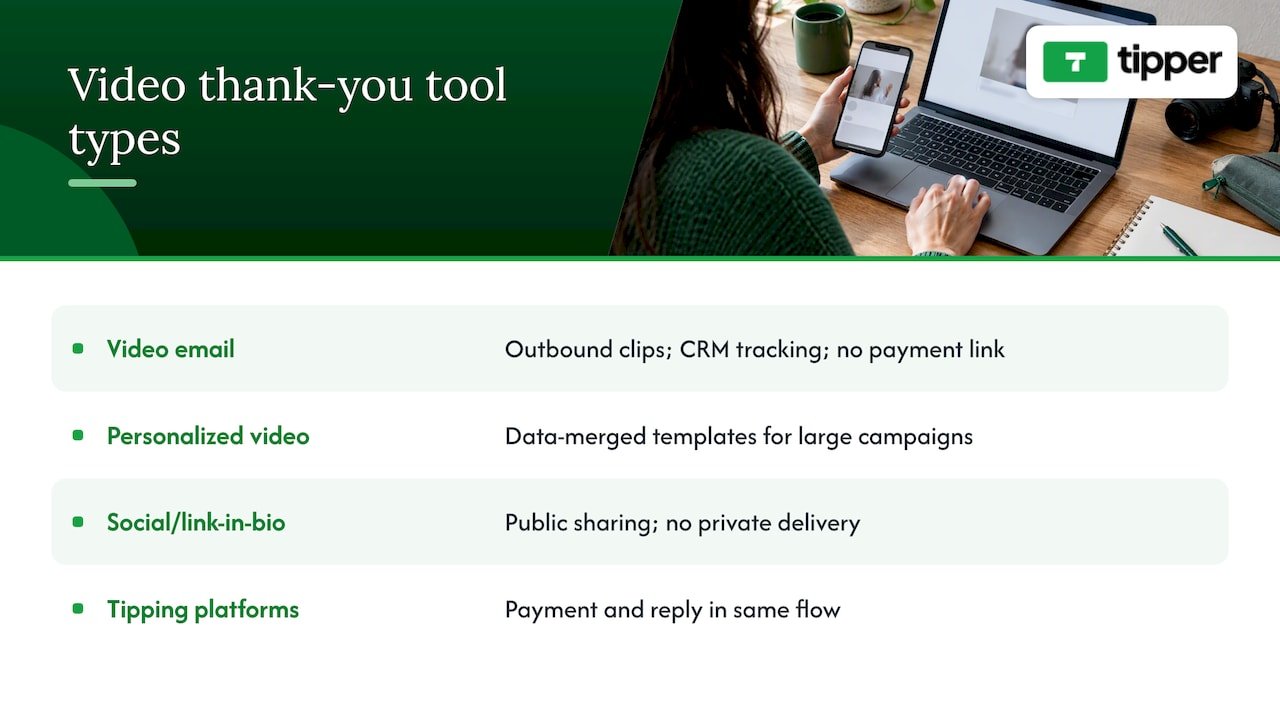
Video email tools focus on recording and embedding clips in outbound messages, with CRM connections and engagement tracking. They suit sales and customer success teams, but they usually do not touch payments, so the thank-you is not tied to a tip or purchase event.
Personalized video generators merge data into a template to produce many versions at once. They shine in large campaigns like the Red Cross example, though they tend toward polished production rather than a quick, human selfie clip.
Social and link-in-bio tools make it easy to share a clip publicly but give no private, one-to-one delivery.
Tipping platforms with thank-you messaging tie the payment and the reply together. This is the category where we sit. The unique feature that matters is the connection: a supporter pays instantly with no account, and you respond with a note or video in the same flow.
If you want a wider look at the market, our digital tipping platforms comparison walks through the options. For a creator whose goal is gratitude that follows a payment, the integrated route saves the most steps.
What does the experience feel like for creators and supporters?
Good ease of use means two different people both finish quickly. The supporter wants to pay and leave. The creator wants to reply without opening five tabs.
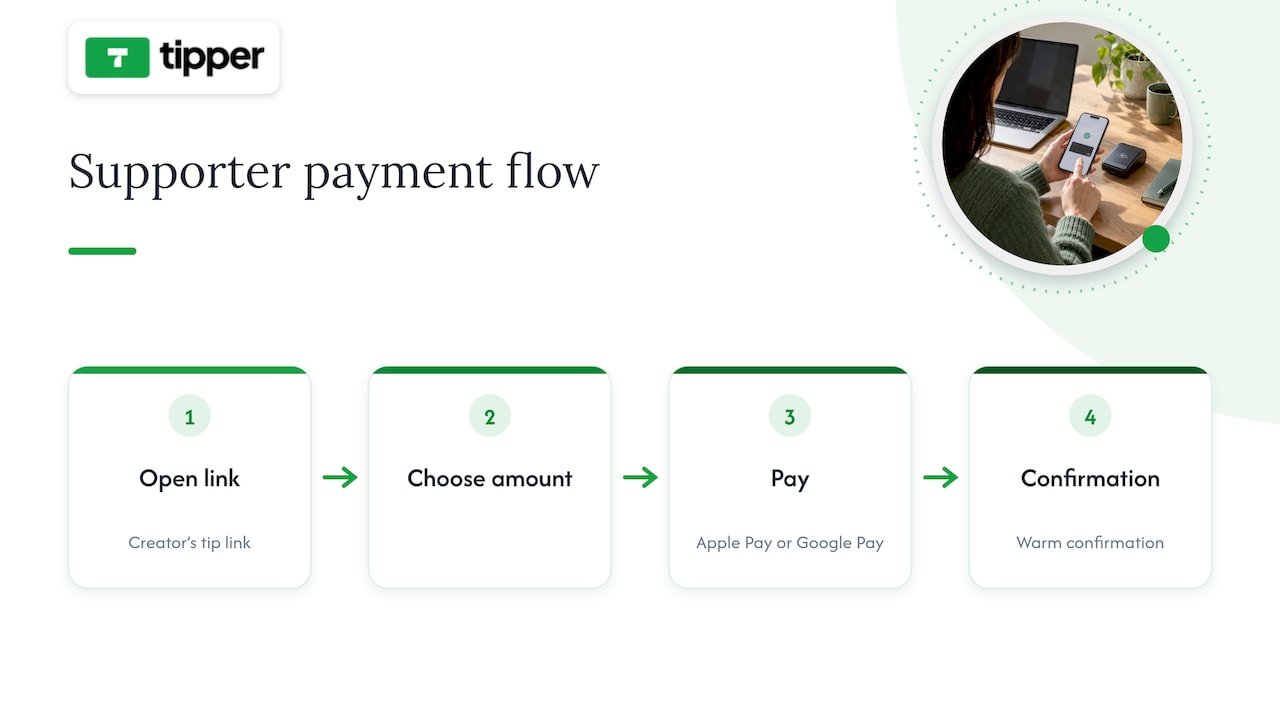
For supporters, the ideal path is a single tap: open your link, choose an amount, pay with Apple Pay or Google Pay, and see a warm confirmation. No account, no password, no form. That is the main reason we skip sender sign-ups, since every extra field loses someone who was ready to give.
For creators, ease shows up in three places. First, setup: a link and a profile you can finish in one sitting, not a week of configuration. Second, notifications: you should know about a tip quickly, because a prompt reply may land better than a delayed one. Third, replying: recording from your phone, using a short script you have already written, with the video attached to the right person.
A few habits keep the experience smooth on both sides. Keep your tip page copy short and friendly. Say what the tip supports and what supporters can expect in return, such as a personal thank-you. Use consistent branding on the page so supporters trust it is really you. Write the wording as if you were speaking to one person, not a crowd.
Test the supporter side yourself on a phone, since most tips happen there. If you find yourself pinching, scrolling sideways or waiting on a spinner, your supporters did too.
What security and privacy features matter?
Video thank-yous involve two kinds of sensitive information: payment details and the personal link between you and a supporter. A good platform protects both without making either of you think about it.
On the payment side, wallet methods such as Apple Pay and Google Pay mean card numbers are not typed into a stranger’s form. That is safer for supporters and simpler for you, since you never handle card data.
On the privacy side, look for these basics:
- No forced accounts for senders, so supporters share less personal information to begin with.
- Private delivery links, so a thank-you video meant for one person is not publicly searchable by default.
- Clear control over what is public, such as whether tip amounts or names appear on your page.
- Straightforward payout details, so you know where the money goes and when.
As a creator, add your own habits. Do not show supporters’ full names or messages in a public video without asking. Avoid filming anything in the background that reveals your address, schedule or other people. If a supporter tips anonymously, thank them by the name they gave, or simply thank them without guessing.
We design Tipper around user privacy and a personal touch, so supporters can say thanks and hear thanks back.
How do you track engagement and income?
A thank-you video only earns its place if you can tell it worked. Look for reporting that answers two questions: how much came in, and what happened after you replied.
For income, you want a clear record of each tip, its date and your payout, so you can see which posts, streams or products bring in support. Separate processing fees from your earnings so the numbers are honest.
For engagement, video tools in the email world show what to measure. Platforms like BombBomb track opens and responses on embedded videos, and the claimed lifts of 81% in open rates and 120% in response rates come from tracking exactly that. Even without a dashboard, you can approximate it: note how many supporters tip again within a few weeks after getting a video, how many replies, and how many share your clip.
A simple routine works well. Once a month, list the tips you thanked with video and the ones you thanked with text. Compare repeat tips between the two groups. If video supporters come back more often, you have a reason to record more. If not, shorten the clips or change the timing.
Pay attention to where your tippers come from. If most tips arrive from a bio link, put your effort there. If they arrive from a QR code at a counter, your thank-you may need to work for people who tip in person and get the video later. Our guide to how businesses share tipping links covers where links tend to work best.
What support and resources should you expect?
Even a simple tool raises questions the first week: how do I change my link, where did that tip go, why did my clip not upload? Good support answers fast and in plain language.
Look for a help section that covers setup, payouts and troubleshooting, plus examples you can copy. Written guides matter more than you would think, because most creators fix problems at odd hours, not during business hours. Templates save the most time, and our acknowledgment message templates are one example of a resource built for exactly that job.
For video itself, supporting resources can make a quiet difference. Basic lighting and audio tips improve every clip. A guide on video SEO and organic reach helps if you plan to share thank-you clips publicly and want them found. Network checks help if uploads fail.
Before you commit to any platform, send a test question to its support team and see how long a real answer takes. That one message tells you more than a feature page.
We keep our own resources focused on what creators actually ask: how links work, how notifications behave, and how to word a reply. If your question is not covered, reach out, because those questions shape what we write next.
Our take on when video beats a written note
Not every thank-you needs a camera. A short written reply is fine for small tips, and sending one beats sending nothing. Save video for moments with the most upside: a large tip, a milestone supporter, or someone who tells their friends about you. The extra minute pays back because the person remembers it.
Three rules cover most cases. Keep clips under 60 seconds. Say the person’s name in the first sentence. Send it within 24 hours.
One practical tip: batch your recording. Set aside one short block each day, record the clips for everyone who tipped, and send them together. You keep the personal touch without letting replies interrupt your whole day, and you avoid the trap of waiting until you feel perfectly ready.
— Tipper
How do you get started with Tipper?
It costs nothing to create your account.
- Sign up at Tipper and build your personalized tip link and page.
- Share the link or QR code in your bio, descriptions or at your counter.
- When a tip arrives, record a short video and send it with your thank-you.
- Remember that supporters can pay with Apple Pay, Google Pay or a card, and you keep 100% of your earnings, with a small processing fee added at checkout.

Create your link today and make your next thank-you one supporters remember.
FAQ
Which platform is best for making thank-you videos?
It depends on the job. For thank-yous that follow a tip or purchase, we recommend Tipper, because supporters pay without an account and you can reply with a short video in the same flow. Video email tools suit outbound sales messages better.
How do you say thank you for a video?
Keep it simple and specific: use the person’s name, name what they did, and say what it meant to you. For example, “Thanks, Sam, your tip after Tuesday’s stream made my week.” A brief, prompt reply works well.
What are some good video ideas for thank-yous?
Try a short personal selfie clip, a behind-the-scenes look at what a tip helped fund, or a milestone message for repeat supporters. Brands have also used post-purchase videos to build loyalty and encourage sharing.
What is the best platform to share videos?
For private thank-yous, use a direct link or landing page delivered through a tip confirmation or email, so only the recipient sees it. For public thanks, use the social channels where your audience already follows you.
How long should a thank-you video be?
Aim for a brief video. That is long enough to sound sincere and short enough that people watch to the end.
Sources
- How the Canadian Red Cross Achieved 17x ROI With Personalized Video | Idomoo
- BombBomb Review: Features, Pricing & Alternatives (2026)
- Press play: The role of video from discovery to retention


[…] have collected wording in our acknowledgment message templates, and a comparison of video thank-you platforms if you want to go […]