

Use an invoice when a payment needs a named client, a job, a due date and a paper trail. Use a payment link when the person already knows what they are paying and just needs a fast way to do it. Most creators need both, for different kinds of money, and the trouble starts only when the two get mixed up.
This guide explains what each one is, what the person paying sees, what it costs and how fast the money lands. It then maps both onto the situations creators actually face: brand deals, commissions, tips and deposits.
TL;DR
- An invoice is an itemized, enforceable bill for work already done. A payment link is a shareable URL to a checkout page, built for speed.
- Pick an invoice for brand deals, client projects and anything that needs a due date, a reference number or tax records.
- Pick a payment link for tips, deposits, merch drops, chat payments and social offers where the amount is already clear.
- A hybrid works: a link collects the money and an invoice or receipt records it, as long as the two are connected.
- For tips specifically, a link or QR code that needs no account from the sender beats an invoice every time.
Table of Contents
- What a payment link is
- What an invoice is
- Payment link vs invoice at a glance
- Where a payment request fits
- What the payer experiences
- Fees and timing creators should expect
- When to use each: creator scenarios
- The hybrid workflow, and its trap
- Our perspective: tips are not invoices
- Collecting tips without an invoice
- Before you share any payment link
- Taxes and bookkeeping
- FAQ
- Sources
What a payment link is
A payment link is a shareable URL that sends a customer to a secure, provider-hosted checkout page where they pay right away, as PayPal describes its own product. You can post it in a bio, drop it in a DM, send it by text or email, or print it as a QR code. The link can usually be reused with many people, which is why it suits one-off offers, digital items and small services.
The key trait is that there is no “bill” in the traditional sense. Nothing is addressed to a specific person, nothing has a due date, and nobody has to be set up in advance. The payer clicks, sees what they are buying, and pays.
What an invoice is
An invoice is an itemized document that includes business and customer details, payment instructions, a due date and a reference number, used for accounting and tax purposes. According to a professional guide on invoices versus payment links, an invoice is legally enforceable under certain standards, while a payment link is generally a non-binding request for payment.
That difference matters when something goes wrong. If a brand pays late, an invoice with a clear amount, scope and due date is the document you point to. A link shared in a chat is a convenience, not a record of an agreement.
Invoices are typically used after a business has delivered goods or services, especially in B2B work. That describes most sponsored content: you post, the brand owes you, and an invoice formalizes it.
Payment link vs invoice at a glance
| Payment link | Invoice | |
|---|---|---|
| What it is | A URL or QR code to a hosted checkout | An itemized bill with a reference number and due date |
| Best moment to use | Before or during a purchase, tip or deposit | After work or delivery |
| Addressed to | Anyone who has the link | A named client or company |
| Setup time | Seconds to minutes | A few minutes of data entry per client |
| Records | Payment confirmation | Full document for bookkeeping and taxes |
| Reminders and tracking | Usually basic | Often automatic reminders and status tracking |
| Partial payments | One-time payment | Possible on some platforms |
| Typical creator use | Tips, deposits, merch, commissions with a set price | Brand deals, freelance projects, retainers |
The platform matters for the details. PayPal’s developer documentation, for example, says its invoices allow partial payments and send automatic reminders, while invoices and Payment Links are both for one-time payments only. Always check the specific tool you use.
Where a payment request fits
There is a third option that confuses many people searching this topic: the payment request. It sits between the two. Relay, a U.S. business banking platform, describes its payment request as a fast, no-frills way to collect payment without building an itemized invoice, sent by email or as a secure payment link.
Think of it as a link with a name and an amount attached. It is useful when a collaborator owes you a set sum, you do not need a formal document, and you want to see in real time whether it was paid. Relay also lets users attach up to five supporting documents to both invoices and payment requests, which is handy for a contract or a screenshot of the agreed scope.
The practical rule: if a person or company needs to file the payment under an expense, send an invoice. If a friend or fan just needs to hand you money, a link or request is enough.

What the payer experiences
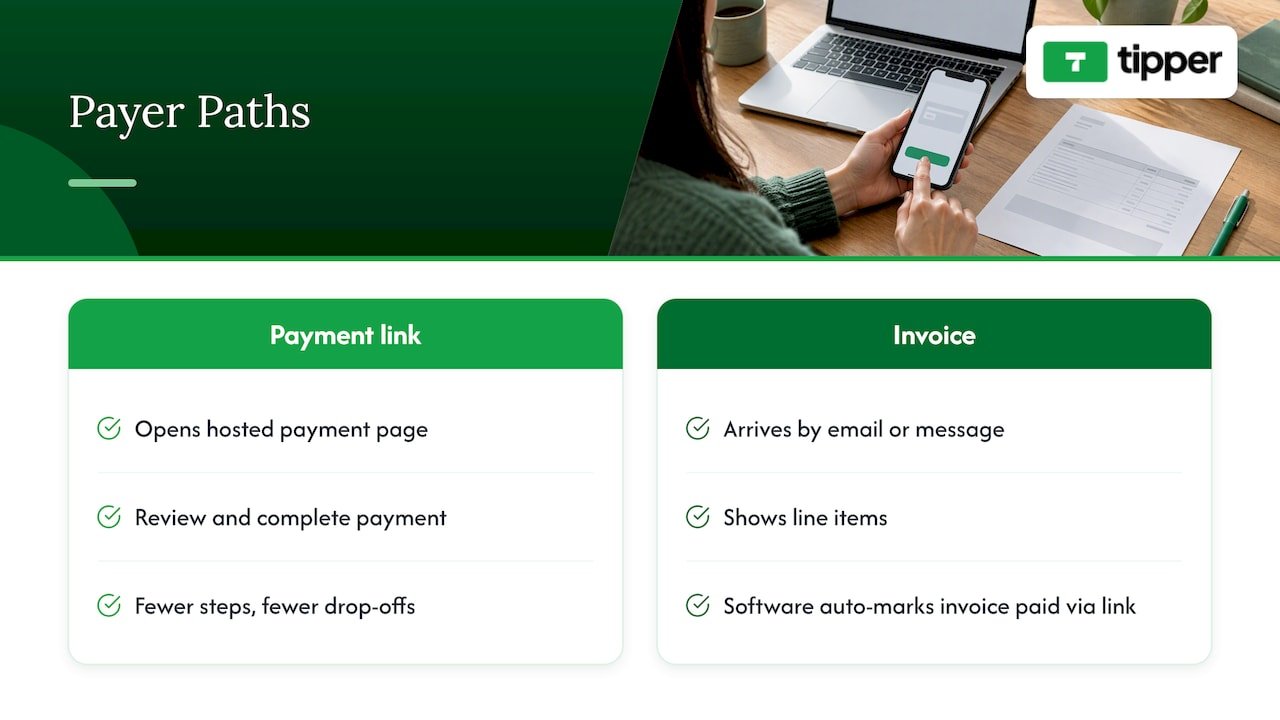
On a payment link, the person lands on a hosted page, reviews what they are paying for and completes payment. Fewer steps means fewer drop-offs, which is why links work well on social platforms where attention is short.
On an invoice, the payer gets an email or message, opens a hosted invoice page, checks the line items and pays. Many invoices contain a payment link inside them, and invoicing software can mark the invoice paid automatically when that link is used. So the question is rarely “link or invoice” in a pure sense. It is whether the money should arrive with a document around it.
Payment methods vary by tool. PayPal says its invoices accept PayPal, Pay Later, Venmo, debit or credit cards, Apple Pay and Pay by Bank (ACH), while its Payment Links accept PayPal, cards and eligible local methods, according to the same developer overview. A payer who pays a lot of bills may prefer ACH. A fan on a phone almost always prefers a wallet like Apple Pay or Google Pay.
Fees and timing creators should expect
No method is free of cost somewhere. Relay lists card payments at 2.9% + $0.30, with fees depending on plan, and says card and bank debit payments take 2 to 3 business days, while ACH or wire takes 1 to 2. Those are one provider’s published figures, so treat them as a typical U.S. range rather than a promise from every platform.
Two things to check on any tool:
- Who pays the fee. Some platforms deduct it from you, others add it at checkout for the payer.
- Any extras. Providers can charge transaction fees, monthly fees, premium-feature costs or volume-based tiers. On a $20 payment, a flat 30-cent component is a large share. On a $5,000 brand deal, the percentage matters more than the flat fee, and a bank transfer may be cheaper than a card.
That is a good reason to match the payment method to the size of the payment. Large B2B invoices often do better on ACH. Small, frequent fan payments suit cards and wallets.
When to use each: creator scenarios
Brand deals and sponsorships
Send an invoice. The brand’s accounting team needs a reference number, a due date and a clear description of the deliverable. Include the campaign name, the agreed rate and your payment instructions. Attach the contract or brief if the platform lets you.
Commissions and custom work
It depends on the stage. For a deposit before you start, a payment link is quick and clear: the client knows the amount and pays on the spot. For the final balance, especially from a business, an invoice that lists the finished work is cleaner. Our guide on tipping for freelancers with links, QR codes and invoices walks through combining them.
Merch, digital products and one-off offers
A payment link fits. It can be reused with multiple customers and used to sell products, services, digital items or one-off offers, so you do not need a full online store. Put it in your bio and pinned posts.
Tips and fan support
A link or QR code, with no invoice involved. A tip is a voluntary gift. Nobody owes it, there is no job to describe and no due date to set. Asking a fan to fill in an invoice would kill the impulse that made them want to tip. The best tip flow needs no account from the sender and lets them pay with a wallet in seconds. We cover why this works in how payment links boost engagement.
Service work where a tip may follow
If you bill clients for a service and they might want to add something extra, you can place a tip option next to the bill. Here is how to add a tip option to a service invoice.
Quick decision guide
- The payer is a business that must book the expense: invoice.
- You need a due date, late reminders or a contract trail: invoice.
- The amount is fixed and the buyer is ready now: payment link.
- The person is not a client, just a supporter: payment link or QR code.
- You want proof but not paperwork: payment request.
One line captures the logic well. The choice should depend on how much naming, explanation and record-keeping the payment needs, not on which option looks more professional. A link is not unprofessional, and an invoice is not always the grown-up choice.
The hybrid workflow, and its trap
Many small operators run both: a link collects the money and an invoice is generated afterward so the books stay clean. That satisfies customer convenience and accounting standards at once. It is a sensible setup for creators who sell through DMs, where a payer wants to pay in one tap but a business buyer later asks for paperwork.
The trap is disconnection. When links and invoices run side by side with no tie between them, reconciliation gets messy: you cannot tell whether a payment settled an invoice or was a separate purchase. Avoid it with three habits:
- Put the invoice number or project name in the link’s description or the payment note.
- Use one tool that marks an invoice paid when its embedded link is used.
- Once a month, match payouts to your records before you forget what each one was for.
Our perspective: tips are not invoices
Most advice on this topic is written for small businesses billing clients. Creators have a different mix of income. Some of it is formal, like a sponsorship. Much of it is small, spontaneous and emotional, like a viewer tipping during a stream or a follower saying thanks for a free guide.
We built Tipper around that second kind. Our view is simple: the moment someone feels appreciation is short, so the path from feeling to payment should be as short. That means no account for the sender, Apple Pay or Google Pay, and a personalized link or QR code that works anywhere you already have an audience. It also means a personal touch on your side, such as a thank-you note, photo or video, because a tip is a relationship moment and not a transaction to be processed.
We also think creators should be clear about which tool does which job. Use invoices for work that has a client and a scope. Use a tip link for gratitude. Mixing them creates friction at both ends: fans bounce from forms, and brands get no paperwork. Creators keep 100% of what supporters send as tips, with a payment processing fee added at checkout, so the economics stay transparent.
— Tipper
Collecting tips without an invoice
If your income includes tips, your tipping tool should be as easy as a payment link and as personal as a message. Tipper gives you a personalized link or QR code, customizable tip pages and thank-you messages in text, photo or video. Supporters can tip with Apple Pay, Google Pay or a card without creating an account. It is free to create and maintain an account, with no subscription, and you keep 100% of each tip, while a payment processing fee is added at checkout.
You can set up your own tip link at Tipper in a few minutes. If you are still deciding how to ask for tips, our guide to collecting tips with no signup required shows how to place the link where fans will actually use it.
Before you share any payment link
A link is quick to send, which makes it easy to send carelessly. Run through this list first.
- Check the amount and description. Open the link yourself as a payer and read every line.
- Name what it is for. A vague label invites questions and disputes.
- Decide if it is reusable. A reusable link suits tips and merch. A client-specific payment should have its own request or invoice.
- Pick the channel. Links can go out by email, text, social media, messaging apps or QR code. Use the one your payer already reads.
- Protect against fakes. Scammers copy popular links and QR codes. Put yours only on accounts you control and look at QR code tipping security threats before printing codes for events or merch tables.
- Plan the record. Decide now where the confirmation goes and how it will show up in your bookkeeping.
For in-person situations such as meetups, pop-ups or live shows, a printed code can replace a card reader entirely. See examples of contactless tip collection for creators for ideas.
Taxes and bookkeeping
Tips, commissions and brand fees are all income for a U.S. creator, however they arrive. That is a good reason to keep a clean record of each payment, whether it came through an invoice, a link or a request. A tidy log with date, amount, payer or source and purpose will save time at tax season.
The rules on what counts as taxable income, estimated payments and reporting thresholds depend on your situation and change over time. Ask a CPA or enrolled agent who works with self-employed people what to track and what to set aside, and check current guidance on the IRS website before you file.
FAQ
Is a payment link the same as an invoice?
No. A payment link is a URL to a checkout page and is generally a non-binding request for payment. An invoice is an itemized, enforceable bill with a due date and reference number. An invoice can contain a payment link, so you often see them together.
Can I send a payment link instead of an invoice to a brand?
You can, but most brands will want an invoice for their accounting. A link alone gives them no reference number, scope or due date to file. If speed is the goal, send the invoice with a payment link inside it.
What is the difference between a payment request and an invoice?
A payment request is a lighter way to ask for a set amount without building an itemized document. Some providers send it by email or as a secure link, and let you track its status. An invoice carries more detail and is better suited to formal business billing.
Which is better for collecting tips?
A payment link or QR code. Tips are voluntary, so there is nothing to itemize and no one to bill. The best setup lets supporters pay with a wallet like Apple Pay or Google Pay without making an account, and lets you reply with a thank-you.
Do payment links and invoices cost the same?
Not necessarily. Fees depend on the provider, plan and payment method. Card payments at one U.S. provider cost 2.9% + $0.30, while bank transfers can be cheaper and sometimes faster. Compare the fee structure of your specific tool before you commit.
Sources
- Invoices vs payment links: differences and uses
- Payment Links: Accept Payments Without a Website, PayPal US
- Invoicing overview, PayPal Developer




Leave A Comment