


Simply money, in the way it actually works for creators today, means one thing: a personalized link or QR code that lets anyone tip you instantly through Apple Pay, Google Pay, or a card, with no account required on their end and the funds landing directly with you. Tipper builds exactly that.
Three things matter most before you set anything up:
- Who it’s for: content creators, freelancers, influencers, and small businesses who want appreciation payments without invoicing or awkward cash exchanges.
- The immediate value: supporters tip in seconds, privately, without creating a login or downloading an app.
- The trust signal: fees are shown transaction by transaction, not buried in fine print, and payout timing is stated up front rather than left vague.
Key Takeaways
An instant tipping link works because it removes every barrier between a supporter’s impulse to give and the payment actually landing in your account.
| Point | Details |
|---|---|
| Setup takes minutes | Create an account, connect payouts, verify identity, and generate your link and QR code in one sitting. |
| Placement drives conversion | QR codes at natural pausing points can raise tipping frequency by up to 22%. |
| Fees stay visible | Transaction-level fees are shown upfront instead of buried in a flat “service charge.” |
| Payout speed protects cash flow | Platforms with delayed payout cycles create real operational friction for creators and freelancers. |
| Tips count as income | Report tip earnings for taxes regardless of the payment method or platform used. |
| Tipper fits the workflow | Tipper combines a personalized link, Apple Pay and Google Pay support, and direct payouts built specifically for creators. |
Table of Contents
- Getting Started With Simply Money in Five Minutes
- Where Should You Put Your Tipping Link or QR Code?
- What Do Payments, Fees, and Payouts Actually Cost You?
- Why Do Supporters Trust One Tip Link Over Another?
- What Actually Makes People Tip More?
- Fixing Common Tipping Link Problems Fast
- What Makes Tipper the Right Tool for This?
- How Do You Track and Manage the Tips You Receive?
- Do You Owe Taxes on the Tips You Receive?
- What Kind of Support Can You Expect if Something Goes Wrong?
- An Honest Take on Tipping Links
- Start Collecting Tips Today
- Sources
- FAQ
Getting Started With Simply Money in Five Minutes
Setting up your tip link doesn’t require a developer or a design degree. Here’s the checklist, in order:
- Create your Tipper account with your name or brand.
- Connect a payout method (bank account or debit card).
- Verify your identity and basic tax information.
- Build your tip page: photo, short bio, and a clear purpose.
- Add preset tip amounts and, if it fits, a visible goal.
- Generate your dynamic QR code and short link.
- Send yourself a test tip to confirm the full flow works.
Creators consistently rank fast onboarding and simple identity verification among the top factors in choosing where to work, according to creator-platform research. A clunky signup kills momentum before you’ve collected a single tip.
Pro Tip: Test your link on both an iPhone and an Android phone before you share it anywhere. Confirm Apple Pay shows up at checkout on iOS and Google Pay shows up on Android. A missing payment button at checkout is the single most common reason a supporter gives up mid tip.
Before going live, run a quick audit: does the page load fast on mobile data, does the layout look right on a small screen, and does the billing descriptor on the card statement clearly say who the charge is from?
Where Should You Put Your Tipping Link or QR Code?
The link only works if it shows up exactly where someone feels generous. That moment is different for every type of creator.
- Live streams: a persistent on-screen QR code or link in chat.
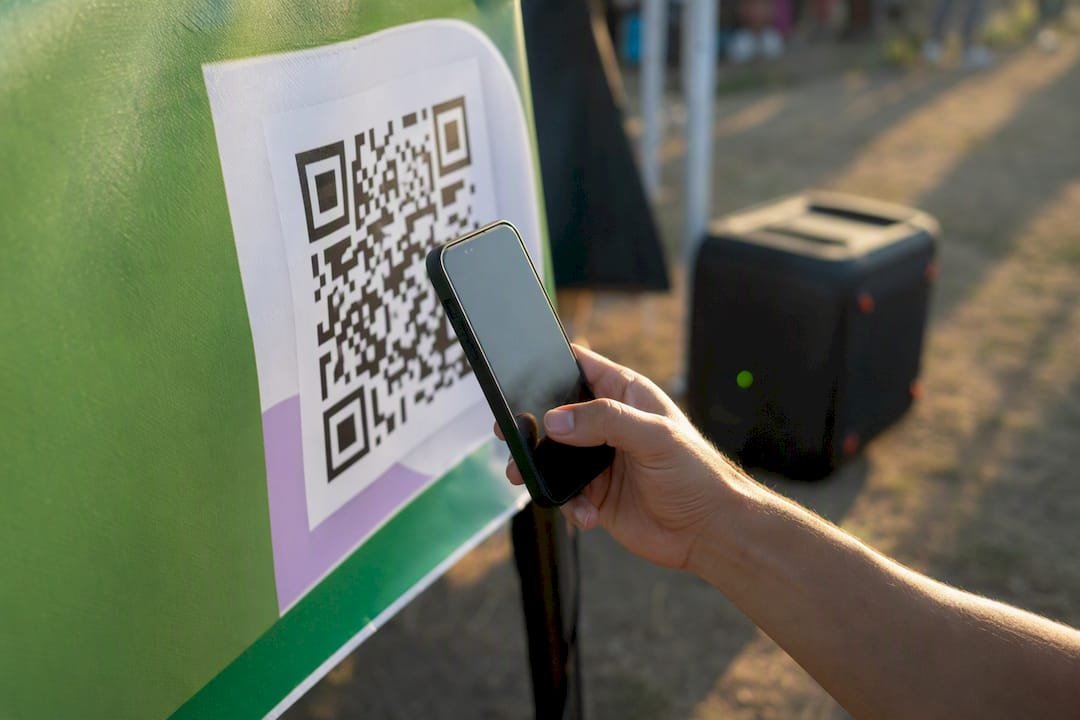
- In-person services: a printed QR code at a barber chair, coffee counter, or tattoo station.
- Events and pop-ups: a table tent or wristband with the code printed large.
- Social bios: one link, permanently pinned, across every platform.
- Email newsletters and invoices: a text link at the sign-off.
- Video end screens: the QR code on the final slide, held for a few extra seconds.
A streamer needs an on-screen alert; a hairstylist needs a laminated card by the register. Match the format to how your audience actually interacts with you, not to what looks impressive on a slide deck.
Placement discipline pays off in measurable ways. Codes placed at natural pausing points, rather than buried mid-content, can increase tipping frequency by up to 22%. Stick to one link and one QR code across your platforms unless you’re running a specific campaign. Multiple codes confuse supporters about which one actually reaches you, and dynamic QR codes let you update the destination without reprinting anything.
What Do Payments, Fees, and Payouts Actually Cost You?
Supporters check out through Apple Pay, Google Pay, or a saved card, all without creating an account. That app-free checkout matters more than most creators realize: every extra step between “I want to tip” and “payment sent” is a chance for someone to change their mind. Guides on QR tipping conversion point to native camera scanning and instant browser checkout as the biggest lever against abandoned tips.
On the cost side, Tipper keeps two numbers separate: a small platform fee and standard payment processing costs, both shown transparently at the transaction level rather than folded into a vague “service charge.” You see exactly what a $10 tip nets before you ever cash out, and creators keep 100% of what the platform doesn’t take in processing.
Payout timing is where platforms genuinely differ. Some hold funds for days or batch them into weekly cycles, which quietly disrupts cash flow for anyone living tip to tip. Industry analysis on payout immediacy flags delayed access to earnings as a real operational cost, not just an inconvenience.
Typical timeline: tip sent → processed in seconds → routed to your connected payout method → available on your normal payout schedule, with no manual withdrawal request needed.
Why Do Supporters Trust One Tip Link Over Another?
Supporters hesitate for a specific reason: they don’t want to hand over a card number to create an account for a $5 tip. A no-account flow removes that entire objection before it forms.
What actually builds trust at checkout:
- No sender account required, ever.
- Transparent fees shown before the supporter confirms payment.
- A billing descriptor that clearly reads your name or brand, not a random code.
- Fraud protections like 3D Secure authentication and card tokenization running quietly in the background.
Research on donor behavior consistently finds that clear billing and visible fees drive more generosity than any discount or incentive could. People give more freely when nothing about the transaction feels hidden.
Pro Tip: Tell supporters exactly what their tip supports. “Help me upgrade my mic” converts better than a bare “Tip Me” button, and a short thank-you note afterward turns a one-time tipper into a repeat one.
What Actually Makes People Tip More?
Most creators undersell their ask, then wonder why tips stay flat. The fix usually isn’t a bigger audience. It’s better language, better placement, and better follow-through.
Do this:
- Use specific, dignified phrasing: “Support this stream” beats “Donate if you want.”
- Show a visible goal, like a progress bar toward a specific purchase.
- Send a personalized thank-you, text, photo, or short video, within a day.
Skip this:
- Vague asks with no stated purpose.
- Burying the link three menus deep.
- Silence after someone tips. That kills repeat generosity fast.
For placement and timing:
- Put the QR code at a natural pausing point, not mid-action.
- Hold it on screen or on the table long enough to scan, a few extra seconds matter.
- Keep the checkout path to one tap or one scan. Speed decides whether the tip happens at all.
A visible goal, like “$200 toward a new camera,” gives supporters context beyond a plain tip jar. It turns a generic gesture into a shared project, which tends to lift the average amount people give rather than just the number of people who give.
Fixing Common Tipping Link Problems Fast
Most issues have a boring, fixable cause. Run through this before assuming something’s broken:
- Card payment fails: check for typos, expired cards, or a bank flagging the charge as unusual.
- Apple Pay or Google Pay missing: confirm the supporter’s device and browser actually support it; not every browser does.
- QR won’t scan: check print size, contrast, and glare, and swap to a static image if a screen is reflecting light.
- Page loads slowly: clear cache and confirm you’re on a stable connection.
- Unfamiliar billing descriptor: update your account name so it reads clearly on statements.
If none of that resolves it, contact support with a screenshot of the error and the approximate time it happened. Specifics get you a faster fix than “it’s not working.”
What Makes Tipper the Right Tool for This?
Tipper was built around one idea: tipping should feel as easy for the supporter as it is rewarding for the creator. That shows up in the details.
- A personalized link and dynamic QR code, generated in minutes.
- Apple Pay and Google Pay support alongside standard card checkout.
- Fully customizable tip pages, your name, your photo, your purpose.
- Direct payouts with no long holding cycles.
- Transaction-level fee transparency, no hidden cuts.
- Thank-you messages in text, photo, or video, sent right from the platform.
Tipping platforms have matured into legitimate financial tools for creator monetization, not novelty add-ons. Tipper treats every tip as a real, professional transaction, not a digital tip jar, and positions the experience accordingly. Visit the Tipper landing page to see the setup flow yourself.
How Do You Track and Manage the Tips You Receive?
Every tip through your link generates a record: amount, timestamp, payment method, and any note the supporter left. That log matters more than most creators expect once tips start coming from multiple channels at once.
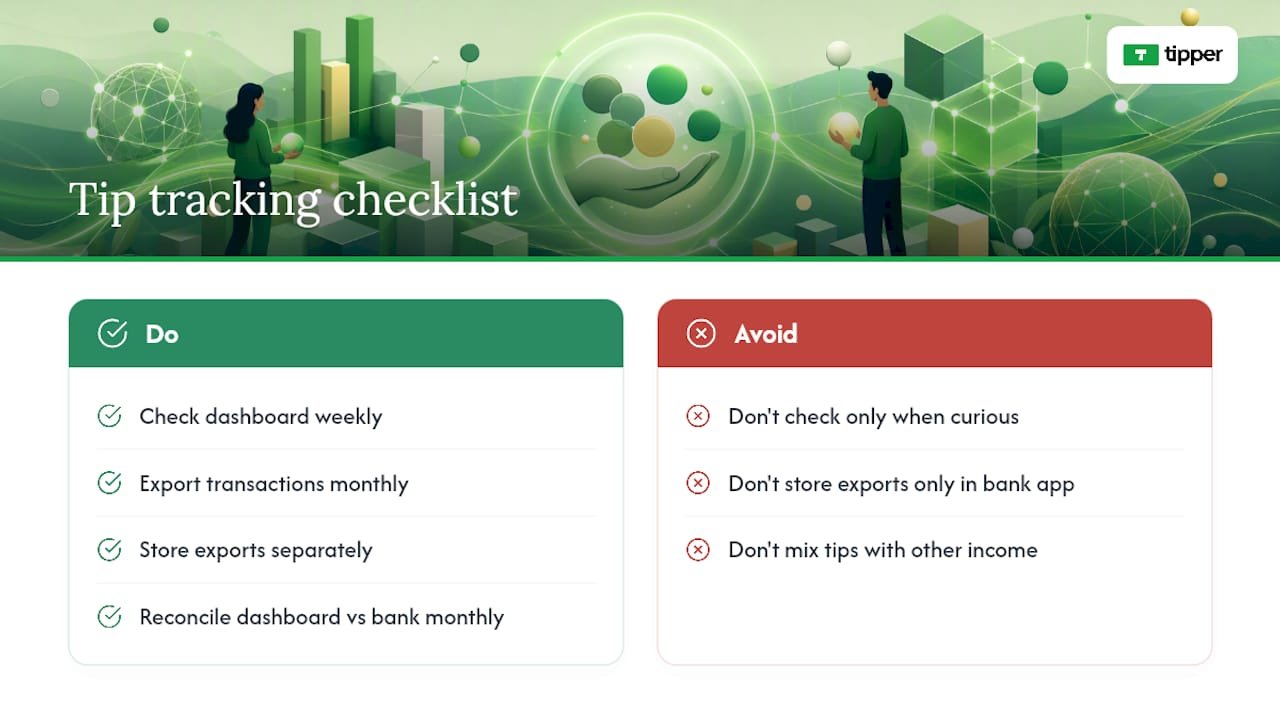
Check your dashboard weekly, not just when you’re curious. Patterns emerge fast: a spike after a specific video, a dead zone during certain hours, a platform where your bio link actually converts versus one where it just sits there. That data tells you where to put more effort, not just where tips happened to land.
Export your transaction history regularly, monthly at minimum, and keep it somewhere separate from your day-to-day banking app. Come tax season, you want a clean record instead of a scramble through months of notifications. If you run tips alongside other income, like freelance invoices or ad revenue, keep tipping income in its own column so you’re not guessing later which dollar came from where.
Reconcile your dashboard totals against your bank deposits once a month. It’s a five-minute check that catches a payout timing mismatch or a failed transfer before it becomes a bigger headache. Treat your tip income the same way you’d treat any other revenue stream. Because to the IRS, and to your own budgeting, it is one.
Do You Owe Taxes on the Tips You Receive?
Yes, in the United States, tips and gratuities you receive through a personal link or QR code count as taxable income, whether you’re a full-time creator or running it as a side project. The IRS treats tip income the same as any other earnings: it needs to be reported, regardless of the platform or payment method that delivered it.
If you’re operating as a freelancer or sole proprietor, tips typically fall under self-employment income, which means tracking them for quarterly estimated taxes rather than waiting until April. Keep a simple running total by month; retrofitting a year of scattered tips into a tax filing is far harder than logging them as they arrive.
Depending on your total earnings and how your payout provider reports transactions, you may receive a tax form summarizing the year’s activity. Requirements and thresholds vary by processor and by your business structure, so confirm your specific situation with a tax professional rather than assuming a flat rule applies. This is one area where getting it wrong costs more than the time it takes to get it right.
None of this makes tipping income complicated to manage. It just means treating it like real money from day one, because it is.
What Kind of Support Can You Expect if Something Goes Wrong?
A failed payment or a QR code that won’t scan during a live event isn’t a minor annoyance, it’s lost income in real time. Support responsiveness matters more here than it does for most software products.
Look for a support channel that lets you attach screenshots and specifics directly, rather than routing you through a generic contact form with no context. The faster you can show exactly what happened, error message, device, approximate time, the faster a real fix comes back instead of a canned response.
Self-serve help matters too. A clear knowledge base or FAQ that covers setup, payout timing, and common checkout issues saves you from waiting on a reply for something you could resolve in two minutes yourself. Before committing to any platform, check whether support documentation actually answers real questions or just restates marketing copy.
An Honest Take on Tipping Links
Tipping links work best when treated as a professional payment channel, not a hopeful digital tip jar. Expect tips to scale with the trust you’ve already built. Fast payouts matter far more once cash flow depends on them.
Start Collecting Tips Today
Tipper gets you from zero to a working tip link faster than setting up a traditional payment processor account, and you keep 100% of what you earn beyond standard processing costs.

Create your link, connect a payout method, and send yourself a test tip today at Tipper. If you’re planning to lean on Apple Pay specifically, the setup walkthrough for businesses covers the exact checkout configuration. Support documentation is available in-app if you hit a snag along the way, but most creators are live and collecting their first tip within ten minutes of signing up.
Sources
FAQ
What Is a Simply Money Tipping Link?
It’s a personalized link or QR code that lets supporters send instant tips through Apple Pay, Google Pay, or a card, without creating an account, with funds paid out directly to the creator.
Do Supporters Need an Account to Tip Me?
No. Tipper’s checkout flow is built specifically so supporters can pay in seconds using a card or a digital wallet without signing up for anything.
How Long Does It Take to Receive a Tip After It’s Sent?
Tips process within seconds and route to your connected payout method on your normal payout schedule, without a manual withdrawal request.
Do I Have to Pay Taxes on Tips I Receive?
Yes. Tips received in the United States count as taxable income and should be tracked and reported, typically as self-employment income if you’re a freelancer or sole proprietor.
Can I Use One Link Everywhere, or Do I Need Multiple QR Codes?
One link and one dynamic QR code across all your platforms is usually best. Multiple codes confuse supporters about which one actually reaches you.



[…] Simply Money: Instant Tips Made Simple for Creators […]