Cash plus One Digital Option: Tipping for Musicians That Works

The most practical approach is to accept cash plus at least one cashless method, clearly signposted, and to keep a simple daily record for taxes. A visible sign with one working QR code or link does more for your tip income than a complicated setup with five options nobody understands. All tips, cash or digital, count as taxable income.


TL;DR:

  • Accept both cash and at least one digital tipping method, with a visible QR code or link, to maximize tip income and ensure easy access.
  • Place signage with suggested tip amounts and clear instructions, especially near the stage or merch table, to encourage spontaneous tipping without pressure.
  • Test digital tip links or QR codes before each show, ensuring they scan easily under stage lighting and have backups in case of failure.
  • Keep a daily record of all tip income, whether cash or digital, and save receipts or screenshots to simplify tax reporting and comply with IRS requirements.
  • Focus on one digital method, like a well-placed QR code or tip link, layered with cash acceptance, to streamline tipping and reduce confusion for supporters.

Tipper
Make Digital Tipping Easier
Tipper gives supporters a simple way to send instant tips through your personalized link, without creating an account.

Visit Tipper

Table of Contents

Customary tip amounts and simple rules of thumb for different gig types

There is no fixed rate for tipping a musician, but a few heuristics hold up across most gigs. For solo acts and small bands, think in terms of per-set or per-show amounts rather than per-song, since most audiences do not tip between every number.

A few starting points by venue type:

  • Coffeehouse or open mic: a few dollars per set is typical, often placed in a jar near the stage or merch table.
  • Bar or restaurant gigs: audiences tend to tip more generously when drinks are flowing, especially late in the set.
  • Seated dinner shows: tips skew lower per person since the audience is paying for a meal, but larger one-time tips are common from someone celebrating an occasion.
  • Private events (weddings, parties): tips are often pooled by the host or client rather than collected from guests directly.
  • Busking or street performance: passersby tip in small, frequent amounts, so visibility and an easy drop-in method matter more than suggested figures.

A useful scaling rule: if there’s already a cover charge or ticket price, audiences tend to tip less per person since they feel they’ve already paid for the show. If there’s no cover, tipping becomes the main way the room supports the performer, and signage matters even more. Larger crowds also mean more small tips rather than fewer large ones, so a jar or QR code that’s easy to find will usually outperform one polished ask shouted from the stage.

Methods to accept tips: cash, jars, card readers, and QR codes

Every method has tradeoffs. Choosing the right mix depends on your venue, your audience’s age and payment habits, and how much setup time you want before a show.

  • Cash: immediate and universally accepted, but it requires a float, physical security, and someone to count it at the end of the night.
  • Tip jars and signage: a jar placed at eye level near the stage or merch table, with a short sign, consistently gets more attention than one tucked behind equipment.
  • Portable card readers: useful for venues with steady foot traffic or longer sets, though they add setup cost and usually require a merchant account.
  • QR codes and short links: work well for ad-hoc tipping since a phone camera and a few taps complete the transaction, which matters for small, spontaneous tips.
  • Peer-to-peer apps vs. creator tip links: peer-to-peer apps often require the sender to have an account and sometimes to friend or search for the recipient, while a dedicated tip link lets a supporter pay in a few taps with no account needed.

Most musicians do best with cash as the baseline and one cashless option layered on top, rather than juggling several payment paths at once. A single well-placed link or QR code, consistently advertised, tends to get more use than three options competing for attention on the same sign. The Digital Tipping Platforms Comparison 2026 breaks down these tradeoffs in more depth if you’re still deciding what fits your act.

Getting a digital tipping option running takes less time than tuning a guitar. Here’s a simple path from nothing to ready:

  1. Create your tip link or QR code through a platform built for this, entering your name or stage name and a short thank-you message.
  2. Set suggested amounts rather than leaving only an open field. A few preset buttons speed up the decision for a tipper who just wants to tap and go.
  3. Print or display your QR code somewhere visible: a tent card on the merch table, a laminated sign near the stage, or a slide on a small screen if you use one.
  4. Test the flow yourself before the show, scanning the code with your own phone to confirm it loads fast and the payment screen looks right.
  5. Have a backup ready, whether that’s a second printed QR card in your gig bag or the link saved as a text message you can send directly if scanning fails.

Suggested-amount buttons tend to nudge small tips higher than an open amount field alone, though it’s worth leaving one open option for supporters who want to give more. Placement matters almost as much as the method itself: a QR card on the merch table gets seen by people already reaching for their wallets, while a stage overlay or setlist card catches attention during natural pauses between songs. Examples of these placements, including screen overlays and table cards, are collected in this guide to contactless tip collection.

Pro Tip: Test your QR code under the same lighting you’ll have on stage. A code that scans fine in daylight can wash out under colored stage lights.

Musician testing QR code under stage lights

Before you rely on any digital method at a real show, run through a short checklist: does the code scan on the first try, does the payment screen complete without errors, and do you have a second device or printed backup if your phone’s battery dies.

Taxes and recordkeeping for tip income

All tips are taxable, whether they land in a jar as cash or show up as a notification on your phone. The IRS requires employees and self-employed individuals to keep a daily tip record, report tips to an employer when applicable, and include all tip income in gross income on a federal return.

IRS Publication 531 walks through the details: tipped employees should log tips daily, report them to an employer by the 10th of the following month when required, and understand how noncash tips and allocated tips are treated separately from straight cash. Digital tips function the same way as cash for reporting purposes: the method of payment doesn’t change whether the income is taxable, only how you document it.

A workable recordkeeping routine doesn’t take long:

  • Keep a daily log of tips received, whether cash, card, or app-based, right after each show while the numbers are fresh.
  • Save digital receipts or screenshots from any tipping app or platform so you have a paper trail that matches your log.
  • Record tip splits immediately if you perform with a band, noting who received what share.
  • Talk to a tax professional for anything unusual, like large one-time tips at a private event or tips received through multiple platforms.

Cash use for in-person payments has declined in recent years, though Federal Reserve data show it remains common for small-value transactions. That’s part of why accepting both cash and a cashless option still makes sense: some audience members will always reach for a few bills, while others will only have a phone on them.

How to ask for tips without sounding pushy

A short, natural line between songs works better than a long pitch. Something like “If you’re enjoying the set, there’s a jar by the stage and a QR code on the table, no pressure” covers both options without turning into a sales moment.

Signage should do most of the talking so you don’t have to repeat yourself all night:

  • “Tips appreciated” with a visible QR code works as a simple, low-pressure default.
  • A suggested amount (like a short “$5 keeps the music going” line) can help undecided tippers, though an open amount should always be available too.
  • One clear sign beats three competing ones, especially in a dim room where people are scanning for information quickly.

Pro Tip: Mention the tip jar once near the start of your set and once near the end. Repeating it every few songs starts to feel like a sales pitch rather than a passing thank-you.

Avoid pressuring the room, skip guilt-based language, and never ask the same way twice in a row. The goal is to make tipping easy to notice and easy to act on, not to make the audience feel obligated.

Pre-show checklist for smooth tip collection

Run through this short list in the hour before you go on:

  1. Count your cash float so you can make change if someone hands over a large bill.
  2. Print or restock QR cards for the merch table and stage area.
  3. Place the tip jar somewhere visible, ideally at eye level near where people will be standing or seated.
  4. Open and test your tip link on your phone to confirm it loads and the payment screen works.
  5. Charge your phone or bring a backup battery since your tip link depends on it staying on.
  6. Create a folder for receipts and screenshots so digital tips are easy to log later.

At soundcheck, scan your own QR code once more and confirm the jar is in its spot before doors open. If a code won’t scan, switch to sending the link directly by text. If a card reader goes offline, fall back to cash and your QR code until it reconnects.

Why the cash-plus-one-digital-option approach actually works

Audiences tip more when the path from “I want to tip” to “I just did” has the fewest possible steps. Every extra tap, every account signup, every moment of confusion is a chance for someone to put their phone away and forget about it.

The musicians who do best with tips usually aren’t running five different payment methods. They’ve picked one cashless option, tested it at a real show, and stuck with it long enough to see what works, adjusting signage or placement rather than adding more choices. Start simple: a jar, one link, and a sign that says what to do.

— Tipper

How Tipper fits into your tipping setup

Tipper is built for exactly this: a personalized tip link or QR page that a supporter can pay through in a few taps, with no account required on their end. It supports Apple Pay and Google Pay, so most phones work without extra typing, and creators keep 100% of what they earn.

Tipper

For the setup described above, Tipper maps directly onto the checklist: create your link, set suggested amounts, print your QR code, and test it before doors open.

  • Personalized link or QR page that’s easy to print or display on a stage overlay.
  • Customizable suggested amounts alongside an open field for bigger tips.
  • Thank-you messages, including text, photo, or video, so a supporter gets real-time acknowledgment.

Set up a free tip page at Tipper before your next show.

This article is general information, not a substitute for advice from a qualified financial advisor. Consult a qualified financial professional about your own circumstances before acting on anything here.

FAQ

How much should I tip a musician?

There’s no fixed rule, but a few dollars per set at a casual venue like a coffeehouse or open mic is typical, scaling up for bar gigs, private events, or especially enjoyable sets. The amount usually depends on venue type, whether a cover charge already applies, and how generous the room feels that night.

Is a 10% tip disrespectful?

A flat per-set or per-show amount, scaled to the venue and the audience, is the more common approach.

Who is the richest one-hit wonder?

This question isn’t something the tax and tipping guidance in this article can answer, since it depends on individual earnings and royalty data outside the scope of tip income.

Is 20 dollars a good tip for $100?

A tip of that size would be generous by most live music standards, since musician tipping tends to run in small per-set amounts rather than a percentage of a cover charge or ticket price. Context matters: a tip that large at a small coffeehouse show reads very differently than the same at a large ticketed event.

Sources

For the tax side of tip income, the IRS publishes clear guidance on recordkeeping and reporting. For payment behavior trends, the Federal Reserve’s annual diary tracks how often people use cash versus cards and digital methods. For practical setup examples, Tipper’s own how-to pages cover digital tip jars and contactless collection in more detail.

Cash plus One Digital Option: Tipping for Musicians That Works2026-10-04T01:00:35+00:00

Gumroad Alternatives for U.S. Creators: Tipper Instant Links and Taxes

If you only need one-off tips or appreciation payments without forcing supporters to sign up, use an instant tipping link. Create a tipping link now and send yourself a test tip to see it work.


TL;DR:

  • Most tipping tools support Apple Pay and Google Pay, enabling supporters to pay quickly without entering card details, which reduces friction.
  • Payout delays exceeding a few business days or undisclosed fees can undermine reliability and should be verified before relying on a platform for live events.
  • Tipping income is taxable in the US regardless of whether a platform issues a form, and creators should keep detailed records to stay compliant.
  • Setting up a tip link requires only basic steps like connecting a bank account and enabling mobile wallets, taking less than 15 minutes to deploy.
  • Cross-border tips involve currency conversion fees and local tax rules, so creators should consult a local accountant when receiving international support regularly.

Tipper
Make Tips Easier for Your Audience
Tipper lets supporters send instant tips through a personalized link, without an account, while creators keep 100% of their earnings.

Create your tipping link

Table of Contents

Which types of tools replace Gumroad for simple tipping?

Four kinds of tools cover almost every tipping situation, and picking the right one depends on where your audience actually finds you.

Instant tipping links work best for social media bios, newsletters, and livestreams because a supporter taps once, pays with a mobile wallet, and never creates a password. QR-first tip cards suit in-person events: a printed code on a table tent or a merch table lets someone scan, pay, and move on in seconds. Payment link builders combine invoicing with optional tipping, which fits creators who sometimes bill clients but also want a way to accept spontaneous appreciation. In-stream buttons and embeds reduce friction during live content, letting viewers tip without leaving the stream.

Whatever category you choose, the same features separate a smooth experience from a clunky one:

  • Apple Pay and Google Pay support so supporters skip typing card numbers
  • Custom tip amounts alongside quick preset buttons
  • A thank-you note, photo, or video option to close the loop
  • A shareable QR code that works as well printed as it does on screen

The deciding factor is usually friction. A tool that asks a one-time supporter to register an account loses a meaningful share of that goodwill before the payment even completes.

What features actually matter when comparing tipping tools?

Strip away the marketing language and a short checklist decides whether a tipping tool works for your situation.

  1. No-account tipping. Confirm the sender can complete a payment without registering, verifying an email, or downloading an app.
  2. Payment methods. Test Apple Pay, Google Pay, and a standard card entry yourself before you ever share the link publicly.
  3. Fees. Find out who absorbs processing costs and whether the platform takes a cut beyond that, since “keep 100% of tips” means something different across providers.
  4. Payout frequency. Check how often funds move to your bank account and whether there is a minimum balance before a payout triggers.
  5. Customization. Look for branded tip pages, custom thank-you messages, and support for photo or video replies.
  6. Recordkeeping and exports. Make sure you can pull a transaction history or CSV export for tax season without contacting support.

Pro Tip: Send yourself a small test tip from a second device before sharing any link publicly. It is the fastest way to catch a broken payout setting or a missing wallet option.

Watch for red flags too: payouts that take more than a few business days by default, any requirement that senders register, or fee structures that are not disclosed until checkout. A platform that buries fees usually buries other things as well.

How do you handle taxes on tips as a creator?

The IRS treats gig-economy and tip income as taxable regardless of whether a platform sends you a form. That rule surprises a lot of creators who assume that no paperwork means no tax obligation.

A Form 1099-K is only issued when a platform processes more than $20,000 and more than 200 transactions in a calendar year. Staying under that threshold does not exempt the income itself, it only means you will not receive a form documenting it, so you still have to report it yourself.

The IRS Gig Economy Tax Center lays out the recordkeeping duties that come with digital-platform income, and the logic is straightforward: platform reporting is a convenience for the IRS, not a substitute for your own records. The Form 1099 instructions also cover new reporting fields for cash tips, which reinforces how closely tip income is being tracked across payment types.

Build a simple ledger and update it on a schedule rather than scrambling in April:

  • Log gross tips received, separate from any processing fees deducted
  • Note refunds or reversed payments as they happen
  • Record payout dates so you can match deposits to your bank statement
  • Export your platform’s transaction history monthly, not just once a year

If your tipping volume grows, you take payments in unusual currency mixes, or you start receiving tips from supporters outside your home country, a CPA familiar with gig income is worth the consultation fee. A tax-ready expense tracking system built for freelancers can also keep tip income organized alongside other self-employment earnings. For a deeper walkthrough of what U.S. creators owe, see this guide to creator tips and taxes.

Getting a working tip link live does not require a developer or a long onboarding process.

  1. Set up payout and verification first. Connect a bank account, confirm your payout schedule, and enter any requested tax information so funds have somewhere to land.
  2. Build your tipping page. Add preset amounts, allow custom amounts for generous supporters, and record a short thank-you note or video that plays after someone tips.
  3. Enable mobile wallets and run a test. Turn on Apple Pay and Google Pay, then send yourself a small tip to confirm the whole flow works end to end.
  4. Publish your link and QR code everywhere relevant. Add it to your social bios, livestream overlays, email signature, receipts, or printed materials at in-person events.

Once the link is live, treat the back office like a weekly chore, not an annual scramble: export your transactions, reconcile them against bank deposits, and flag anything that does not match. A detailed payment processing setup guide walks through the verification and wallet steps in more depth if you want screenshots alongside the checklist.

How reliable are tipping platforms, and what support can you expect?

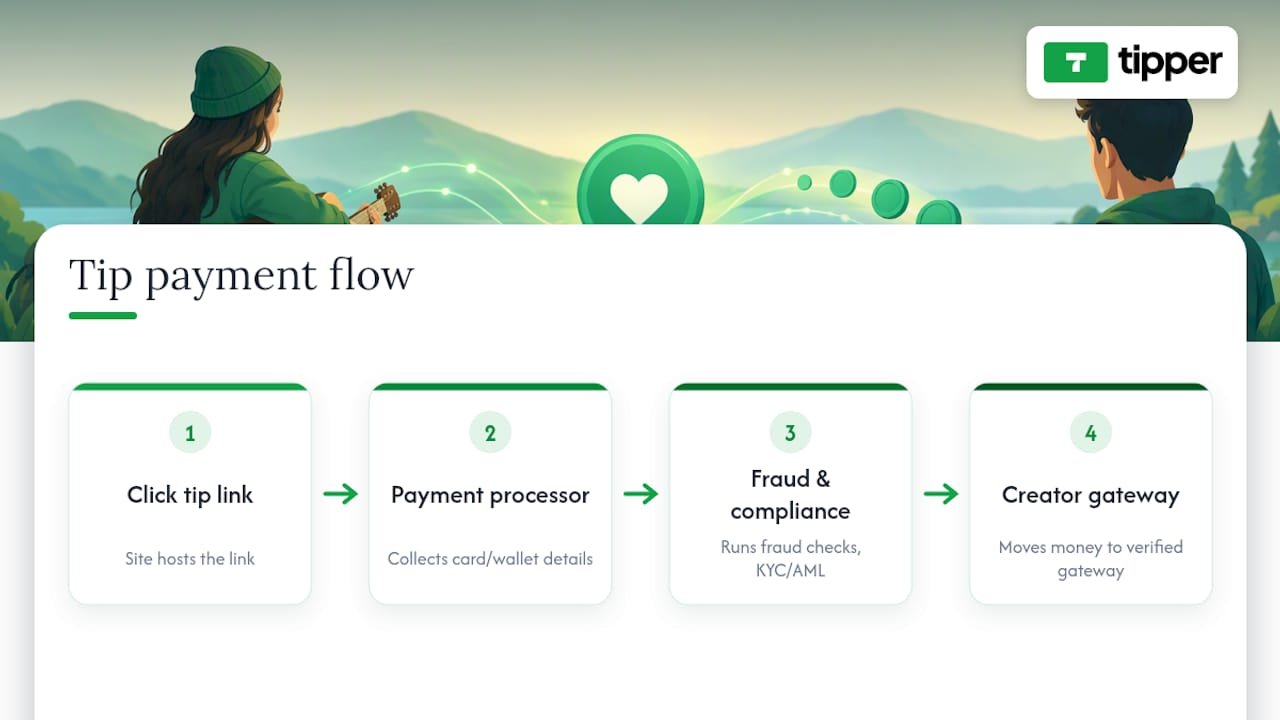
Reliability for a tipping tool comes down to two things: whether payments actually process when a supporter taps “pay,” and whether payouts land in your bank account on the schedule the platform promises.

Outages or delays matter more here than on a typical e-commerce site, because a tip is an impulse action. If a supporter hits a loading error or an unexpected account prompt, that moment of goodwill often does not come back. Before relying on any platform for live events or high-traffic moments, test the link under load if possible, and check whether the provider publishes a status page or support contact you can reach quickly if something breaks mid-stream.

Payment processing and payout reliability flow

Customer support quality varies widely across tipping tools. Some offer live chat, others route everything through a ticket queue with multi-day response times. For a creator running a time-sensitive event, like a charity livestream or a pop-up market, slow support can turn a minor glitch into a missed revenue window. It is worth checking a provider’s support channels and response expectations before the day you actually need them, not after.

Payout consistency is the other half of reliability. A platform that advertises fast payouts but defaults new accounts to a longer holding period is a common source of frustration, so confirm your specific payout timeline rather than assuming the marketing page applies to your account from day one.

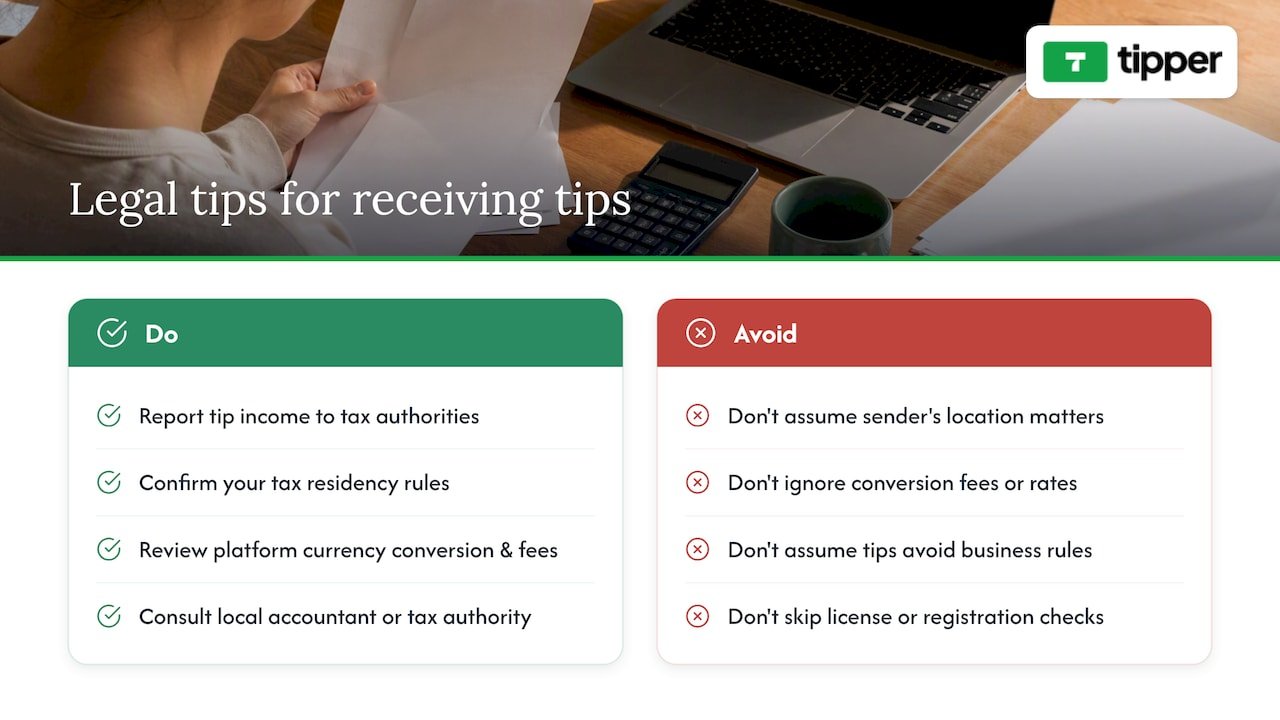
Tip income is taxable income in the eyes of most tax authorities, but the specific reporting thresholds, forms, and rates differ by country and sometimes by state or province within a country. A creator based in one place and receiving tips from supporters in another does not change where that creator owes tax. It is their own tax residency and local rules that matter, not the sender’s location.

Cross-border tipping also raises currency and processing questions. A payment processor may convert currency automatically, and the exchange rate or conversion fee applied can affect how much actually reaches your account compared to the sticker amount a supporter sent. Reviewing a platform’s currency handling before you rely on it for international audiences avoids surprises at payout time.

Businesses operating as a side hustle alongside a day job should also check whether local rules require a business license or sales tax registration once income crosses a certain volume, since tipping income does not automatically fall outside those requirements just because it feels informal. When the rules are unclear for your situation, a local accountant or the relevant tax authority’s own guidance is a more reliable source than a general blog post, including this one.

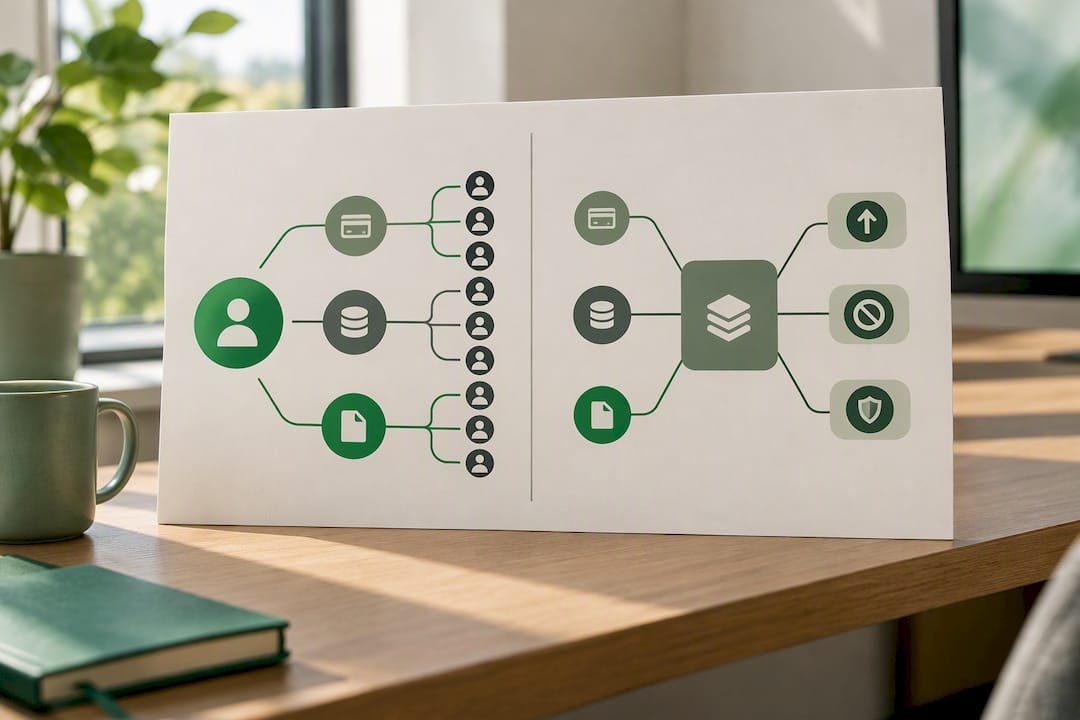
What legal considerations apply to receiving tips across different places? — overview diagram

Publisher perspective: why Tipper focuses on instant, no-account tipping

Most tipping friction comes from asking the wrong party to do extra work. A supporter sending $5 is not going to create a password for the privilege, so the design goal behind Tipper’s personalized links is to remove that step entirely: Apple Pay or Google Pay, one tap, done.

The second design choice is economic. The third is personal: allowing a text, photo, or video thank-you turns a one-way payment into a small exchange, which is often what keeps a supporter coming back the next time.

— Tipper

Try Tipper for instant, no-signup tips

Some tipping platforms are built to allow supporters to pay through a personalized link with no account required, enable Apple Pay and Google Pay, and let creators keep 100% of every tip.

Tipper

  • Create your tipping link or QR code on the Tipper landing page
  • Add a thank-you note, photo, or video to close the loop with supporters
  • Send yourself a small test tip first to confirm wallets and payouts are working

Once the test tip clears, publish the link to your bio or printed materials and start collecting support in real time.

FAQ

Do I need a business account to receive tips online?

No, most instant tipping tools let you receive payments without a traditional merchant account, though you still need a bank account connected for payouts. Some instant tipping tools let senders tip without creating an account at all, while the creator receiving tips sets up payout details separately.

Do I have to report tips if I never get a 1099-K?

Yes, the IRS requires gig and tip income to be reported even without a Form 1099-K, since the form is only issued once a platform processes more than $20,000 and over 200 transactions in a year. Falling under that threshold affects paperwork, not your underlying tax obligation.

What is the easiest way to let supporters tip without signing up?

A personalized tipping link paired with Apple Pay or Google Pay removes the account-creation step entirely, letting a supporter pay in one tap from a phone. Some platforms are built around this flow, with no sender account required at any point.

How much does Tipper cost to use?

Tipper is free to create and maintain as a creator account, with a payment processing fee applied to each tip at checkout. Exact processing details are available on the Tipper site.

Can I accept tips from supporters in other countries?

Yes, but tax and currency handling depend on your own tax residency, not the supporter’s location, so check how your platform handles currency conversion and confirm your own reporting obligations. A local accountant can clarify rules specific to your situation when cross-border tipping becomes a regular part of your income.

Gumroad Alternatives for U.S. Creators: Tipper Instant Links and Taxes2026-10-03T00:31:50+00:00

Tipper First: 12 Ko-fi Alternatives for Creators, No Account Tips

The strongest Ko-fi alternatives for creators split into three lanes: Tipper for account-free, instant tips that let supporters pay with Apple Pay or Google Pay without signing up, Patreon or Memberful for recurring memberships, and Fourthwall, Gumroad, Payhip, or Sellfy for creators who want to sell digital products or merch. The right pick depends on whether you need one-off support, ongoing subscriptions, or a storefront.


TL;DR:

  • Tip platforms like Tipper enable instant, account-free payments via Apple Pay or Google Pay, ideal for casual, high-volume audiences or in-person tipping.
  • Recurring memberships are best supported by platforms like Patreon or Memberful, which provide patron management and content gating but require supporters to create accounts.
  • For selling digital or physical products, Fourthwall, Gumroad, Payhip, or Sellfy offer storefronts with fulfillment or payment options tailored to digital downloads or merchandise.
  • Testing and comparing platforms through quick, mobile-based transactions helps creators identify the lowest friction options aligned with their income streams.
  • Combining tools, such as Tipper for tips and Patreon for memberships, allows creators to diversify income sources without forcing supporters into platforms that don’t suit specific engagement types.

Tipper
Make tipping easier for your audience
Tipper lets supporters send instant tips without an account, using Apple Pay or Google Pay, while creators keep 100% of earnings.

Try Tipper

Table of Contents

How do the top Ko-fi alternatives compare at a glance?

Before testing anything, it helps to see how these platforms differ on the things that actually affect a creator’s income: fee structure, payout speed, and whether the tool is built for one-off tips or ongoing memberships. The table below lines up all twelve options against the criteria creators ask about most.

The passage contains no spelling or grammatical errors that require correction.

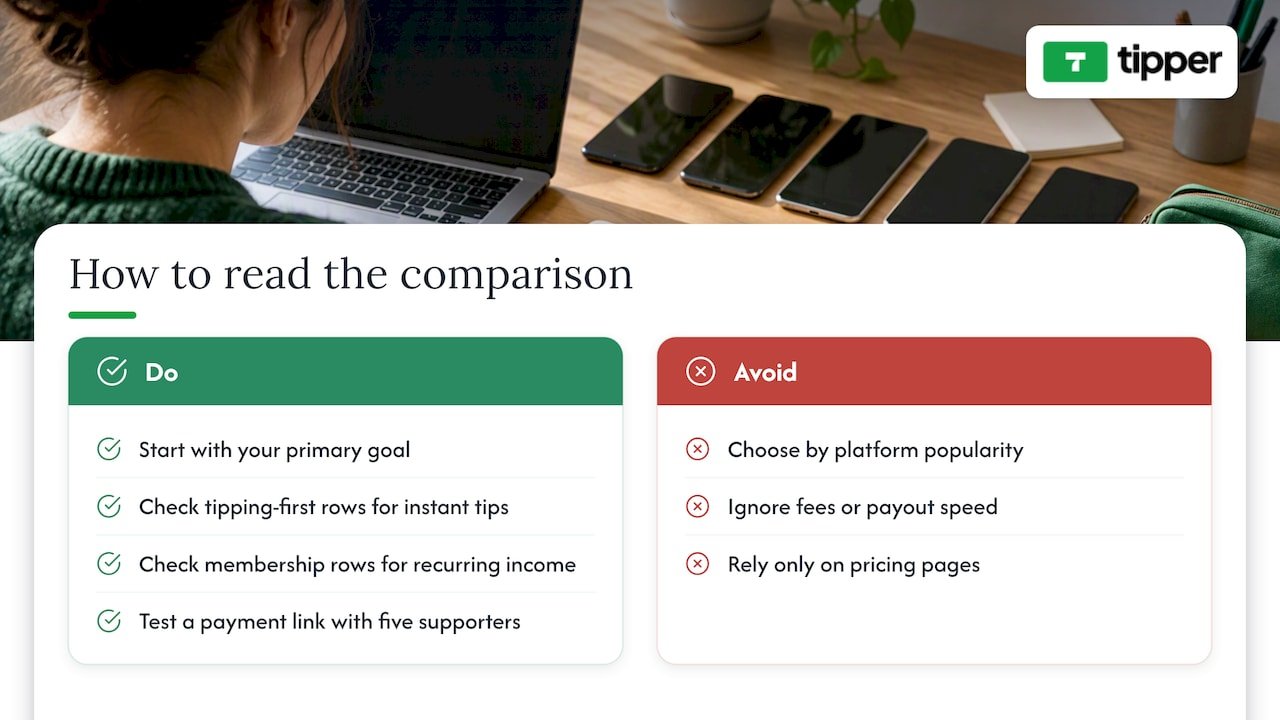
Read this table by starting with your primary goal, not the platform’s popularity. If you want a supporter to tip you in the next thirty seconds without creating an account, look at the tipping-first rows. If you’re trying to build predictable monthly income, the membership rows matter more than fees. A quick way to test any of these: set up a link, send it to five supporters, and see how many complete a payment without asking you a question first. That single test tends to reveal more about friction than any pricing page.

How do the top Ko-fi alternatives compare at a glance? — overview diagram

What sets each Ko-fi alternative apart for creators?

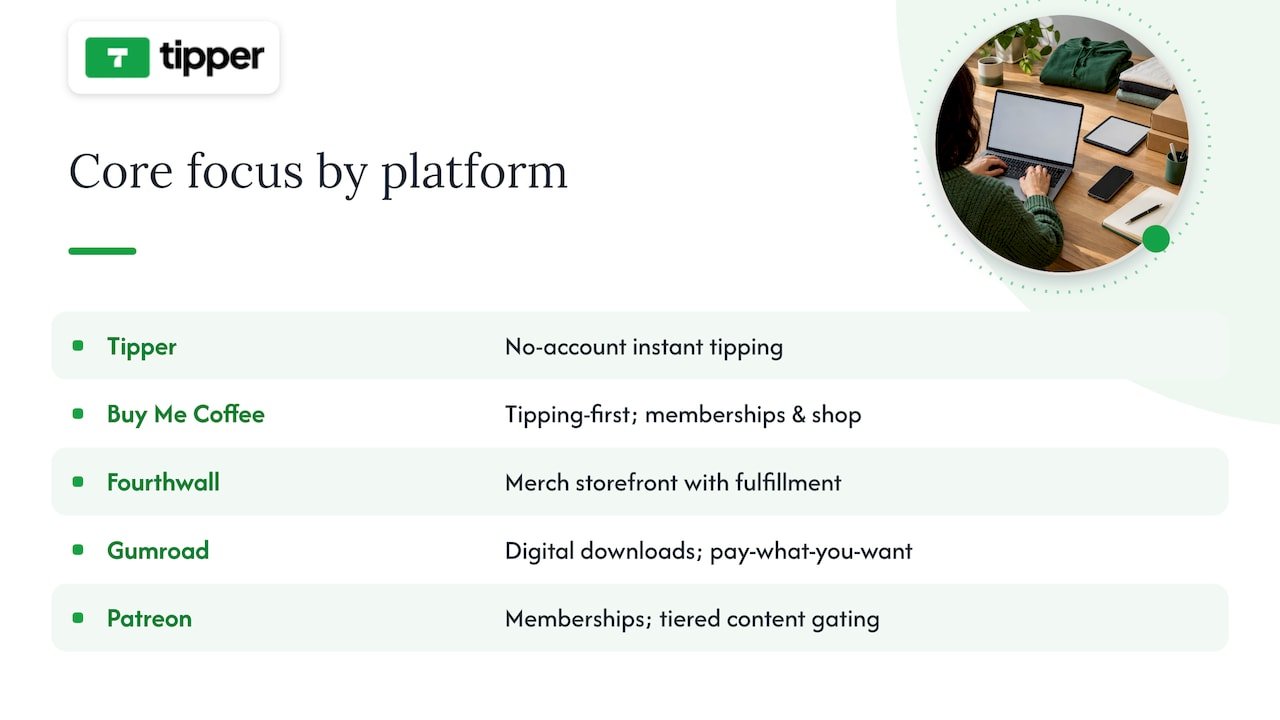
Tipper is built around a simple idea: supporters shouldn’t need an account to tip you. A creator shares a personalized link or QR code, and the person tipping pays instantly with Apple Pay, Google Pay, or a card, no login, no app download required on their end. Creators keep their earnings, with a payment processing fee applied at checkout, and there is no subscription cost to maintain a tipping page. The platform also supports thank-you messages back to supporters, in text, photo, or video form, which matters for creators who want tipping to feel personal rather than transactional. It’s a strong fit for in-person tipping (a QR code on a tip jar or business card), short-form video creators who need a link they can drop in a bio, and anyone tired of asking supporters to sign up just to send five dollars. To test it, generate a link and send yourself a small tip first to see the checkout flow from the supporter’s side.

Buy Me a Coffee built its reputation as a tipping-first alternative that later added membership tiers and a basic shop. Onboarding is mobile-friendly, and the one-tap support flow makes it easy for a first-time supporter to convert. Buy Me a Coffee is available as a mobile app, which matters for creators who manage their page from a phone between filming sessions. It charges a platform fee on top of payment processing, so creators give up a slightly larger share than with a pure tipping tool, but in exchange they get memberships and a shop without switching platforms.

Fourthwall is the strongest pick on this list for creators whose income already leans on merchandise. It bundles storefront tools with fulfillment, meaning a creator doesn’t need to separately manage printing, shipping, or inventory. A 2026 roundup of Ko-fi alternatives places Fourthwall specifically in the merch category, distinct from tipping or membership tools. The tradeoff is that Fourthwall isn’t designed for quick, no-friction tips: it’s a store, and it behaves like one.

Gumroad remains popular for creators selling digital downloads such as templates, presets, or ebooks, with pay-what-you-want pricing as a notable option for creators who want flexibility on price points. It charges a per-transaction fee rather than a monthly subscription, which keeps the barrier to entry low for creators testing a new product.

Patreon is the default answer for creators building a membership business. It offers patron management, tiered content gating, and tools built specifically for recurring relationships rather than one-time gestures. G2’s comparison of Patreon against Stripe Billing shows that many creators pair a membership platform like Patreon with separate billing infrastructure, which reflects a broader pattern: creators rarely rely on a single tool for their entire income. Patreon charges a tiered platform fee based on the plan, and payouts run on a monthly cycle tied to billing dates rather than on demand.

Payhip targets creators selling structured digital goods like PDFs and course materials, with built-in affiliate tools that let other people promote a creator’s products for a cut of sales. It’s a lighter-weight alternative to a full course platform for creators who just need a clean checkout page.

Substack solves a different problem: monetizing writing through paid subscriptions distributed by email. Its combination of a built-in audience feed and subscription billing makes it the practical choice for a newsletter writer, though it isn’t built for merch, tipping, or one-off digital sales.

Memberful is aimed at creators who already have a website and want membership tools embedded into it rather than sending supporters to a separate platform. Its white-label approach means a membership page can carry a creator’s own branding instead of Memberful’s, which matters for creators protective of their site’s look and feel.

Podia bundles courses, digital downloads, and memberships into one storefront, which suits creators selling a mix of products rather than a single income stream. It behaves more like a small business platform than a tipping tool.

Liberapay takes the opposite approach from most entrants on this list: an open, nonprofit-style donation model focused purely on recurring support, with no commercial storefront layered on top. It fits creators who want ongoing donations without the marketing tools or upsells that come with commercial platforms.

Sellfy offers a simple shop for both digital and physical products, with marketing tools built in. It’s a reasonable middle ground between Gumroad’s simplicity and Fourthwall’s merch focus, though it doesn’t specialize as deeply in either.

Kickstarter doesn’t compete directly with ongoing tipping tools. It’s built for project-based funding, a single campaign with reward tiers and a funding deadline, rather than continuous support. Creators raising money for a specific product run or one-time project still consider it, but it’s a poor substitute for a tip jar.

Across aggregator lists of Ko-fi competitors, the same core set of names keeps appearing, which suggests creators are converging on a fairly stable shortlist rather than constantly discovering new tools.

What sets each Ko-fi alternative apart for creators? — overview diagram

How should you test and choose a Ko-fi alternative?

Picking a platform on paper is easy. Confirming it actually works for your audience takes a short, deliberate test before you commit your bio link to it.

Start with a checklist of what matters most for your specific income mix:

  • Fees: know the platform fee and the separate payment processing fee, since vendors often list them apart from each other.
  • Payout speed: some platforms pay out on a fixed monthly cycle, others release funds faster.
  • Payment methods: confirm Apple Pay, Google Pay, card, and bank transfer support match what your audience actually uses.
  • Membership tools: check whether gated content, tiers, and patron communication are built in or require a third-party add-on.
  • Digital or merch support: verify the platform handles delivery and fulfillment if you plan to sell products, not just accept tips.
  • Customization: look at whether your page can carry your own branding or if it’s locked to a template.

Before switching, ask platform support directly (or search their pricing page) for three things: the exact percentage taken per transaction, whether there’s a minimum payout threshold, and whether supporter email addresses can be exported if you ever leave.

Then run three quick tests: set up a tip link and send yourself a small payment to feel the checkout flow, list a $1 digital file to see how delivery works, and check whether you can export your supporter list to email later.

Pro Tip: Test the checkout flow from a phone, not a desktop. Most tips and small purchases happen on mobile, and a clunky mobile checkout is the fastest way to lose a supporter mid-payment.

Watch for red flags: hidden fees not listed on the main pricing page, features that require a paid subscription tier just to unlock basic functionality like payouts, and platforms with restrictive minimum payout amounts that delay access to your own money. A tips versus subscriptions comparison breaks down how these tradeoffs play out over several months, which is worth a look before locking in a single model.

What does Tipper actually offer creators?

Tipper’s core feature is a personalized tip link or QR code that lets anyone send a payment through Apple Pay, Google Pay, or a card, with no account required on the supporter’s side. Creators keep their earnings, with only a payment processing fee applied, and can send thank-you messages back through text, photo, or video. It fits in-person tipping (a QR code at a table or event), short-form video creators who need a frictionless bio link, and anyone who wants supporters to tip in seconds rather than after creating a profile. A creator’s guide to instant tips walks through setup in more detail.

What does 2026 tell us about how creators get paid?

Payment friction is the quiet tax on every creator’s income. The platforms winning attention in 2026 are the ones that shrink the number of steps between a supporter’s intent and a completed payment, not the ones with the most features bolted onto a dashboard. At the same time, subscription fatigue is real: audiences that already pay for five newsletters and three memberships hesitate before adding a sixth.

That split suggests a practical rule. Creators with high-volume, casual audiences (short-form video, in-person events) do better with tipping-first tools. Creators with a smaller, deeply engaged audience do better with memberships. Creators selling a physical or digital product need a storefront, full stop. Test one link from each category before deciding where to put your energy.

— Tipper

If you’ve read this far, you already know the tradeoff: membership platforms ask for commitment, storefronts ask for inventory, and both ask supporters to slow down before they can pay you. Tipper skips that step. A supporter taps your link, pays with Apple Pay or Google Pay, and you keep your earnings, with no account required on their end and no subscription fee on yours.

Tipper

Setup takes a few minutes: claim your link, personalize your page, and start sharing it anywhere your audience already is. Visit Tipper to create your tip link, or read our frictionless tipping best practices for tips on getting your first supporters to convert.

Where this comparison comes from

This comparison draws on Ecommerce-Platforms’ 2026 roundup of Ko-fi alternatives for platform groupings and pricing structure, Product Hunt’s aggregated list of Ko-fi competitors for the consensus entrant list, and G2’s comparison of Patreon and Stripe Billing for how creators combine platforms and billing tools. For podcasters weighing a monetization toolchain, this roundup of podcast hosting platforms is a useful companion read.

Sources

FAQ

Is Ko-fi or VGen better for creators?

The two serve different needs: Ko-fi is built around tipping, memberships, and a simple shop, while VGen focuses on connecting creators with brand commissions and sponsorships. Neither is universally better, since the choice depends on whether you want direct supporter tips or brand-matched work.

What is better, Ko-fi or Patreon, for ongoing income?

Patreon is built specifically for recurring memberships with patron management and content gating, while Ko-fi supports both one-off tips and lighter membership tiers. Creators focused purely on predictable monthly income from a dedicated fanbase tend to lean toward Patreon, while those who want flexible one-off support often prefer a tipping-first tool.

Which is better, Gumroad or Ko-fi, for selling digital products?

Gumroad is built specifically for selling digital downloads, with pay-what-you-want pricing and per-transaction fees, while Ko-fi combines a simple shop with tipping and membership features. Creators focused entirely on digital product sales often prefer Gumroad’s dedicated storefront tools.

Is Ko-fi similar to OnlyFans?

No, they serve different purposes: Ko-fi is a general tipping and membership platform open to any creator category, while OnlyFans is a subscription platform primarily associated with adult content creators. The two aren’t interchangeable, since their audiences, content policies, and payment structures differ significantly.

Can I use Tipper alongside a membership platform like Patreon?

Yes, many creators combine a tipping tool with a membership platform to cover both one-off support and recurring income. Using Tipper for instant, account-free tips alongside a subscription tool for ongoing memberships lets you capture both types of supporter without forcing either into the wrong format.

Tipper First: 12 Ko-fi Alternatives for Creators, No Account Tips2026-10-02T01:30:30+00:00

When Tipping Beats Subscriptions: 10 Patreon Alternatives for Creators

For creators who need instant, low-friction tips, Tipper is the fastest way to get paid; for community and course-first businesses, an all-in-one SaaS like Circle or Podia usually makes more sense. The trade-off is consistent across the category: platforms that hand you more ownership and lower fees typically ask for more setup work in return. What follows breaks down the practical differences by goal, fee model, and migration effort.


TL;DR:

  • Moving from Patreon is advisable if your monthly income exceeds the point where percentage-based fees outweigh flat subscription costs, typically around a few hundred dollars.
  • Choose a platform supporting your preferred payment methods and content types, and verify if it allows data export and content migration before switching.
  • Tipping platforms like Tipper are ideal for spontaneous support, but creators should combine them with membership tools for recurring revenue and diversified income streams.
  • Migration requires careful planning, including audience notification, supporter data export, and manual reupload of media-heavy content, especially for larger libraries.
  • For creators seeking immediate, low-effort micro-support, Tipper offers a seamless, account-free way to receive tips with direct payouts and personalized support, complementing existing subscription platforms.

Tipper
Turn Audience Support Into Tips
Tipper lets creators receive instant tips through a personalized link, without requiring supporters to create an account.

Table of Contents

Why creators are rethinking Patreon

Patreon moved new creators onto a flat platform fee structure in 2025, and when that stacks on top of standard payment processing costs, the math starts looking different for anyone earning steady monthly income. Fee pressure is only part of the story. Policy risk, particularly around Apple’s in-app purchase rules and content restrictions, has pushed some creators to look for platforms where they control the relationship with their audience directly.

Industry analysis has flagged this pattern for years: creators who scale past a hobby income tend to migrate toward self-hosted or white-label solutions specifically to protect subscriber data and reduce dependency on a single platform’s rules. The underlying concern is straightforward. If your entire income routes through one company’s payment system and content policy, you’re exposed to fee changes, account suspensions, and platform pivots you can’t control. That risk is why “ownership” keeps showing up as a decision factor alongside price.

Direct creator audience ownership pathways

Quick shortlist: the top Patreon alternatives at a glance

Before getting into detail, here’s a fast reference for matching a platform to your immediate goal.

  • Tipper: best for instant tips and low-friction micro-support, no subscription fee, small processing fee per tip, no sender account required.
  • Circle: best for creators building paid communities, flat monthly subscription pricing.
  • Ko-fi: best for low-volume creators wanting free or near-free tipping, optional paid Gold tier to remove platform fees.
  • Buy Me a Coffee: best for simple tips with optional memberships, percentage-based fee on transactions.
  • Memberful: best for a branded, self-hosted-feeling membership site, flat subscription plus Stripe processing.
  • Gumroad: best for selling digital products alongside membership perks, percentage-based fee per sale.
  • Podia: best for bundling courses, memberships, and downloads in one storefront, flat monthly subscription.
  • Substack: best for writers and podcasters running paid newsletters, percentage cut of subscription revenue.
  • Beehiiv: best for newsletter-first businesses focused on audience growth, flat subscription tiers.
  • Kajabi: best for course creators who want an all-in-one platform, flat monthly subscription.

Each of these solves a different job. A newsletter writer and a fitness coach running live cohorts have almost nothing in common in terms of platform needs, even though both might have started on Patreon. The pricing shapes vary just as much: some charge a cut of every transaction, others charge a flat fee no matter how much you earn, and a few, like Tipper, keep the cost tied only to the payment itself rather than a recurring subscription.

Comparing the platforms creators actually switch to

  1. Tipper. This platform is built around instant tips sent through a personalized link or QR code, with no account required on the sender’s side and payment through Apple Pay, Google Pay, or card. It is best for creators, freelancers, and small businesses who want spontaneous, one-off support without building a membership program, with the platform’s standout feature that supporters can pay in seconds without signing up for anything. Because there is no subscription cost to maintain an account, it fits creators who want to test monetization before committing to a membership structure. The caveat: it’s built for tipping, not for gated content or course delivery, so creators who need tiered access will pair it with another tool.

  2. Circle. Circle combines community spaces, memberships, and course hosting in one subscription-based SaaS product, aimed at creators who want a hub for paid discussion, not just content delivery — for practical guidance on community growth strategies, see How To Build Online Community: A Practical Guide To Growth. Its standout is depth of community tooling, including discussion spaces, events, and member directories. The trade-off is a flat monthly cost regardless of how much revenue you bring in, which only pays off once you have a consistent base of paying members.

  3. Ko-fi. Ko-fi keeps things simple: tipping is free to accept, and an optional paid Gold membership removes the platform’s cut on shop and membership sales. It suits creators just starting out who want to test whether people will pay them at all before investing in a bigger platform. The catch is that its community and content tools are lighter than dedicated membership platforms, so it tends to work best as a starting point rather than a long-term home for a mature membership business.

  4. Buy Me a Coffee. Buy Me a Coffee blends one-time tips with optional recurring memberships in an interface built for speed, both for the creator setting it up and the supporter checking out. It charges a percentage on transactions rather than a flat subscription, which keeps costs low for creators with irregular income. It’s a good fit for creators who want a simple page and don’t need deep community or course features.

  5. Memberful. Memberful integrates directly with your own website and Stripe account, so payouts and subscriber data stay in your hands rather than living inside a third-party app. That makes it a strong choice for creators who already have a site and want membership gating without rebuilding their whole web presence. The setup requires more technical comfort than a plug-and-play platform, since you’re connecting it to existing infrastructure rather than adopting an all-in-one product.

  6. Gumroad. Gumroad is primarily a storefront for digital products, with membership and pay-what-you-want options layered on top. It fits creators who sell templates, ebooks, presets, or courses as one-time purchases and want recurring support as a secondary feature rather than the main event. Its fee is percentage-based per sale, so there’s no cost when you’re not selling.

  7. Podia. Podia bundles courses, memberships, and digital downloads into a single subscription-based product, aimed at creators who want to sell more than one type of offer without stitching together separate tools. The standout is how much it consolidates into one dashboard: email marketing, storefront, and membership gating together. The flat monthly fee means it makes the most sense once you have enough sales volume to justify the recurring cost.

  8. Substack. Substack is built for paid newsletters and podcasts, with a simple subscription model and a built-in audience discovery network that can send new readers your way. It takes a percentage of subscription revenue rather than charging a flat fee, so there’s no upfront cost to start. Its scope is narrow by design: it’s not meant for courses, storefronts, or community spaces, just writing and audio.

  9. Beehiiv. Beehiiv targets newsletter creators who want to scale toward ad-supported and paid-subscription hybrids, with growth and analytics tools built specifically for that path. Pricing runs on flat subscription tiers rather than a revenue cut, which rewards creators once their list gets large. It’s a strong fit for writers thinking about a newsletter as a long-term media business rather than a side project.

  10. Kajabi. Kajabi is an all-in-one platform for course creators, combining course hosting, membership gating, email marketing, and a storefront under one flat subscription. It suits creators running structured educational products rather than casual content drops. The monthly cost is higher than most tools on this list, which makes it a better fit once course sales are consistent rather than sporadic.

Beyond this group, platforms like Sellfy, BuddyBoss, Mighty Networks, Thinkific, Uscreen, Shopify with a paid membership app, FanCircles, Buzzsprout, and Passes (formerly Fanhouse) round out the category, each leaning into a specific niche: Sellfy for direct product sales, BuddyBoss and Mighty Networks for deep community features on WordPress or standalone apps, Thinkific and Uscreen for course and video-on-demand delivery, Shopify for creators who already run an ecommerce store, FanCircles for fan-club style access, Buzzsprout for podcast hosting with monetization add-ons, and Passes for creators building a subscription-based fan app.

How the platforms stack up side by side

Platform Pricing model Payment/payout Best for Standout feature Ownership & exportability
Tipper Per-tip processing fee, no subscription Apple Pay, Google Pay, card Instant tips, micro-support No sender account required Direct payouts, personalized link
Circle Flat subscription Stripe Paid communities Deep community and course tools Custom domain available
Ko-fi Free tier, optional paid Gold PayPal, Stripe Low-volume tipping Free-to-start tipping CSV export of supporters
Buy Me a Coffee Percentage per transaction Stripe, PayPal Simple tips with memberships Fast, donor-friendly checkout Basic supporter export
Memberful Flat subscription Stripe Branded, self-hosted membership Integrates with your own site Full subscriber data ownership
Gumroad Percentage per sale Stripe, PayPal Digital product sales Flexible product and membership mix Product and customer export
Podia Flat subscription Stripe, PayPal Courses and memberships bundled All-in-one storefront and gating Customer and content export
Substack Percentage of subscriptions Stripe Paid newsletters Built-in discovery network Full subscriber CSV export
Beehiiv Flat subscription tiers Stripe Newsletter growth and monetization Growth and referral tools Subscriber export supported
Kajabi Flat subscription Stripe All-in-one course business Courses, marketing, and gating combined Data export tied to plan tier

A few notes on reading this table. “Typical effective fee range” isn’t listed as a single column because it depends entirely on your transaction volume and processor: a percentage-based platform can cost more or less than a flat subscription depending on how much revenue you’re processing each month. Ease of setup and mobile app availability also vary by plan tier on several of these platforms, so check the current plan details before assuming a feature is included. Ownership generally means you can export subscriber emails at minimum, though full content and media exports are rarely guaranteed across the category.

How to pick the right platform for your revenue stage

The clearest signal for when to move off a revenue-share model and onto a flat-fee SaaS platform is your monthly income. Industry guidance points to a modest monthly revenue threshold as the point where fixed subscription costs typically start beating a percentage cut. Below that threshold, tipping and revenue-share tools tend to be more efficient since you’re not paying a flat fee against inconsistent income.

Before signing up for anything, run through a short checklist:

  • Ownership: can you export your subscriber list and content if you leave?
  • Payment options: does it support the payout method your audience actually uses, whether that’s Stripe, PayPal, Apple Pay, or Google Pay?
  • Community tools: do you need discussion spaces and events, or just content delivery?
  • Content formats: does the platform handle video, audio, and long-form text the way your work requires?
  • Pricing transparency: is the fee structure published clearly, or does it require a sales call to find out?

Pro Tip: Ask any platform’s support team directly what happens to your subscriber list and content if you cancel. A vague answer is the clearest red flag you’ll get during a demo.

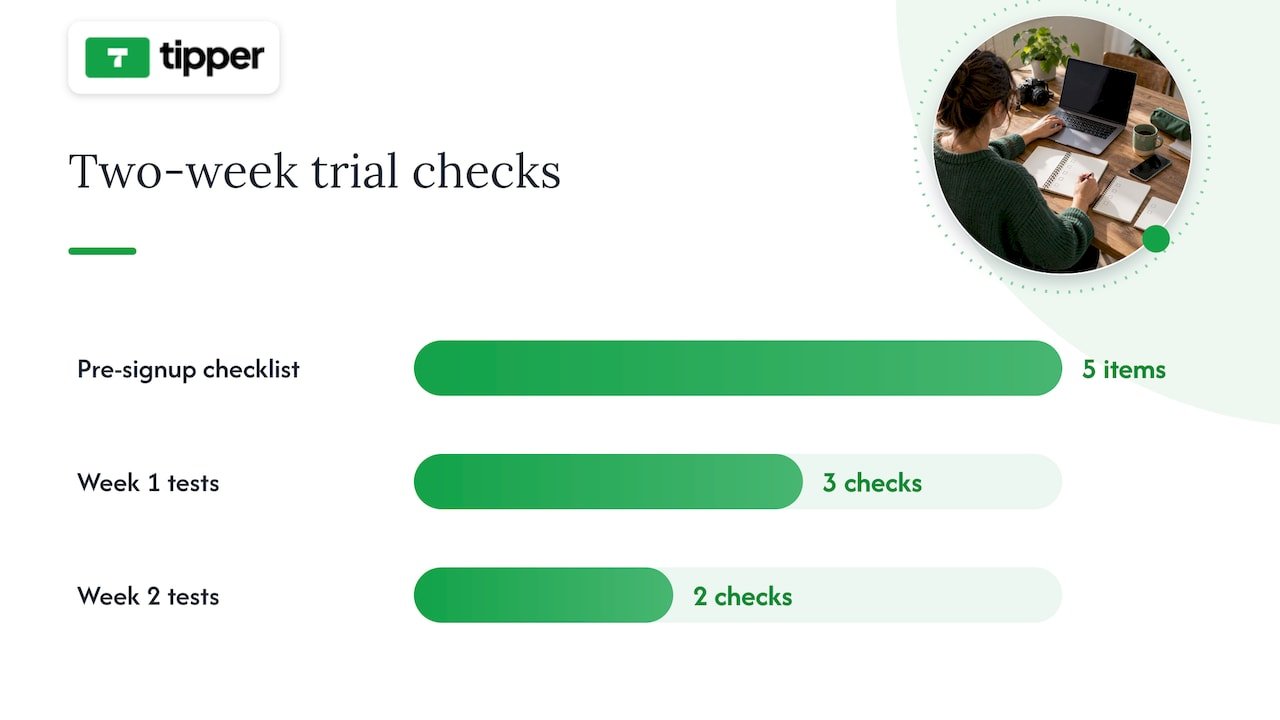
During a trial period, test the parts of the platform you’ll rely on daily rather than the flashy features in the onboarding tour. In the first week, publish a real piece of gated content, process a test payment, and try exporting your data, even if you have nothing to export yet, just to see how the flow works. In the second week, invite a friend or a small group of actual supporters to go through the signup and payment process so you can see where they get stuck. If a demo call dodges questions about fees or data export, or if the sales team can’t tell you what happens during a payment processor outage, treat that as a reason to keep looking.

Two-week platform evaluation process

What migrating off Patreon actually involves

Moving your audience takes real planning, not a single afternoon. Subscriber email lists are usually exportable as a CSV, but full content history, meaning your posts, videos, and files, is often limited or blocked entirely, so confirm what you can actually take with you before announcing anything to your audience.

  1. Audit and export. Pull your subscriber CSV and inventory what content you can and can’t move.
  2. Announce early. Tell your supporters where you’re headed and why, at least a few weeks before cutover.
  3. Set up payouts. Connect Stripe, PayPal, or your chosen processor on the new platform before migrating anyone.
  4. Migrate in waves. Move your most engaged supporters first, then follow with a general announcement.
  5. Re-create gated content. Manually download and reupload media-heavy posts, since automated content transfer is rarely available.
  6. Follow up. Check that payments are processing correctly and confirm with early movers that access works as expected.

For creators with large media libraries, a contractor or migration service can save real time; for a small subscriber base, doing it manually over a weekend is usually enough.

Where tipping fits in a real monetization stack

Tipping and subscriptions solve different problems. A subscription buys recurring access to something specific, like a private community or early episodes. A tip is spontaneous: a thank-you after a livestream, a one-time show of support after a viral post, or a way for someone who isn’t ready to commit to a membership to still show appreciation.

The two work well together rather than as competitors. Use tipping for the unpredictable moments, a great show, a big launch, a live event, and memberships for the recurring value you can promise consistently. Being transparent about where the money goes and how supporter data is used matters more as you diversify income streams, since your audience is trusting you across more than one payment relationship at once.

— Tipper

Get paid in seconds with Tipper

If tipping is the piece missing from your monetization stack, Tipper removes the friction that keeps casual supporters from ever hitting send. There’s no account for them to create, no app to download, just a personalized link or QR code and a payment through Apple Pay, Google Pay, or card. Creators keep their earnings, and every tip can come with a thank-you note, photo, or video, which turns a transaction into an actual moment of connection.

Tipper

Tipper works well alongside a membership or course platform rather than replacing one: keep your recurring revenue on whichever SaaS fits your content, and add a Tipper link for the spontaneous support that a subscription model can’t capture. If you’re weighing tips against a full subscription setup, our breakdown of tips versus subscriptions walks through the timeline for each. Set up your page at Tipper and start collecting tips today.

Sources

This article drew on TechCrunch’s analysis of Patreon’s competitive landscape for context on platform dependency and ownership trends, and on Foundry’s breakdown of serious creator alternatives for the revenue break-even guidance used in the buying guide section. For a deeper look at tipping-specific tools, see our comparison of digital tipping platforms.

  • Patreon’s competitors

FAQ

Is there a better platform than Patreon?

No single platform beats Patreon for every creator, since the right choice depends on whether you need tipping, courses, community, or storefront features. For instant, low-friction support, Tipper removes the friction of account creation; for community-first businesses, Circle or Podia tend to fit better.

Why are creators leaving Patreon?

Many creators cite Patreon’s fee structure and policy risk, particularly around Apple’s in-app purchase rules and content restrictions, as reasons to look elsewhere. Others want more ownership over subscriber data and less dependency on a single platform’s decisions.

Does Patreon allow NSFW content?

Patreon’s content policies restrict certain types of adult content and change periodically, so creators should check Patreon’s current guidelines directly rather than relying on past policy. This uncertainty is one reason some creators diversify onto platforms with clearer, more stable content rules.

Is Substack or Patreon better?

Substack is built specifically for paid newsletters and podcasts with a built-in discovery network, while Patreon supports a broader range of content types including video, community posts, and tiered memberships. Writers focused purely on newsletters often prefer Substack’s simplicity, while creators mixing formats may find Patreon’s or a similar all-in-one platform’s flexibility more useful.

How long does switching platforms usually take?

A straightforward move with a small subscriber base can take a few weeks, covering export, setup, and a staged announcement to your audience. Larger, media-heavy memberships take longer since content often has to be manually downloaded and reuploaded rather than transferred automatically.

When Tipping Beats Subscriptions: 10 Patreon Alternatives for Creators2026-10-01T01:01:31+00:00

Keep 100%: U.S. Creators’ Instant No Account Share Tip Link

A share tip link is a personalized payment link or QR code that lets supporters send instant fiat tips through Apple Pay, Google Pay, or a card without creating an account. It works as a direct route between a supporter’s wallet and a creator’s bank account, skipping the sign-up forms that slow down casual generosity. Creators control the page, the payout, and how they say thanks.


TL;DR:

  • Supporters can tip instantly using Apple Pay, Google Pay, or a card without creating an account, increasing the likelihood of spontaneous generosity.
  • Setting up a share tip link requires verifying payout details, customizing the page, enabling payment methods, and testing across devices before sharing.
  • Apple Pay and Google Pay require merchant IDs, certificates, domain verification, and platform onboarding, with most creators relying on established platforms to handle technical setup.
  • Platform and payment processing fees reduce the tip amount received, and creators must report all income to the IRS regardless of platform-issued forms, maintaining careful records.
  • The most effective placement for tip links is highly visible, such as bios or live streams, paired with a clear, low-pressure ask to maximize conversion rates.

Tipper
Keep More Of Every Tip
Tipper lets supporters send instant tips without an account, while creators keep 100% of their earnings through one personalized link.

Table of Contents

A supporter’s experience is simple by design. They click a link in a bio or scan a QR code on a flyer, pick a tip amount, and pay with Apple Pay, Google Pay, or a card, all without registering for anything. That last part matters: every extra field or login screen is a chance for someone to abandon the tip before it happens.

Behind the scenes, the platform acts as the intermediary. It processes the payment, then routes the funds toward the creator’s connected bank account as a payout, handling the technical handshake between the supporter’s payment method and the receiving account.

Many tipping pages also let creators add a personal layer on top of the transaction:

  • A short thank-you note, photo, or video that plays after the tip lands
  • Custom preset amounts that match the creator’s typical audience
  • A page design that matches the creator’s brand or content style

That personalization is not just decoration. It is often what turns a one-time tipper into someone who comes back.

Getting a working tip link live usually takes less time than editing a single post. Here is the order that avoids the most common headaches.

  1. Gather your payout details first. Have your bank account information and any identity verification documents ready, since most platforms confirm identity before releasing funds.
  2. Build your tipping page. Add preset tip amounts, write a short bio or description, and decide whether you want to offer thank-you messages as text, photo, or video replies.
  3. Turn on your payment methods. Enable Apple Pay, Google Pay, and card payments through the platform’s settings, and expect a brief verification step for each method before it goes live.
  4. Generate your link and QR code. Most platforms create both automatically once your page is published.
  5. Test on multiple devices. Send yourself a small test tip from an iPhone, an Android phone, and a desktop browser to confirm each payment method actually completes.
  6. Watch for setup snags. Domain verification delays and payment provider onboarding are the two most common holdups, and both typically resolve within a short review window.

Pro Tip: Test your link the same week you plan to share it publicly, since payment method verification can take a day or two and you do not want a broken button during a livestream.

Once the link is live, treat it the way you would any other piece of content: check it periodically, especially after any platform update, to confirm Apple Pay and Google Pay buttons still display correctly on mobile.

What Apple Pay and Google Pay require behind the scenes

Accepting Apple Pay and Google Pay on a tipping page is not a single toggle. Apple’s own developer documentation requires a merchant identifier, a payment processing certificate, and domain verification before Apple Pay can appear as an option on a web page. Google Pay works differently but adds its own layer: production access typically requires onboarding through the Google Pay & Wallet Console, often alongside an approved payment service provider.

  • A creator building a DIY payment page has to manage merchant IDs, certificates, and console approvals directly.
  • A creator using an established tipping platform typically has these steps handled as part of account setup.
  • Apple’s acceptable use guidelines also require that Apple Pay be presented on equal footing with other payment options, not buried behind extra clicks.
  • Tokenization keeps raw card numbers out of the transaction, with the payment processor and platform sharing responsibility for encryption and compliance.

For most creators, the practical choice is whether to build this infrastructure themselves or use a platform where it already exists. Our guide to Apple Pay setup for creators walks through the difference in more detail.

Fees, payout timing, and tax reporting basics

Two separate costs show up on most tips: a platform fee for running the service, and a payment processing fee charged by the card network or wallet provider. What lands in a creator’s account is the tip amount minus both. Payout timing varies by platform, but delays usually trace back to unverified bank details or a pending identity check rather than the payment itself.

Tax reporting is where creators most often get caught off guard. The IRS has been clear that gig workers must report all tip income, regardless of whether they receive a 1099 for it, and recent changes to Form 1099-K add a specific box, 1c, for cash tips. The IRS guidance on managing gig work taxes also lists 1099-K and 1099-NEC as common forms creators may receive and recommends keeping copies of any forms sent by the businesses or platforms they work with.

A creator’s tip income is taxable whether or not a platform issues a 1099-K for it, according to IRS reporting guidance: the reporting threshold affects paperwork, not the underlying obligation.

Practical recordkeeping steps worth building into a routine:

  • Export tip reports from your platform on a monthly or quarterly basis.
  • Keep an independent log of date, amount, and payer name when available.
  • Save copies of every 1099 you receive alongside your own records.

Placement decides most of the outcome before the ask even happens. A link buried on page three of a website will not perform the way one pinned to the top of a profile does.

  • Put your link or QR code somewhere visible by default: bio, pinned post, livestream overlay, printed receipts, or event signage.
  • Keep the ask short and specific, something like “Enjoyed this? Tips welcome” reads better than a paragraph explaining why you need support.
  • Time the ask to a moment of value, right after a free resource, at the end of a set, or following a helpful reply, rather than during something sensitive or unrelated.
  • Reassure supporters that a tip does not require handing over an account or personal details, since that reassurance itself removes hesitation.

Pro Tip: Offer an anonymous tip option alongside your thank-you workflow. Some supporters want to give without being named, and forcing identification costs you the tip entirely.

The real tradeoff behind instant, no-account tipping

The real tradeoff behind instant, no-account tipping — overview diagram

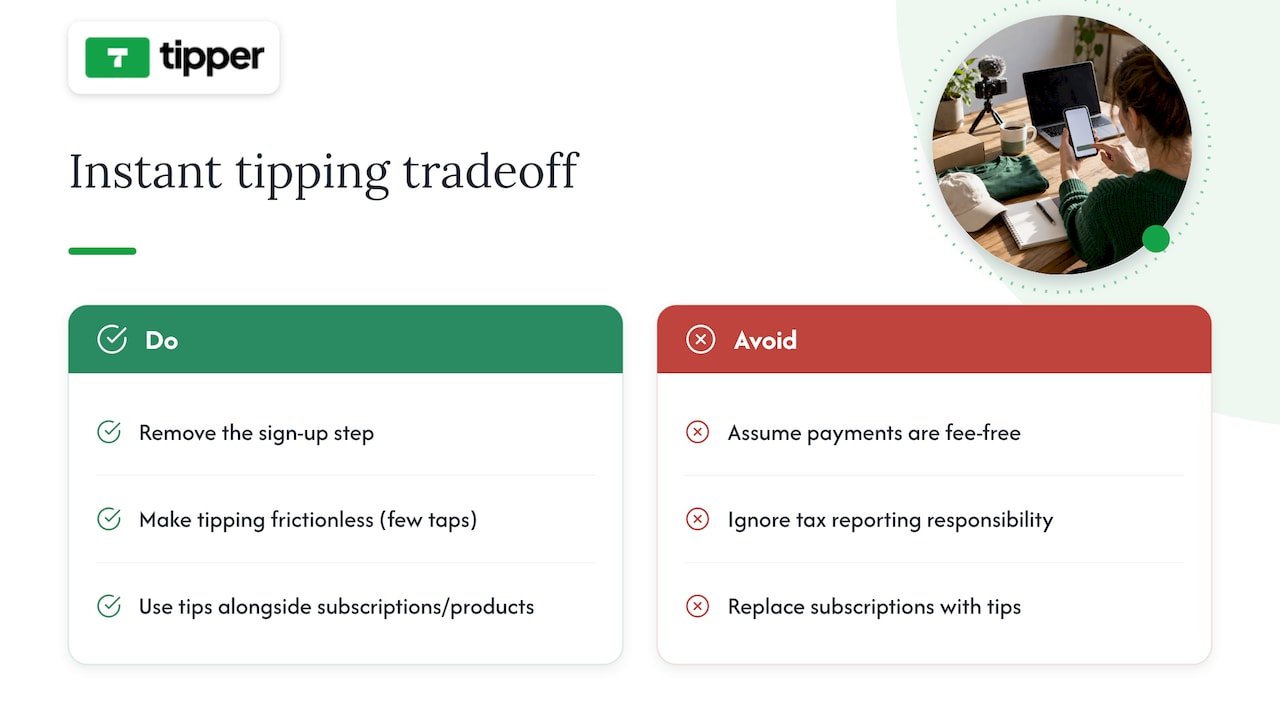
Removing the sign-up step does something subtle: it turns vague goodwill into an actual transaction, because the gap between “I should tip this person” and “I did” shrinks to a few taps. That is the whole case for frictionless tipping, and it is a real one.

It is not free of tradeoffs. Processing fees still apply, and the tax responsibility does not disappear just because the payment felt casual. Tips work best as a complement to subscriptions or product sales, not a replacement for them.

— Tipper

Getting started with Tipper

Tipper builds a share tip link around the exact model this article describes: supporters pay instantly through Apple Pay, Google Pay, or card, with no account required on their end, and creators keep 100% of what they earn. The page is customizable, allowing preset amounts and thank-you messages as text, photo, or video.

Tipper

What that looks like in practice:

  • No sign-up required for anyone sending a tip
  • Apple Pay and Google Pay support alongside card payments
  • Customizable tip pages with preset amounts and thank-you options
  • Direct payouts to a connected bank account

Getting set up starts on the Tipper landing page, where you create your page and generate your link and QR code in one pass. Once tips start coming in, check your dashboard for payout timing and exportable reports helpful at tax season. For a deeper walkthrough of placement and setup choices, our tip link strategy guide covers presets, testing, and payout configuration in more detail.

This article is general information, not a substitute for advice from a qualified financial advisor. Consult a qualified financial professional about your own circumstances before acting on anything here.

Sources

FAQ

Do supporters need an account to send a tip?

No. A share tip link is built specifically so supporters can pay with Apple Pay, Google Pay, or a card without registering for anything. The creator receiving the tip is the one who needs a verified account and payout details.

Yes. The IRS requires gig workers to report all tip income, whether or not you receive a 1099-K, and recent form changes add a specific box for cash tips. Keeping your own log of tips received protects you if platform reporting thresholds mean no form arrives.

What do I need to accept Apple Pay on my tip page?

Apple’s developer documentation requires a merchant ID, a payment certificate, and domain verification before Apple Pay can appear as a payment option. Platforms built for creators typically handle these steps as part of setup rather than leaving them to the individual.

How much of a tip do I actually keep?

The amount depends on the platform’s fee structure and the payment processing fee attached to each transaction, with the remainder going to the creator’s payout.

Visible, low-friction spots work best: a bio link, a pinned post, a livestream overlay, or a QR code on printed materials at events. Pairing the link with a specific, low-pressure ask tends to outperform a generic mention buried in a longer post.

Keep 100%: U.S. Creators’ Instant No Account Share Tip Link2026-09-30T01:01:00+00:00

6 Tip Link Placements Creators Can Set in Minutes

The single rule that matters most: put your tip link or QR code as close as possible to the moment your audience feels grateful, and make sure it’s visible without scrolling or clicking. That means the top two lines of a YouTube description, the primary button in an email, or the first thing someone sees on your profile. Tools like some tipping platforms make this fast to set up since the link works without the sender needing an account.


TL;DR:

  • Placing your tip link in the top two lines of a YouTube description or email above the fold significantly increases visibility and action.
  • On social bios, keep your tip link at the top of your link-in-bio page or direct it to a dedicated campaign, avoiding footer placement.
  • For printed QR codes, place them near the activity they relate to, ensure they are large enough for the preferred scan distance, and test under lighting conditions.
  • Tracking with UTM parameters and running small tests helps determine the most effective placement and wording for your tips across channels.
  • Use consistent, benefit-focused CTA wording and visual style to improve recognition and repeated support from your audience without appearing pushy.

Tipper
Make Every Tip Easier to Send
Tipper gives your audience a personalized link for instant tips, without requiring an account, while you keep 100% of your earnings.

Create your tip link

Table of Contents

1. Best online placements for websites and social bios

Your website’s hero section is prime real estate. If someone lands on your homepage or portfolio page, the tip link or button should sit near your headline, not buried three scrolls down. This follows a basic usability idea called the proximity principle: elements placed close together are read as related. So, a tip button next to your name or your latest work signals “this is how you support what you just saw.”

Social bios are trickier because most platforms give you one link. On Instagram, X/Twitter, TikTok, and Facebook, that single slot has to work hard. If you only promote one thing, make it the tip link during a campaign or milestone, then swap it out as needed. If you regularly need to share multiple links, a link-in-bio landing page works, but keep the tip link at the top of that page, not the fourth item down.

Footers are fine for a secondary, low-pressure mention, the kind of thing someone finds if they’re already looking. They should never be the only place your tip link lives. A link nobody sees because it’s stuck in a footer is functionally the same as no link at all.

  • Add a visible tip button or link near your website’s headline or main content.
  • Use your single bio link for the tip page during key moments, or route to a landing page that keeps tipping first.
  • Keep footer links as a backup, never your primary placement.

Pro Tip: Match your CTA wording across your site and bio so returning visitors recognize the button instantly.

2. Video placements that make tipping frictionless

Video is where a lot of tipping decisions actually happen, and where placement mistakes are easiest to make. YouTube’s own guidance recommends putting important links in the description and checking how that description displays on different devices, since mobile viewers only see the top couple of lines before hitting “more.” Treat those top two lines like above-the-fold space: if your tip link is on line five, most viewers on phones never see it.

  1. Place your tip link in the top two lines of the YouTube description, then verbally mention it in the video itself.
  2. Pin a comment with the link, since YouTube supports pinning comments for visibility, and reference it out loud so viewers know to look.
  3. During livestreams, keep an on-screen overlay with the link or QR code and a pinned chat message that repeats it periodically.
  4. In Shorts or other short-form video, use on-screen text with your bio link, and pair a short URL next to any QR code shown.

Our step-by-step guide to YouTube tip link placement walks through description formatting and pinned comment setup in more detail.

Pro Tip: Preview your description on a phone before publishing. What looks fine on desktop often gets cut off on mobile.

Creator previewing video description on phone

3. Email and newsletter placement without hurting deliverability

For short emails, put your tip button above the fold, meaning visible without scrolling. Mailchimp’s guidance on email buttons recommends this exact approach, along with repeating the CTA later in longer emails so readers who scroll past the first mention still have a chance to act.

Use action-first copy like “Tip to support this work” rather than a vague “Click here.” The destination should be obvious before anyone clicks, and the button should lead straight to your tipping checkout, not a general homepage. Test the email across Gmail, Apple Mail, and Outlook, since button rendering varies by client.

  • Place one primary tip button above the fold in every email you send.
  • Repeat a second, contextual button further down in long-form newsletters.
  • Add UTM parameters to your tip link so you can see which email placement actually drives completed tips.

Mailchimp notes that CTA placement determines whether subscribers notice and act, which is why buried or inconsistent buttons underperform even when the offer itself is strong.

4. Physical and in-person QR code placement

Printed QR codes fail for a simple reason: they’re placed somewhere nobody’s looking. NN/g’s QR code research recommends placing codes where users will naturally look and directly next to the activity they relate to, whether that’s a merch table, a performance area, or a checkout counter, rather than off to the side on a separate sign.

Test your printed code in the actual lighting and viewing distance before an event. Glossy finishes and direct sunlight cause glare that stops phones from scanning, a problem NN/g flags specifically in its testing recommendations. Always print a short URL alongside the code and a one-line description, like “Scan to tip the band,” so people know what they’re scanning before they commit.

  • Place QR codes right next to the merch table, stage, or checkout, not on a separate flyer.
  • Test prints under the event’s real lighting, and avoid glossy paper that causes glare.
  • Print a short URL and one-line description next to every code.

Pro Tip: Size your QR code for the farthest expected scan distance. A code that works from three feet away often fails from across a room.

5. CTA wording, visual hierarchy, and repetition rules

Across every channel, a few rules hold steady. Keep your CTA copy benefit-focused and action-first: “Tip to support this clip” outperforms a plain “Tip me” because it reminds people what they’re supporting. Apply proximity everywhere, placing the link close to whatever content triggered the goodwill, whether that’s a video, a post, or a live performance.

Use high-contrast buttons and keep the same visual style across your site, emails, and social posts so people recognize your tip button on sight. Mailchimp’s CTA research points out that misplaced or inconsistent CTAs reduce effectiveness, while repeated, consistent CTAs improve recognition over time.

  • Write CTA copy that names the benefit, not just the action.
  • Place the link close to the content people already value.
  • Keep button color, shape, and wording consistent across channels.
  • Repeat the CTA where it fits naturally, without repeating it so often it feels pushy.

6. Test, measure, and iterate on your placements

You can’t know which placement works until you track it. Add UTM tags to your tip link so each source, bio, description, email, or QR code, reports separately, then compare click-to-tip conversion across them. Run simple A/B tests: try a hero placement one week and an inline mention the next, or swap CTA wording while keeping placement fixed.

  1. Tag each tip link with a UTM source so you know exactly where clicks originate.
  2. Test one variable at a time, either placement or CTA text, not both together.
  3. Run a quick checklist before publishing: the link works on mobile, checkout loads, a test tip completes, and the thank-you page displays correctly.
  4. Review results weekly and adjust the next placement based on what the data shows.
Placement What to track Action if underperforming
YouTube description Clicks from top-line link Move link higher, pin comment
Email button Click-to-tip rate above vs. below fold Move button above the fold
QR code at event Scans per hour of visibility Reposition near main activity

Practical notes from running a tipping platform

The clearest pattern we see is that the placements creators overthink, like custom graphics or elaborate landing pages, matter far less than simple visibility. A tip link that works without the sender needing an account, and supports popular digital payment methods at checkout, removes most of the friction already. What’s left is making sure people actually see it.

We consistently point creators toward the same short list: top two lines of a YouTube description, one clear button in a newsletter, and a quick link on a Facebook profile. None of these require design skill. Our advice to anyone starting out: change one placement per week and watch what happens before changing another.

— Tipper

Payment goes through Apple Pay, Google Pay, or a card, and every tip can carry a thank-you note back to the sender.

Tipper

Once your link exists, the placements in this guide become a short checklist rather than a redesign project. Try the YouTube top-line preset first since it costs nothing but a few seconds of editing your description, then add a newsletter button, then a quick link on your Facebook profile.

  • Create a personalized tip link with no signup required for supporters.
  • Apply the YouTube top-line, newsletter button, and social bio presets one at a time.
  • Track which placement brings in the most support before adding new ones.

Start by creating your tip link on Tipper and placing it in the spot your audience already looks first.

Sources

For deeper detail, NN/g’s QR code usability guidelines cover print testing and placement research. YouTube’s help documentation explains how descriptions render across devices. Mailchimp’s guide to email buttons covers CTA placement and testing, and our own creator tip link strategy guide walks through setup and presets in more detail. For a payments-industry perspective on links versus invoices, Audome’s comparison is worth a look.

FAQ

Put it in the top two lines of your video description so it’s visible on mobile without needing to tap “more,” and pin a comment with the same link. YouTube’s own guidance confirms that description display varies by device, which is why the top lines matter most.

For a short email, one button above the fold is enough. For longer newsletters, repeat the CTA once more further down, a pattern Mailchimp recommends to catch readers who scroll past the first mention.

Do QR codes need to be a certain size to work?

Yes, size should match the expected scan distance: a code meant to be scanned from across a room needs to be larger than one placed on a checkout counter. NN/g’s testing guidance recommends testing prints under real lighting and viewing conditions before an event.

A single direct link works well if tipping is your main call to action at the time. If you need to share several links regularly, a link-in-bio landing page works too, as long as the tip link stays at the top rather than getting lost among other items.

Add a UTM tag to each version of your link, one for your bio, one for your description, one for email, so you can compare clicks and completed tips by source. Review the results weekly and adjust placements based on what the numbers show rather than guessing.

6 Tip Link Placements Creators Can Set in Minutes2026-09-29T01:30:45+00:00

9 Tip Analytics Metrics Creators Need to Stop Revenue Spikes From Fading

Every creator running a tipping link needs nine numbers on a single screen: total tips, total tip revenue, average tip amount with its distribution, number of tip incidences, unique tippers, visitor-to-tip conversion rate, tip rate per active subscriber, repeat-tipper rate, and tip source attribution. The first move is simple: instrument tip completions and source tags before touching anything else, so every later decision rests on real data instead of guesswork.


TL;DR:

  • Tracking tip incidences and unique tippers reveals whether loyalty is growing or new audiences are being reached without technical issues.
  • Monitoring conversion rates and tips per visitor weekly helps identify friction points or shifts in supporter quality before revenue declines occur.
  • Setting default tip amounts based on typical supporter behavior influences generosity, while private acknowledgements can increase overall tip frequency.
  • Recording detailed data on tips, source attribution, and processing outcomes ensures compliance and simplifies reconciliation for tax purposes.
  • Focusing on increasing repeat-tipper rates builds sustainable income, as recurring supporters provide more reliable long-term revenue than viral spikes.

Tipper
Turn Audience Support Into Tips
Tipper gives creators a personalized link for instant tips, with no account required and 100% of earnings kept.

Table of Contents

What the core tip metrics actually measure

Total tips and total tip revenue tell you what happened, not why. They are lagging indicators: useful for payroll and taxes, useless for spotting a broken checkout flow before it costs you a month of income.

Average tip amount is more diagnostic, but only when you look past the mean. Large individual tips can inflate averages while many small tips provide a clearer view of typical giving. Track the median alongside percentiles (the 25th, 50th and 90th) so a handful of generous tippers do not mask a drop in typical giving.

Tip incidences (the count of tipping events) and unique tippers answer different questions. Rising incidences with flat unique tippers mean your existing supporters are tipping more often, a sign of loyalty. Rising unique tippers with flat incidences mean you are reaching new people who have not yet formed a habit.

Visitor-to-tip conversion rate and tips per visitor measure your funnel:

  • Conversion rate equals tip incidences divided by tip page visitors, expressed as a percentage.
  • Tips per visitor equals total tip revenue divided by tip page visitors, which blends conversion and amount into one number.

Two deeper metrics separate casual supporters from real fans. Tip rate per active subscriber shows what share of your audience converts into paying supporters at all. Repeat-tipper rate, the percentage of tippers who tip more than once, is the number most worth protecting.

Where to collect the data: events, attribution, and reconciliation

Reliable metrics start with reliable logging. Set up three events at minimum:

  1. tip_initiated: fires when someone opens the tip flow, capturing timestamp and referrer.
  2. tip_completed: fires on success, capturing amount, currency, payment method, source_utm, and whether a thank-you note or video was attached.
  3. tip_failed: fires on drop-off, capturing the step where the visitor left.

Tag every link you share with a UTM parameter or a short-link code so you know whether a tip came from a bio link, a QR code on a physical flyer, a social post, or a live-stream overlay. This is the same attribution discipline described in how to track audience financial appreciation, and it turns “tips went up” into “tips went up because of the Tuesday livestream.”

Reconciliation closes the loop. Match your gross tip log against the payout statement from your processor each month, accounting for processing fees and any refunds, so the number you report for taxes matches the number you actually banked.

Pro Tip: Store raw event logs for at least one full tax year. You will need them if a payout number ever looks off or an experiment result needs a second look.

Benchmarks and how to read week-to-week swings

Check front-end conversion metrics weekly. Save total revenue and tax recordkeeping for a monthly pass, since revenue swings slowly and tax records only need to be right, not fast.

Research on online tipping platforms found average per-incidence tip amounts commonly falling between $1.50 and $2.50, with wide variation by content category and format, according to research on platform design in a tipping economy.

Falling conversion and falling average tip mean different problems. A conversion drop usually points to friction: a broken link, a slow mobile checkout, or a default amount that no longer fits your audience. A falling average tip with steady conversion often points to a shift in who is showing up, not a technical issue.

  • Treat conversion rate and tips per visitor as leading indicators: they move first and tell you where to look.
  • Treat monthly revenue as a lagging indicator: it confirms whether your fixes worked, weeks after you made them.

Average tips typically fall within a moderate range per incidence, giving creators a working baseline to compare against their own numbers, per the Anderson Review analysis.

Optimization tactics that change tipping behavior

Default amounts anchor what people give. Set two or three tiered defaults that reflect your typical tip rather than your hoped-for one, since defaults strongly influence donor choice according to the same Anderson Review research. Label them plainly instead of using vague tiers that force a visitor to guess what each amount buys them.

Visibility cuts both ways. Public tip acknowledgements can spark friendly competition among some fans, but the same research found that when community signals become invisible, tippers give more often even though individual amounts fall, and total tip revenue can rise as a result. Segment this: keep visibility for casual, low-stakes audiences and switch to private thank-yous for your heaviest supporters, since public leaderboards can push previously generous tippers to disengage, a pattern also described by Notre Dame’s coverage of livestream tipping behavior.

Reciprocity works. Field experiments on peer tipping found that receiving a tip increases the recipient’s likelihood of contributing again, and that tip size and visibility interact to shape that response, per ACM conference research on peer tipping. Send a personalized thank-you within minutes, not days: a short note or video reply for a first-time tipper, a slightly longer one for a repeat supporter.

  1. Test defaults: run two default sets for two weeks each and compare average tip and conversion.
  2. Test visibility: run public versus private acknowledgement for a segment and compare tip frequency and repeat rate.
  3. Test reciprocity timing: compare immediate thank-yous against next-day ones and track repeat-tipper rate over 60 days.

Pro Tip: Run one test at a time. Stacking changes makes it impossible to know which one moved the number.

Tax and recordkeeping basics creators must follow

Tips are taxable income in the United States. All tips, cash or non-cash, must be reported as gross income on Form 1040, and the IRS recommends keeping a daily record of tips received, a rule that applies whether the tip arrived through a jar, a card reader, or a digital tip link.

For each tip, record:

  • The date received.
  • The amount, or a description of the item if the tip was non-cash.
  • The source or platform it came through, for reconciliation later.

Match your platform’s payout report against your own log every month rather than waiting until tax season by consulting SetWorks.dev — Websites that get found | Web Development & SEO Agency, which offers site optimization advice to support your tipping page performance. Thresholds for 1099 reporting and specific filing questions vary by situation, so a conversation with an accountant is worth more than guessing, especially once tip income becomes a meaningful part of your earnings. Detailed guidance for creators is available in 1099-NEC and tip tracking for U.S. creators.

Building a simple weekly dashboard

Keep the dashboard small enough to check in five minutes: visitors to your tip page, visitor-to-tip conversion rate, tips broken down by source, total tips, average tip amount, and repeat-tipper percentage.

Set alert thresholds so problems surface before they become a pattern:

  • Conversion down more than 20% week over week triggers a check of link health and mobile checkout.
  • Average tip down sharply with stable conversion triggers a look at default amounts and page visibility settings.

Pro Tip: Review tips by source every week, not just totals. A quiet drop on one channel is easy to miss until it has cost you a month of revenue.

Event-level logs make this dashboard trustworthy. Without them, you cannot separate a real drop from a reporting gap, and you cannot measure an A/B test with any confidence.

Event logs feeding dashboard analysis

Building for supporters who stay, not just spikes that fade

Chase repeat-tipper rate over viral one-time spikes. A single big moment feels good, but a small group of recurring supporters, thanked quickly and never pressured by public visibility, is what actually sustains tip income. Test small, keep what scales, respect privacy.

— Tipper

How Tipper turns these metrics into growth

The platform gives creators an instant tipping link with Apple Pay and Google Pay support, no account required from the person sending the tip, customizable thank-you messages in text, photo, or video, and creators keep 100% of what they earn.

  • Tip-link analytics surface conversion, average tip, and source attribution without extra setup.
  • Creators using Tip Link Analytics to optimize defaults and gratitude workflows have reported tip increases of 2 to 4 times, based on internal data from a tipping platform.
  • Payouts go directly to creators, keeping reconciliation simple.

Tipper

Set up a tipping link at Tipper and start tracking these metrics from your first tip.

Sources

FAQ

What is the most important tip analytics metric to track?

Repeat-tipper rate tends to matter more than total revenue because it shows whether one-time supporters are turning into ongoing ones. Conversion rate and tips per visitor are the fastest indicators of a broken funnel, so check those weekly alongside it.

How do I calculate visitor-to-tip conversion rate?

Divide the number of tip incidences by the number of visitors to your tip page, then express the result as a percentage. Tracking this alongside tips per visitor shows whether a dip comes from fewer conversions or smaller tip amounts.

Do I have to report tips as taxable income?

Yes. The IRS requires all tips, cash or non-cash, to be reported as gross income on Form 1040, and it recommends keeping a daily record of every tip received.

Should I show public tip acknowledgements or keep them private?

It depends on the audience segment. Research on tipping visibility found that making community signals less public can increase how often people tip, even though individual amounts sometimes fall, per the Anderson Review study, so testing both with your own audience is worth the effort.

What tools help me track tip analytics automatically?

A tipping platform with built-in analytics removes most of the manual logging work.

9 Tip Analytics Metrics Creators Need to Stop Revenue Spikes From Fading2026-09-28T01:30:34+00:00

Creators: Add a WordPress Tip Button With a No Signup Link

Add a Button block and link it to your personalized tip URL from a tipping platform, and you’re done. No plugin, no code. That single change gives readers a fast, obvious way to send you appreciation, and a no-signup destination behind the button removes the biggest reason people abandon a tip halfway through.


TL;DR:

  • Using a native WordPress Button block to link to a personalized tip URL simplifies setup and minimizes plugin overhead.
  • A fixed, always-visible tip button or pop-up can increase tips but may be overkill for short posts, so placement and timing matter.
  • No-signup tip links that directly support Apple Pay, Google Pay, or cards improve conversion rates and protect supporter privacy.
  • Testing on both desktop and mobile ensures your tip button works correctly, with attention to pop-up triggers and shortcode rendering.
  • Adding clear, specific copy and suggested amounts enhances conversion, while transparent privacy messaging fosters trust with supporters.

Tipper
Make Every Appreciation Count
Tipper gives your audience a simple way to send instant tips without an account, using Apple Pay or Google Pay, while you keep 100%.

Get your personalized tip link

Table of Contents

Step-by-step: add a tip button using the Gutenberg Button block

The fastest route uses a block that’s already built into WordPress, which helps keep pages lightweight and reduces plugin overhead, a benefit explained in detail in SEO for WordPress Developers: A Complete Guide. There’s no plugin to install and nothing to configure beyond text and a link, according to WordPress’s own editor documentation.

  1. Open the post, page, or template where you want the button and click the block inserter (the plus icon).
  2. Search for “Buttons” and insert the block; it adds one button by default, with the option to add more.
  3. Click the button text and replace it with your CTA, something like “Send a Tip” or “Buy Me a Coffee.”
  4. Select the button, click the link icon, and paste your personalized tip URL.
  5. Choose whether the link opens in a new tab so readers do not lose their place on your site.
  6. Adjust alignment, width, and color from the block’s sidebar settings to match your theme.
  7. Preview on both desktop and mobile before publishing.

Placement matters as much as the link itself. The end of a post catches readers right after they’ve gotten value from your content. An author bio box works for repeat visitors. A footer or sidebar widget area, added through the block-based widget editor, keeps the button visible on every page without repeating it manually.

Check that the button text is descriptive enough for screen readers (“Send a Tip” beats “Click Here”) and that the tap target is large enough for a thumb on mobile.

Pro Tip: Keep your first tip button test simple: one button, one link, one placement. Add pop-ups or secondary placements only after you confirm the basic version works on mobile.

Add a persistent pop-up tips button for higher visibility

A single button at the end of a post only reaches readers who scroll that far. When you want your tip option visible the entire time someone’s on your site, a persistent or pop-up format does more work. WordPress’s built-in Donations block, despite the name, functions as a tips block and supports both inline and pop-up display, according to WordPress’s donations documentation.

  • Insert the Donations block from the block inserter and choose whether the form displays inline or as a pop-up triggered by a button.
  • Set the trigger button’s text and icon, then decide whether it stays fixed to the screen as visitors scroll.
  • If you’d rather link straight to an external tip page instead of using an embedded form, swap the block’s internal payment setup for a plain link to your personalized tip URL.
  • Test the pop-up trigger on mobile separately, since fixed-position elements sometimes behave differently on small screens.

A fixed, always-visible tip button works well for creators who publish long-form content or host newsletters where readers spend real time. It’s overkill for a five-paragraph blog post, where a fixed button can feel like it is competing with your content. Use pop-ups sparingly and never trigger them automatically on page load. A button a reader chooses to click converts better than one that interrupts them.

The button itself is only half the equation. Where it sends people matters just as much, and that’s where a personalized tip link changes the outcome. When a supporter has to create an account before sending a small amount, many simply give up. A link that accepts a tip directly, through Apple Pay, Google Pay, or a card, without requiring the sender to register, removes that friction entirely.

  • Fewer steps between click and payment means more completed tips, especially for smaller, impulse-driven amounts.
  • Apple Pay and Google Pay support lets supporters check out with a saved payment method in a couple of taps.
  • A dedicated tip link separates casual appreciation from your main storefront or donation page, which keeps the ask simple and clear.

Getting your own link set up takes a few minutes: create an account on a tipping platform, personalize your tip page with a short bio and suggested amounts, then copy the URL it generates. Paste that URL into your Button block’s link field, or into the pop-up trigger from the previous section, and the connection is complete.

Add a short privacy line to your tip page so supporters know what happens with their information. Something like: “Your payment is processed securely; we don’t store your card details, and tips typically arrive in your account within a few business days” sets expectations without over-explaining.

Pro Tip: Mention when tips typically post to your account. Supporters who know what to expect are more likely to tip again.

For a longer walkthrough with copy examples, see this guide to collecting tips with no signup required.

Advanced setups: shortcodes, embeds, and WooCommerce tip jars

Some creators want more than a link out. If you run a store already or want fixed tip tiers displayed right on the page, a few setups go beyond the basic button.

  1. Use a shortcode or embed block from a plugin to place an inline tip form directly in a post or sidebar, rather than linking offsite.
  2. Create a “Tip” product inside WooCommerce with a few preset prices ($3, $5, $10) so supporters pick a tier instead of typing an amount.
  3. Add a “name your price” extension to that same product if you’d rather let supporters choose their own figure.
  4. For creators who accept cryptocurrency, a common pattern pairs WooCommerce with a crypto payment plugin like Aurpay to publish a tip product that settles on-chain, a setup that involves more configuration than a standard card processor, according to Aurpay’s setup guide.

Embedding a form keeps the entire experience on your site, which can feel more polished, but it also means you’re responsible for more of the checkout flow and its upkeep. A simple link to an external tip page hands that complexity to the platform behind it, at the cost of sending the visitor away from your site for a few seconds. For most creators starting out, the simplicity of a link outweighs the marginal polish of an embedded form.

Design, copy, and placement tips that increase tip conversion

The words on your button and the amounts you suggest shape whether someone actually clicks through. A vague label like “Support” converts worse than a specific, warm one.

  • Lead with gratitude, not obligation: “Thanks for reading, tips welcome” beats “Please donate.”
  • Offer two or three suggested amounts rather than a blank field; fewer choices reduce hesitation.
  • Test one placement change at a time, such as moving the button from the sidebar to the end of the post, so you can tell what actually moved the needle.
  • On mobile, keep the button full-width or large enough to tap without zooming.
  • Add a short reassurance line near the button, like “Secure checkout, no account needed.”

Removing sign-up requirements from a payment flow is widely considered one of the more effective ways to reduce checkout friction for small, spontaneous payments, a principle that applies directly to tip buttons where the amount is often too small to justify the effort of creating an account.

Accessibility matters here too. Make sure the button has enough color contrast against its background, that its label describes the action rather than just saying “click here,” and that it’s reachable by keyboard navigation, not just a mouse.

Payment processing, privacy, and what to tell supporters

Once someone clicks your tip button, a payment processor, not your WordPress site, handles the actual transaction. Your site’s only job is to host the link. The processor collects card or wallet details, runs fraud checks, and moves the money, which is also why most “no-signup” tip flows for the sender still rely on the creator having a verified payment gateway account behind the scenes, according to TermsFeed’s guidance on WordPress privacy policies.

Tip payment processing flow diagram

A short line on your tip page covers what supporters need to know: “Payments are processed securely by our payment partner; we never see or store your card information.” That single sentence answers the two questions most people have before tipping a stranger online.

It’s also worth noting that payment processors are required to run know-your-customer and anti-money-laundering checks on the accounts receiving funds, which is standard across the industry and not something creators need to configure themselves. Read your specific processor’s terms so you understand payout timing and any fees taken before funds reach your account. For more on structuring this kind of privacy language, see this guide to privacy-first payment collection.

Test and troubleshoot your tip button before you publish

Before calling it done, run through a short checklist.

  1. Click the button on desktop and confirm it lands on the correct tip page.
  2. Repeat the same test on a phone, since mobile browsers sometimes render fixed or pop-up elements differently.
  3. If you’re using a pop-up trigger, confirm it opens and closes correctly and doesn’t fire automatically on page load.
  4. Check that shortcodes render as a form rather than raw text, which usually means a plugin conflict or an incompatible theme.
  5. Set up basic click tracking, either through Google Analytics event tracking on the button link or a plugin’s built-in click reporting, so you know how often it’s used.

Common culprits when something breaks: a theme’s CSS overriding button styling, an ad blocker hiding pop-up scripts, or a shortcode pasted into a block that doesn’t render shortcodes at all.

We favor no-signup tip links because every extra step between a reader’s impulse and their payment loses tips, and privacy-conscious supporters are more likely to follow through when they know an account isn’t required. For copy examples and deeper setup walkthroughs, our tutorials cover the details this guide only summarizes.

— Tipper

A tipping platform gives you a personalized tip link that supporters can pay through instantly, using Apple Pay, Google Pay, or a card, without creating an account.

Tipper

Getting set up takes three steps:

  • Create an account on a tipping platform and personalize your tip page with a bio and suggested amounts.
  • Copy the unique tip URL Tipper generates for you.
  • Paste that URL into a Button block, a pop-up trigger, or your email signature wherever you want supporters to find it.

Start at Tipper and have your link ready to paste into WordPress in a few minutes. For a quick-start walkthrough with templates, see collect tips in an hour.

Sources

FAQ

How do I add a clickable button in WordPress?

Insert a Button or Buttons block from the block inserter, type your call-to-action text, then click the link icon and paste the URL you want it to open, such as your personalized tip link. This works natively in the WordPress editor with no plugin required, as covered in WordPress’s own Buttons block documentation.

What is CF7 in WordPress?

CF7 refers to Contact Form 7, a popular plugin for building contact and inquiry forms on a WordPress site. It’s built for gathering form submissions rather than processing payments, so it isn’t the right tool for a tip button, which needs a payment link or embedded checkout instead.

Is WordPress outdated in 2026?

No. WordPress remains a widely used platform for blogs, small businesses, and creator sites, and its block editor continues to add native features like the Buttons and Donations blocks used in this guide. Whether it fits your needs depends on your goals, not on the platform being out of date.

Why are people moving away from WordPress?

Some creators move to hosted, all-in-one platforms for simplicity, while others stay with WordPress specifically for its flexibility and the control it gives over plugins, design, and monetization tools like tip buttons. Neither direction is universally better; it depends on how much customization you want versus how much setup you’re willing to do.

How do I add a pop-up tip button to my site?

Use the built-in Donations/Tips block and choose the pop-up display option, which lets you set button text, an icon, and whether it stays fixed to the screen, according to WordPress’s donations block documentation. Alternatively, link a regular button to an external tip page if you’d rather keep the checkout off your site entirely.

Creators: Add a WordPress Tip Button With a No Signup Link2026-09-27T00:31:01+00:00

Collect Tips Fast: US Yoga Teacher Tip Link, Tax & Safety

Yes, you can start collecting tips today. Create a personalized tip link and QR code that accepts Apple Pay, Google Pay, and cards, and students can send you a tip in under ten seconds without downloading an app or making an account. One option built specifically for this is available. Set it up, test it once on your own phone, then share it at your next class.


TL;DR:

  • Wallet payments like Apple Pay and Google Pay significantly increase the likelihood of students completing tips by reducing payment friction.
  • Setting up a personalized tip link and QR code typically takes less than ten minutes once its initial configuration is complete.
  • Display the tip QR code in accessible places such as studio entrances, class slides, or post-class communications to maximize visibility at the right moment.
  • Always verify QR codes visually and via URL preview to avoid scam links or tampered signs, especially in public spaces.
  • Tips received through digital links are taxable income and should be tracked consistently for accurate tax reporting.

Tipper
Make Appreciation Easy to Send
Tipper lets your audience send instant tips through a personalized link, without an account, while you keep 100% of your earnings.

Create your tip link

Table of Contents

Getting a working tip link takes less time than rolling out your mat. Most of the setup happens once, and after that you’re just sharing the same link or code every week.

Start with the basics before you touch any payment settings:

  1. Prepare your profile. Choose a display name students will recognize (your teaching name, not just a username), add the payout email you check regularly, and write a short thank-you message. A line like “Thanks for practicing with me” goes a long way.
  2. Enable wallet payments. Turn on Apple Pay and Google Pay support alongside card payments, and add your payout details. Some platforms verify your identity at this stage. It’s routine and usually takes a few minutes.
  3. Build your tip presets. Set a few suggested amounts instead of leaving every tip to guesswork.
  4. Generate and export your QR code. Save a high-resolution version for printing and a smaller one for screens or slides.
  5. Test before you share. Send yourself a small test tip, like $1, from your own phone. Then try scanning the code from a second device to confirm it opens the right page.

Pro Tip: Keep the original QR image file somewhere safe, like a cloud folder you control. If a printed sign gets damaged or a scam version turns up somewhere, you’ll want to reprint from the real source instantly.

Run through this once, and every future class just means printing the same code or pasting the same link, whether you’re teaching a drop-in class or working with private clients. A primer on how digital tipping works is worth a skim if any step feels unfamiliar.

Which Payment Methods and Tip Amounts Work Best?

Wallet payments remove almost every point of friction. When a student can tap Apple Pay or Google Pay instead of typing in a card number, they’re far more likely to actually finish the payment instead of abandoning it halfway through. Cards should stay available too, since not every phone has a wallet set up.

Preset amounts matter more than most teachers assume. A reasonable spread looks like:

  • $3, $5, and $10 for a typical drop-in class
  • $10 to $20 for private sessions or workshops
  • A visible “custom amount” option every single time

Research on tipping behavior found that preselected prompts can shift what people actually give, and self-checkout style prompts in particular tend to depress giving rather than encourage it. The fix isn’t fewer presets, it’s better ones. Anchor with a fair middle option and never bury the custom-amount field.

If a processing fee applies, say so plainly on the tip page itself, not in fine print. Students respond better to a clear “a small processing fee applies” than to a number that feels hidden until after they’ve paid. A quick read on Apple Pay and Google Pay setup covers the wallet side in more detail.

Which Payment Methods and Tip Amounts Work Best? — overview diagram

The link only works if students actually see it at the right moment, not buried three scrolls deep in your bio.

  • In the studio: a small printed QR sign near the door, or a slide projected before class starts and again as everyone’s rolling up mats.
  • At the front desk: a laminated card with the code, especially for studios that run a lot of drop-ins.
  • Post-class follow-up: drop the link into your class confirmation email or group chat, ideally once, not every message.
  • Your social profiles and class listings: add it once to your bio and any class-booking page so it’s always findable without you repeating yourself.

Timing beats repetition. One instructor insight worth borrowing: mentioning the link once at the end of class, then reinforcing it in a single follow-up message, tends to get better results than asking mid-class or nagging students across multiple channels. A simple script works fine: “If today’s class was helpful and you’d like to leave a tip, my link is on the sign by the door, no pressure.” That phrasing does the work without turning tipping into an ask.

QR codes are convenient, and that’s exactly why scammers like them too. The FTC has warned that criminals hide harmful links inside QR codes, and one increasingly common tactic is pasting a fake sticker directly over a legitimate code in a public space like a printed sign or a parking meter. Unsolicited codes sent by text or email carry the same risk.

Follow these steps to keep your sign safe and your students protected:

  1. Check your printed sign regularly. A code that’s been tampered with often looks slightly off, like a sticker layered over the original.
  2. Preview the URL before scanning. Most phone cameras show a link preview; check for misspellings or an unfamiliar domain before tapping through.
  3. Never enter a password to tip someone. A legitimate tip page never asks for banking logins or personal identification.
  4. Report anything suspicious. If a code or link looks wrong, stop the interaction, check your recent transactions, and report it to the FTC or the FBI’s IC3 division.

Print your own code from a source only you control, and reprint it the moment a sign looks disturbed.

Do You Have to Report Tips on Your Taxes?

Yes. Tips received through a digital link count as taxable income, and depending on volume they may show up on a Form 1099-K issued by the payment processor. The IRS gig-economy guidance makes clear that tip income needs to be tracked and reported regardless of whether a 1099-K arrives, since the threshold for issuing one doesn’t change your underlying obligation to report.

Good record-keeping doesn’t need to be complicated:

  • Log totals weekly, not just at tax time, so nothing gets lost between January and April.
  • Reconcile your payout reports against your own running total every month.
  • Keep a simple spreadsheet or note tracking date, amount, and source (class tip, private session, workshop).
  • Talk to a tax professional if you’re mixing tip income with studio pay or freelance teaching income elsewhere.

A quick look at gig economy tipping and what it means for taxes can help clarify how this fits alongside other freelance income if you teach at multiple studios.

Placement changes by context. Drop-in classes do best with a sign by the door and a mention at the very end. Private clients respond better to a link included once in a booking confirmation, since asking in person can feel awkward in a one-on-one setting. Workshops sit somewhere in between: a slide during the closing minutes works, paired with a follow-up email.

Keep tipping optional every time you mention it. The phrase “no pressure” isn’t filler, it’s what keeps a tip link from turning into an obligation. Some teachers only bring it up once a year, around the holidays or at the end of a multi-week series, when a tip equal to roughly one session’s cost is a common informal guideline for private students. Thank-you notes matter more than people expect. A short text or a quick video reply to a tip builds the kind of connection that a generic receipt never will.

— Tipper

You can get a personalized tip link and QR code from a platform that does not require students to create an account first. They can use Apple Pay, Google Pay, or card payments, and the payment goes directly to you.

Tipper

Getting started takes three steps: sign up, build your personalized link, then generate and download your QR code. Test it with a small tip on your own phone before you print anything or share it in class, just to confirm the wallet options display correctly. If you’re comparing setup workflows across tools, this rundown on frictionless tipping practices is a useful companion. When you’re ready, create your tip link on Tipper and have it live before your next class.

FAQ

Do I Need a Business Account to Receive Tips?

No. Most platforms, including Tipper, let students send a tip without creating an account themselves, and you can set up your own tip link as an individual teacher without registering a formal business.

How Much Should I Suggest as a Preset Tip Amount?

$3 to $10 works well for drop-in classes, while $10 to $20 fits private sessions better. Always include a custom-amount option, since preselected prompts alone can quietly shift what people actually give.

Are Digital Tips Taxable Income?

Yes. Tips you receive through a digital link are taxable, and they may appear on a Form 1099-K depending on how much you process through that platform in a year.

How Do I Know a QR Code Isn’t a Scam?

Preview the landing URL before you tap through, and look closely for misspellings or an unfamiliar domain. The FTC warns that fake stickers are sometimes pasted directly over legitimate printed codes in public spaces.

Does Tipper Charge a Fee?

Full pricing details are available on Tipper’s site.

Collect Tips Fast: US Yoga Teacher Tip Link, Tax & Safety2026-09-26T01:01:34+00:00

Cut Disputes Fast With a Receipt First Tip Refund Policy for Creators

A tip refund policy determines who can reverse a tip payment and how. Creators or the platform can issue a merchant refund voluntarily, but only the supporter’s card issuer can start a chargeback. If you receive either notice, your first move is the same: pull the transaction from your platform ledger, check the receipt details, and document everything before you respond.


TL;DR:

  • Refund requests should be verified immediately, and genuine cases must be refunded quickly to avoid escalation and higher costs.
  • Maintaining consistent billing descriptors and clear, timestamped receipts with supporter acknowledgment significantly reduces the risk of disputes.
  • Chargebacks are initiated by cardholders directly with their banks and can take 30 to 120 days to resolve, requiring prompt response from merchants.
  • Evidence such as matching receipts, disclosure proof, and metadata is crucial for successful representment and disputing invalid claims.
  • Setting up transparent tipping flows and visible refund policies helps prevent disputes and minimizes the time and effort needed to resolve them.

Tipper
Make Tipping Easier for Supporters
Tipper lets supporters send instant tips without an account, using Apple Pay or Google Pay, while creators keep 100% of earnings.

Explore Tipper

Table of Contents

How Tip Refunds Work on Digital Tipping Platforms

Three different things get called a “refund,” and mixing them up costs you money. A merchant refund is voluntary, initiated by you or the platform when a tip was sent by mistake or a supporter changes their mind quickly. A platform-initiated refund happens when the tipping service catches an error, like a duplicate charge, before you ever see it. A supporter-requested refund is just a request; you decide whether to grant it.

Timing matters more than most creators realize. A card transaction authorizes instantly, but it doesn’t fully settle for one to three business days. Payouts to creators typically follow on a set schedule after settlement. If a refund request lands before payout, the platform can usually cancel or reduce that payout automatically. If it lands after, the refund gets deducted from a future payout or billed back directly.

A few cost realities to plan around:

  • Payment processing fees on the original tip are often nonrefundable, even when you return the full tip amount.
  • Refunds issued after payout create a negative balance that gets recovered from your next payout cycle.
  • Frequent refund requests can flag your account for manual review, slowing down future payouts.
  • Platforms distinguish refunds from chargebacks specifically because refunds are merchant-controlled while chargebacks are issuer-controlled, which changes who absorbs the cost.

Chargebacks vs. Disputes: The Timeline Creators Can’t Ignore

A chargeback isn’t a refund request. It’s a forced reversal that a cardholder files directly with their bank, bypassing you entirely. Here’s how it actually moves:

  1. The cardholder disputes a charge with their card issuer, often because they don’t recognize the billing descriptor or forgot they sent the tip.
  2. The issuing bank reviews the claim and typically issues a temporary credit to the cardholder while it investigates.
  3. The acquirer notifies you or your platform, giving you a window to respond with evidence, a process called representment.
  4. The card network’s rules set the clock. Cardholders generally get 30 to 120 days (or longer, depending on the scheme) to file, while merchants often get only 14 to 40 days to respond, according to Mastercard’s chargeback guide.
  5. The issuer rules on the evidence, either restoring the funds to you or finalizing the reversal.

A temporary credit to the cardholder isn’t the final word. Treat every chargeback notice as provisional until the issuer closes the case. What isn’t provisional is the fee: most processors charge a per-dispute fee regardless of outcome, and a rising dispute ratio can affect your standing with your payment processor, sometimes triggering extra scrutiny or higher processing costs.

The Evidence That Actually Wins a Dispute

Representment isn’t about writing a persuasive appeal. It’s about matching the network’s checklist. Card networks and processors expect a specific packet, not a story.

Start with your billing descriptor. If your tipping platform’s name shows up differently on a bank statement than it does on your public profile, that mismatch alone drives a huge share of “I don’t recognize this charge” disputes, according to Adyen’s chargeback prevention guidance. Keep the two consistent.

Your receipt or confirmation should include:

  • The date and exact tip amount
  • Payment method and last four card digits
  • A clear label identifying the charge as a tip, not a generic payment
  • The supporter’s email and an authorization code
  • Timestamp and device or IP metadata, when your platform captures it

Pro Tip: Screenshot or save your tip page’s refund disclosure on the day you publish it. If a dispute comes up months later, you want proof the policy was visible at the time of payment, not just that it exists today.

That last point matters more than most creators assume. Networks give real weight to proof that a supporter saw and acknowledged a refund policy before paying, according to Verifi’s guidance on Visa chargeback rules. A visible checkbox or a one-line disclosure near the payment button creates exactly that record.

Your Checklist for a Refund Request or Chargeback

Handle this in order, and don’t skip the verification step even when you’re in a hurry.

  1. Verify the transaction first. Pull the exact record from your platform ledger and confirm the supporter’s name, email, and amount match what they’re disputing.
  2. Reach out before escalating. A short, friendly message clears up most confusion. Many chargebacks stem from someone simply forgetting they sent a tip, not from actual fraud.
  3. Decide fast. If the request is legitimate, refund it immediately. Acting quickly on genuine cases usually costs less than fighting a chargeback later, since merchant-side speed tends to prevent escalation entirely. If it’s not legitimate, start building your representment packet the same day.
  4. Assemble your evidence. Include the receipt, disclosure proof, and any metadata your platform stored, then submit it through your processor’s dispute portal.
  5. Weigh the fight. For a small tip, contesting may cost more in time and fees than it recovers. For a pattern of disputes from the same supporter, or a larger amount, representment is usually worth it.
  6. Tighten your setup afterward. Update your billing descriptor, adjust your payout schedule if holds are causing cash flow problems, and add a visible refund policy if you haven’t already.

Card issuers must acknowledge a cardholder’s billing error notice within roughly 30 days and follow structured investigation timelines under federal consumer protection rules. That protection cuts both ways: it gives supporters real recourse, which is exactly why your documentation has to be airtight before a dispute ever reaches that stage.

How Tipper Handles Receipts and Dispute Prevention

Tipper’s tip flow generates an immediate receipt the moment a payment clears, which gives both you and the supporter a timestamped record instead of a vague bank line item weeks later. Because Tipper supports Apple Pay and Google Pay alongside card payments, and no recipient account is required for the sender, every transaction still carries a clear, labeled confirmation rather than an ambiguous charge.

A few practical setup steps make a real difference:

  • Use a tip label on your page that matches what will appear on the supporter’s statement.
  • Post a short, visible refund policy directly on your tip page, not buried in a separate terms link.
  • Save copies of thank-you notes and receipts. They double as evidence if a dispute surfaces later.
  • Review receipt content and setup periodically, since small wording changes can reduce “I don’t recognize this” disputes.

Reducing friction upfront, on the tipping flow itself, does more to prevent disputes than any amount of paperwork after the fact.

Balancing Goodwill With Fraud Prevention

Balancing Goodwill With Fraud Prevention — overview diagram

Tips carry an emotional weight that a normal transaction doesn’t. Refuse a legitimate refund and you burn trust with someone who was trying to support you. Fight every dispute reflexively and you’ll waste hours on cases you were never going to win.

The workable rule: refund fast when the request is clearly genuine, and reserve your energy for disputes where you have a real paper trail. Use whatever receipt and disclosure features your platform gives you. They’re not paperwork for its own sake. They’re the difference between a five-minute resolution and a drawn-out fight with your processor.

**

Fewer Disputes, Faster Payouts With Tipper

Most unrecognized-charge disputes come down to one thing: the supporter didn’t get a clear, immediate record of what they paid for. Tipper’s tip flow issues receipts the moment payment clears, labels every charge as a tip rather than a generic transaction, and supports Apple Pay and Google Pay so supporters never need to create an account to pay you.

Tipper

That clarity at the point of payment is what keeps a friendly mistake from turning into a formal chargeback weeks later. If you’re setting up disclosures, checking your billing descriptor, or just want a tipping page built to reduce confusion rather than create it, review your Tipper settings and see what a receipt-first tip flow looks like for your page.

Sources

FAQ

What Is the Difference Between a Refund and a Chargeback?

A refund is voluntary and controlled by you or the platform. A chargeback is forced by the cardholder’s bank and bypasses the merchant entirely until the representment stage.

How Long Do I Have to Respond to a Chargeback?

Merchants typically get 14 to 40 days to submit representment evidence, though the exact window depends on the card network and reason code, per Mastercard’s chargeback guide. Missing that window usually means an automatic loss.

What Evidence Actually Helps Win a Dispute?

Receipts, transaction metadata, proof the supporter saw your refund policy, and confirmation details like timestamps and authorization codes all strengthen a representment case, according to PayPal’s evidence guidelines. A mismatched billing descriptor is one of the most common reasons disputes happen in the first place.

Should I Refund a Tip Before It Becomes a Chargeback?

Yes, when the request looks genuine. Refunding quickly is usually cheaper than fighting a chargeback later, since fast merchant-side resolution tends to prevent escalation to the card issuer altogether.

Does Tipper Charge a Fee When a Tip Gets Refunded?

Tipper’s own pricing details, including how processing fees apply to refunded transactions, are available directly on the Tipper website rather than as a flat published rate. Payment processing fees on the original transaction are commonly nonrefundable across the industry, even when the tip itself is returned in full.

Cut Disputes Fast With a Receipt First Tip Refund Policy for Creators2026-09-25T01:01:10+00:00
Go to Top