


Apple Pay retail tipping is the feature that lets consumers add a gratuity directly during a contactless payment at a retail checkout, using an iPhone or Apple Watch. The role of Apple Pay retail tipping has grown sharply as contactless payments now represent over 55% of U.S. in-store transactions as of Q2 2026. That number signals a fundamental shift in how Americans pay and, increasingly, how they tip. For retail workers, this shift can mean more consistent gratuities and less cash handling. For consumers, it means tipping is faster and less awkward than ever before.
How does apple pay integrate tipping into retail POS systems?
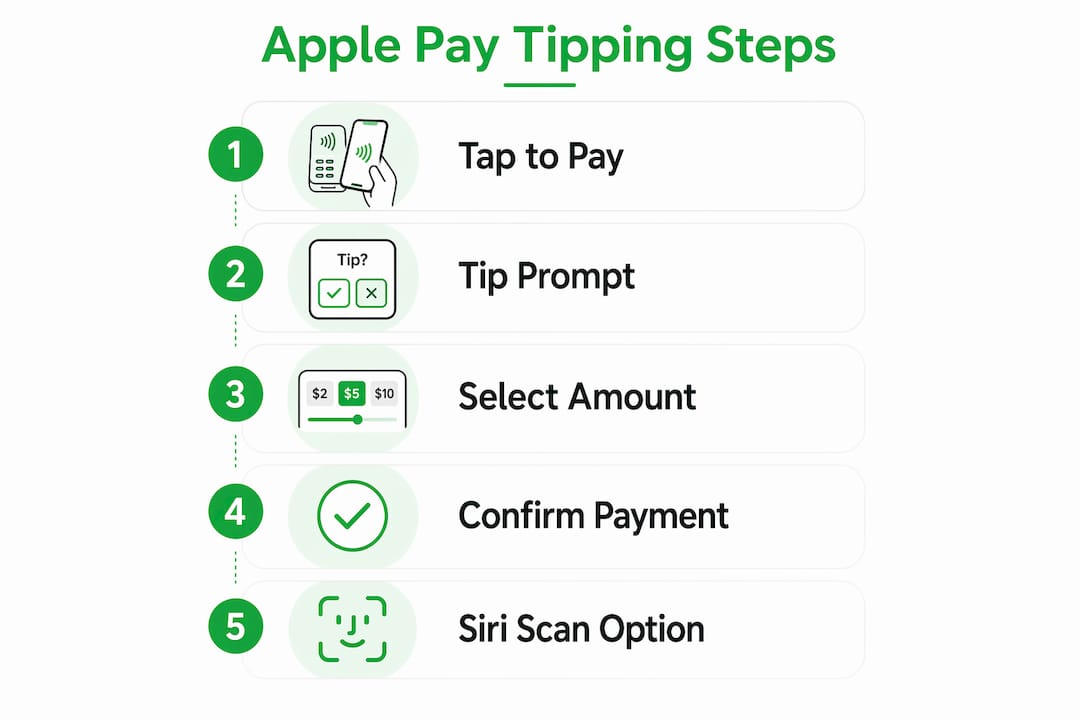
Apple Pay handles the payment, but the tipping interface is entirely controlled by the merchant’s point-of-sale software. The POS must trigger the tip prompt before NFC tokenization occurs. If the prompt does not appear before the customer taps their device, the payment completes with no opportunity to tip. That single configuration detail explains most of the confusion customers experience at checkout.

How POS platforms enable tip prompts
Modern POS platforms give merchants real control over how tips are presented. Lightspeed Retail allows merchants to configure tipping prompts as percentage options, fixed dollar amounts, or a “No tip” option on the customer-facing screen. Changes to these settings take effect within minutes. The customer sees the prompt, selects an amount, and then taps their iPhone or Apple Watch to complete the payment in one motion.
Common POS tipping configuration options include:
- Percentage presets: Typically 15%, 20%, and 25% displayed as one-tap buttons
- Fixed dollar amounts: Useful for lower-ticket retail purchases where percentages feel disproportionate
- Custom tip entry: Lets the customer type any amount they choose
- No tip option: Required by most POS providers to avoid customer friction
What iOS 27 adds to the tipping experience
iOS 27 introduced a meaningful upgrade for group settings. Siri-powered receipt scanning now uses the iPhone camera to identify items on a bill, calculate each person’s share, and compute tip and tax automatically. Apple’s VP of Software confirmed the feature is designed to remove awkward group tab calculations by embedding the tool directly inside Apple Wallet and Messages. For retail workers at cafes, food halls, or service counters where groups pay together, this reduces the time spent at the register considerably.
Pro Tip: If you manage a retail location, ask your POS provider specifically whether tip prompts fire before or after NFC authorization. That one question will tell you whether your current setup supports Apple Pay tipping at all.
What is the real impact of apple pay tipping on workers and customers?
The impact of Apple Pay on tipping is not just about convenience. It changes the economics of gratuity for retail staff in measurable ways. Digital tipping via Apple Pay can save businesses 5–8 hours weekly by automating tip pooling and eliminating 1–3% shrinkage from cash tip mismanagement. For a small retail team, that is real money recovered and real time returned to customer service.
Benefits for retail workers
Retail staff gain three concrete advantages when Apple Pay tipping is active:
- Automated pooling: Tips collected digitally can be distributed by the POS system according to preset rules, removing disputes over who earned what
- No cash shortfalls: Digital tips cannot be lost, miscounted, or pocketed accidentally
- Consistent prompt visibility: Every customer sees the same tip screen, which removes the social awkwardness of a worker verbally asking for a tip
Common misconceptions customers hold
Many customers walk away from a register assuming that if no tip screen appeared, tipping was not an option. Staff can often manually enter a tip after a customer requests it, as long as the POS allows manual entry before the NFC tap. The absence of a prompt is a merchant configuration issue, not a payment system limitation.
“Businesses lacking digital tipping create customer friction that pushes users toward competitors with better payment options.” — Kwickos Digital Wallets Report, 2026
The cultural dimension matters too. Digital tipping removes the eye contact and social pressure that cash tipping involves. Some customers tip more generously when the interaction feels private and low-pressure. Others tip less because the prompt feels automated rather than personal. Retailers who understand this dynamic can design their tip screen language to feel warmer and more human.
Apple pay tipping vs. cash and other digital methods
Not all tipping methods perform equally for retailers or customers. The table below compares the four most common approaches across the factors that matter most in a retail environment.
| Tipping Method | Convenience | Security | Tip Pool Automation | Consumer Adoption |
|---|---|---|---|---|
| Cash tip | Low (requires exact change) | Low (loss/theft risk) | None | Declining |
| Manual POS card entry | Medium (extra steps) | Medium | Partial | Moderate |
| Apple Pay integrated tip | High (one tap) | High (NFC tokenization) | Full | Growing rapidly |
| Other digital wallets | High | High | Partial | Moderate |
Apple Pay is used by over 75% of iPhone owners in the U.S. and processes over $6 trillion annually worldwide. That scale means Apple Pay tipping features reach more retail customers than any competing mobile wallet. Cash tipping, by contrast, depends on a customer carrying the right denominations, which fewer people do as contactless payments become the default.
The iOS 27 Siri receipt scanning feature gives Apple Pay a specific advantage in group tipping scenarios that no other wallet currently matches. Apple Intelligence calculates individualized tip shares from a photo of the receipt, removing the math entirely. Other digital wallets require manual input or third-party apps to achieve the same result.
The main limitation of Apple Pay tipping is merchant dependency. If a retailer’s POS is not configured to show the tip prompt before NFC authorization, the feature does not work regardless of what the customer wants to do. Consumer awareness is the second gap. Many Apple Pay users do not know tipping is possible at all during a contactless transaction.
How can consumers and retailers optimize the apple pay tipping experience?
Getting the most from Apple Pay tipping features requires action on both sides of the counter. Here is what each party should do.
For consumers:
- Open Apple Wallet before you reach the register so you are ready to respond to the tip prompt without holding up the line.
- If no tip prompt appears, ask the cashier whether a tip can be added manually before you tap your device.
- Use the iOS 27 Siri receipt scanning feature when splitting a group bill. Point your iPhone camera at the receipt and let Apple Intelligence assign items and calculate each person’s share.
- Check your Apple Wallet transaction history after payment to confirm the tip amount was recorded correctly.
For retailers:
- Log into your POS settings and confirm that tip prompts are enabled and set to fire before payment authorization.
- Test the tip flow yourself by running a small transaction on your own device. This is the fastest way to catch configuration errors.
- Configure at least three tip percentage options plus a custom entry field. Customers who cannot find a comfortable preset often skip tipping entirely.
- Train staff to mention the tip screen briefly during handoff. A simple “you’ll see a tip option on the screen” removes confusion and increases tip frequency.
Pro Tip: Retailers using Lightspeed Retail can update tip prompt settings in the dashboard under Payment Settings. Changes go live within minutes and require no software update or reboot.
Future trends point toward deeper Apple Intelligence integration in tipping. Expect Siri to suggest tip amounts based on service type and past behavior, and for Apple Wallet to offer tip reminders for services where tipping is customary but often forgotten, such as curbside pickup or delivery confirmation.
Key takeaways
Apple Pay retail tipping works only when the merchant’s POS is configured to display the tip prompt before NFC payment authorization, making merchant setup the single most important factor in whether customers can tip digitally.
| Point | Details |
|---|---|
| POS configuration is everything | Tip prompts must fire before NFC tokenization or the payment completes without a tipping option. |
| iOS 27 improves group tipping | Siri receipt scanning calculates individual shares and tip amounts automatically from a photo. |
| Workers benefit financially | Digital tip pooling saves 5–8 hours weekly and eliminates 1–3% cash shrinkage for retail businesses. |
| Consumer adoption is high | Over 75% of U.S. iPhone owners use Apple Pay, giving digital tipping features broad reach. |
| Misconceptions cost workers tips | Customers who see no prompt often assume tipping is impossible, but manual entry is usually still available. |
Why retailers who ignore digital tipping are leaving money on the table
I have watched retail operators spend thousands on new POS hardware and then leave the tip prompt toggled off because nobody thought to turn it on. That is not a technology problem. It is an attention problem, and it costs their staff real income every single day.
The shift from cash to digital tipping is not gradual anymore. Contactless payments are projected to hit 75% of U.S. in-store transactions by 2027. Customers who never carry cash are not going to dig through their wallet for a dollar bill to leave on the counter. If the tip screen does not appear, the tip does not happen. It is that direct.
What surprises me most is how little friction the iOS 27 updates actually remove for group tipping. Splitting a bill used to require a calculator, a negotiation, and someone inevitably underpaying. Siri receipt scanning handles all of that in seconds. The integration within Apple Wallet makes tipping feel like a natural part of paying rather than an afterthought.
My honest prediction: within two years, retailers who have not configured digital tipping will face the same reputational pressure that restaurants faced when they stopped accepting cards. Customers will notice, staff will notice, and the gap in tip income will become impossible to ignore. The retailers who move now will have a smoother transition and better-compensated teams.
— Steve
Make digital tipping work for you with Tipper
Retail tipping through Apple Pay is only one piece of the digital gratuity picture. Tipper takes the concept further by letting anyone receive tips through a personalized link, with no account required from the sender. Whether you are a retail worker, a freelancer, or a creator, Tipper lets supporters pay instantly using Apple Pay or Google Pay. You keep 100% of every tip. Supporters can attach a note or video message, making the exchange feel personal rather than transactional. If you want to explore no-fee tipping systems or understand point-of-sale tipping alternatives, Tipper’s resources cover both in depth.
FAQ
What is apple pay retail tipping?
Apple Pay retail tipping is the ability to add a gratuity during a contactless payment at a retail POS terminal using an iPhone or Apple Watch. The tip prompt appears on the customer-facing screen before the NFC payment tap completes.
Why did no tip screen appear when i paid with apple pay?
The tip prompt is controlled entirely by the merchant’s POS configuration. If the retailer has not enabled tipping in their POS settings, or if the prompt is set to appear after NFC authorization, no tip screen will display.
How do i tip with apple pay if there is no prompt?
Ask the cashier to manually add a tip to your transaction before you tap your device. Most POS systems allow manual tip entry by staff even when the automated prompt is not configured.
What does iOS 27 change about tipping?
iOS 27 adds Siri-powered receipt scanning inside Apple Wallet. The feature uses the iPhone camera to read a bill, assign items to individuals, and calculate each person’s tip and tax share automatically.
Does apple pay tipping benefit retail workers?
Digital tipping through Apple Pay automates tip pooling and removes cash handling errors. Businesses that switch to digital tips recover 1–3% lost to cash shrinkage and save up to 8 hours of administrative work each week.




Leave A Comment